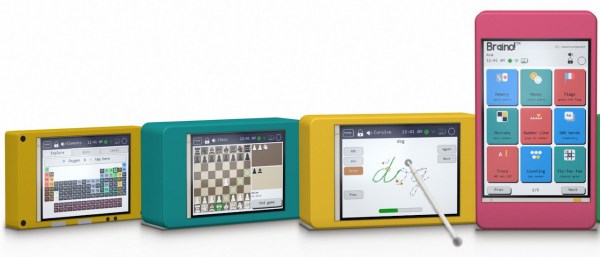
ESP-Osito Eschews Retrocomputing For Modern Code On Modern, Equivalent Hardware

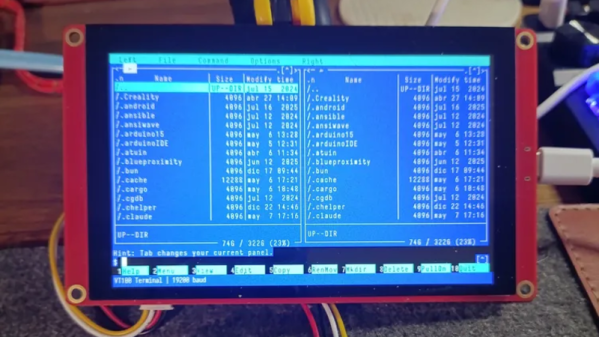
If you’re of a certain vintage, you have probably looked at some of the microcomputers on the market these days and thought “that would have been a decent workstation back in the day!”. We certianly have, and so did [Roberto Alsina]. Rather than allow himself to contemplate his age and threfore rapidly approaching mortailty, [Roberto] wrote a useful operating system called ESP-Osito for the Cheap Yellow Display, which he refers to as “the cheapest computer”. He’s not wrong, and it’s certainly a better use of time than an existential crisis.

He explains some of his reasoning behind the project in an accompanying blog post, but on the project page he compares it to a Palm Pilot– it’s on quick, apps load quick, and the API is simple enough for easy app creation in a few hundred lines of C, unlike certain pocket computers we won’t name. Sure, there’s no multitasking, but when apps jump from SD card to run in memory in microseconds, who cares? Saving the current state of the app back to SD means the experience is virtually identical from a user perspective anyway.

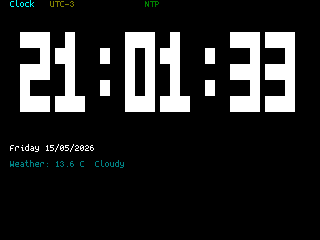
DOS knew what time it was, but how many of us wasted phone time for weather reports?

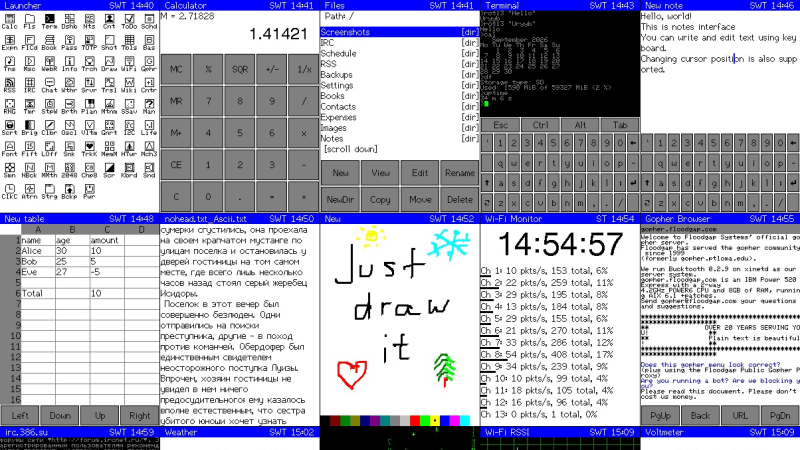
As this is a one-man show for now, the app store won’t quite rival your smart phone– but there’s everything you’d expect on the 90s-era computer this has the horsepower of: a serial terminal, a text editor, a file explorer, a calculator, a clock, but also some things that aren’t so retro. The clock app gives weather info via futuristic wireless networking, the reader app takes Markdown text, and the chat app connects to an LLM somewhere instead of your friends on IRC. The blackberry keyboard option gives it a feel of a slightly different vintage. You can also play snake, because no computer is complete without games. The OS and all its applications are released under the MIT license on GitHub, and [Roberto] is actively looking for collaborators.

If you doubt the workstation comparison at the start of this article, this CYD runs Macintosh System 3 via a 68k emulator. That’s got old-school cred, but there’s something great about having retro constraints with modern code on modern hardware. In that way, ESP-Osito is similar to the 3D graphics engine behind this Wipeout clone.

Win95-Tracker-CYD Is A Cheap Yellow Mod Tracker With I2S

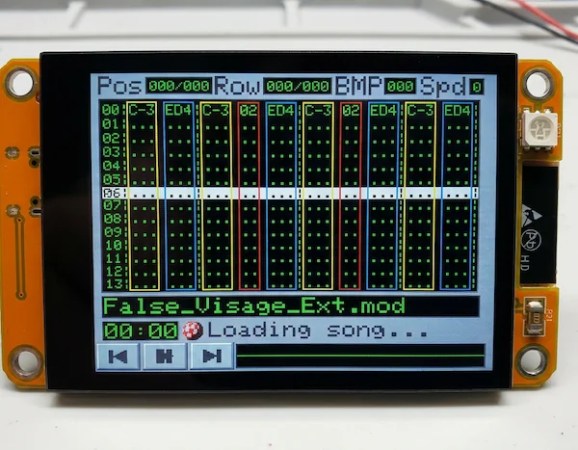
The Cheap Yellow Display is a great little module to start a project with, but it wouldn’t necessarily be our first choice for an audio device. That’s because the PWM on the ESP32 isn’t exactly going to put out hi-fi, and the I2C pins needed for the I2S audio protocol aren’t broken out on the CYD board. That didn’t stop [ivans805] AKA [Ill-Town-5623]– he wanted a mod tracker, he had a CYD board, and necessity is the mother of invention.

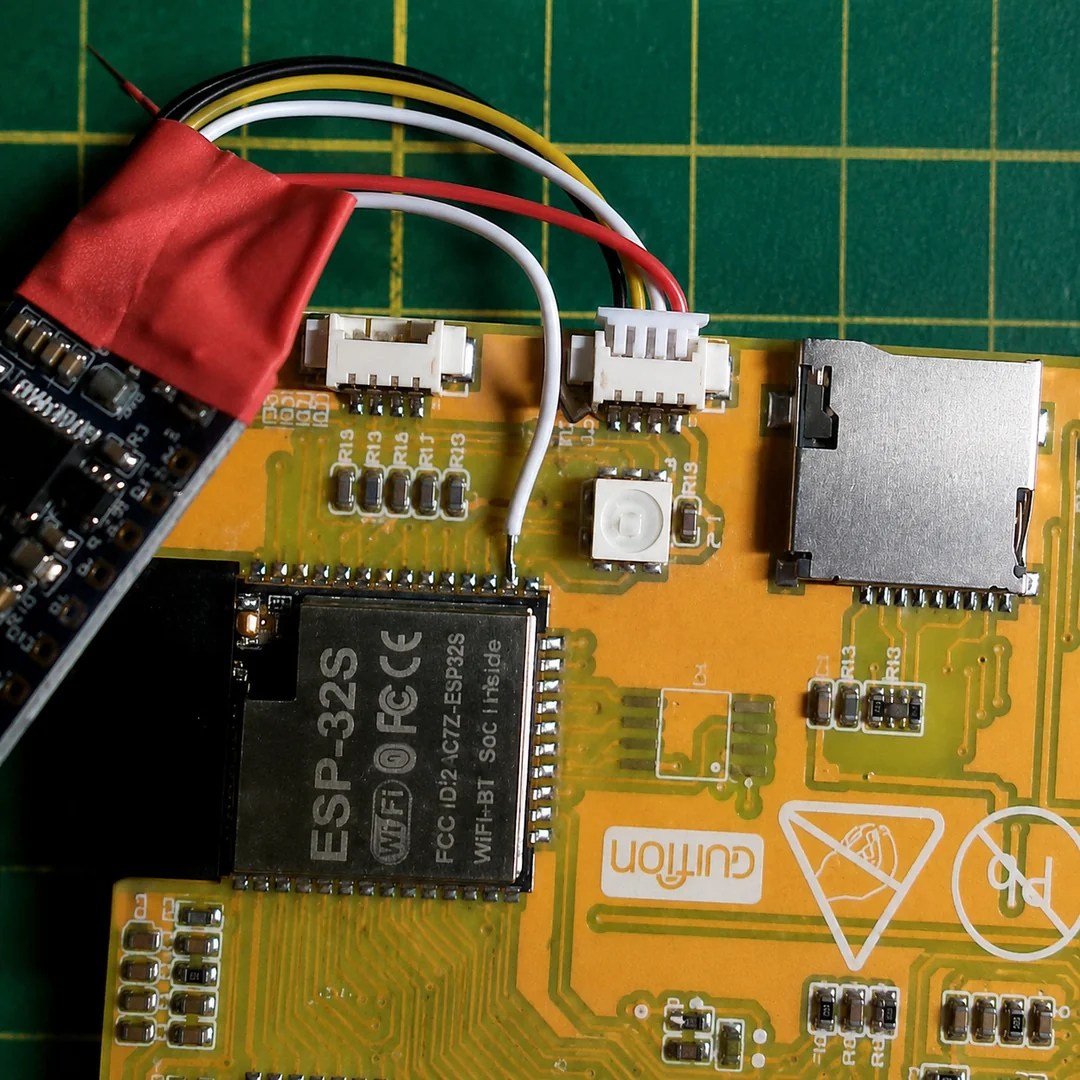
It isn’t exactly a ground-breaking hack: he’s just tossed a bodge wire to the pin he needs on the ESP32, and run it to the I2S sound module. Still, in this era of endless modules it’s nice to see someone hacking what they have rather than running to AliExpress or somewhere else for a part that has everything the project needs built in.

The bodge wire is how you know it’s a hack.

What really caught our eye when we saw this project on the ESP32 subreddit was the aesthetics. It might be called “Win95-Tracker-CYD” but that interface just screams “Amiga” to us– look at that Boing Ball! Given where MOD files come from, that’s perfect. The UI was made with Lopaka.app, which we haven’t seen before but appears to be a sort of WYSIWYG editor for embedded device interfaces.

While you don’t need an ESP32 to play mod files– the diminutive CH32 can manage the task— there’s no arguing the CYD could make a nice little player. If you actually wanted to push its limits, you might try a 3D engine instead,

ESP32 Weather Display Runs Macintosh System 3

It seems like everybody takes their turn doing an ESP32-based weather display, and why not? They’re cheap, they’re easy, and you need to start somewhere. With the Cheap Yellow Display (CYD) and modules like it, you don’t even need to touch hardware! [likeablob] had the CYD, and he’s showing weather on it, but the Cydintosh is a full Macintosh Plus Emulator running on the ESP32.

Honey, I stretched the Macintosh!

The weather app is his own creation, written with the Retro68k cross-compiler, but it looks like something out of the 80s even if it’s getting its data over WiFi. The WiFi connection is, of course, thanks to the whole thing running on an ESP32-S3. Mac Plus emulation comes from [evansm7]’s Micro Mac emulator, the same one that lives inside the RP2040-based PicoMac that we covered some time ago. Obviously [likeablob] has added his own code to get the Macintosh emulator talking to the ESP32’s wireless hardware, with a native application to control the wifi connection in System 3.3. As far as the Macintosh is concerned, commands are passed to the ESP32 via memory address 0xF00000, and data can be read back from it as well. It’s a straightforward approach to allow intercommunication between the emulator and the real world.

The touchpad on the CYD serves as a mouse for the Macintosh, which might not be the most ergonomic given the Macintosh System interface was never meant for touchscreens, but evidently it’s good enough for [likeablob]. He’s built it into a lovely 3D printed case, whose STLs are available on the GitHub repository along with all the code, including the Home Assistant integration.

For Such A Small Program, ZX81 1K Chess Sure Packs A Lot In

The Sinclair ZX81 was hardly the most accomplished of 1980s 8-bit microcomputers, but its ultra-low-budget hardware was certainly pressed into service for some impressive work. Perhaps the most legendary piece of commercial software in this vein was 1K Chess, which packed an entire chess engine into the user-available bytes in the unexpanded 1K ZX’s memory map. [MarquisdeGeek] has taken this vintage piece of code in 2026 and subjected it to a thorough analysis, finding all the tricks along the way.

Though hackers have since found ways to trick the ’81 into displaying bitmap graphics, using it as intended is text-only with some limited block graphics. The chess board then is text-only, and its illusion of “thinking” about moves comes courtesy of the on-screen board doubling as the play area memory. In the GitHub repository you can find decompiled and annotated versions as well as the original ZX binary, with as a bonus a screen capture of the game as it appears as BASIC with the ZX’s odd means of storing Z80 code in REM statements.

If that wasn’t enough, in his note giving us the tip he reveals that much of the work was done in a ZX emulator running in a Dragon emulator, and gives us a fun glimpse of the game running in an emulator on a Cheap Yellow Display inside 1K Chess cassette box. We like it, a lot!

If you need a greater ZX81 fix, take a look at how this machine chased the beam to make TV graphics on the cheap.

Stream Deck Radio Controller Built With Cheap Yellow Display

Stream decks are pretty useful in all kinds of contexts, but commercial models can feel a bit pricy for what is effectively a bunch of buttons. [WhiskeyTangoHotel] has whipped up one of their own on the cheap using some readily available parts.

The build came about due to the use of Stream Decks as a common way to control the Flex-6400 software-defined radio. [WhiskeyTangoHotel] figured that using a full-priced Elgato Stream Deck was overkill for this purpose, and that a cheaper interface could be put together for less. Enter the Cheap Yellow Display—a combination of the ESP32 microcontroller with a 2.8-inch touchscreen LCD. It was simple enough to code the device such that it had four big touch buttons to control RIT-, RIT+, XIT-, and XIT+ on the Flex-6400. Plus, with the ESP32 having WiFi onboard, it’s able to control the radio wirelessly—you just need to feed the unit 5 volts, and you’re up and running.

Continue reading “Stream Deck Radio Controller Built With Cheap Yellow Display”

An Electric Jellyfish For Androids

We have to admit, we didn’t know that we wanted a desktop electric jellyfish until seeing [likeablob]’s Denki-Kurage, but it’s one of those projects that just fills a need so perfectly. The need being, of course, to have a Bladerunner-inspired electric animal on your desk, as well as having a great simple application for that Cheap Yellow Display (CYD) that you impulse purchased two years ago.

Maybe we’re projecting a little bit, but you should absolutely check this project out if you’re interested in doing anything with one of the CYDs. They are a perfect little experimentation platform, with a touchscreen, an ESP32, USB, and an SD card socket: everything you need to build a fun desktop control panel project that speaks either Bluetooth or WiFi.

We love [likeablob]’s aesthetic here. The wireframe graphics, the retro-cyber fonts in the configuration mode, and even the ability to change the strength of the current that the electric jellyfish is swimming against make this look so cool. And the build couldn’t be much simpler either. Flash the code using an online web flasher, 3D print out the understated frame, screw the CYD in, et voila! Here’s a direct GitHub link if you’re interested in the wireframe graphics routines.

We’ve seen a bunch of other projects with the CYD, mostly of the obvious control-panel variety. But while we’re all for functionality, it’s nice to see some frivolity as well. Have you made a CYD project lately? Let us know!

Mini Multi-Arcade Game Cabinets With An ESP32 And Galagino

Most people love arcade games, but putting a full-sized arcade cabinet in the living room can lead to certain unpleasant complications. Ergo the market for fun-sized cabinets has exploded alongside the availability of cheap SBCs and MCUs that can run classical arcade titles. Microcontrollers like the ESP32 with its dual 240 MHz cores can run circles around the CPU grunt of 1980s arcade hardware. Cue [Till Harbaum]’s Galagino ESP32-based arcade emulator project, that recently saw some community versions and cabinet takes.

There was a port to the PlatformIO framework by [speckhoiler] which also added a few more arcade titles and repurposed the enclosure of an off-the-shelf ‘My Arcade’ by stuffing in an ESP32-based ‘Cheap Yellow Display‘ (CYD) board instead. These boards include the ESP32 module, a touch display, micro SD card slot, sound output, and more; making it an interesting all-in-one solution for this purpose.

Most recently [Davide Gatti] and friends ported the Galagino software to the Arduino platform and added a 3D printed enclosure, though you will still need to source a stack of parts which are listed in the bill of materials. What you do get is a top display that displays the current game title in addition to the display of the usual CYD core, along with an enclosure that can be printed both in single- or multi-color.

There’s also a build video that [Davide Gatti] made, but it’s only in Italian, so a bit of a crash course in this language may be required for some finer details.

Continue reading “Mini Multi-Arcade Game Cabinets With An ESP32 And Galagino”