

Don’t want AI features on your Mac? Tough luck, unless one wants to imperfectly do it by hunting down settings in about a dozen different places. Even then, the multi-gigabyte models stay on disk. Unsatisfied by this state of affairs, [omlahore] created RemoveMacAI, a one-stop-shop debloater that shows Apple Intelligence the door, reclaiming its disk space on the way out.
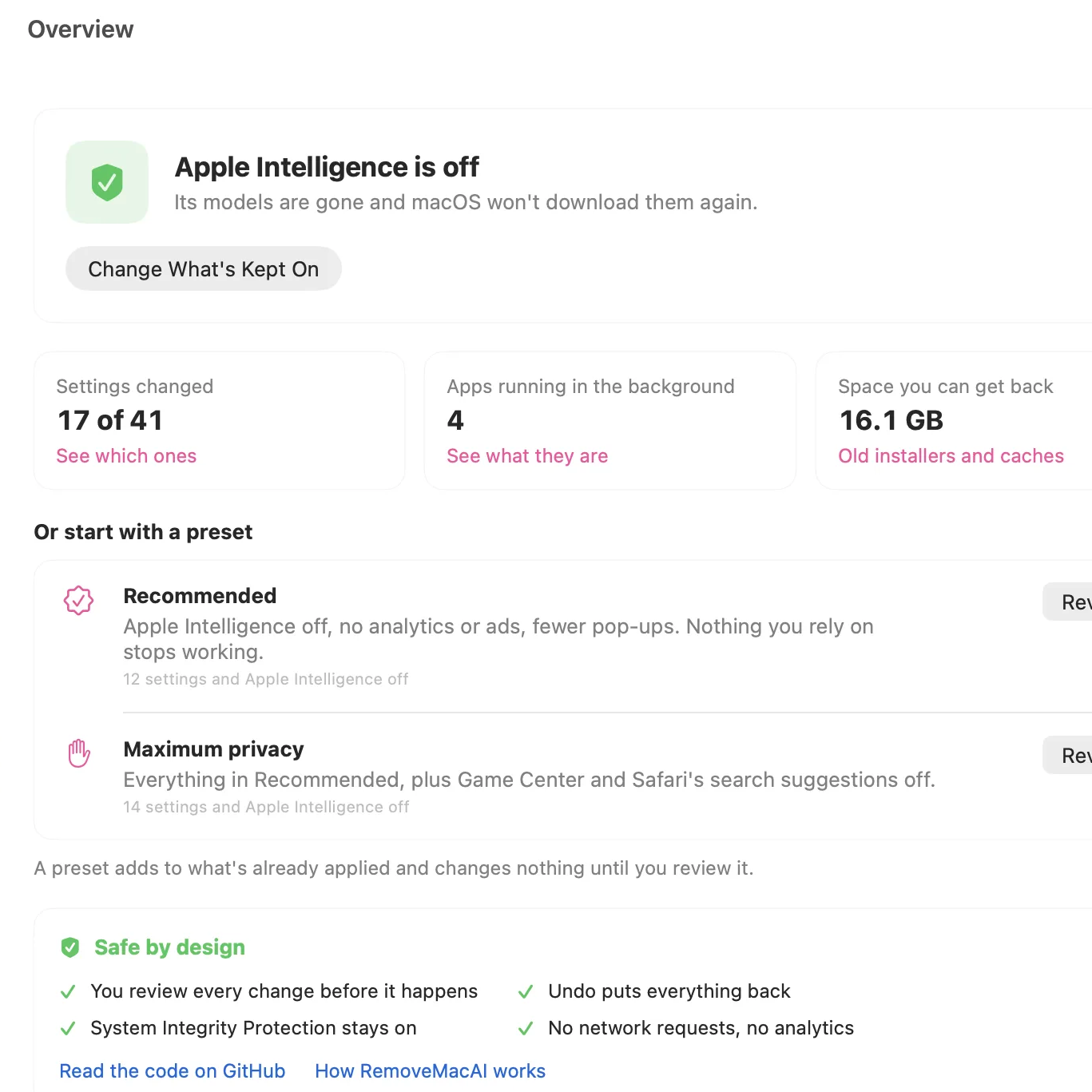 With RemoveMacAI one has a single location from which to turn individual AI features off, delete the models behind them, and block MacOS from downloading them again by redirecting attempts to a closed local port.
What’s refreshingly nice about the tool is how transparent it is about what each setting or preset will change, and communicates clearly what exactly one loses access to by disabling it. Want it all gone? Easy. Use one or two features, but don’t want the rest? No problem. All changes are shown up-front before the tool changes anything, and all alterations are reversible.
Released only a couple weeks ago, to say the tool is popular would be an understatement. Windows 11 also got a “remove AI features” tool, and it requires constant updating to stay functional. Will a future MacOS update interfere similarly with RemoveMacAI? Probably, but one thing that is clear is that a tool like this resonates deeply with a nontrivial number of users.












Remember when computers did what you told them to…? Yeah good times
The inclusion of non tech people into computing has been terrible for the rest of us.
Videogames are cool though. Instagram, Facebook, “Download Now” buttons, spyware… Not good
DIY
Linux
This is my choice. I sometimes have to tweak Linux to get things to work after an update, but it’s an unintentional bug, not some decree of how I’m allowed to use my PC. When you have to actively fight against your OS, it’s time to change OSes.
Yes, great times!
DATA_A EQU 02H ; SIO-2 channel A data port
CTRL_A EQU 03H ; SIO-2 channel A status/command port
MODE EQU 4EH
CMD EQU 37H
TXRDY EQU 01H ; status bit 0 = transmitter ready
ORG 0000H ; start of user RAM
START: LXI SP,0100H ; stack in low RAM
CALL INIT
LXI H,MSG
LOOP: MOV A,M
ORA A ; end of string?
JZ DONE
CALL PUTC
INX H
JMP LOOP
DONE: HLT
INIT: XRA A
OUT CTRL_A ; three zeros to guarantee 8251 is
OUT CTRL_A ; in command-instruction state
OUT CTRL_A
MVI A,40H ; internal reset
OUT CTRL_A
MVI A,MODE
OUT CTRL_A
MVI A,CMD
OUT CTRL_A
RET
PUTC: PUSH PSW
WAIT: IN CTRL_A
ANI TXRDY
JZ WAIT
POP PSW
OUT DATA_A
RET
MSG: DB ‘hellorld’,0
END
I find it hilarious that Apple and MS are pushing 8GB systems on to people preloaded with LLM models. For one, an 8GB is woefully inadequate for even the smallest models. Also 8GB is woefully inadequate for even Chrome to run.
“pushing” ?
There is only one Mac available with 8GB – the Macbook Neo, which is meant to be the cheap entry Model, all others have 16GB minimum.
Apples own words before the great RAM crisis began. “8GB in an apple computer is as good as a 16GB windows computer.” I take this statement to mean they were aware of the iminent price inflation of memory before the monopoly enacted its heinous cashgrab. They are also aware that an 8GB system in 2026 is trash and are working to sell more expensive 16GB options. 16 is a little low in 2026 too, I would plan for 32-64GB systems if prices were at all sane.
Likely its because Apple can kill off support for older tech a long time before MS can, because backcompatibility is part of why windows is so succesful. Apple doesn’t need that because their software only runs on their hardware, supported anyway. So while “8GB on a mac is as good as 16GB on windows” is marketing speak, there is probably some truth to it.
HP (and maybe some others) still sells new laptops with 4GB RAM.
Yes but for Chrome sometimes 512GB is woefully inadequate.
😂 If you are scared of closing tabs or streaming 4k yes
It’s no secret I am a defender of AI use as a tool, however I am 100% against any OS telling the owner of a PC what they are allowed to install or remove from the computer. Avoid walled gardens. They are NOT for your benefit. They are solely for the benefit of the *corporation. *
Its too early in the morning here for me. What benefit does MS and Apple get by adding a LLM to their OS? Why is it not a benefit to their customers (except using extra storage space if not used)?
Perhaps I could have written this more clearly. Walled gardens are not for your benefit. Walled gardens are for the benefit of the corporation alone. Removing user choice, locking people into ecosystems, these are retention tactics to keep you coming back and paying more money. They’re not for your productivity or financial stability. I really don’t want to have to explain predatory tactics that corporations use to separate you from your money. If you truly are uninformed, please go do a few internet searches.
You can make the case that AI is for the benefit of the user, and I would agree. Where I draw the line is when MS and Apple say that I cannot uninstall the software I do not want on my computer and they will reinstall it against my wishes. This is unacceptable. This is the type of behavior that pushed me to go 100% Linux. I lost some software I paid for due to that move, but I won’t be held hostage by a software corporation.
Does that help?
Finally getting a useful system help/troubleshooting assistant?
There is a clear use case for an LLM that knows how the system works and can guide you through the various settings. I would be wary of letting it actually touch any of the settings, but just being able to ask where everything is and what you do with it would save a lot of time.
100%. My old 64gb iPad lost 8GB of storage to this nonsense. And there’s no removal option there!
Were you using those 8GB for something useful then?
AFAIK: Every MiB of free space on an SSD/EMMC/etc.(?) gives the wear-level stuff more room to increase lifetime.
more free space => longer lifetime (one factor among several)
Trunk in my car is empty most of the time – should Hyundai install something there once I leave my car in their workshop?
You paid for that trunk. Why would you leave it empty then? That’s a waste of money, right?
Most people use their disk space as a hoard. Hoarding photos, videos, old software, old stuff they will never use, stuff that they can’t even find anymore and don’t even know they have anymore. And once they get a “disk full” message, they either spend multiple days cleaning it up, or just buy an extra disk, or backup everything to an external USB disk and never look at it ever again.
If you paid for that trunk and only use it as a hoard, the trunk is useless, just a stopping station for the waste collection facility, in use only because you’re not taking the time to go to that facility to empty your trunk again.
What if Hyundai would install something really, really useful in your trunk, like something that extends the range of your car greatly, or helps you drive safely. For free. What would you be complaining about then? That Hyundai is taking up storage that you could use to store junk in?
This is the angle that I was taking. And believe me, I’m not flaming you, because I am speaking from experience myself. :) Both with storing junk on my computer storage and junk in the boot of my car.
Take a step back and think about it. :) Or ask your wife about her views on this situation. ;)
Ouch. That’s a big hunk of your storage for something you never wanted and would otherwise remove. Is it possible to go back to the previous version of iOS or whatever they’re labeling it these days?
Unfortunately no version for intel Macs.
I think tools like this are becoming increasingly important as companies continue integrating AI into their operating systems. I don’t think that every AI feature should be forced on you automatically without giving users a straightforward way to remove it. This actually explains what each change does and makes the changes reversible, seems like something Apple should have implemented itself. One concern I have though, is how well this would hold up after major macOS updates. Could blocking model downloads cause unexpected problems with other system features? I think giving users this level of control is important but I wish it didn’t rely on third-party tools.
It’s a shame that companies continue overintegrating AI into their operating systems. AI features shouldn’t be installed automatically without giving users a straightforward way to remove it. This actually explains what each change does and makes the changes reversible, which seems like something Apple should have implemented itself. One concern I have is how well this approach will hold up after major macOS updates.