
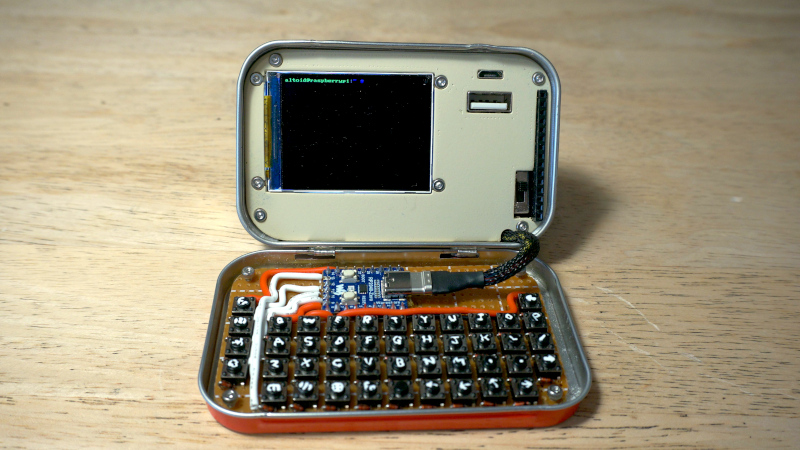
In the time Hackaday has been in existence we must have brought you plenty of projects housed in Altoids tins, as well as a sizeable number of cyberdecks. But until today with [Exercising Ingenuity]’s build, we’ve never brought you a project that combines the two. It’s a fully functional computer that runs Linux, and with its Altoids tin enclosure, looks for all the world like a miniature clamshell laptop.
Hardware wise it’s a Pi Zero with a UPS PHAT and an SPI display, but perhaps it’s arguably the home-made keyboard that really sets it apart. There’s a full-size USB port as well, and a selection of GPIOs are broken out to a header. It wasn’t all plain sailing though, the Altoids hinges needed modifying to make it close, and he driver for the SPI screen required an older version of Raspberry Pi OS. We will forgive it those foibles.
It’s fair to say we’ve not seen anything quite like this, in that there have been plenty of tiny laptops but never one as integrated as this. There’s a demo video with details of the build, that we’ve placed below.










An altoids tin?
I think you mean “case designed for homebrew mp3 players back when buying one cost an arm, leg and your first-born that coincidentally was filled with mints”.
really? my impression is that it’s been easy to build a small homebrew mp3 player for just about as long as the product category has been absurdly inexpensive. back when they were expensive, the individual components to build one were just as expensive and a lot less convenient to hack on. are we remembering different timelines?
Don’t look now, but Guy Fawkes just hacked Prince Albert in his can.
I bought a solder-it-up 8051-based MP3 player from pjrc.com back in the late 90’s that could take a 2 gig IDE hard drive for storage, when competing commercial players were limited to 16/32 megabytes. Similar price, though, in the $150USD range.
yeah that sounds about right…though 8051, even for the time…yikes! but you won’t fit a 1990s IDE HDD in an altoids tin. by the time cheap storage would fit in an altoids tin, i thought mp3 players were basically two bucks more than the cost of the flash they contained.
I remember that system. It was very cleverly designed. Yes, it had an 87C52 that handled basic logic, control and i/o, but all the heavy lifting was done by a xilinx fpga, which loaded the mp3s from the hard drive into external RAM, streamed that to a specialized mp3 decoder chip, and of course that finally fed a DAC.
Of course, now you can get a general purpose ARM/Xtensa/RISC-V microcontroller that is powerful enough to do all of that on its own in software.
Was an 8051-based microcontroller really that “yikes” for the time, though? It was a comparatively ancient architecture, sure, but so was PIC, and don’t remember there being a whole lot of other options for affordable microcontrollers back when this came out (there was the Basic STAMP I guess). Atmel’s AVR was brand new and just getting started.
The 1.8″ hard drive was released in 1991. The 1.3″ hard drive in 1992. Either would fit in an Altoids tin.
yeah and wouldn’t those 1.8″ IDE drives cost an arm and a leg, just like the microsoft zune that contained one?
This was the era of salvage my dude. Buying random parts on the internet wasn’t really a thing yet but a lot of electronics stores were or already had gone out of business.
mmm…so impressive…ripe for the picking of some company to…well nuff said
No company would ever touch a cli linux computer if they expected to make a profit. Who would buy it? The Venn diagram of who would use it and who could build it at home is a single circle.
I would buy it. Well after a revision or two I would.
Do you think you could build it at home?
This revision yes. But if they polished it a bit by maximizing the screen, adding a nice battery, maybe using a different SBC, and improving the keyboard I wouldn’t bother.
So you fit in the circle. ;)
Basically if they changed everything about it and made it a completely different thing that you probably could NOT build, you’d buy it. Got it. Thanks for pointlessly disagreeing while completely proving my point. lol
Cool. The next project is a computer in Altoids Mini Tin
raspberry pi in this form is always a failure because it’s fundamentally not a portable board. The pi zero has pretty low power consumption for an always-on linux box but fundamentally it doesn’t have any power save modes and that’s really the whole story.
but wait! there’s more: “and the driver for the SPI screen required an older version of Raspberry Pi OS.”
without knowing the details of this struggle, i’m just going to observe that this is a common struggle with raspberry pi. It’s not really open source and so to get drivers to work you have to target a specific version of the upstream firmware, which then before you know it that becomes a back version. Yuck. So many consequences of the low quality, low stability, and closed-ness of the underlying firmware.
Somewhat ironically, the problem with the official waveshare spi display drivers – and many others – is that the PI has moved away from a display driver that handles everything by calling the VideoCore firmware/binary blob. The new setup is an open KMS rendering stack where everything is handled in kernel space, so the old proprietary drivers (based on Videocore’s DispManX library) no longer work.
There are actually quite good open SPI display drivers for the new stack that work with many, if not all, of these displays, but they’re not configured or tested specifically for the waveshare implementations so they can be much harder to set up initially.. and the touchscreen aspect of the display is a separate driver to worry about, etc, etc.
(and of course the underlying pi firmware is still proprietary, it’s just the
[…] rendering stack that’s now open)
yeah that’s actually the same problem i had that soured me on raspberry pi. after a considerable effort, i interfaced with the “vchiq” (videocore proprietary firmware) HDMI CEC driver, and got it set up ‘just so’. And then literally a week later, they released a new firmware that used the standard linux CEC driver instead. Which is clearly better, but means i would have to redo a significant fraction of my work, and still (i’m confident, or afraid) have to spend some time working around new bugs in pi.
moving to a standardized interface is good but if it’s preceded by years with a proprietary interface, you’re making a headache for everyone that bothered to do the work to make the proprietary work.
For my next trick, I’ll put a server farm in a cement truck drum…
That’s not even all that difficult. You do have to weld up the racks to the outside. Then use a slip ring to provide power. I don’t have the finances but it doesn’t even sound like an actual challenge.
Probably going to need a beefy generator though, but then you could drive around a cement truck with a rotating drum with a server farm in it. If I had all the equipment I could get it working in a day or so.
For a proto modules build, that’s pretty good. Maybe a Nokia keyboard and a thumb stick as mouse.
in my household, that would get confused for a regular altoids tin and thrown away.
Cool build though! :)
Nice! I love the concept, I been wanting a cyberdeck for a while now only a little bigger than a Altoids tin with about a 5 to 7 inch screen
Wont anyone mention the lack of numbers?
Or am I just blind, stupid or both?
“…a sizable number of cyberdecks…”
Apparently “sizeable” can mean “one” or “maybe two”.
There have been a bunch of really neat custom portable computers featured here, but almost no actual cyberdecks.
A cycberdeck is a portable, general purpose computer, that is assembled at the location of use, in a place not specifically intended for it, of multiple parts that serve different functions, and disassembled afterwards.
A laptop is not a cyberdeck.(Self contained)
A game console is not a cyberdeck. (Not general purpose)
A PC at a LAN party is not a cyberdeck. (Space is explicitly intended for using a computer)
A slabtop, a laptop with no screen, used with a VR headset, in a coffee shop, is a cyberdeck.
A phone + portable display + keyboard, used in a classroom to take notes, is a cyberdeck.
A Steam Deck + Projector + speakers, used in a parking lot to project a movie onto the side of a warehouse, is a cyberdeck.
If you look at the original sources of the word, Gibson/Shadowrun/Johnny Mnemonic/Cyberpunk stories, you will see these common threads.
Using a custom machine, lugged to a location it isn’t intended to be used, assembled, then removed.
Further, use case is just as important as the physical form.
Remember that this is all “-punk”.
A mason jar is a jar. (It’s in the name…)
But stick an empty one at every place setting at a table and drink beverages from it and it becomes a glass.
Just because a portable computer is cool, or home made, or even has a cyberpunk aesthetic doesn’t make it a cyberdeck.
It needs to meet the requirements above, including use.
I suspect most people hearing the phrase ‘cyber deck’ wouldn’t be thinking of your definition. The top 5 hits on youtube for ‘cyber deck’ disagree with you. Nearly every project tagged ‘cyber deck build’ on the internet disagrees with you. The top 5 discussions on reddit on the question of ‘what is a cyber deck’ disagree with you. Is this level of linguistic gate-keeping even slightly valuable?
Absolutely, gatekeeping is a healthy way of preserving meaningful distinction and preventing everything being diluted into a grey/brown mess.
You can say it’s a portable computer with cyberpunk aesthetics in the same way that gluing a bunch of gears on something makes it steampunk.
Aesthetics and functional forms are two distinct measurable aspects.