Attach A Full Size Lens To A Tiny Camera

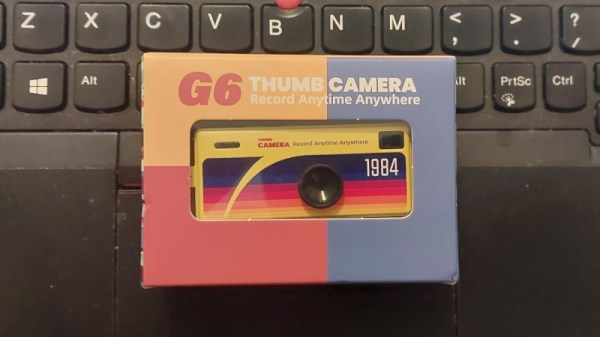
The Kodak Charmera is a tiny keychain camera produced by licencing out the name of the famous film manufacturer, and it’s the current must-have cool trinket among photo nerds. Inside is a tiny sensor and a fixed-focus M7 lens, and unlike many toy cameras it has better quality than its tiny package might lead you to expect. There will always be those who wish to push the envelope though, and [微攝 Macrodeon] is here to fit a lens mount for full-size lenses (Chinese language, subtitle translation available).

The hack involves cracking the camera open and separating the lens mount from the sensor. This is something we’re familiar with from other cameras, and it’s a fiddly process which requires a lot of care. A C-mount is then glued to the front, from which all manner of other lenses can be attached using a range of adapters. The focus requires a bit of effort to set up and we’re guessing that every lens becomes extreme telephoto due to the tiny sensor, but we’re sure hours of fun could be had.

The Charmera is almost constantly sold out, but you should be able to place a preorder for about $30 USD if you want one. If waiting months for delivery isn’t your bag, there are other cameras you can upgrade to C-mount.

Continue reading “Attach A Full Size Lens To A Tiny Camera”

Chip Swap Fixes A Dead Amiga 600

The Amiga 600 was in its day the machine nobody really wanted — a final attempt to flog the almost original spec 68000 platform from 1985, in 1992. Sure it had a PCMCIA slot nobody used, and an IDE interface for a laptop hard drive, but it served only to really annoy anyone who’d bought one when a few months later the higher-spec 1200 appeared. It’s had a rehabilitation in recent years though as a retrocomputer, and [LinuxJedi] has a 600 motherboard in need of some attention.

As expected for a machine of its age it can use replacement electrolytic capacitors, and its reset capacitor had bitten the dust. But there’s more to that with one of these machines, as capacitor leakage can damage the filter circuitry surrounding its video encoder chip. Since both video and audio flow through this circuit, there was no composite video to be seen.

The hack comes in removing the original chip rather than attempt the difficult task of replacing the filter, and replacing it with a different Sony chip in the same series. It’s nicely done with a connector in the original footprint, and a small daughterboard. The A600 lives again, but this time it won’t be a disappointment to anyone.

If you want to wallow in some Amiga history as well as read a rant about what went wrong, we have you covered.

Why Push A Button When A Machine Can Do It For You

Remote control is a wonder of the age, we press a button, and something happens as if by magic. But what happens if there is no remote control, and instead a real physical button must be pressed? [What Up TK Here], who regular Hackaday readers might just recognize, had just this problem, and made a remote control button presser.

It’s a 3D printed frame which we’re told is designed for a specific item, on top of which is mounted a hobby servo. Rotating the servo brings the lever down on the button, and the job is done. At the user end there’s a button in a printed enclosure that’s definitely not a knock-off of a well-known franchise from a notoriously litigious console company.

This is all good, but the interest for other projects lies in how it works. It’s using a pair of ESP32 microcontrollers, and instead of connecting to an existing WiFi network it’s using ESP-NOW for simplicity and low latency. This is a good application for the protocol, but as we’ve seen, it’s useful for a lot more than just button pressing.

Continue reading “Why Push A Button When A Machine Can Do It For You”

Review: Cherry G84-4100 Keyboard

The choice of a good keyboard is something which consumes a lot of time for many Hackaday readers, judging by the number of custom input device projects which make it to these pages. I live by my keyboard as a writer, but I have to admit that I’ve never joined in on the special keyboard front; for me it’s been a peripheral rather than an obsession. But I’m hard on keyboards, I type enough that I wear them out. For the last five years my Hackaday articles have come via a USB Thinkpad keyboard complete with the little red stick pointing device, but its keys have started parting company with their switches so it’s time for a replacement.

I Don’t Want The Blackpool Illuminations

A picture of the Blackpool illuminations at night against a dark sky.
Is it a gamer’s keyboard, or the Blackpool seafront at night? I can’t tell any more. Mark S Jobling, Public domain.

For a non keyboard savant peering over the edge, this can be a confusing choice. There’s much obsessing about different types of mechanical switch, and for some reason I can’t quite fathom, an unreasonable number of LEDs.

I don’t want my keyboard to look like the Blackpool Illuminations (translation for Americans: Las Vegas strip), I just want to type on the damn thing. More to the point, many of these “special” keyboards carry prices out of proportion to their utility, and it’s hard to escape the feeling that like the thousand quid stereo the spotty kid puts in his Opel Corsa, you’re being asked to pay just for bragging rights.

Narrowing down my needs then, I don’t need any gimmicks, I just need a small footprint keyboard that’s mechanically robust enough to survive years of my bashing out Hackaday articles on it. I’m prepared to pay good money for that.

Continue reading “Review: Cherry G84-4100 Keyboard”

Jenny’s Daily Drivers: Haiku R1/beta5

Back in the mid 1990s, the release of Microsoft’s Windows 95 operating system cemented the Redmond software company’s dominance over most of the desktop operating system space. Apple were still in their period in the doldrums waiting for Steve Jobs to return with his NeXT, while other would-be challengers such as IBM’s OS/2 or Commodore’s Amiga were sinking into obscurity.

Into this unpromising marketplace came Be inc, with their BeBox computer and its very nice BeOS operating system. To try it out as we did at a trade show some time in the late ’90s was to step into a very polished multitasking multimedia OS, but sadly one which failed to gather sufficient traction to survive. The story ended in the early 2000s as Be were swallowed by Palm, and a dedicated band of BeOS enthusiasts set about implementing a free successor OS. This has become Haiku, and while it’s not BeOS it retains API compatibility with and certainly feels a lot like its inspiration. It’s been on my list for a Daily Drivers article for a while now, so it’s time to download the ISO and give it a go. I’m using the AMD64 version.

Continue reading “Jenny’s Daily Drivers: Haiku R1/beta5”

The EFF Nails It: What’s Wrong With UK Digital ID

It sometimes seems as though we are in a constant tussle over privacy between governments and the governed, with each year bringing fresh attempts to extend surveillance, and consequent battles. For Brits the big news at the moment comes in a new digital ID scheme, something that will be required for anyone wishing to work in the country, as well as for certain government services. It’s something that has attracted a lot of opposition, and now the EFF have produced an analysis  of why they think it won’t work.

From the perspective of a British writer it would be easy to write screeds about the flaws in the scheme, the way it over-reaches, and about the historical distrust of Brits for their government’s bureaucracy. With the parliamentary petition opposing it approaching three million signatures, there’s no shortage of people who don’t support it. Perhaps the most obvious thing for most of us is how unnecessary it is for its stated aim of preventing illegal immigrants from seeking employment, it neglects that we already have to show proof of right to work before being hired, and that if crooked employers ignore that they will surely also ignore the digital ID.

If you’re reading this elsewhere in the world from where this is being written then it’s still of relevance, because governments like to point to other countries to justify these measures. Follow the EFF on this matter, and take note.


Art: British Passport SVG by Swapnil1101, Public Domain

Anatomy Of A Minimalist Home Computer

There are plenty of well-known models among the 8-bit machines of the 1980s, and most readers could rattle them off without a thought. They were merely the stars among a plethora of others, and even for a seasoned follower of the retrocomputing world, there are fresh models from foreign markets that continue to surprise and delight. [Dave Collins] is treating us to an in-depth look at the VTech VZ-200, a budget machine that did particularly well in Asian markets. On the way, we learn a lot about a very cleverly designed machine.

The meat of the design centres not around the Z80 microprocessor or the 6847 video chip, but the three 74LS chips handling both address decoding and timing for video RAM access. That they managed this with only three devices is the exceptionally clever part. While there are some compromises similar to other minimalist machines in what memory ranges can be addressed, they are not sufficient to derail the experience.

Perhaps the most ingenuity comes in using not just the logic functions of the chips, but their timings. The designers of this circuit really knew the devices and used them to their full potential. Here in 2025, this is something novice designers using FPGAs have to learn; back then, it was learned the hard way on the breadboard.

All in all, it’s a fascinating read from a digital logic perspective as much as a retrocomputing one. If you want more, it seems this isn’t the only hacker-friendly VTech machine.

John Dalton, CC BY-SA 3.0.