Kitchen Bench Splash Guard Powered By Arduino

If you’re blessed with high water pressure at home, you probably love how it helps blast grime from your dishes and provides a pleasant washing experience. However, it can also cause a wonderful mess when that water splashes all over your countertops. [vgmllr] has whipped up a simple solution to this problem by installing an automatic splash guard.

So tidy!

The concept is simple enough—install a pair of flat guards that raise up when the sink is running, in order to stop water getting everywhere. To achieve this, [vgmllr] grabbed an Arduino, and hooked it up to a piezo element, which acts as a water sensor.

The piezo is attached to the bottom of the sink, and effectively acts as a microphone, hooked up to one of the Arduino’s analog-to-digital pins. When water flow is detected, the Arduino commands two servos to raise a pair of 3D printed arms that run up and down the outside of the sink. Each arm is fitted with magnets, which mate with another pair of magnets on the splash shields inside the sink. When the arms go up, the splash shields go up, and when the arms go down, the splash shields go down.

It’s an ingenious design, mostly because the installation is so clean and seamless. By using magnets to move the splash shields, [vgmllr] eliminated any need to drill through the sink, or deal with any pesky seals or potential water leaks. Plus, if the splash shields are getting in the way of something, they can easily be popped off without having to disassemble the entire mechanism.

It’s a tidy little build, both practical and well-engineered. It’s not as advanced as other kitchen automations we’ve seen before, but it’s elegant in its simple utility.

What Happened To Running What You Wanted On Your Own Machine?

When the microcomputer first landed in homes some forty years ago, it came with a simple freedom—you could run whatever software you could get your hands on. Floppy disk from a friend? Pop it in. Shareware demo downloaded from a BBS? Go ahead! Dodgy code you wrote yourself at 2 AM? Absolutely. The computer you bought was yours. It would run whatever you told it to run, and ask no questions.

Today, that freedom is dying. What’s worse, is it’s happening so gradually that most people haven’t noticed we’re already halfway into the coffin.

Continue reading “What Happened To Running What You Wanted On Your Own Machine?”

The PDP-1 Can Sound Hauntingly Beautiful

The chiptune music scene is largely rooted in the sounds of the original Nintendo Game Boy and the Commodore 64, while still welcoming a wide range of other hardware under its general umbrella. Still, few chip musicians show up to a gig hauling a PDP-1. That’s perhaps a shame, given that the 1950s era machine can produce beautiful music—as demonstrated by [Peter Samson] and [Joe Lynch].

The video demonstration was recorded at the Computer History Museum in Mountain View, California. [Peter Samson] is operating the PDP-1, which is running the Harmony Compiler—which allows the machine to play four individual voices. This is achieved by taking advantage of the PDP-1’s program flags, which are visible as six light bulbs on the control panel. Instructions can be used to turn these bulbs on and off. The Harmony Compiler works by switching the bulbs on and off fast enough to create audible square waves when the light bulb outputs are wired to a simple audio amplifier.

Using Harmony Compiler, [Joe] and [Peter] worked together to transcribe the song Olson by Boards of Canada to play on the PDP-1. The song is encoded on paper tape, and fed into the machine—which dutifully plays back the hauntingly beautiful melody.

If you’re interested in the code that achieved this, it’s blessedly available via Github. If you love stories about old computers playing music, we’ve got those too. Video after the break.

Continue reading “The PDP-1 Can Sound Hauntingly Beautiful”

Open Source Hack Lets The Razer Nari Headset Work With Linux

The Razer Nari is a decent wireless headset, but it’s a little oddball—because it uses a bespoke USB dongle for pairing. This is all well and good if you’re using a supported configuration; plug it into a Windows PC, run the utility, and you’re good to go. If you’re a Linux user, though, you were out of luck—but [JJ] has just solved that problem.

The tool was created by reverse engineering the pairing protocol used by Razer’s own proprietary software. [JJ] figured out the necessary pairing command, and how to send it to both the dongle and the headset. The headset itself must be connected by a USB cable when initiating the pairing process.

[JJ] believes the tool should work with any Razer Nari and dongle variant. However, the Nari Ultimate and Nari Essential models are yet to be tested, with verification still required. However, the pairing commands were extracted from Razer’s own tool and don’t appear to differ so it should probably work across the boardSetup is still a little fussy, particularly to get both the Game Audio and Chat Audio outputs working under Linux. However, [JJ] has helpfully provided the necessary detail to get everything up and running with PulseAudio and PipeWire setups.

Proprietary hardware can be frustrating to work with at times, but that’s never stopped hackers from reverse engineering their way to success before. If you’ve got your own projects in this vein, don’t hesitate to notify the tipsline!

Building A Minecraft Lantern For Halloween

Sometimes it’s fun to bring props from video games into the real world. [Hulk] has done just that with their latest Halloween build—creating a working replica of the lantern from Minecraft.

Key to the build is the 3D printed enclosure, which faithfully mimics the look of the in-game item. By virtue of Minecraft’s simplistic visual style, it’s a relatively straightforward print, without a lot of quirky geometry or difficult overhangs that might otherwise trip up your printer. It’s printed in six parts and assembled with acrylic lenses which act to diffuse the light coming from inside.

Electronically, an Arduino Nano runs the show. It’s hooked up to a pair of NeoPixel addressable LED rings, which provide rich RGB colors on demand. Rotary pots are installed on the enclosure to enable the color to be tuned to the user’s desire. Power is courtesy of an 18650 lithium-ion cell and a TP4056 module ensures the battery is kept happy when charging.

It’s a fun prop build, and one that would be the perfect addition to any Minecraft costume. Except for maybe a chicken jockey, because they don’t use lanterns. In any case, we’ve seen similar work before, too.

Continue reading “Building A Minecraft Lantern For Halloween”

Budget Stream Deck Clone Is Ripe For Hacking

The original Stream Deck was a purpose-built device to make it easier to manage a live video stream on the fly. Since its release, many other similar products have hit the market. Among them is the Ulanzi D200 U-Studio, which is proving popular with hackers for good reason.

[Rodrigo Laneth] has been digging into the D200, and found out it’s running Linux 5.10.160 on a quad-core Rockchip RK3308HS chip. Notably, he determined the kernel appears to be from Android, but that Ulanzi removed the Android userspace and “slapped Buildroot on top,” in his own words. Interesting, if not that unusual. What is key, however, is that the device has a fully open adb root shell, as noted by [lucasteske], which inspired [Rodrigo]’s investigation. This pretty much allows full access to the device, so you can make it do whatever weird thing your heart desires.

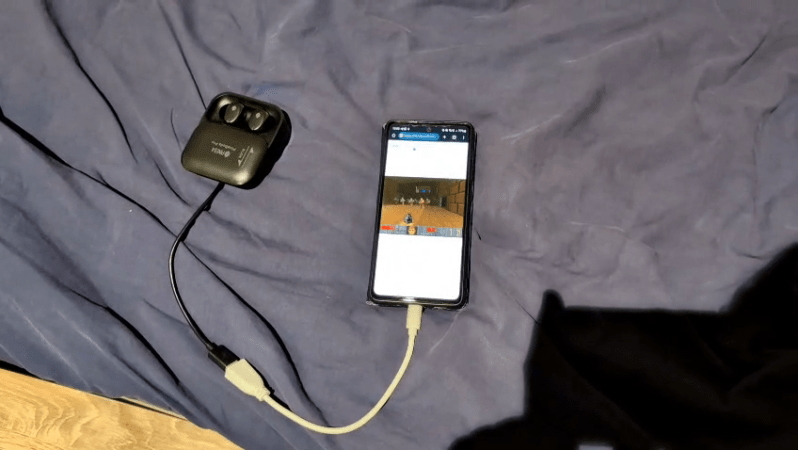
As you might expect, people are already making the D200 do fun stuff. [lucasteske] got it running DOOM in short order. Meanwhile, [Rodrigo] has it playing out Bad Apple!! at 30 FPS, with code and a deeper explanation available on GitHub.

It’s rare these days that manufacturers leave root open on any commercial device. You normally need to pull a few tricks to get that kind of access.

Continue reading “Budget Stream Deck Clone Is Ripe For Hacking”

Blinking An LED With A Single Transistor

Let’s say you want to blink an LED. You might grab an Arduino and run the Blink sketch, or you might lace up a few components to a 555. But you needn’t go so fancy! [The Design Graveyard] explains how this same effect can be achieved with a single transistor.

The circuit in question is rather odd at first blush. The BC547 NPN transistor is hooked up between an LED and a resistor leading to a 12V DC line, with a capacitor across the emitter and collector. Meanwhile, the base is connected to… nothing! It’s just free-floating in the universe of its own accord. You might expect this circuit to do nothing at all, but if you power it up, the LED will actually start to flash.

The mechanism at play is relatively simple. The capacitor charges to 12 volts via the resistor. At this point, the transistor, which is effectively just acting as a poor diode in this case, undergoes avalanche breakdown at about 8.5 to 9 volts, and starts conducting. This causes the capacitor to discharge via the LED, until the voltage gets low enough that the transistor stops conducting once again. Then, the capacitor begins to charge back up, and the cycle begins again.

It’s a weird way to flash an LED, and it’s not really the normal way to use a transistor—you’re very much running it out of spec. Regardless, it does work for a time! We’ve looked at similar circuits before too. Video after the break.

Continue reading “Blinking An LED With A Single Transistor”