3D Printing Metal Structures With A 6-axis Robot

robot printer

[Joris Laarman] is working on a project called the MX3D-Metal which uses an ABB industrial robot arm and a welding machine to create strong metal structures on any working surface and in any direction.

He started last year with the MX3D Resin printer, which is the exact same concept, but instead of metal, it uses a two-part epoxy that bonds instantly upon mixing. Their lab is located in Amsterdam, and they work closely with IAAC (the Institute for Advanced Architecture of Catalonia) — Autodesk provides funding for the research.

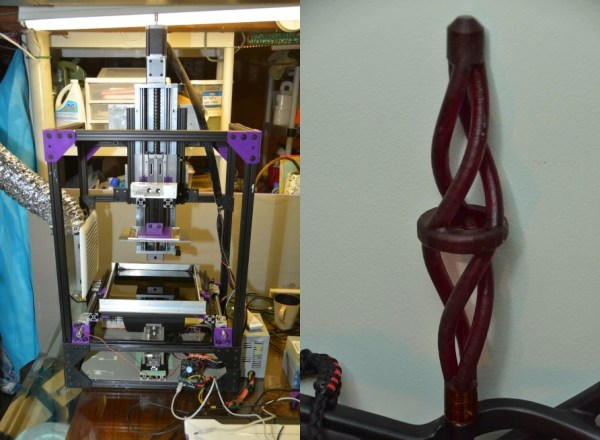
[Joris] has successfully printed complex structures using steel, stainless steel, bronze, copper, and even aluminum. Poking around their website you can find many examples of different things they have printed, including intricate matrices of multiple curved lines which end up looking more organic than mechanical. It uses mostly the same concept as the Rostock Welding robot we covered a few months ago, which is open source and fairly cheap to make at home!

Stick around for a video of both the MX3D-Metal and Resin robot printers in action!

Continue reading “3D Printing Metal Structures With A 6-axis Robot”

3D Printed RGB LED Bracelet

3dprintedrgbbraclet

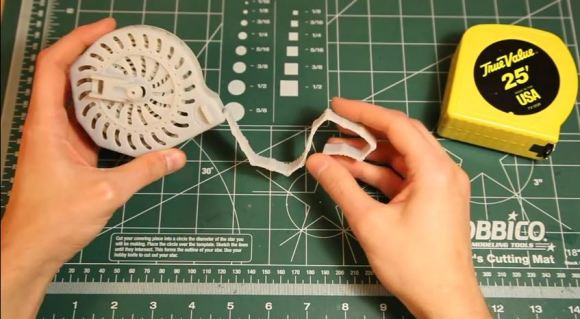
[Marcus’s] 3D-printed LED bracelet has moved through a number of revisions recently, but each iteration is impressive in both simplicity and functionality. Inspired to experiment with his print of [nervoussystem’s] Diagrid Bracelet, [Marcus] took the opportunity to add some LEDs with his first build, which combined a strip of RGB LEDs, a small battery, and an Adafruit Trinket microcontroller.

A second build soon followed, which overhauled the bracelet’s design into a more solid form and managed to double the amount of LEDs by upgrading to a different strip. The bracelet is currently in its third revision, cycling through the spectrum for around 3.5 hours on a single charge. This build also sports a 3-axis accelerometer: when the wearer shakes the bracelet, the colors skip around. If shaken long enough, the bracelet will enter a dazzling flurry of color flickering. Stick around after the break for a few demonstration videos. If you want to print your own, head over to [Marcus’s] Thingiverse file.

Continue reading “3D Printed RGB LED Bracelet”

Dual Color Extruder With A Single Stepper

extruder

Once you have a 3D printer able to build a few objects in a single color, the next logical upgrade is a dual extruder. A dual extruder allows for multiple color prints, and by adding a dissolvable filament, the ability to print object that would otherwise be impossible. Fitting a dual extruder on an existing 3D printer presents a problem: simply by using a second stepper motor, you reduce the print area of your printer significantly. That’s the problem Dglass 3D aims to solve with their extruder. It’s a dual filament extruder that uses only one stepper motor and takes up less space than some other single filament extruders.

This isn’t the first time the guys at Dglass 3D have tried Kickstarting a dual filament extruder; last year we saw a very similar mechanism that used a single stepper motor to feed two filaments. This older model lacked retraction, though, meaning two colored prints would range somewhere between messy, inaccurate, to impossible.

The new extruder uses a servo to ‘latch’ the filament and drive it into the hot end. This means retraction of the filament is possible and from the sample prints with this extruder, the results look pretty good.

Below You’ll see a few video demos of the dual color/retraction extruder printing an object in black and white filaments at the same time. It’s very cool, and with the addition of a dissolvable filament means very complex objects can be printed very easily.

Continue reading “Dual Color Extruder With A Single Stepper”

We’re Going To The Midwest RepRap Fest

One month from now, Goshen, Indiana – deep in the land of Dairy Queens – will become one of the premier sites for RepRapping, 3D printing and everything involving open source manufacturing. It’s the 2nd annual Midwest RepRap Festival to be held March 14-16. Oh, Hackaday will also be there, cavorting around, distributing some swag, and doing some live videos and posts of the event.

Highlights of the Festival include [Prusa] giving a talk on the state of open source printing, [Sonny Monicou] discussing the challenges of his RepRap workshops, a roundtable discussion of the RepRap project, [Nicholas Seward] and his creations – the Wally, Simpson, and Lisa, along with a few folks from Lulzbot and UltiMachine. Basically, the only way to go to a bigger RepRap convention would be to visit a Maker Faire, and even that would only add a few hundred 9-year-olds astounded by printed Minecraft figurines.

If you’re willing to make the drive, there’s no fee to attend; just register, show up, and you’ll get a table for all that up-til-midnight RepRapping. There’s also a waffle breakfast on Sunday, along with me walking around makin’ it rain Hackaday stickers.

3D Printering: Making A Thing With Solidworks, Part I

printering1

Brian has graciously allowed me to hop on the 3D Printering bandwagon to write a brief intro to the wonderful world of Solidworks. We’ll be making the same ‘thing’ as done in the previous ‘Making a Thing’ tutorials:

engineeringdrawingblack1

Admittedly, most Hackaday readers probably don’t have Solidworks as it is a very expensive program. The main reason we are posting this tutorial is so that you can understand the work flow and compare it to some of the free/open packages out there.

Continue reading “3D Printering: Making A Thing With Solidworks, Part I”

3D Printering: Making A Thing In FreeCAD, Part II

printering

It’s time once again for another installment of a Making A Thing tutorial, where I design the same part, over and over again, in multiple 3D design software packages.

Last week we took a look at FreeCAD, a free, open source parametric modeller. It’s an amazingly powerful tool, and not it’s finally time to complete our model of a strange object ripped from the pages of an 80-year-old drafting textbook.

Here’s some links to previous Making A Thing tutorials, doe:

Read on for the second part of our FreeCAD tutorial

Continue reading “3D Printering: Making A Thing In FreeCAD, Part II”

Update: Tetris Handheld Get PCB And Case

update-handheld-tetris

Check out this sweet-piece of homemade handheld gaming! [Jianan Li] has been hard at work on the project and published the updates in two parts, one that shows off the PCB he had fabbed for the project, and another which details the 3D printed case. This is, of course, is the culmination of the Tetris project we first saw as an incredbily packed, yet thouroughly tidy breadboarded circuit.

We really enjoy the 8-sided PCB design which hosts all the parts and gives you a place to hold and control the unit, all without seeming to waste much real estate. The case itself is quite impressive. The openings for the square-pixel LED matrices (the original design had round pixels) and the bar graphs all have nice bevel features around them. The control area has a pleasant swooping cutout, with blue buttons which stand out nicely against the red. Check out the slider switch by his left thumb. He printed matching covers for this slider, and the two that stick out the bottom. Also on the bottom are female pin headers so that you don’t need to disassemble the case to interface with the electronics.

All of this and more are shown off in the clip after the break.

Continue reading “Update: Tetris Handheld Get PCB And Case”