Hacking A Streetlight With Lasers

$20, some spare parts and a bit of mischief was a small price for [Chris] to pay for a reprieve from light pollution with this remote control laser hack. The streetlight in front of his house has a sensor that faces westward, and flips the lamp on once the sun has disappeared over the horizon. As it turns out, [Chris’s] third floor window is due west of this particular lamp, meaning he takes the brunt of its illumination but also conveniently places him in a prime location for tricking the sensor.

According to [Chris], the lamp’s sensor requires two minutes of input before it will switch off and stay off for around 30 seconds before cycling on again. The lamp does not zap straight to full brightness, though; it takes at least a minute to ramp up. [Chris] recalled a hack from a few years ago that essentially used LED throwies tacked onto the sensors with putty to shut off lamps for a guerrilla drive-in movie, but the sensors on those lamps were at the base and easily accessed. [Chris] needed to reach a sensor across the block and nearly three stories tall, so he dug around his hackerspace, found a 5V 20mA laser diode, and got to work building a solution.

[Chris] 3D printed a holder for the laser and affixed it via a mounting bracket to the wall near his third floor window, pointing it directly at the street lamp’s sensor. He plugged the laser’s power supply into an inexpensive remote control outlet, which allowed him to darken the street lamp at a touch of a button. This is certainly a clever and impressive hack, but—as always—use at your own risk. Check out a quick demo video after the break.


Continue reading “Hacking A Streetlight With Lasers”

Pet Water Warden

This weekend’s Make project is a great one for pet owners — an automatic water bowl refilling device!

It’s a fairly simple build, utilizing an old water jug, an Arduino, an aquarium pump, and some home-made water sensors. As always, MAKE has a very thorough guide, and the estimated build time is only an hour or two. They even threw in the ability to Tweet it’s status, including when the reservoir is empty.

But are we over-complicating this? A gravity based water feeder using the jug could work just as well. Sure, you wouldn’t get Twitter updates, but we hope you’re around your pets long enough to know when they’re thirsty.

A more refined version of this could include a solenoid water valve tapped into your house, eliminating the need of the reservoir and making this project a bit more useful. But even that might be a bit much, do we really need the Arduino?  What about a spring-loaded water bowl that breaks a contact when the bowl is empty? Hook that up to a 5 second timer relay controlling the water valve, and you’ve simplified the project quite a bit!

After the break, check out the video to get some more ideas!

Continue reading “Pet Water Warden”

BlenderDefender: Automating Pavlovian Conditioning

blenderDefender

This isn’t your typical home automation project; who turns a blender on remotely? [Brian Gaut] did, when he rigged his blender and a strobe light to scare his cat off the kitchen counter. To be fair, we’ve linked to this project before on Hackaday—twice actually—but neither the article about relays or the related cat waterwall article actually talk about the BlenderDefender, and that’s a shame, because it’s pretty clever.

[Brian] began by installing a DCS-900 network camera on the wall near his kitchen sink. The camera monitors any motion on the counter, and once it detects something, a networked computer starts recording individual frames. This security camera setup isn’t looking for criminals: [Brian] needed to keep his cat away from a particularly tasty plant. The motion detection signals an X10 Firecracker module to turn on both a nearby blender and a strobe light, provoking some hilarious reactions from the cat, all of which are captured by the camera.

Check out some other ways to work with the X10 firecracker, and feel free to jump into the home automation discussion from last week.

[Thanks Joy]

Raspi Z-Wave Automation Is Automated

raspiAutomationLocksnLights

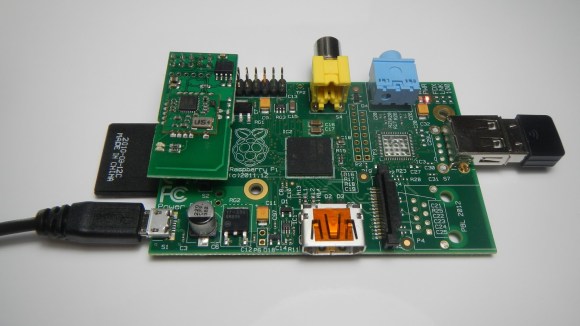
Home automation keeps popping up here at Hackaday, so [Cristian Zatonyl] decided to share his Raspberry Pi-based system with us. This build takes a firm stance on the “automated” side of the automation vs. control debate we had last week: no user input necessary. Instead, [Cristian] relies on geofencing to detect whether he has driven outside the set radius and automatically turns off the lights and locks his door.

The build takes advantage of Z-Wave products, which are your typical wireless remote-control gadgets, but tacks on a third-party “RaZberry” board to a Raspi to give it control over off-the-shelf Z-wave devices. The final step is the integration of a custom iOS app that keeps tabs on the geofence boundaries and signals the Pi to control the lights and the front door lock.

[Cristian’s] tutorial covers the basics and admits that it’s a proof of concept without any security features. Judging by his other YouTube videos, however, we’re sure more developments are underway. Check out the video below for a demonstration of the system, then feel free to speculate on security concerns in the comments. Our article on Z-wave security from a few years ago might be a good starting point.

Continue reading “Raspi Z-Wave Automation Is Automated”

Raspberry Pi Garage Door Automation

Like many of us, [Felix] sometimes wonders if he actually closed the garage door. I know I’m always double-checking my car locks! So, he decided to automate his garage door to give him some peace of mind!

He’s been working on a pretty big Raspberry Pi home automation series, and in this final segment he shows off his new GarageMote board which, as you can guess, lets him wirelessly control the door. It’s a very simple board complete with a small relay, a diode, and 2 resistors. The 8 pin header provides connection to two hall effect sensors that detect the status of the garage door, and the original door opener. He then connects this to an open-source wireless Arduino clone of his own design, dubbed the Moteino. A pair of these communicate to the Raspberry Pi which acts as his secure home automation gateway server.

The whole project is extremely slick, and very well documented – so if you’re looking at automating your home, [Felix] has a wealth of knowledge to share — well at least if you want to use is Raspberry Pi!

Stick around after the break to see the web-server controlled garage door in action.

Continue reading “Raspberry Pi Garage Door Automation”

Ask Hackaday: What Is “Home Automation”?

homeAutomationCollage

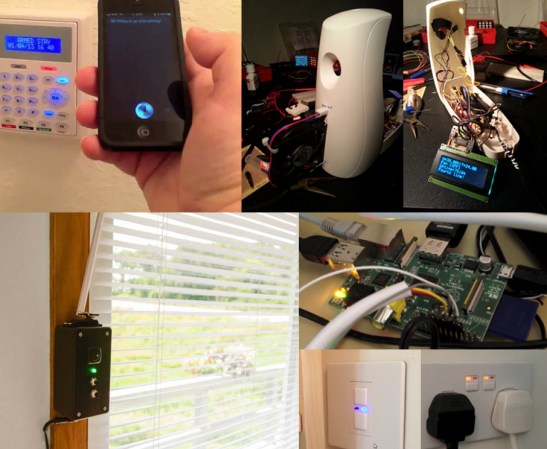
We’re not entirely sure what’s become of the term “home automation.” The definition seems to have settled for any user interface in the home—via tablets, phones, handheld remote controls, etc. Some of these devices lack any form of automation and instead require manual input. Even Wikipedia’s home automation article suggests a move toward this trend, offering the following definition (emphasis ours):

It is automation of the home, housework or household activity. Home automation may include centralized control of lighting, HVAC (heating, ventilation and air conditioning), appliances, security locks of gates and doors and other systems, to provide improved convenience, comfort, energy efficiency and security.

Though “automation” is clearly included in the first sentence, one could interpret the bolded potion as meaning either:

  • Truly automated systems may also include centralized control (as a feature).
  • The category of home automation also includes systems that merely provide centralized controls.

So, are automated components optional? Judging by the phrasing of projects submitted to our tips line: yes sir. Truly automated systems exist, but if you browse through any home improvement store’s “home automation” section, you’ll be pummeled by a string of remote-controlled light dimmers and outlets. How many of these are designed to interact with sensors as feedback systems or otherwise function unattended?

Our articles often favor an “automation-optional” categorization. Should we, however, reserve the “automation” label for projects like the light switch based on room occupancy and deny other builds, like the voice-activated lights/outlets system or the RasPi lighting and audio control via web interface? Hit up the comments and help shed some light on how to properly use the terminology.

Temp-Sensitive Automatic Blinds

blindMinder

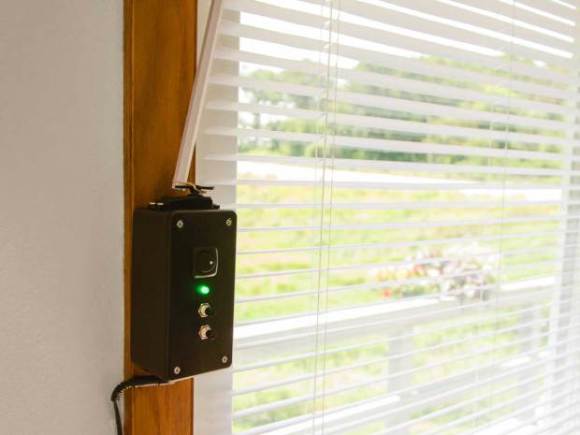
Any opportunity to shave a few bucks off your power bill is probably worth considering, especially if it’s a device like [Steve Hoefer’s] Mini Blind Minder. This little guy staves off (or welcomes) the sun by monitoring the room with a temperature sensor and checking against a setpoint. If the room is too warm or too cool, the top-mounted servo will spin the wand and close or open the blinds, respectively.

[Steve] started by building a homemade Arduino shield from some perfboard to which he added a handful of discrete components: some current-limiting resistors for the RGB LED indicator light and a 10k trim pot for fine-tuning the temp sensor. Although this build forgoes an LCD readout to display precise information, it does provide feedback by stepping the RGB LED’s color through a spectrum of blue to red to indicate how the current room temperature compares to your setpoint. The two momentary pushbuttons beneath the light allow the user to adjust the setpoint up or down.

See the video below for a detailed guide to building your own, and take a look at a similar automatic blinds build from earlier this year that opens and closes in response to ambient light.

Continue reading “Temp-Sensitive Automatic Blinds”