This Marriage Proposal Is The Best PCB Design Ever

best_pcb_design_ever

While you will often see hacks on this site that feature high voltage, fire, and metal, that doesn’t mean that hackers, makers, and electronics geeks don’t have a soft side. In fact, we find the opposite to be true the vast majority of the time.

Take for instance [Bill Porter].

You may have seen his projects and tutorials featured here a time or two, and though I have never met him, he seems like a great guy whose heart is in the right place.

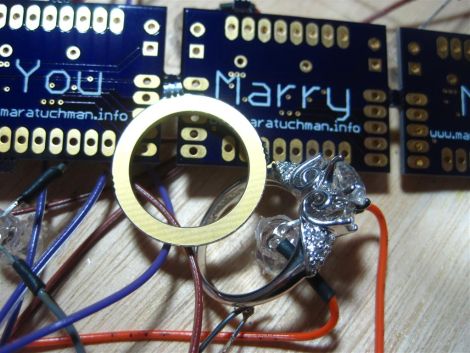
He recently decided that his college sweetheart was “the one” and had to think of a clever and surprising way to pop the question to a girl who is always one step ahead of the curve. [Mara (soon to be) Porter] was working on a project that required a custom PCB, and having never ordered one before, [Bill] was happy to help her get things in order. After sending the schematics off to [Laen] at DorkbotPDX, [Bill] fired off another email asking to have his proposal silk screened on the boards. [Laen] said he was happy to help, and so the wait began.

The boards arrived a few weeks later, and the rest, they say, was history.

How did it go? We’re guessing you’ve figured it out by now, but be sure to swing by [Bill’s] site to see how it all went down.

You know you want to…you big softie!
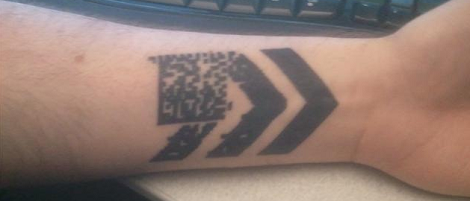
Barcode Tattoo Has A Lot Of Thought Put Into It

This bar code tattoo was sent into us by [Lifespan]. Before going under the needle, [Lifespan] didn’t care much for tattoos. After seeing this video he realized that a tattoo could have dynamic content through domain redirection.

[Lifespan] spent a lot of time going over the different styles of 2D bar codes. QR codes were deemed ugly because of the three large squares in the corners. An EZ Code, like the one in his YouTube inspiration, are a proprietary format that must be read with a ScanLife app. He eventually settled on a Data Matrix bar code because of its open format and ubiquity in business and industry. To make the tattoo dynamic, [Lifespan] made the tattoo point to 5id5.com. With a little bit of smart phone wizardry, that domain can be redirected to any URL in a moments notice.

Like all well-planned tattoos, he found himself a very good artist to do the piece. [Connor Moore] managed to ink some skin at 15 dpi, which was a little risky, but the results came out great. While it’s not scarification via a laser cutter, barring fading this tattoo is technologically future proof.

Electronic Diaper Bag Reminds You To Pack Everything But The Baby

lilypad_diaperbag

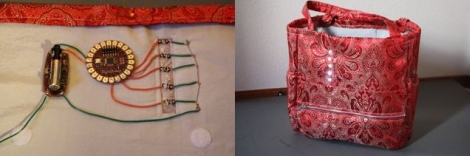
[jnorby] knows what it’s like to leave the house with her baby in tow, only to realize that she has left something she needs at home. Instead of relying on a paper checklist, she decided to craft her own diaper bag that alerted her if she had forgotten to pack a particular item.

She built her bag from scratch, wiring small circuits into each of the pockets she created on the inside of the bag. Wires were run to each half of a snap fastener, so that they would complete the circuit when the snaps touch. The LEDs and snaps were then connected to a LilyPad Arduino, which checks the status of the snap circuits, lighting the appropriate LED once the proper item has been packed.

While we like the idea of a bag that uses functional indicators that remind you to pack items, we do think that the use of the Arduino, or any microprocessor for that matter, is massive overkill. We would ditch the LilyPad and snap fasteners for reed switches or perhaps normally closed micro leaf switches that turn the LEDs off once the proper item has been packed, rather than the other way around.

Arduino Sip N Puff Switch

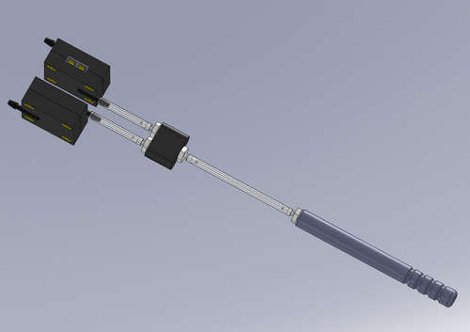
[kayakdiver] is developing a SIP and PUFF controlled kayak, but in order to start you first need a SIP and PUFF switch. These devices allow the user to lightly sip or puff into a tube to control switches or sensors, and are sometimes mounted in joysticks for control of a computer, or wheelchair, etc, but finding the cost prohibitive the next best thing was to whip up their own.

The design is clean and direct featuring off the shelf tubing and fittings, 2 pressure/vacuum switches, and an Arduino. Each one of the switches can detect pressure or vacuum, so one switch set to each is fed though a Y and up to the mouthpiece, since everything is sealed this has the advantage of only needing pressure and not airflow making it more comfortable for the user over long periods, and keeps down on humidity in the tubes.

Fixing The Future

[iFixit] (who we’ve posted about many times before) has launched a passionate manifesto promoting the skills and knowledge of repair as a solution to technological consumerism and waste. They use powerful footage of electronic waste dumps in Ghana to make the point that we must collectively change the way we use and relate to our high technology–take a look after the break.

The manifesto rallies against the practice of withholding repair knowledge such as manuals, error codes and schematics–putting responsibility in the hands of manufacturers–but also makes it clear that it is up to every one of us to inform ourselves and to value functionality over novelty.

Considering the many-faceted resource crisis that we are headed towards, any efforts to push our behavior towards a sustainable and considerate way of life should be considered. As hackers we repair, reuse and rethink technology as part of our craft–but we are also privileged by our enthusiasm for technical challenges. The real battle is to disseminate the kind of knowledge and skills we possess into the general population. This is where the heart of [ifixit]’s message comes into play: the creation of an open, editable online repair manual for every electronic device. If you have something to teach, why not pop over and help expand their database?

Continue reading “Fixing The Future”

DTG Using A Stock Printer

[youtube=http://www.youtube.com/watch?v=qc3OrrsnMHs]

Here’s a Direct-to-Garment device that uses a stock printer. [Jeff German] used an Epson R1900 with the stock firmware to get the results seen in the video. His hardware modifications involve adding two buttons to the printer’s circuit board. For DTG beginners this certainly lowers some of the obstacles to getting started. [Jeff] is working on detailed instructions but for now take a look at our own How-to for building a DTG printer.