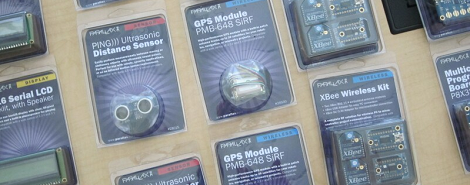
Meet Radio Shack’s New Parallax Lineup

It looks like Radio Shack is pretty serious about their new found commitment to their focus on the DIY, inventor, creator and geek demographics. [Ken Gracey], Parallax forum guru, put up a post on the Parallax stuff that will be sold at Radio Shack. Everything is priced, “below spousal approval level,” but no word on what those prices are.

Here’s the (probably not conclusive) list we gleaned from the pics: 2-axis joystick, gyroscope, GPS, compass and altimeter modules, an infrared sensor, 2×16 backlit LCD, BASIC stamp 2 board, and an XBee 2-pack that we assume would be priced above girlfriend approval levels.

We’re curious about how many (and in what quantity) of these items will be stocked at the East Nowheresville strip mall, and again there’s no mention of improving the selection of individual components.

At Hack A Day, we were thinking how amazing a Radio Shack ‘component vending machine’ would be. A modified pick and place machine that will dole out caps, resistors, other components, and has the potential to be competitive with online stores. Anyone feel like sending that suggestion in?


Dumpster Hackers And Junkyard Makers Get Their Own TV Show

junkies_tv_show_science_channel

The Science Channel has a new show premiering tomorrow night that we think you won’t want to miss.

JUNKies takes a look at a group of junkyard engineers led by [Jimmy “The Junk Genius” Ruocco], who also happens to be the junkyard’s owner. From the trailer you can see below, the show looks like it will be pretty entertaining, combining the best parts of Junkyard Wars, Mythbusters, and even Jackass – with hilarious and interesting results.

The show includes crazy stuff that [Jimmy] and his crew piece together, as well as the creations of individuals that come by the shop looking for parts. When the crew is not busy concocting crazy machines, they seem more than happy to help random inventors and makers dig out just the right parts for their projects.

The show airs tomorrow night, 8/18, at 10 PM Eastern, so be sure to check it out and let us know what you think!

[via Make]

TI’s New Web Site Appeals To The Penny Pincher In Us

tideals_chronos_watch

We’ve got to admit, we’re pretty much cheapskates when it comes to buying electronic bits online. Whether its microcontrollers or PCBs, we hate to part with money. So, we were pretty excited to hear that Texas Instruments is dishing out deals two weeks at a time to hackers, makers, and the like.

Several of you wrote in to tip us off to TI’s new site: TI Deals. Basically, they are deeply discounting various products, changing the lineup every two weeks. Now, we were expecting something like 20%-25% off certain items, but so far the TI Deals look pretty sweet. Right now, they are offering the Chronos watch kit for 50% off – which is a pretty nice discount. We’re definitely interested to see what sorts of other things will go on the chopping block in the future.

Thinking of picking up a Chronos watch? Let us know what sort of project you have planned.

If you are on the fence and need a little inspiration, check out these Chronos-based projects we have featured in the past:

Printable gripping rover is wristwatch controlled

Google two-factor authentication in a wristwatch

Wireless Sniffing and Jamming of Chronos and iclicker

Texas Instruments watch claims it’s a computer mouse

DIY PCB Exposure Box Looks Professionally Made

diy_double_sided_exposure_box

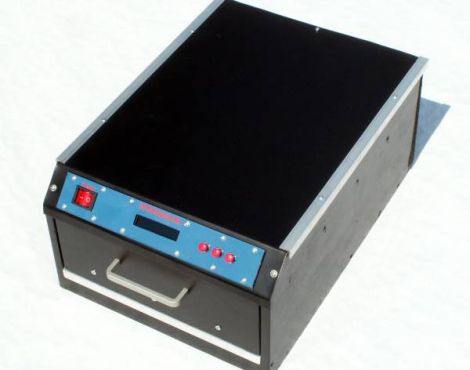
[Stynus] was frustrated with the fact that he would have to flip his PCBs over mid way through the exposure process, so he decided the best course of action would be to build his own double-sided PCB exposure box.

He scored some UV LEDs on eBay, and after waiting a few weeks for PCBs to arrive, he was ready to start construction. The box contains a sliding glass shelf, which is positioned between two sets of LED panels. The setup lets him simultaneously etch both sides of any PCB, up to 20cm x 30cm in size. The exposure box is run by a PIC 16F628P and features an LCD status panel as well as a small handful of controls. [Stynus] programmed the box to retain the length of the last exposure, making it easy to replicate his results time after time.

Towards the end of the build log he shows off some pictures of the completed exposure box, which looks very professionally done. It’s a great job all around, and we would gladly take one for our workshop in a heartbeat.

Hackaday Weekly Roundup


In case you missed them, here are our most popular posts from this week:

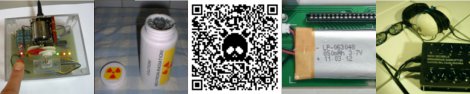
First up is [Bertho’s] Pointless Switch machine. This machine is yet another take on the ‘most pointless machine’. It looks like his server couldn’t handle the load from his video so he moved it over to youtube. You can find it here.

Next is The DIY nuclear reactor, which links to a project by a fellow who was silly enough to post his nuclear experiments online. You can imagine how that went…

This week’s most popular post was the tutorial created by our writer [Brian Benchoff]. In this tutorial, he shows how you can insert your logo into a still-readable QR code.

After that is this post showing how you can resurrect your IBM model M keyboard to use it as a bluetooth device.

Finally, we wrap up our roundup with a brainwave disruptor. This device allows [Rich] to experiment with light and sound to see how it affects brain waves.

Installing Linux On A 386 Laptop

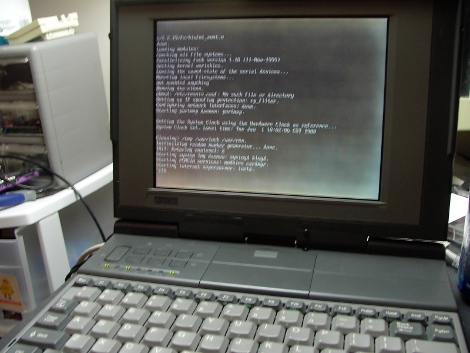
The “cheap” and “easy” way in about an hour! A question that pop’s up from time to time is “I somehow ended up with an archaic old laptop / computer, can it run Linux?” Well of course it can, but that totally depends! On what? Well machine CPU, CPU speed, hard disk space, RAM and most importantly what you are expecting it to do.

Okay, why a Intel 386? Well number one I own a 386, but more importantly its the absolute bottom Intel CPU you can run Linux on. While it wont be able to do much, it will give you a basic system to kick around and “get to know” the insides of Linux without a million things installed and the worry of breaking it.

Unfortunately a 386 requires some special moves as the actual chip was dropped from almost all distributions long ago. All of the modern distributions I have looked at require at least a 486 CPU. This tutorial will be strictly for installing a basic bare bones Linux on a 386. Have a 486? Pentium? Faster? Never fear I will be covering that in a part II later this week.

Linux on a 386 in about an hour? Madness you might think, it probably takes Linux longer to boot on a 386 (and in some cases you are correct)! Want to know the trick? Simple, cheat!

Join me after the break for the parts and steps needed to get you started.

Continue reading “Installing Linux On A 386 Laptop”

Make W7 64 Bit Play Nice With Your Programmer

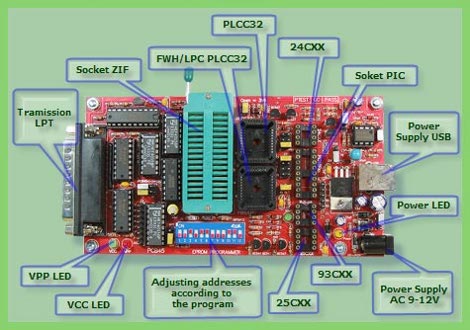
External EPROM burners are pretty handy gadgets to have around. They obviously can read and write EPROMS, but often times they will also handle a pile of PIC’s, some AVR’s, and other programmable logic like PAL/GAL and CLPD’s. While you can often find old models floating around for cheap (or free in my case) there are a few issues to be hammered out.

Typically the models you’re going to get for a song and a dance are old parallel port models that use software in MS-DOS or Windows and hasn’t been updated since. The software typically bit bangs the port using it like a 1 byte wide GPIO line, and this was a common trick, that is long gone from current operating systems by default.

[Doug] sought to find a solution to using one of these gadgets on Windows 7 X64, and lots of Google-fu, poking at libraries, and a little code modification he does just that getting his Sivava Willem EPROM programmer working like a champ on a nice new i7 with a parallel port add in card.