Firing Up A Raspberry Pi Zero

I ordered a Raspberry Pi Zero from Adafruit in their Startup Pack right after they were released. There are a few Greater Than Zero Pis (GTZPi) already on my workbench so my purchase was driven by curiosity, not necessity. With no rush on delivery it eventually got here, and I finally got around to looking at it. My experience with the Pi family began with the Pi B+ and, shortly after that, the Pi 2. The speed difference between them was noticeable so I decided to dive in and further test the performance of the Zero.

Continue reading “Firing Up A Raspberry Pi Zero”

Solder More USB Ports To The Raspberry Pi Zero

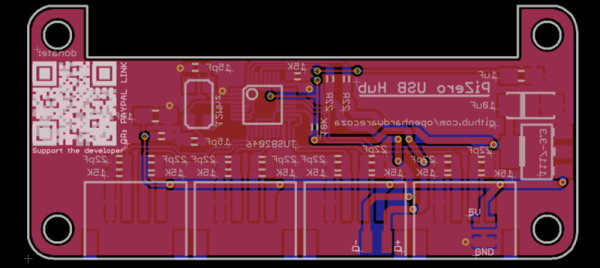
Slowly, Raspberry Pi Zeros are falling into the hands of everyone who wants one. Quickly, though, it was realized that one USB port wasn’t enough, and having a single USB OTG port was only just the most economical solution. The Pi Zero does have a lot of test points exposed on the back, and [Peter van der Walt] is clever enough to come up with a 4-port hub you can solder directly to the Pi Zero.

[Peter] has a bit of experience with USB ports on the Pi, and the test points available on the bottom of this cheap and wonderful board provide everything you need to break out the single USB OTG port to a USB hub. We’ve seen this done before with a few tenuous solder connections between the Zero and an off-the-shelf USB hub. [Peter]’s build does it by soldering a USB hub directly to the Pi through these test points. It’s the first purpose built bit of hardware designed for the express purpose of giving the Pi four USB ports while only making it a sliver thicker.

The chip [Peter] is using for the build is the TI TUSB2046B, a device that turns a single USB port into a 4-port hub. This is a part that only costs about $2 in quantity, and the USB connectors themselves are only about $0.60 if you want to build a thousand of these solderable USB hubs. Now you see why the Pi Foundation didn’t include a whole host of ports on the Pi Zero, but it does mean you should be able to pick this board up for under $10 when it’s inevitably cloned in China.

[Peter] doesn’t have this board working yet. In fact, he’s only just sent the Gerbers off to the PCB fab. There will be an update once [Peter] gets the boards back and solders up the tiny but tolerable 0603 parts.

Shoving A Raspberry Pi Zero Into An Xbox Controller

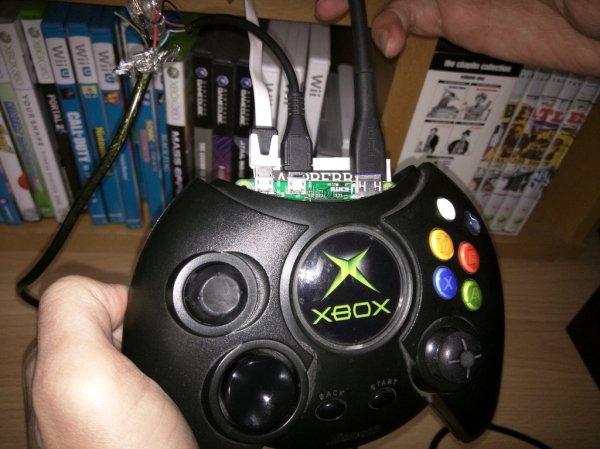
With the release of the Raspberry Pi Zero last month, we’ve been waiting in excitement to see the first creative hacks to come out, making use of its tiny size; which if you didn’t know, is smaller than a business card. [Terence Eden] hopped to it and made what might be the first Raspberry Pi Zero emulator: inside an Xbox controller.

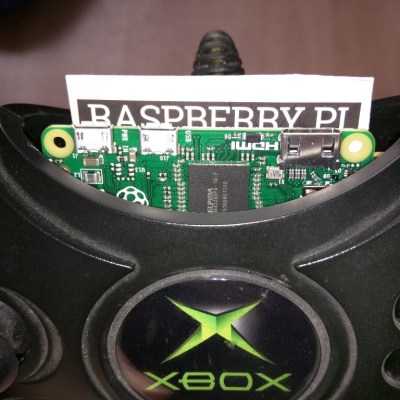
10-Pi-Cardboard-insulatorThanks to its small size it’s actually a fairly straight forward hack with minimal modification to the controller in order to make it fit. In fact, you only need to remove the memory card holder from the controller and snip one bit of plastic in order to make it fit right in the middle — awesome.

Now it does stick out a bit as you can see in the pictures, but we’re sure it won’t take someone long to make a 3D printed part that snaps into the controller giving it a more stock appearance. Unfortunately since HDMI can’t carry a power source to the Pi, [Terence] is using a micro-USB to power it — but there is enough space inside the controller for a battery pack if you wanted to make it truly portable.

Continue reading “Shoving A Raspberry Pi Zero Into An Xbox Controller”

Pi Zero HackChat With Lady Ada

This Thursday, December 3rd, join us for a Live HackChat about the Raspberry Pi Zero with special guest [Limor Fried]. You may know [Limor] as [Lady Ada], the founder of Adafruit Industries. Adafruit has been on the forefront of the Pi Zero release. The $5 single board computer was announced one week ago by the Raspberry Pi Foundation.

Join in the chat to discuss the Raspberry Pi Zero. Limor has done a lot of work with the board already, including hacking analog audio back into the form factor. This is a great opportunity to ask questions, talk about your own plans for the hardware, and to find collaborators for future projects.

Pi Zero HackChat starts Thursday at 5pm PST (here’s a timezone cheat sheet if you need it). Participating in this live chat is very simple. Those who are already part of the Hacker Channel can simply click on the Team Messaging button. If you’re not part of the channel, just go to the hacker Channel page, scroll to the bottom of the “TEAM” list in the left sidebar and click “Request to join this project”.

HackChat takes place in the Hacker Channel every few weeks and is a friendly place to talk about engineering and the projects you’re working on.