Hacklet 95 – More Pi Zero Contest Entries

We’re well into the second week of the Hackaday and Adafruit ultimate team-up: The Raspberry Pi Zero Contest. The entries have been flying in! As of Thursday evening, we have 70 projects vying for one of 10 Raspberry Pi Zeros, and one of three $100 gift certificates to The Hackaday Store. This week on The Hacklet, we’re going to take a look at a few more contest entries.
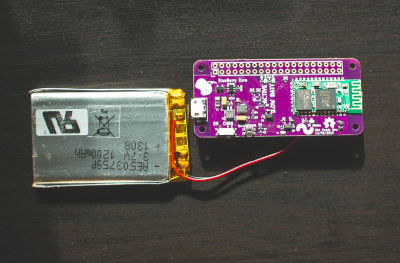
blueberryWe start with [Sean Hodgins] and Blueberry Zero – Keep your Pi in your Pocket. [Sean] can’t leave home without his Raspberry Pi Zero. Carrying all the cables, adapters, and accessories required to power up a tiny Linux computer can be a chore though. He’s created a solution to simplify all that with Blueberry Zero. This custom PCB hat contains an HC-05 style Bluetooth module connected to the Pi’s console port. Serial alone doesn’t make for a standalone Pi, so [Sean] added a LiPo battery and charger chip. A switching power supply boosts the 4.2 V LiPo output up to the 5 V required for the Pi. Now when [Sean] just has to hack out some python code, all he needs to do is open a Bluetooth connection from a cell phone, tablet, or computer.
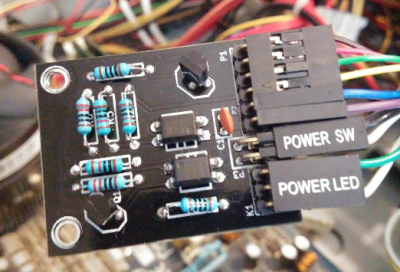
pcpower[Doihaveto] is using his Pi Zero to manage a desktop PC. PC Power allows him to not only turn his computer on or off, but to disconnect the mains power completely. [Doihaveto’s] PC does have Wake On Lan, but he’s run into problems when the system has failed. His Pi provides an extra layer of protection in case things don’t wake up as expected. The board contains two optoisolated connections to a host PC. One is the power switch output, the other is the power LED input. If all else fails, PC Power also can control a solid state relay to completely isolate the computer from mains power. PC Power uses a web interface created with Python using the flask web framework.
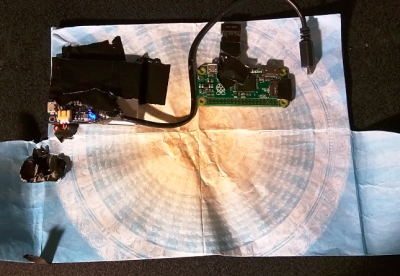
pifoldNext up is [tomwsmf] with PiFold. Like [Sean] up above, [tomwsmf] can’t leave home without his Pi Zero. Rather than hacking code though, [tomwsmf] is serving up media. PiFold is a wallet containing a Pi Zero powered server. The Anyfesto software package runs on the Pi, serving up songs and files via WiFi. Audio is also transmitted on 88.1 MHz FM via PiFM. A 2500 mAh battery pack coupled with a boost converter keeps PiFold humming away. When the battery needs a charge, [tomwsmf] can use a small solar panel to top up the battery while staying green.
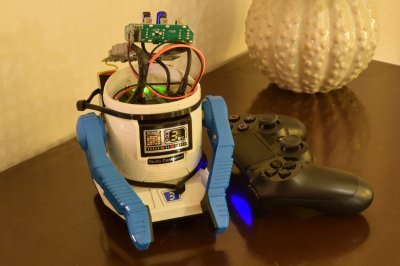


retrorobotFinally, we have [Fredrik J] with Retrofit Robot. The 1980’s were a golden age of toy robots from Japan. Tomy, Nikko, and a few other companies created devices like Omnibot, which were ahead of their time. [Fredrick] still has his vintage Nikko RC-ROBOT, but it has long since ceased to function. The Pi Zero presents a perfect opportunity to give the little guy a new lease on life. [Fredrik’s] goal is to keep the RC-ROBOT’s original look while giving him new functions. The old DC motors are being replaced with closed loop servos. The servos will be controlled by an Adafruit 16 channel servo driver board. The next step for Retrofit Robot is a big 6000 mAh battery. We can’t wait to see how this one turns out!

If you want to see more entrants to Hackaday and Adafruit’s Pi Zero contest, check out the submissions list! If you don’t see your project on that list, you don’t have to contact me, just submit it to the Pi Zero Contest! That’s it for this week’s Hacklet. As always, see you next week. Same hack time, same hack channel, bringing you the best of Hackaday.io!

Hacklet 94 – Pi Zero Contest Entries

Hackaday and Adafruit have joined forces to present the Raspberry Pi Zero Contest. A great contest is nothing without entries though. This is where the Hackaday.io community is proving once again that they’re the best in the world. The contest is less than a week old, yet as of this Thursday evening, we’re already up to 33 entrants! You should submit your own project ideas now for a chance at one of the many prizes. This week on The Hacklet, we’re going to take a look at a few of these early entrants!

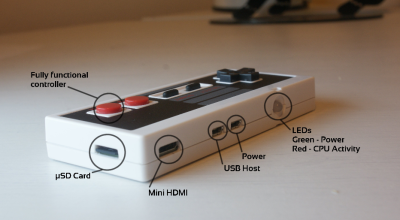
controllerWe start with [usedbytes] and Zero Entertainment System [usedbytes] has crammed an entire emulator into a classic Nintendo Entertainment System control pad thanks to the Raspberry Pi Zero. Zero Entertainment System also has something the original NES couldn’t dream of having: An HDMI output. The emulator uses the popular RetroPie front end. We’re happy to say that [usedbytes] knew that hacking up a real Nintendo controller would be sacrilegious, so they grabbed a low-cost USB clone from the far East. A bit of creative parts-stuffing and point-to-point wiring later, ZES was ready to meet the world!

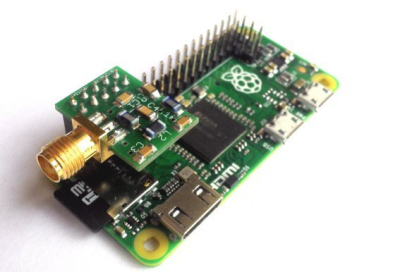
wsprNext up is [Jenny List] with The Australia Project. [Jenny] is a hacker from Europe. She’s hoping to use a Pi Zero to talk to Australia. “Talk” may be pushing it a bit though. The Australia Project will use the Weak Signal Propagation Reporter (WSPR) network to transmit RF straight out of the Pi’s GPIO ports. All that is required is a good filter, an antenna, and a balun. The filter in this case is a 7-pole Chebyshev low-pass filter. The filter keeps the Pi’s harmonic filled square waves from messing up every band from DC to light. [Jenny] normally sells these filters as a kit, but she’s made a special version specifically for the Pi Zero.

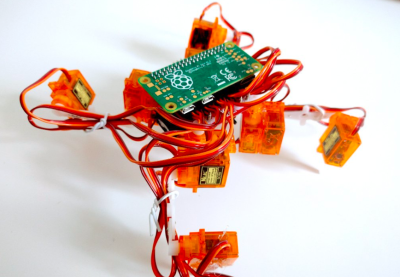
tote0[Radomir Dopieralski] has brought his signature walking robots to the Pi Zero world with Tote Zero. Tote Zero is a quadruped walking robot built mainly from 9 gram servos. [Radomir’s] custom tote board interfaces the servos to the Pi Zero itself. The Pi Zero opens all sorts of doors for sensors, vision, and advanced processing. The Arduino board on the original Tote would have been hard pressed to pull that off. Tote is programmed in Python, which will make the code quick and easy to develop. Tote Zero just took its first steps a few days ago, so follow along as a new robot is born!


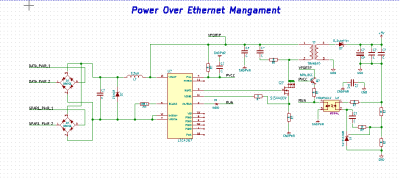
ethernetpoFinally we have [julien] with PoEPi: Pi Zero Power over Ethernet with PHY. The Raspberry Pi Zero is so tiny, that it’s easy to forget it needs a fair amount of power to run. [Julien] is giving us a way to connect our Pi to a network while ditching the USB power supply using Power Over Ethernet (PoE). PoE has been powering devices like IP cameras for years now. It’s become a standard way of transmitting power and data. For the Ethernet physical interface, [Julien] is using Microchip’s ENC28J60, which has a handy SPI interface. Linux already has drivers in place for the device, so it’s a slam dunk. The “power” part of this system comes with the help of an LTC4267 PoE interface chip, which has a built-in switching regulator.

If you want to see more entrants to Hackaday and Adafruit’s Pi Zero contest, check out the submissions list! If you don’t see your project on that list, you don’t even have to contact me, just submit it to the Pi Zero Contest! That’s it for this week’s Hacklet. As always, see you next week. Same hack time, same hack channel, bringing you the best of Hackaday.io!
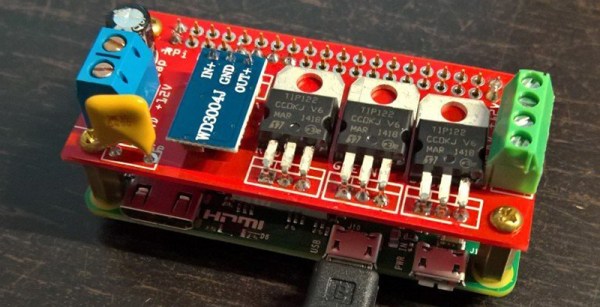
Cramming A Pi Zero Into A USB Hub

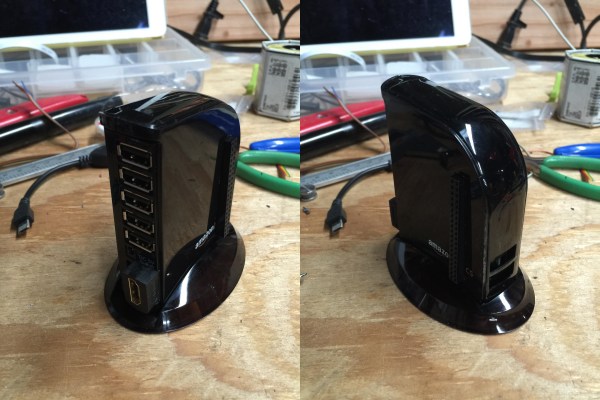
We kinda feel bad posting all these awesome hacks you can do with a Raspberry Pi Zero when we know most of our audience here probably doesn’t have one due to the backlog of orders… but regardless — here’s another one you can try — if you have one anyway. A Raspberry Pi USB Hub!

In case you didn’t know, Amazon has a series of electronics accessories called Amazon Basics — and they’re actually pretty good quality accessories. One of them is a 7-port, 4A USB hub. Looking at this [gittenlucky] figured he might just have enough room to fit a Pi Zero inside… and as it turns out. He did.

Continue reading “Cramming A Pi Zero Into A USB Hub”

Hackaday And Adafruit Launch The Pi Zero Contest

Hackaday and Adafruit are teaming up to bring you the Pi Zero Contest. Unless you’ve been hiding out in your workshop for the past month or so, you probably already know The Pi Zero is the $5 Linux-based computer which has been taking the world by storm. Think you have the next great project for this single-board computer? Enter it for a chance to take home one of three $100 gift certificates to the Hackaday Store. We know Zeros have been hard to find, so we’ll be giving away 10 of them before the contest is over. Even if you don’t have a Pi Zero, read on!

This is all about documenting quality projects to Hackaday.io. We’re looking for well thought out, well documented builds intended for the Pi Zero. Any project submitted to this contest can also be rolled over to the 2016 Hackaday Prize. Think of it as getting a head start.

Here are the details:

  • From February 2nd, to February 20th, Lady Ada will make 10 ‘From the Desk of Lady Ada’ broadcasts focusing on this contest. During each broadcast she will present an idea for a Pi Zero Project. You don’t have to build Lady Ada’s projects, they’re starter ideas to get your wheels turning. If you don’t have a Raspberry Pi Zero, don’t worry! You can prototype with a Raspberry Pi Model B, or a Pi 2. There are also 10 Pi Zero boards up for grabs before the contest is over.
  • The deadline for winning a Pi Zero is 12:00am PST February 25th, 2016. The judges will pick the 10 most well thought out and well documented projects.
  • On February 29th, the judges will announce the winners of 10 Raspberry Pi Zero boards.
  • The grand prize for this contest is one of three $100 gift cards to the Hackaday store. The deadline to enter is 12:00 am PST March 14th, 2016.

Entering is easy.  All you have to do is submit your project. Just click the “Submit to” drop down list on your project page. Then select Adafruit Pi Zero Contest.

So fire up your soldering irons, warm up your 3D printers, and load up your favorite code editor. It’s time to start hacking!

Yet Another Pi Zero USB Hub

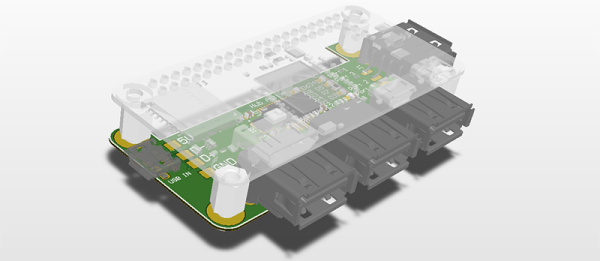
The Raspberry Pi Zero was back in stock at Adafruit this week – for about eight minutes. That means a few more people get Pi Zeros, many more will put them up on eBay, and everyone is working on their own version of a Pi Zero USB hub. The latest version of a Pi Zero hub comes from [Nate], and he’s doing this one right. His Pi USB adapter adds four USB ports and features not found in other DIY USB hubs like fuses and ESD protection.

As with other Pi Zero USB hub add-ons, this build relies on a USB hub controller, a few passives, and not much else. The chip used in this hub is the FE1.1s chip, a highly integrated 4-port hub controller that can be found through the usual Chinese resellers. This hub controller doesn’t require much, just a 12MHz crystal, a few passives, and four USB jacks.

Of particular interest is how [Nate] is connecting this hub to the Pi Zero. He’s left the option open for using either a USB cable, or soldering the USB’s differential pairs directly between the Pi and the hub. In either case, the hub should work, and with the addition of the zeners, fuses, and other parts that keep the hub from frying itself, [Nate] might have a very nice project on his hands.

Hackaday Links: December 27th, 2015

PCBs can be art – we’ve known this for a while, but we’re still constantly impressed with what people can do with layers of copper, fiberglass, soldermask, and silkscreen. [Sandy Noble] is taking this idea one step further. He took C64, Spectrum, and Sinclair PCBs and turned them into art. The results are incredible. These PCBs were reverse engineered, traced, and eventually turned into massive screen prints. They look awesome, and they’re available on Etsy.

$100k to bring down drones. That’s the tagline of the MITRE Challenge, although it’s really being sold as, “safe interdiction of small UAS that pose a safety or security threat in urban areas”. You can buy a slingshot for $20…

[styropyro] mas made a name for himself on Youtube for playing with very dangerous lasers and not burning his parent’s house down. Star Wars is out, and that means it’s time to build a handheld 7W laser. It’s powered by two 18650 cells, and is responsible for more than a few scorch marks on the walls of [styropyro]’s garage.

Everybody is trying to figure out how to put Ethernet and a USB hub on the Pi Zero. This means a lot of people will be launching crowdfunding campaigns for Pi Zero add-on boards that add Ethernet and USB. The first one we’ve seen is the Cube Infinity. Here’s the thing, though: they’re using through-hole parts for their board, which means this won’t connect directly to the D+ and D- USB signals on the Pi Zero. They do have a power/battery board that may be a little more useful, but I can’t figure out how they’re doing the USB.

[Keith O] found a fascinating video on YouTube and sent it into the tips line. It’s a machine that uses a water jet on pastries. These cakes start out frozen, and come out with puzzle piece and hexagon-shaped slices. Even the solution for moving cakes around is ingenious; it uses a circular platform that rotates and translates by two toothed belts. Who would have thought the latest advancements in cutting cakes and pies would be so fascinating?

It’s time to start a tradition. In the last links post of last year, we took a look at the number of views from North Korea in 2014. Fifty-four views, and we deeply appreciate all our readers in Best Korea. This year? For 2015, we’ve logged a total of thirty-six views from the Democratic People’s Republic of Korea. That’s a precipitous drop that deserves an investigation. Pyongyang meetup anyone?

Firing Up A Raspberry Pi Zero

I ordered a Raspberry Pi Zero from Adafruit in their Startup Pack right after they were released. There are a few Greater Than Zero Pis (GTZPi) already on my workbench so my purchase was driven by curiosity, not necessity. With no rush on delivery it eventually got here, and I finally got around to looking at it. My experience with the Pi family began with the Pi B+ and, shortly after that, the Pi 2. The speed difference between them was noticeable so I decided to dive in and further test the performance of the Zero.

Continue reading “Firing Up A Raspberry Pi Zero”