Code Craft-Embedding C++: Hacking The Arduino Software Environment

The Arduino software environment, including the IDE, libraries, and general approach, are geared toward education. It’s meant as a way to introduce embedded development to newbies. This is a great concept but it falls short when more serious development or more advanced education is required. I keep wrestling with how to address this. One way is by using Eclipse with the Arduino Plug-in. That provides a professional development environment, at least.

The code base for the Arduino is another frustration. Bluntly, the use of setup() and loop() with main() being hidden really bugs me. The mixture of C and C++ in libraries and examples is another irritation. There is enough C++ being used that it makes sense it should be the standard. Plus a good portion of the library code could be a lot better. At this point fixing this would be a monumental task requiring many dedicated developers to do the rewrite. But there are a some things that can be done so let’s see a couple possibilities and how they would be used.

Continue reading “Code Craft-Embedding C++: Hacking The Arduino Software Environment”
Code Craft – Embedding C++: Templates

The language C++ is big. There is no doubting that. One reason C++ is big is to allow flexibility in the technique used to solve a problem. If you have a really small system you can stick to procedural code encapsulated by classes. A project with a number of similar but slightly different entities might be best addressed through inheritance and polymorphism.

A third technique is using generics, which are implemented in C++ using templates. Templates have some similarities with #define macros but they are a great deal safer. The compiler does not see the code inserted by a macro until after it has been inserted into the source. If the code is bad the error messages can be very confusing since all the developer sees is the macro name. A template is checked for basic syntax errors by the compiler when it is first seen, and again later when the code is instantiated. That first step eliminates a lot of confusion since error messages appear at the location of the problem.

Continue reading “Code Craft – Embedding C++: Templates”

Raspberry Pi Zero, Or Minus One?

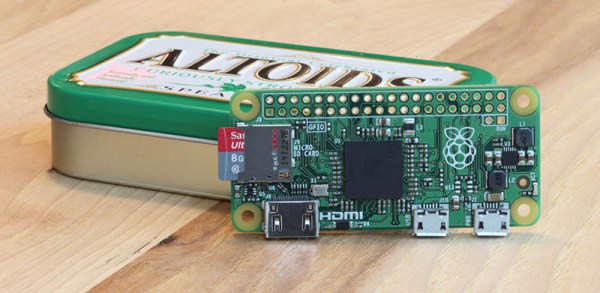
The Wall Street Journal reported that [Eric Schmidt] of Google and now Alphabet Inc, promoted the idea of an inexpensive version of the Raspberry Pi to the Raspberry Pi foundation’s [Eben Upton]. Apparently [Upton] accepted this recommendation despite existing plans to make a more expensive, more powerful version of the Pi. The outcome is the Raspberry Pi Zero that sells, in some places, for $5.00 and was given away for free on the cover of the MagPi magazine.

From the WSJ article:

“He [Schmidt] said it was very hard to compete with cheap. He made a very compelling case. It was a life-changing conversation,” Mr. Upton said, adding that he went back to the lab and scrapped all the engineering plans for more expensive versions of future Pi computers. “The idea was to make a more powerful thing at the same price, and then make a cheaper thing with the same power.”

Plans were scrapped. The more powerful Pi 2 was released at the price point of existing Pis, and now we have the Zero.

Pi’s Purpose

Foundation Mission

The Raspberry Pi Foundation is a registered educational charity in the UK. The purpose of this Foundation according to their About Us page is to, ‘advance the education of adults and children, particularly in the field of computers, computer science, and related subjects.’

Why is the Raspberry Pi Foundation so concerned about computer education? From the 1990s onward, fewer and fewer A Level students in the UK applying to study Computer Science had previous experience as hobbyist programmers. An applicant in the 2000s usually might have only done a little web design.

Why then does the Raspberry Pi Zero exist? [Upton] also told Cnet, “We really hope this is going to get those last few people in the door and involved in computer programming.”

Very good, but how well does the Zero support this goal or address their concerns?

Continue reading “Raspberry Pi Zero, Or Minus One?”

Code Craft-Embedding C++: Hidden Activities?

What is an embedded system? The general definition is a computer system dedicated to a specific purpose, i.e. not a general purpose system usable for different tasks. That is a very broad definition. I was just skimming the C++ coding guidelines for the Joint Strike Fighter. That’s a pretty big embedded system and the first DOD project that allowed C++! When you use an ATM to get money you’re using an embedded system. Those are basically hardened PCs. Then at the small end we have all the Internet of Things (IoT) gadgets.

The previous articles about embedding C++ discussing classes, virtual functions, and macros garnered many comments. I find both the positive and critical comments rewarding. More importantly, the critical comments point me toward issues or questions that need to be addressed, which is what got me onto the topic for this article. So thank you, all.

Let’s take a look at when embedded systems should or should not use C++, taking a hard look at the claim that there may be hidden activities ripe to upset your carefully planned code execution.

Continue reading “Code Craft-Embedding C++: Hidden Activities?”

Code Craft – Embedding C++: Classes

For many embedded C developers the most predominate and questionable feature of C++ is the class. The concern is that classes are complex and therefore will introduce code bloat and increase runtimes in systems where timing is critical. Those concerns implicate C++ as not suitable for embedded systems. I’ll bravely assert up front that these concerns are unfounded.

When [Bjarne Stroustrup] created C++ he built it upon C to continue that language’s heritage of performance. Additionally, he added features in a way that if you don’t use them, you don’t pay for them.

Continue reading “Code Craft – Embedding C++: Classes”

No Pascal, Not A SNOBOL’s Chance. Go Forth!

My article on Fortran, This is Not Your Father’s FORTRAN, brought back a lot of memories about the language. It also reminded me of other languages from my time at college and shortly thereafter, say pre-1978.

At that time there were the three original languages – FORTRAN, LISP, and COBOL. These originals are still used although none make the lists of popular languages. I never did any COBOL but did some work with Pascal, Forth, and SNOBOL which are from that era. Of those, SNOBOL quickly faded but the others are still around. SNOBOL was a text processing language that basically lost out to AWK, PERL, and regular expressions. Given how cryptic regular expressions are it’s amazing another language from that time, APL – A Programming Language, didn’t survive. APL was referred to as a ‘write only language’ because it was often easier to simply rewrite a piece of code than to debug it.

Another language deserving mention is Algol, if only because Pascal is a descendant, along with many modern languages. Algol was always more popular outside the US, probably because everyone there stuck with FORTRAN.

Back then certain books held iconic status, much like [McCracken’s] black FORTRAN IV. In the early 70s, mentioning [Nicolas Wirth] or the yellow book brought to mind Pascal. Similarly, [Griswold, (R. E.)] was SNOBOL and a green book. For some reason, [Griswold’s] two co-authors never were mentioned, unlike the later duo of [Kernighan] & [Ritchie] with their white “The C Programming Language”. Seeing that book years later on an Italian coworker’s bookshelf translated to Italian gave my mind a minor boggling. Join me for a walk down the memory lane that got our programming world to where it is today.

Continue reading “No Pascal, Not A SNOBOL’s Chance. Go Forth!”

Code Craft: Using Eclipse For Arduino Development

As we work on projects we’re frequently upgrading our tools. That basic soldering iron gives way to one with temperature control. The introductory 3D printer yields to one faster and more capable. One reason for this is we don’t really understand the restrictions of the introductory level tools. Sometimes we realize this directly when the tool fails in a task. Other times we see another hacker using a better tool and realize we must have one!.

The same occurs with software tools. The Arduino IDE is a nice tool for starting out. It is easy to use which is great if you have never previously written software. The libraries and the way it ties nicely into the hardware ecosystem is a boon.

When you start on larger projects, say you upgrade to a Due or Teensy for more code or memory space, the Arduino IDE can hamper your productivity. Moving beyond these limitations requires a new, better tool.

Where do we find a better tool? To begin, recognize, as [Elliot] points out that There is no Arduino “Language”, we’re actually programming in C or C++. We chose which language through the extension on the file, ‘c’ for C and ‘cpp’ for C++. An Arduino support library may be written in C or C++ depending on the developer’s preference. It’s all mix ‘n match.

Potentially any environment that supports C/C++ can replace the Arduino IDE. Unfortunately, this is not easy to do, at least for inexperienced developers, because it means setting up the language tool chain and tools for uploading to the board. A developer with that much experience might eschew an integrated development environment altogether, going directly to using makefiles as [Joshua] describes in Arduino Development; There’s a Makefile for That.

The reality is the Arduino IDE is not much more than a text editor with the ability to invoke the tools needed to compile and download the code to the Arduino. A professional IDE not only handles those details but provides additional capabilities that make the software development process easier.

Continue reading “Code Craft: Using Eclipse For Arduino Development”