
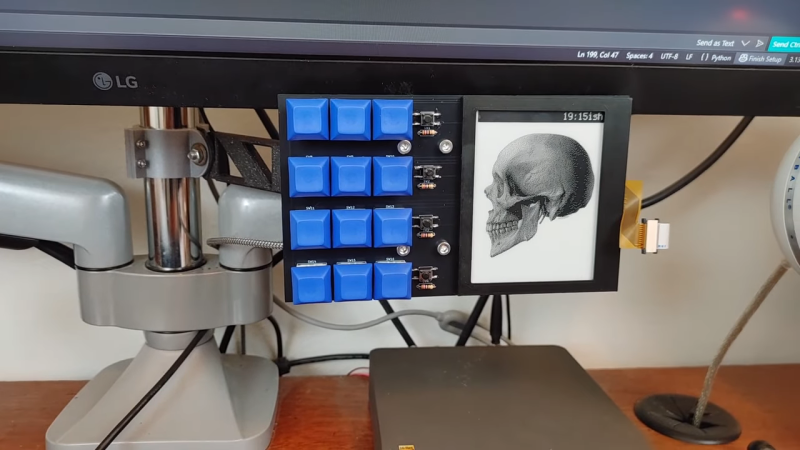
Why press many button when few button do trick? That was the thinking of [Bike Cook Robots] when it came time to revamp his desk. To that end, he whipped up a tidy macropad to make daily computing tasks easier.
The build is based around an Adafruit RP2040 Feather ThinkInk devboard, chosen because it plugs straight into a readily-available 4.2 inch e-ink. The display is tasked with showing icons that correspond to the macro assignments for the 3 x 4 array of mechanical keyboard switches. Everything is wrapped up in a 3D printed frame, with an bracket to mount it to the monitor arms on the desk. The macropad is set up to talk to a custom Python app that runs on the host machine, which handles triggering actions and can also talk back to the pad itself.
The combination of e-ink display and button pad is a great way to display the function of each key without excess complexity. We’ve seen some other great builds in this space before, too.












That’s a really nice compromise for usability and cost:
It has real physical controls that can be felt blind before actuation.
It has a cheap(?) display that shows what the controls presently do, and possibly status.
productivity this, productivity that, why don’t you produce your mother some grandkids? jokes aside this “productivity” trend is getting more and more frustrating, what your productivity gets you? more time to scroll the web? why there’s no “be more human and enjoy your life” trend?
macropad is cool though, i just hate the excuse of being “more productive”
creator here, and i totally get what your saying. For me its been less of a productivity booster, and more of a “laziness enhancer”. so far ive made it trigger a couple of linux scripts, toggle my pc leds on and off, and join/leave discord chat. Its nice to have labeled keys rather than remembering shortcuts
I skipped most of the video, he was mentioning something about auto hot key and apps, i built one in the past, a crude one, on a perf board with an arduino (mini?) that has integrated usb, i use it for media controls, play pause, mute, volume, next, previous… i simply made it send the usb command for that key press, works great on windows and linux, don’t have a mac to test.. adding an eink display and more functionality could be am improvement, i’ve already been thinking on making a case for it and use mechanical switches that i have from the time i bought extra to fix a keyboard