
You may not have noticed, but so-called “artificial intelligence” is slightly controversial in the arts world. Illustrators, graphics artists, visual effects (VFX) professionals — anybody who pushes pixels around are the sort of people you’d expect to hate and fear the machines that trained on stolen work to replace them. So, when we heard in a recent video that [Niko] of Corridor Digital had released an AI VFX tool, we were interested. What does it look like when the artist is the one coding the AI?
It looks amazing, both visually and conceptually. Conceptually, because it takes one of the most annoying parts of the VFX pipeline — cleaning up chroma key footage — and automates it so the artists in front of the screen can get to the fun parts of the job. That’s exactly what a tool should do: not do the job for them, but enable them to enjoy doing it, or do it better. It looks amazing visually, because as you can see in the embedded video, it works very, very well.
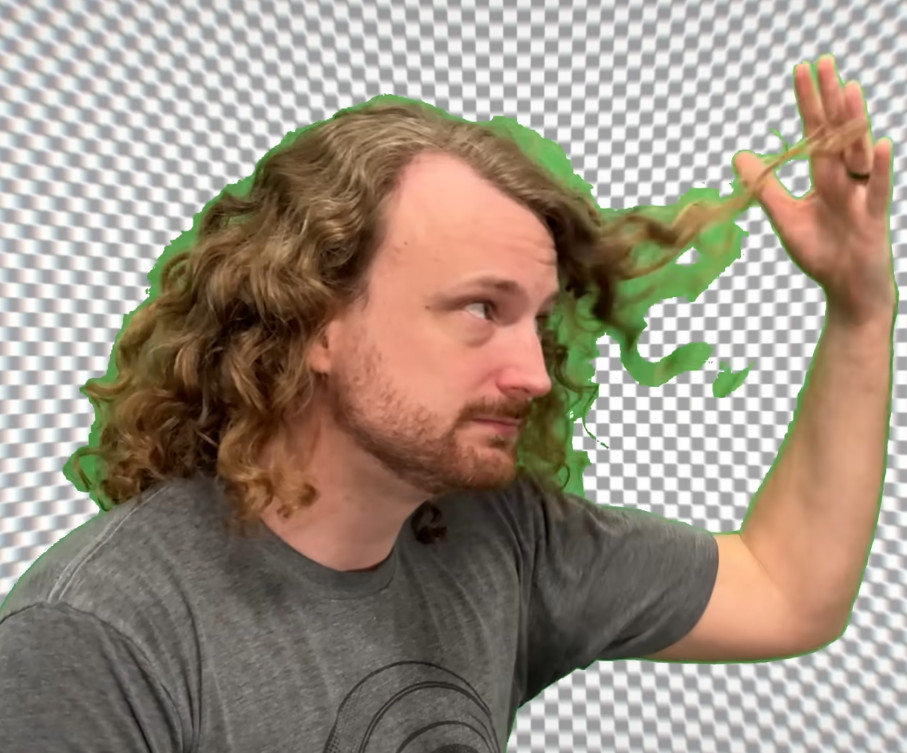
For the uninitiated, chroma keying removes one specific ‘key’ color from images, hence the green or blue screens you always see in behind-the-scenes footage. The chroma key is set to remove the selected color, and all the fancy CGI effects can show through instead. If you’ve never played with the technology before, you might not see the appeal of this new AI tool, after all, green screen seems like it should be a pretty automated process already. You tell the computer what counts as green, and it eliminates it, right?
Theoretically, yes, but in practice that’s very often not good enough. A great deal of very tedious frame-by-frame touch-up is often needed to get a truly professional result.
Unless, that is, you can harness a neural network to do it for you. Which [Niko] has. Even better, he’s released the software under a modified Creative Commons BY-NC-SA 4.0 license so we can all benefit from his work. The project documentation goes a good job of explaining what the software does and how it works, and the video below more-or-less defines the problem and demonstrates the solution.
Interestingly, [Niko] is part of the crew who recreated Disney’s lost sodium-light keying a couple of years back. Evidently they went back to regular green screen if this tool was needed. Something about the way green screen enables virtual set making must have given it an edge over the old sodium process. Feel free to chime in below if you know the full details.
Thanks to [piachoo] for the tip!












I’d watch that video, maybe.
I’m definitely NOT watching it when it’s screaming at me with its thumbnail.
Classic HAD comment. You don’t have to watch the whole thing, that’s what the timestamps are for. I found the procedural generation of training data at 13:30-ish and the result at 23:30 quite interesting.
You’re missing a cool video for a dumb reason.
“You’re missing a cool video for a dumb reason.”
“You’re missing a chance to make Bud Light your goto beer because of a commercial.”
You say it’s a cool video and a sewer rat may taste like pumpkin pie but I’ll never know.
If I didn’t previously know about Bud Light I might watch that commercial. Then I could make an informed decision about Bud Light in the future.
I do not think that anybody cares whether you watch it or not.
You may see a person screaming surrounded by a tared green screen, other might see a person who ripped a piece op paper apart and smiled for the photo in an “arrrrr… pirate kind of way”. But who cares. Anyone who ever messed with green screen might find it interesting, silly thumbnail or not. Personally I more scared by the length of the video, 30 minutes. But who cares what I think and does it matter? I wasted time watching sillier things.
I understand, but that’s how it works.
When a YouTuber has his mouth closed, he will get half the views compared to a video with his mouth open.
For some reason, most people are more likely to click on a video with the mouth open. A YouTuber I follow tested this out and it appears to work incredibly well and you see tons of YouTubers with their mouths open as a result.
:0
I’m sure there’s a part of that equation that depends on the audience and type of content. Perhaps the hackaday crowd and the corridor digital crowd don’t intersect all that much, although I have to say I’m a fairly regular corridor digital viewer.
I understand thumbnail A-B testing is built into the creator suite these days so youtubers can maximise their videos’ reach.
I’ve actually been ignoring this video for the same reason. I didn’t see any substance in the title or thumbnail, it looked like clickbait
Unfortunately the guys at Corridor Crew know that you have to make these clickbait titles / thumbnails to get any traction, despite the fact most of their work is actually really high quality and well done.
I hate the proliferation of “reaction” videos too, but their “VFX artists react” videos should more accurately be called “VFX experts discuss fascinating technical details of the art” but of course they’d get zero views for that. They have some seriously talented people come in & discuss their work in real technical detail with great explanations.
I hate that the internet forces good creators to ape the shitty ones just to get noticed.
I hate it too. But a ton of these people are making or attempting to make this their actual job. And the stupid algorithms penalize anyone who doesn’t fall in line with what it demands. And it demands that everything be the most over the top clickbait thumbnail.
If you must blame someone, blame the users who overwhelmingly prefer to click clickbait thumbnails and Google for codifying it in the algorithm that dictates creators must do this if they want to earn a living making the content we enjoy for free.
Which is why you should punish those videos and not watch them. You know, to provide a different signal to the algorithm.
No such thing. Clickbaiters take money from google who take money from companies who take money from you.
See that supermarket ad before the video? You paid for it.
I met a few youtubers, they are completely addicted/slaves to the algo, super scary to see. I had guys run of mid dinner a few times to check the performance of their video… dude, maybe you should eat?! This influencer/creator shit is literally killing people.
The ones chasing views for the sake of it and trying to make a living from almost nothing of substance have a terrifying and fragile existence, the ones doing it for the love of their subject hopefully are a bit more normal.
Ya aren’t missing anything that isn’t in the HaD blurb. Amazing how three or four sentences of text can make YT behavior irrelevant. The only thing I dislike more than the loud zomg vids are the asmr repair vids that are 80% centering the item between the thumb and forefinger in black nitrile gloves. The real magic of those videos is how the mobo revision changes 3/4 the way thru when they realize the traces are all shot lol. Hilariously, HaD content with a YT video behind it make up about 75% of the right pane of my yt feed so I usually have seen this crap two weeks before it is somehow found here.
There are good content creators out there but I feel like most of them follow the click formula. A specific example we have probably all seen in the feed is the guy growing a tomato from a Burger King Whopper tomato seed. I thought “aw man fun just like 2nd grade science…” Guy starts out strong with a heavy background in gardening and even sets up a cleaned seed and whole tomato slice with mayo variable… That is about where the science-y part ends. Spoiler alert the one in the bucket didn’t do so good because he straight up “forgot to water it” so it nearly died in the bucket lol. So I guess in the end it was just a lot of shots of him in the garden with the seeds and full on plants which may or may not have gotten the same level of care…. But he got his clicks so we can all go to bed safely and the Patreons can use their money on pizza for themselves :)
And when you say “pizza”…you mean….?
Child jerky of course.
Talk about judging a book by it’s cover. This vid is exceptional
Or wait literally 12 hours when the thumbnail is swapped, because “dumb face at upload to get kid views then swap to acceptable once that first rush ends” is the most proven way to boost engagement with dumb youths
IIRC there’s a firefox extension that blocks those cringy thumbnails.
What?
Creators showing their ‘surprise butt sex’ face on the thumbnail is traditional on YouTube.
The thumbnail is about as mild as YouTube allows without deprioritizing. If you want a useful thumbnail, use DeArrow: https://dearrow.ajay.app/
Hackers have always automated everything they can—AI just moves the line, it doesn’t remove the person drawing it.
Does training a neural network count as AI or Machine Learning?
I mean, by the traditional definition nothing we have today counts as AI anyway – it’s all ML/LLM/Some variation of that XKCD about shovelling a big pile of statistics until approximately plausible answers start falling out.
As long as we don’t let AI write movie scripts optimized for revenue, oh too late, never mind.
I actually approve of this use of AI, it removes the drudgery of a repetitive task, and doesn’t effect the CREATIVITY of the user. Think of it like the Photoshop lasso tool, but smarter.
British spelling?
pointless response?
Agreed!
The only downside to this is that I actually like artifacts on occasion.
For example, if I wanted the audience to “see” an invisible man sneaking up on someone—I want the stalker to wear a green suit and smock such that he appears as lines of force.
I might have a green foam halo on my head to look like a force-field helmet.
There are different types of artifacts that can be used in different ways.
You might remember the Adult Swim OFF THE AIR shorts, which explored liminal spaces even before the Backrooms.
One OFF THE AIR episode had a still image that fragmented because someone moved, the artifact following him.
Some smartphones have a “cleaner?” invisibility filter, or something.
What I would want to do is have one type of invisible character stalked by another–using the OFF THE AIR effect, with a person in a green ghillie suit attacking the first character.
The actor playing the victim freezes in place as Mr. Ghillie suit walks in front–‘absorbing’ his prey.
A third character in the foreground thinks he hears a hiss, and he turns around right as you throw the switch and he sees…nothing.
He moves off, you throw another toggle, and the creature follows him.
You might remember how the CRT consoles in NASA Mission Control looked snowy, because they were shot not on film, but video.
I say–good!
Have a TV episode where the hero says “the UFO is jamming Mission Control!” and cut to the image where all the monitors are snowy.
When the UFO or whatever is destroyed, cut to film footage of Mission Control:
“Our instruments are working again!”
The sodium process is killer but it requires (if I’m recalling this right) two cameras and a beam splitter to achieve the key. It is a far more complicated optical system.
Meanwhile everyone has a green/blue screen already set up and all you need is to point a camera at it.
I missed you comment before making my own, ya beat me to it! 😎👍
They also have an older video of a rediscovery of a “lost” Disney technique of keying using dichroic prisms. Very cool practical effect!
Oops! MrSilbarita Beat me to it! 😎👍
it is very cool. it was very not “lost” to anyone who knew vfx. What it wasnt (and still isnt) is pratical.
no actual production shoot would put up with trying to shoot this way with a special (fiddly) camera just for vfx and you still have a ton of limitations on wardrobe and screen quality and a host of other pratical issues with what is required to capture footage with this. best technical approach always loses to practical on set issues because 100 guys in a closet in post fixing keys for months on end is a drop in the bucket against the dump trucks of cash on fire on set.
Oh my goodness, at 3:47 there’s an actual clip of John Noakes in the BBC kids TV show Blue Peter from the early 1980s!
Im wondering if this can be expanded to work not just with green screen but with any kind of background? As it’s trained with synthetic examples anyway, and they have such a large library of perfectly keyed footage now. That would be th perfect next step :)
We can all benefit, as long as we don’t use it commercially. Whatever that entails. (CC-BY-NC should be purged from the world, it’s extremely vague and counterproductive)
You can use it for commercial projects. You just can’t commercialize the software itself. E.g. resale, paid api, etc.
Yeah. CC isn’t intended for code. Unfortunately being content creators and not programmers these guys are familiar with CC and not more appropriate licenses – honestly the GPL would have been a pretty nice fit for the use cases Niko detailed.
They’ve already closed an issue on the repo discussing this with “it hasn’t bitten us yet”. Oof.
Why is it, we need talking heads? Just write an article, with pictures if needed, done. Easy to then read all, or skim to find the ‘meat’ of the matter, copy and paste code/urls/etc. Seems obvious to me which is the ‘better’ medium to convey most information. Just like, instead of ‘listening’ to your favorite news channel until you ‘hear’ what you are interested in, one can just go to a news website and skim the headlines, click, read, done. On to bigger and better things.
I’m guessing YT videos generate a lot more revenue.
Ok, so read the article here and the readme on GitHub, which was called out in the text as being a better source for technical info.
You have what you want, why waste your time complaining other people are getting something else they want– namely VIDEO evidence of a VIDEO technique. Strange as it sounds, people into videography don’t always mind watching things.
True, I do have what I want… But maybe wake someone up to ‘better’ source of information and utilization of their time rather than sit through a 30 minute ‘video’ for 1 minute of real information transfer. That’s all. Sometimes it makes sense, other times it is more of a waste of time.
I’ve done a lot of AI research, and one “start here” thought problem is to write an algorithm that counts the colors in an image. And to make the problem easier you can count the colors in a cel from a cartoon such as Popeye or Simpsons.
Of course you can count the unique actual RGB values and the result will be 60,000 or so, but any human looking at the image would say that there’s 5 (or whatever) colors. Counting the unique colors runs into issues of color resolution (if the system used 16-bit words for each R, G, and B value then the count would be different for the same image) and spacial resolution.
Where two colors anti-alias into each other is where most of the variation happens, and the variation counts are much smaller and generally IID, while the human-counted colors are generally bell curves in a color that correlate with other bell curves in the other color channel, giving rise to the EM algorithm in three dimensions.
It gets fairly complicated, but when it’s calculated out each pixel will have a probability of being in one of the 5 “human counted” colors, and for most pixels the probability of being in 1 color is high and the other four are negligible, but where two colors meet and anti-alias into each other the main probabiltiy goes down and one of the other probabilities go up. There’s a place (using sub-pixel accuracy) where the probability is 50% one color and 50% the other color.
A good chroma-key system would find these probabilities and subtract the percentage of the backdrop color probability from the pixel, then when pasting the new background in would add that percentage of the new background to the remaining percentages of the foreground.
That’s what the correct algorithm would be. In practice, lots of things get in the way of doing that to make the process exceedingly difficult. For example, if the anti-alias algorithm used to blend the two colors together (when the cel is created) has a flaw it can create spikes in the distribution or otherwise make the distribution be non-gaussian, and this throws off the algorithms (I’m looking at you, Mr. Gimp). The human eye won’t notice the difference, but plotting the color spectra shows clear artifacts.
It’s a very hard problem.
It’s probably simpler to just train an AI and let it sort things out,
That color separation problem sounds a lot like the GIF palette selection algorithm by subdivision of clusters in the RGB 3-space. Clever, but pretty simple in the end.
i dont have the link handy but there is a disney research paper from maybe 7-8 years ago that had an analytical approach to this (not ai). i think it was called “color unmixing” it never took off in vfx though. Im not sure why but i think it was too slow and fiddly for actual production use.
I think that the really interesting thing about this was how they got all the training data. What they did was simulate a bunch of 3d scenes with and without a green screen. This allows them to tweak a bunch of things like the color of the background and the lighting. So the training data is quite ethical (no mass scraping of questionably legal sources).
Another resource:
https://techxplore.com/news/2026-03-shadowless-images-indistinguishable.html
Many years ago, Logitech shipped an early webcam the was miraculous in that it could provide a green-screen like background without any kind of green screen.
It worked by first taking a snapshot of the background without the talking head. Any pixels that appeared different from that pre-stored image must be the desired subject of the video. It did that processing in real time.
It worked brilliantly well, with perfect clean separation between subject and background.
But it had one critical flaw that if anything moved, or the lighting changed, that magic background replacement failed, and you would have to go through the setup process again.
Modern processors and software should have no trouble at all distinguishing a static background from a talking head, but the usual suspects (Zoom, Teams) do a terrible job at it without a greenscreen. Why?
i feel a duty to provide an actual vfx expert take when i see this posted here as i think this crowd could appreciate it. caveat, ive only watched the video once the other day and i havent tried to use the tool itself yet,
tldr, a terrible video but a possibly cool and interesting approach but far from the level of game changer that they portray it. i havent seen independent results from using it on actual production footage though, just based on what they showed.
my issue with this video is it sets up a straw man. they make you think that keying is limited by some hard cap technical capability. look at how bad keyer handles hair!! omg!!! artists have to spend days and days fixing it all frame by frame!!! Except that isnt remotely how youd actually make a professional composite on that footage. i didnt see them showing the actual process they would do, but they did show the guy who was gonna check the result drop the fixed one into after effects. that right there is the first red flag. no hate on ae for what its good for (like yt vfx) but it is not remotely close to the capability for creating high quality composites (including keys) that the actual professional grade software(nuke) can do in the right hands. keying is waay more sophisticated already with existing approaches than what they show as the baseline.
Their “impossible to key” shots are also not. existing keying methodologies handle semi transparency. especially their examples where the screen is extremely flat and defect free. in those cases you arent actually even “keying” the edge. most
of those could be a single drop into a template script and a few tweaks to dial it in, not some omg how would we ever key motion blur better throw ai at it problem… again feels like a straw
man. tbh if you used after effects these shots would be super hard, probably impossible. but just because they couldnt do it with the tools/skills they have doesn’t mean its impossible like they say.
to try to put it in terms this site would understand its like saying look we solved the the cad edge renaming thing! but they only show it working in kicad on a really basic case, and never mentioned that other more professional software maybe hadn’t solved it perfectly, but had it working enough that it wasn’t a pratical issue.
could it be good even great?! maybe.. i havent seen any takes yet from actual vfx people who id trust whove tried it on legit non cherry picked examples.. could it “solve” a problem that people who are using aftereffects have, maybe! but most of the actual professional vfx people i know tend to think of the cc guys as youtubers first and vfx ppl second… so just idk take this thing with the skepticism that its presentation style warrants.
a small technical aside about green screens that i noticed in this video, theirs would key traditionally just fine but is too bright. even with this new tool i suspect they wont get the result they are looking for. in the old optical film matting days you had to light the screen to a certain photographic density because you needed to chemically/optically turn it into a solid matte. so the best pratice was to put the screen as a certain exposure thst
was always a stop or two above the fg. that somehow got engrained in the minds of dps and people still today overlight the screens. what actually works best is to light the screen close to the brightness of the background you want to put into it. so if its a dark bg make darker and a bright brighter. there are subtle lens effects like halation that will make the resulting edge in the wrong spot or require you to try and despill the extra light out. anyway.. their screen looks too bright for putting people
in a dungeon.
The artifact I find most jarring are matte lines
Now, for Star Trek II: The Wrath of Khan, I would have liked to have seen some VFX guys not eliminate, but reduce matte lines as an ellipse that travel with the ship, like a low level force field (not the stronger shields and deflectors).