Neural Net Reads The Gas Meter

In an ideal world, the role of technology would be to make all of our lives easier. And although all the ads suddenly appearing in our smart TVs and gaming systems might make it seem otherwise, some technology can still improve our lives if we work hard at it. For [Cian], that meant training a neural network to read his gas meter so he wouldn’t have to do it himself.

The root issue here is twofold, first that [Cian]’s gas company hasn’t upgraded their own technology to modern, remote-readable meters, and second that the meter can’t be read by a gas employee because it’s hidden in the depths of [Cian]’s basement. This latter fact requires him to delve into Moria-like depths to get to the meter, so the solution here was to place a Raspberry Pi in this location instead. With a camera pointed at the meter, it’s not quite capable of discerning digits on its own so a neural network was trained in order to get accurate readings of the dial. And, finally, since the machine is networked already [Cian] set it up to automatically notify the gas company of its reading so he is now completely out of the loop.

For automating tedious tasks like these, the Raspberry Pi with something like OpenCV as a computer vision tool is a fairly mature platform for light machine learning duties like these. We’ve seen license plate readers as well as neighborhood traffic surveys built on these platforms to help automate human labor away, making our lives easier one single-board computer at a time.

Continue reading “Neural Net Reads The Gas Meter”

Two maps of London turned into hexagonal regions heat mapped from white to peach to purple. The left map is according to: density, ratings, surprise, cuisine diversity, and independent share. The map on the right of merged data assigns the dominant hub type in a region. Purple is assigned a value of "Elite", reddish orange is "Strong", peach is "Everyday", and white/grey is "Weak." The five locations deemed to be the highest scorers were Ealing-Acton, Kingston Upon Thames, Enfield, Bromley, and Havering.

Google Maps Killed The Restaurant Star

We all know that Google and other big players pick and choose what information people see, but we sometimes overlook it outside of the search and social media space. [Lauren Leek] decided to take a look at how Google Maps picks winners and losers in the restaurant scene in London.

Building a machine learning model to determine a new restaurant recommendation (as one does), [Leek] uncovered interesting, and perhaps concerning, elements of how Google Maps ranks restaurants. Broken down by relevance, proximity, and prominence, many new restaurants face the issue of not drawing traffic without reviews and vice-versa causing a vicious cycle. Relevance and proximity are fairly straightforward, but what goes into “prominence?”

[Leek] found that “it is not just what people think of a place – it is how often people interact with it, talk about it, and already recognise it.” This leads to chains and high foot traffic areas awash in reviews while more out-of-the-way places find it more difficult to draw traffic. Some of this is expected and would be happening even when word of mouth was the primary way to find out where to eat, but as with many things, the algorithm amplifies this, along with the undisclosed paid placement of restaurants in Maps results.

While still in its infancy, [Leek] built a public dashboard where people can sort restaurants in the city. The machine learning algorithm is designed to identify places that are hidden gems that punch above their Google Maps weight and may make you look like the trendy one (if you live in London).

Zooming out further, [Leek] found larger clusters that revealed restaurant “diversity, in other words, is not just about taste. It is about where families settled, which high streets remained affordable long enough for a second generation to open businesses, and which parts of the city experienced displacement before culinary ecosystems could mature.”

If you want to step outside the algorithm mayhem, how about a good old-fashioned Web Ring? We’ve also addressed what’s an AI versus an algorithm, and Cory Doctorow advised us on how to reverse course on the current wave of enshittification.

Teaching An AI To Play A Racing Game Via Screen Input

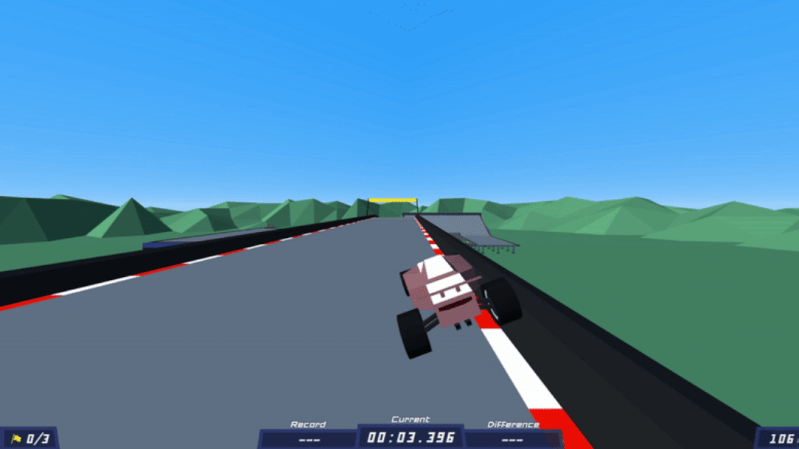
If you’re a fleshy human, you probably learn to play video games by looking at the screen and pressing the buttons, and maybe copying the way you’ve seen others play the game before. [tryfonaskam] has recently been trying to teach an AI to play games in much the same way.

[tryfonaskam] built PILA—short for Polytrack Imitation Learning Agent. As you might have guest from the name, it’s an AI agent designed to play a simple racing game called PolyTrack. Rather than manually programming the agent’s behavior, PILA instead trains itself through supervised learning, where it observes the gameplay state via screen capture and monitoring the keyboard inputs made by human players as they drive the tracks. It then uses this to guide its own behavior, and learns to play the game by itself. The model receives live frames from the graphics engine while playing, and then predicts the appropriate actions and makes the right keyboard inputs in turn to steer the car through the track.

This project reminds us of similar efforts to teach a raw AI how to play Trackmania, or the Drivatar technology in the Forza series of racing games.

Off-Grid OCR Server Powered By IPhone

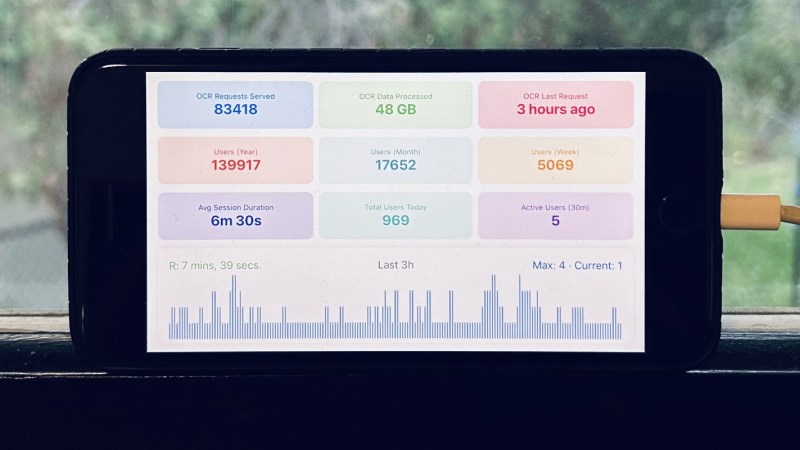
Running an optical character recognition (OCR) server might sound like it would need some powerful hardware, like a rack-mounted, water-cooled machine, or at least a nice desktop or laptop. But if you have the time, anything could be used. [Hemant] has a long-running personal project that processes a lot of image data over a long time, and set up the OCR server on an iPhone 8 running entirely with solar power, rather than turn to more typical hardware.

Part of what makes this task feasible for low-powered hardware is Apple’s Vision framework, which uses machine learning to aid in things like character recognition (among other tasks). It will run on an iPhone just as easily as a Mac. The phone’s built-in battery already provides the first step of an off-grid setup. This build relies on a separate power bank to integrate the phone with the solar panel more easily. On the software side, [Hemant] reports that the true challenge wasn’t setting up the server as much as it was keeping the iPhone from sleeping or stopping his program from running full-time.

A system like this running off-grid, especially considering the costs of the solar panel and power bank, might seem counterproductive. But when comparing electricity costs for running the same software on his server, he estimates he saves about $10 per month with this setup, which has a payback of somewhere around 2-3 years. Not too bad for a phone that would have otherwise ended up in a landfill. Old phones can be surprisingly good choices for servers, too. It helps if they can run Linux, but plenty of phones will support server applications, even when running their native OS.

Training A Transformer With 1970s-era Technology

Although generative language models have found little widespread, profitable adoption outside of putting artists out of work and giving tech companies an easy scapegoat for cutting staff, their their underlying technology remains a fascinating area of study. Stepping back to the more innocent time of the late 2010s, before the cultural backlash, we could examine these models in their early stages. Or, we could see how even older technology processes these types of machine learning algorithms in order to understand more about their fundamentals. [Damien Boureille] has put a 60s-era IBM as well as a PDP-11 to work training a transformer algorithm in order to take a closer look at it.

For such old hardware, the task [Damien Boureille] is training his transformer to do is to reverse a list of digits. This is a trivial problem for something like a Python program but much more difficult for a transformer. The model relies solely on self-attention and a residual connection. To fit within the 32KB memory limit of the PDP-11, it employs fixed-point arithmetic and lookup tables to replace computationally expensive functions. Training is optimized with hand-tuned learning rates and stochastic gradient descent, achieving 100% accuracy in 350 steps. In the real world, this means that he was able to get the training time down from hours or days to around five minutes.

Not only does a project like this help understand these tools, but it also goes a long way towards demonstrating that not every task needs a gigawatt datacenter to be useful. In fact, we’ve seen plenty of large language models and other generative AI running on computers no more powerful than an ESP32 or, if you need slightly more computing power, on consumer-grade PCs with or without GPUs.

Repurposing Old AMD APUs For AI Work

The BC250 is what AMD calls an APU, or Accelerated Processing Unit. It combines a GPU and CPU into a single unit, and was originally built to serve as the heart of certain Samsung rack mount servers. If you know where to find cheap surplus units of the BC250, you can put them to good use for AI work, as [akandr] demonstrates.

The first thing you’ll have to figure out is how to take an individual BC250 APU and get it up and running. It’s effectively a full system-on-chip, combining a Zen 2 CPU with a Cyan Skillfish RDNA 1.5 GPU. However, it was originally intended to run inside a rackmount server unit rather than a standalone machine. To get it going, you’ll need to hook it up with power and some kind of cooling solution.

From there, it’s a matter of software. [akandr] explains how to get AI workflows running on the BC250 using Ollama and Vulkan, while noting useful hacks to improve performance like disabling the GUI and tweaking the CPU governor. The hardware can be used with a wide range of different models depending on what you’re trying to achieve, it just takes some careful management of the APU’s resources to get the most out of it. Thankfully, that’s all in the guide on GitHub.

We’ve already seen these AMD APUs repurposed before for gaming use. Unfortunately the word is out already  about their capabilities, so prices have risen significantly in response to demand. Still, if you manage to score a BC250 and do something cool with it yourself, be sure to let us know on the tipsline!

This is an image that would have been difficult to chroma key by hand.

CorridorKey Is What You Get When Artists Make AI Tools

You may not have noticed, but so-called “artificial intelligence” is slightly controversial in the arts world. Illustrators, graphics artists, visual effects (VFX) professionals — anybody who pushes pixels around are the sort of people you’d expect to hate and fear the machines that trained on stolen work to replace them. So, when we heard in a recent video that [Niko] of Corridor Digital had released an AI VFX tool, we were interested. What does it look like when the artist is the one coding the AI?

It looks amazing, both visually and conceptually. Conceptually, because it takes one of the most annoying parts of the VFX pipeline — cleaning up chroma key footage — and automates it so the artists in front of the screen can get to the fun parts of the job. That’s exactly what a tool should do: not do the job for them, but enable them to enjoy doing it, or do it better. It looks amazing visually, because as you can see in the embedded video, it works very, very well.

Continue reading “CorridorKey Is What You Get When Artists Make AI Tools”