
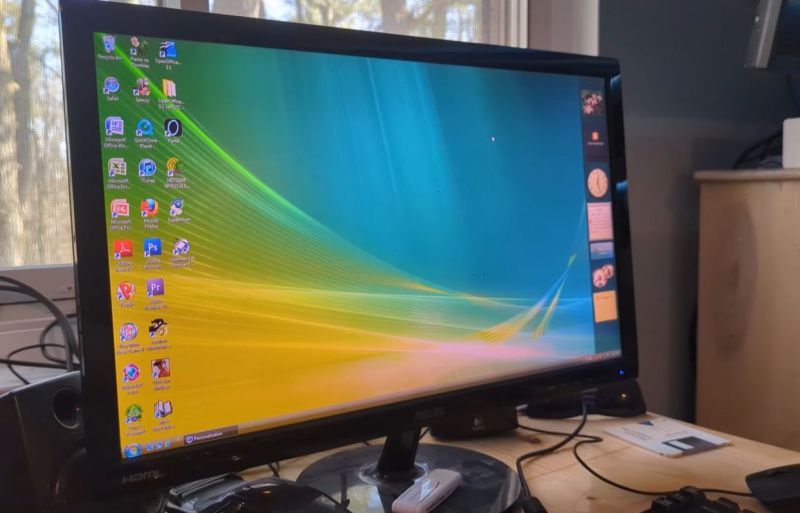
It’s a bit of an understatement that at release Windows Vista rather fell flat. Much of the problem was due to how rushed of a release it was, with incomplete driver support and various glitches in the OS that ought to have been ironed out prior to release. In a retrospective, [SteelsOfLiquid] takes a look at what used to be the most infamous Windows OS until the arrival of first Windows 8 and subsequently the popcorn-fest that is Windows 11.
After a brief re-run of the development history and initial release of Vista, the OS is installed on a Core 2 Duo E8400 with 4 GB of DDR3 and a Geforce 310 card. This being the first NT6-based Windows version (with Microsoft jumping up to version 10 with Windows 10), it’s still got a lot of working software for it in 2026. Some have argued that Windows 7 is basically Vista SE in the vein of Window 98, so it doesn’t face the same software and driver hurdles as e.g. Windows XP does.
Thus the video focuses mostly on the software that was provided with the OS, giving a detailed look at an OS that many of us skipped in favor of sticking to Windows XP to the despair of Microsoft who had to push back that OS’s EOL by a few years as a result. For those of us who joined in the hate-fest against Vista it feels somewhat nostalgic to look back at an experience that in 2026 terms would have been less rough than trying to use Windows 10 or 11 until years of updates made at least the former not entirely terrible to use.
Here’s hoping that Windows 12 will be more of a modern Windows 7, especially in the GUI department, as it’s so nice to have a colorful OS interface with some tasty skeuomorphism rather than monochrome, flat icons.












Here is the Thing…..
Microsoft is OUT, After shutting down the activation service, Who would ever get into another Microsoft product?
Things are going to change.
Windows 12 can get BENT. That crap is too invasive for common use.
Windows Vista was pre Nadella era, still. Different Microsoft from now, basically.
After Windows 7, Windows became a touch OS with software-as-a-service model, rather than a serious Desktop PC OS.
Speaking of activation.. It can be done locally, too.
In addition, Windows Vista has lower system requirements than a modern standard Linux distribution (hello Ubuntu!).
And it’s also more visually appealing and offers significantly more features and helpful wizards that provide optimal user support.
If someone had to guess, Windows Vista would likely be considered the more modern OS here.
Also in comparison to the minimalistic Windows 10/11.
“In addition, Windows Vista has lower system requirements than a modern standard Linux distribution (hello Ubuntu!).”
It also has lower system requirements than modern standard Windows.
I have been using Ubuntu on my Lenovo R61i until Ubuntu 16 with zero trouble and probably would use it until now if I didn’t donate it.
The grief with Vista was partially due to Microsoft naively certifying PCs with only 1GB RAM as “Vista ready”.
Even worse than that, 512 MB was bare minimum.
There were “Vista capable” certified PCs that even ran XP SP3 badly.
By late 2000s, my own XP PC had full 4 GB of RAM, of which ca. 3,5 GB were visible to XP x86.
It was an AMD Ahlon 64 X2 4800, I think. With an nForce mainboard anf GForce 6200 or something.
Anyway, my point is that Vista was a power user OS or gamer OS at the time.
It had latest DirectX support anf it worked okay if the hardware was up to it.
(After Windows 7 was out, Vista got the Platform Upgrade which brought Vista on same level as 7.
Except for lack of WDDM 1.1 support, among other things.)
Main RAM had to be on eye level with GPU RAM, for example, because of how rendering worked with WDDM 1.0 drivers and that Composition Manager.
A copy of the video RAM was basically held in memory.
By disabling Aero Glass the CPU itself had to render the GUI,
which wasn’t exactly better or prettier.
The “recommended” requirements for Vista were the real minimum requirements, also, I think.
In practice, by 2007/2008, a dual-core and 2GB of RAM (better 3 or 4 GB) made more sense.
A RAID config or SSHD drive or other kind of SSD/HDD hybrid (Momentus XT type of thing) might been helpful in terms of HDD performance.
The minimum requirements for Vista were not realistic, at all.
However, MS probably mentioned them because of the vast number of existing XP PCs.
And with the minimum requirements, Vista did just boot to desktop.
The GUI was very sluggish on low RAM.
In essence, it was just like with Windows 98/Me PCs before.:
Back in early/mid 2000s, Pentium to Pentium III PCs with 64, 128 or 256 MB of RAM were still in wider use.
However, XP SP2 wanted about 256 MB minimum to be smooth (by my definition IMHO).
I had 384 MB at the beginning (128+128MB, 64+64 MB), after I ran it on a humble 64 MB first time (XP SP0).
Back then, I’ve upgraded many PCs to have a more realistic RAM expansion.
CPU wise, a Pentium MMX or Pentium II was still capable enough.
Yes. My point here is that back then Vista was considered bloatware.
And now, today, Linux distros are even worse in this respect and Linux users are fine with it.
They can’t even boot up anymore on “low” RAM (say 2GB),
while Windows technically still can. Albeit with horrible performance.
This is somehow of an unreal situation, I think.
Especially if thinking of Damn Small Linux (DSL, once 50 MB in size) or of Wirth’s law.
https://en.wikipedia.org/wiki/Wirth%27s_law
With Vista, the memory consumption was still sort of understanable or explainable, though.
It was more than just simply bloated code, as with other large OSes.
The switch to use of .Net Framework and Windows Forms, how GUI is rendereed (via Direct 3D now instead of GDI or GDI+)..
Vista also did online compression/decompression during copy operations, because it was meant for internet age.
Great for using network drives on fast PCs in principle,
but same time that caused poor performance on local file operations on slower PCs.
Then, the built-in DRM that constantly probed the graphics driver and tried to reset it if it timed out..
Or lack of hardware acceleration for sound (Direct Sound 3D)..
Speaking of graphics drivers, they now ran in user mode again, like they did in Windows NT 3.x once.
That was slower but more stable, also.
Years before Vista, Windows NT 4 had moved graphics drivers from user mode into kernel mode for performance reasons.
That’s why servers ran with plain VGA driver most time – it was tested and stable.
That is false. I installed Debian Trixie with XFCE on a machine with 2GB of RAM and it boots and runs just fine.
There are reasons to criticize Linux but please stick to factual ones.
There are different linux versions with different software stack and DE/WM. For example my install(Arch by the way :)) uses ~600MB on start with hyprland, xfce4 would probably use similar or a little bit more(xfce4 is basically vista style desktop). Firefox uses 3x that much on start… So the system does not necessary need that much memory but if you want to use every day apps like a web browser than you need a little bit of ram. With 12GB of ram i do not have swap enabled.
XFCE. 🙄
Why not just straight TWM? Hm?
There were times a full-size distro with KDE could run on a Pentium 90 with 32 MB of RAM!
How comes that modern Linux systems require 100 times the RAM?
I mean, how exactly is that even being justified? 🤔
What important features were added, how became the code so bloated?
And most importantly, I think, how is that considered progress if software constantly adds more complexity that ruins performance of latest hardware? 🤷♂️
If developers would focus on making latest software boot on old systems, then the system overhead would remain in reasonable dimensions.
And latest hardware would keep getting quicker instead of retaining status quo or slowing down.
Again, as I said, with Vista there was a background story, at least.
The development of Whistler and Longhorn are well documented.
Vista was in large parts a re-write and a different OS than what was before.
There were several resets in development. So the overhead was at least understandable, it was a big software project.
Linux distros didn’t have to go through similiar stuff, I think.
They keep everything separate and are not related to each other.
Modern software isn’t simply inefficient or bloated.
The problem is the same that every government or large organization faces.
It takes resources to manage resources.
If you have 10 people doing work. One of them might be able to handle directing them.
But if you have 10 THOUSAND people working, the management system is going to get way bigger and have more complexity.
And with 10 million people, you need a system to manage the system itself.
Modern operating systems require more resources, because they are CAPABLE of managing more resources, whether or not the system itself HAS those resources available.
Imagine the OS is a single librarian and one cabinet for files.
They could manage a small library with a few standing bookshelves.
You create a new OS that can handle 500 bookshelves. It has 20 librarians and uses 50 cabinets for filing.
If you want to use this second OS to run a much more lean library, you still have to deal with most of those librarians. And you still need to have room for those 50 cabinets, whether or not you need them all.
MS system requirements are a joke. You should x2 or more.
You are mistaking “absolute minimum requirements” with “recommended requirements”. Ubuntu works perfectly in a device with 4GB. Vista… well…
Vista can be installed on a PC with 512 MB of RAM.
It also boots up with less RAM after that, but neither configuration is enjoyable here.
With 1 GB of RAM Vista is usable, but not smooth.
With about 2 GB or more it starts to behave normally.
Modern, “normal” Linux distros (not the crippled XFCE vsriants) start to crawl at 4 GB instead of running smooth as silk as they should.
To put things into perspective, a few years ago, the “to RAM” option worked with about a Gigabyte of RAM, still.
And that included a whole RAM drive, not just RAM needed to run the kernel (now consumes 700 MB all alone?) or the whole OS.
With a whoppin’ 4 GB of RAM in total, any modern Linux live distro or Linux live+installer distro should still be able to run off a RAM drive to this very day.
That was possible a few years ago, still, after all.
I remember how Knoppix ran that way on much humbler specs.
Stop with your bullshit. I have MX with KDE running on a core 2 netbook with 2 GB RAM. And for typical daily use (email, web browsing, etc…) it works just fine.
Good to hear, though Vista had offered more than just basic stuff with same specs.
With those same specs it was a high-end multimedia/gaming system.
And that’s all I’m trying to state. I have barely mentioned how great the older Win XP ran on those specs. ;)
“Windows Vista has lower system requirements than a modern standard Linux ”
Good luck getting updates!!! :)
Always a fan boy close by.
I’m not a Vista fan, I think, but I was very curious about it when it was an Release Candidate, still.
Also because KDE and Gnome always copied Windows and Mac OS.
So the Windows development was important to whole IT, even if someone wasn’t using it.
Windows shaped the computing landscape, simply.
“In addition, Windows Vista has lower system requirements than a modern standard Linux distribution (hello Ubuntu!).”
I like that about Linux. If you like heavy, flashy looking software and have the hardware to run it you can choose that. But if you prefer something lighter or your hardware isn’t so well endowed you can also choose any one of another distros that fall along a wide spectrum of heaviness.
No one HAS to start with Ubuntu or any other specific distro. There was a time where Ubuntu’s hardware detection made it easier than all the others for a newbie to install but I don’t know about that today. Maybe it’s just that I am out of touch with the newbies… but I think they have pretty much all gotten easy except maybe for a few intentional outliers like Gentoo or Arch.
Vista was a horribly misunderstood OS. Most of the issues were the completely underpowered prebuilts (Running Vista on a Pentium 4 with 512 MB RAM and Intel GMA graphics is a horrible idea), incompatible drivers, and the original UAC dialog that would go off if look at your computer funny.
By the time Vista SP1 rolled out, all the issues were fixed, but the reputation was already ruined.
If Intel GMA was a bad idea, how about those with built-in SiS Mirage 3 graphics? It was hideously slow it couldn’t even play 1080p 24fps H.264 video on a Pentium Dual Core T4500 (2.3GHz) laptop, whereas a Core 2 Duo T7100 (1.8GHz) with GMA X3100 could do so without issues.
No it wasn’t an hardware issue
[
windows 95 fine
windows 98 crap
windows xp fine
]
Vista crap.
windows7 fine
windows8 crap
windows10 fine
windows11 crap
I use Windows 11 every day at work. Is it perfect? No. But it works no worse than Windows XP or Windows 10 did for the mixture of light programming, CAD, Office, and other software I use. I prefer to run Linux at home, but still have Windows 11 on another partition and it doesn’t make me feel “dirty” when I use it.
Vista and 8 both worked well enough after Microsoft released a few updates that reverted some of their “great ideas”.
Corporate (read custom per-company de-bloated) Win 11 is a completely different experience than the OEM builds or even the Microsoft download site.
Stock Win 11 ‘Pro’ has clip-champ, tik-tok, start menu ads, and Candy Crush. Imagine if your point-of-sale let you play the lotto and binge Jerry Springer
Ah, I didn’t realize that was the case. After backing up the drivers on my new laptop, I did an install from Microsoft with a local account. But then again, I did similar for every version of Windows I have used in the last 15 years.
Ah yes, the tick-tock scheme.
It falls apart, though, if all versions were included.
Let’s take Windows 95. It had RTM and A, B, C versions. Or OSR 2.x versions.
Some versions were considered unstable, I remember. The one with Active Desktop and IE4, I think?
Or let’s take Windows 98. There was 98FE (crashy if unpatched) and 98SE (better). Windows Me, too.
Then there’s NT 3.1, NT 3.50, NT 3.51, NT 3.51 with NewShell, and NT 4. And 2000. Each with different Service Packs.
The Windows Server editions existed, too. Such as Windows Server 2003.
In early 90s, there were Windows 3.0, 3.0a, MME, Windows 3.10, 3.11, WfW 3.10, WfW 3.11 and Windows 3.2 (China only).
As I remember it, it took a lot of servicepack releases before XP became “fine”. Then XP had a particularly long lifespan so we mostly remember it from after those service packs. But you could almost consider early and late XP to be two separate OSs.
And Win98 crap??? It was the same as XP. Win98SE was (for the time) awesome!
And how can anyone talking about crap vs fine Windows versions go all the way back to 95 and forget to mention Windows ME? That thing was horrid!
Maybe ME is what you were actually remembering when you decided to write that Win98 was crap?
I remember getting up pre service packs and I connected to dialup internet and before the modem speaker turned off the machine starting getting net dialog popup boxes and was infected with Spyware… I reformatted and went back to 2000 (returned xp)
That’s what I always associated with xp anti-virus out the ass spy bot and still some damn manager type would get their computer pawned every week
Windows Vista is 7 with a service pack and a re-brand (Vista became a scape-goat).
When Vista was dropped people were trying to run it on 400mhz Pentium II and Celerons with 128mb of RAM. Also a flagship i7 laptop quad-core was 1.5ghz all-core, it was a terrible time.
Lol. This is so correct.
It’s interesting to look back at Windows Vista from today’s perspective. While it had a rough launch with performance issues and hardware compatibility problems, Vista actually introduced many features that shaped modern Windows — like improved security (UAC), a redesigned UI, and better search functionality.
At the time, it felt frustrating for users, but in hindsight, Vista was more of a “foundation release” that paved the way for the success of Windows 7. It’s a good reminder that not every version needs to be perfect to be important.
Vistu som roky používal na multimediálnom PC Fujitsu Siemens SCALEO E… Vyladený s TV tunerom vedel prakticky všetko, čo v tom čase používané analógové satelitné prijímače…
Picture Frito Lay launching a new line of Dorito chips (a product like
Windows that literally sells itself), but this one is made with lawn clippings and dog doo.
Now after the product’s inevitable crash and burn, picture someone on Hackaday observing… “Most of the issues were resolved by the time the grass and dog doo was replaced with broccoli, “… but the reputation was already ruined.”
Vista was the consequence of an army of collective decision makers who actually believed that their dog doo was not only appropriate for the hardware you described, but an “improvement” over XP, which arguably WAS a halfway decent desktop OS.
The issue with Vista has nothing to do with “misunderstanding” and more than alot to do with corporate incompetence.
Fun fact: Doritos are produced on a Tick-Tock schedule too.
They slowly reduce the amount of nacho cheese powder on the chips over a few years. Then they increase it back to the high level with a “now with more nacho cheese” rebrand.
The cycle repeats every 5-8 years and has been documented several times.
My father bought a windows vista image after a year it was launched, for the family computer. It was really slick looking and the first OS that looked “modern”, even though our iGPU couldn’t support all the nice transparent windows features that it had.
It wasn’t too slow, perfectly usable for the 2GB of RAM we had
And you could also fall back to a more badic theme then
A brother gave me a windows vista machine, which was then a few years old, but still current. I started it up and saw a lot of blue tiles and clicking on them did not do much. I did not have normal access to programs or a desktop. There was no clue at all of how to start a file browser or install new software. I fiddled with it for about 5 minutes, then gave up and installed Linux. After that I never used windoze again. Later I bought a new PC in parts (Mobo, Processor, Memory, SSD, Power supply) and getting started with Linux is extremely easy these days. You just boot from an USB stick and the OS starts up and you can try it out. If you decide to install, you run the install program from the desktop, and a few minutes later you do a reboot from the freshly installed OS. After that you do an update, which updates all installed programs (many programs are already installed by default (web browser, office suite, text editor and more).
There is no scrolling though endless pages of EULA garbage (which is probably not enforceable anyway, but who knows…) No stupid activation procedures, no advertisements, no spyware. It “just works”.
The linux distribution I use is Linux Mint 22.3 with XFCE desktop. There are many others that probably also “just work”, but Mint is a very user friendly distribution and easy on maintenance. My heart goes out to Debian as a base distribution, but Mint is much easier to maintain. Nearly everything “just works” and it is a good starting point for everybody curious to what this “Linux” thing is.
Sounds like you had a rather rare experience, being outsmarted by Windows Vista. Perhaps you were doing it wrong?
Being ‘outsmarted’ by the latest version of windows was a constant pain for admins.
Anecdote:
While in the military we had a test network where we were testing an early preview build of windows to get ready for the inevitable deployment. We constantly sent feedback to Microsoft for bug fixes, but they never seemed to listen to anything UX related so we didn’t bother.
We had a problem trying to install printers on these machines, because we literally could not figure out where they ‘lived’.
Printers are hardware. They are a device you install. So we looked in device manager and saw nothing.
We could add network printer ports, but no printers were recognized.
A dozen or so Microsoft Certified admins who had over a century of combined admin experience couldn’t install any of the printers we had on hand.
We brought this up in a meeting when talking about the progress we had made.
Literally 15 minutes after the meeting our captain was in the lab and figured it out immediately.
“I typed Printer into the Start Menu”
We were floored.
Not only had none of us thought to use the “lazy search”, we had actively ignored it other than to try using it to bypass policy controls for security auditing.
This kind of situation CONSTANTLY happens with Microsoft products.
A logical and repeatable process is abandoned in favor of “What would a clueless user try to do in this situation?” controls.
And it makes ZERO sense in a computer context, because it’s a computer and that means you can have any number of places all point to THE SAME setting.
Want to move “office equipment” like printers, scanners, fax machines, etc into it’s own place so normies don’t get scared with lots of hardware names? Go for it.
But don’t REMOVE it from the hardware manager!
This problem had so many complaints that this was a rare case of Microsoft backing down a tiny bit and adding the printer section to the Control Panel instead of ONLY a Start Menu sub-item.
If only they hadn’t kept gutting administrative controls from Windows…
I have a friend, retired electrical engineer, who had a laptop with Vista, that he used for all of your typical desktop functions… spreadsheets, writing the occasional document, surfing/ordering stuff online, email, etc. He mentioned in passing that support of the OS had ended and that he’d likely now have to buy a new machine.
I suggested that if he’d already written off that hardware, that he should let me wipe it and install Mint with Cinnamon. He said ‘… fine, go knock yourself out, but I’m a Windows guy.'”
A few days after returning the machine he demanded to know what I’d done to upgrade the hardware. He’d never seen the machine boot or run so fast. He now loves Mint, and I saved him the cost of a new computer.
Thing is… even if he eventually does buy a new on, I suspect he’ll now want any Windows wiped, in favor of Linux
Most people remember Vista SP0 (TRM), installed in PCs and notebooks built for XP but sold (forcefully) with Vista preinstalled. Which was terrible to say the best.
I got a living being paid to remove Vista and upgrade to XP, I did that so many times that I even made a badge with the writing “authorized Vista uninstaller” :)
Vista SP2 and post SP2, is really an usable system to this day, but when SP2 was released Win7 was already a thing and no one noticed.
Windows Vista required a lot of tweaking to make it usable. I remember it took a big portion of my 64GB HDD. I periodically had to delete temporary OS files to prevent it from filling my disk. I even deleted some wallpapers the OS came with to save a few MB. I had to disable services and start up programs I did not use. I disabled some graphical effects and disable popup delays to make the OS feel snappier. It honestly was not bad. But I had many driver issues at the beginning.
Sorry for off-topic. Windows RT was interesting OS, but died right away. Our company used laptops with RDP client. The RT laptops were lightweight and had long battery life. The RDP client was preinstalled on them. Back then was a big deal to have lightweight laptops. We started using RT laptops for RDP at the clinics and one day boom… No longer supported.
Here’s the thing; Windows 11 is worse in that regard, years after release.
I think comparing resource requirements of a 2026 Ubuntu to a 2006 Windows Vista and then saying Ubuntu is bloated, is a bit unfair.
In 1995, I ran Slackware Linux in 16M, including X and Mosaic/Netscape. But that was 30 years ago. Sure, programs are larger today, and Linux kernel does not fit to one floppy anymore, but does that matter? 16M RAM machines, or those from Vista era are not in use anymore, so there is very little need for a so light footprint desktop OS.
Tinkering with old hardware is fun, I still have a few CP/M machines and a PC/XT. But I do not complain about not being able to run PC-DOS in my Kaypro, or Windows NT on the XT. Neither do I complain that latest Lubuntu is very slow on my 1G RAM EeePC. I have working and usable OS’s and software for all my toys. Actually, I prefer to run era correct software an experience the machines as they were originally.
As for Linux, if resoources are really scarce, perhaps in an embedded system, you of course don’t use out of the box Ubuntu. With e.g. Yocto, you can tailor the kernel and filesystem to include just as much as you need. I doubt Windows supports that kind of customization .
“As for Linux, if resources are really scarce, perhaps in an embedded system, you of course don’t use out of the box Ubuntu. ” Yep. In RPI Land you can run PI OS server which is fairly lean with just the console or ssh access. Then load what you need. That is another cool thing about Linux as ‘you’ can tailor it to ‘your’ needs — not some company ‘telling you’ what you need.
This Visa and Me were to of the BIIGEST pieces of “CRAP” microshaft made.
BSOD all the time!!!
I’m a Linux user since 2002, but if I was ever “FORCE” to run windoz, it would be windoz 7
Probably want to look at Win 10 LTSC version then.
When I was still using Windows, Win 7 was the best (and last for me at home). At work, I went through all the iterations 3.1 to now 11…. Unfortunately work is still a M$ shop. At least at home, I am Windoze free. Linux is reliable, just works, does everything that needs doing, no registration, subscriptions, forced updates, etc. No going back.
At work, we didn’t like Vista hosting our SCADA system at the time. There were issues that broke the system — can’t remember what those issues were though now… Just the bad taste…. Win 8 it was the stupid user interface.
I agree that 7 was fine from technical point of view, I think.
The preview of 8 was okay, still, too. It was still like 7, overall.
Before it got that Metro UI and the fullscreen start menu in the final release.
8 had the WARP rasterizer that could do Aero Glass via software rendering. It also added native USB 3 support.
However, old Vista was more visually appealing than its successor Win 7.
I’ve used 7 for years and felt that it was colder, more plain looking than both Vista or XP.
Not just visually, but also in terms of UI in generally.
And that depressed me a bit, to be honest.
Vista was optimistic, futuristic by its look&feel.
XP was colorful, uplifting and comfy. Comfy like an old sofa with patches. Something that’s dated, but reliable.
A piece of home. A remisiscence of year 2000 optimism.
7 by contrast was like an ice lanscape, with everything turned down to a minimum.
Of course, that shortcoming did appeal many users. Minimalism was in again at the time (sigh).
But to emotional people like me, the aesthetics did still matter, too. Functionality alone wasn’ t enough.
If a not so small time is spent on a computer, then the interface should be supportive. So the logic goes.
Speaking of interfaces.. I think Vista was comparable to Mac OS X 10.5 Leopard in terms of sophistication and complexity, XP was more like Mac OS X 10.4 Tiger.
Anyway, just saying.. Thanks to success of Windows 7, the Platform Update for Vista was released, still. So it was a win-win situation to both 7 an Vista.
I am one that is more interested in usability than bling. I want icons, menus, programs easy to find and be recognizable as to function. I don’t need a new ‘rabbit trail’ on each DE release. And apply the KISS principle to the DE. No need for ‘sophistication and complexity’… After all, what do you use a computer for? Run applications to do a job of course. I really like how Linux approaches the problem. You have choices. I currently use KDE as my DE as it fits my workflow. But there is Gnome, Cinnamon, LXDE, Xfce, Mate, etc. to fit just about anyone’s tastes. And if you don’t like any, there is straight console interface. You have choices rather than having ‘one’ shoved down your throat as in ‘we know what is best for you’.
I was like you once, before I realized the psychological side of things..
What I liked less than others was the Windows 95 “tombstone” style, I must admit.
You know, that iconic concrete look. That KDE and PC GEOS copied, as well.
That gray taskbar was depresssing, just like the boxy 3D elements of Windows 95 and late WfW 3.11 (if fully updated).
That’s why I liked XP so much, I guess. It felt so fresh.
The Luna style (or better, Royale style) was closer to Windows 3.1 than 95. It was rounder, more 2D again.
On Windows 3.1, I often renamed ctl3d.dll and ctl3dv2.dll to *.bak in order to change Windows 3.1 control panel applets back to original 2D style.
Never liked that Windows 95 style, not even in the 90s when it was current.
In retrospect, the only Windows 9x that I’ve found clean looking was Windows 98SE, I think.
It had that cloud look in Windows Explorer and was otherwise very tidy.
On 98SE, I’ve changed the gray tone to a warmer, rather sand colored tone.
Basically Windows 2000 color scheme.
I enjoyed Redmond theme and preferred it to whatever WinXP and latter offered – I only changed color scheme to my liking. I used in even on my KDE3.
most bsods are caused by either bad/wrong drivers or poorly selected memory timings. you cant just punch numbers in that look good, you also have to verify them with a long burn in and lots of memory tests.
One thing I do want to note, I haven’t looked if they fully updated Vista, but Vista basically got a bunch of patches that ultimately went into Windows 7, which GREATLY sped it up compared to how it was on initial release. So I’ve seen a few videos that have been like ‘This isn’t too bad what were people complaining about?’. Well with SP2 on ir Vista wasn’t that bad but before that, it really was.
I really think Windows Vista is the greatest release of Microsoft Windows. BitLocker, Desktop Window Manager (DWM), Windows Display Driver Model (WDDM), Windows Search (Windows Vista even introduced searching from the Start menu), and User Account Control (UAC) are examples of some of its revolutionary features. One could mention so many of its other features.
Windows 7 is an incremental upgrade over the Windows Vista platform.
I ran Vista for some years on an application development PC and the only real problem I had was when MS pushed an update that killed fixed width fonts. I reverted to the previous version and all was well. Eventually another update came out, I installed it and continued working with that version for several more years.
I never understood why people had such a down on Vista. Windows ME, now … don’t get me started.
With the recent concern over youth and social media and screens in general we need to look at the whole interface. The statement made here that we all need more colorful “3D” icons is a warning that things are still escalating towards a market driven social mess. New US laws for accessibility in academic media now include white on black, speaking words, etc.
I’ve always found icons are part of gaming and have no place in a literacy based interface. I know words are boring but it’s never time for playtime that fuels the ADDADHD mess that we are being rewired for. We’re being forced to use pictograms like cavemen instead of the words of advanced civilizations.
I demand a text only mode option for all operating systems to comply with ADA standards. This should be the standard for all early years of schooling. Teach words and meaning instead of an exciting and always changing experience. Lots of us including at work don’t need a fashion makeover in our daily drivers every few years.
I must say that Mr. Jobs wasn’t entirely wrong with his preference for real-world icons (Skeuomorphism).
https://en.wikipedia.org/wiki/Skeuomorph
I noticed myself that older versions of Windows or Android with shiny icons were easier to make out than current “flat” icons.
The modern icons look like modern art, basically
and I’ve to think twice before I realize what they do stand for.
(And I say that as someone who likes abstract thinking.)
Even ancient Windows 95 (and to some degree 3.1) had realistic 16 color icons.
The minmalistic design language of Windows 10/11 is the worst so far, I think.
Hard to read pastel color tones and no clear outlines.
It’s an UI/UX without consistancy. The Nintendo Wii interface made better use of it, even.
Ancient Windows 3.1/95 and System 7/Mac OS 8 were better thought through, I think.
Even KDE 2 and the highly dull and “bureaucratic” looking OS/2 were more eye friendly.
On top of that, I think that the interface of Windows 1 was better though through than that of Windows 10/11. No kidding.
The think twice is fatiguing. A death by a thousand cuts over the course of a session. Instead of recognition your mind has to work. I also get caught out with no clear outlines, a solid edge will set a boundary.
It’s interesting to look back at Windows Vista from today’s perspective. While it had a rough launch with performance issues and hardware compatibility problems, Vista actually introduced many features that shaped modern Windows — like improved security (UAC), a redesigned UI, and better search functionality.
At the time, it felt frustrating for users, but in hindsight, Vista was more of a “foundation release” that paved the way for the success of Windows 7. It’s a good reminder that not every version needs to be perfect to be important.
Answer From : Pdigitalsoftwarekey
In 2007 my brand new laptop Core 2 Duo T7500 came with Vista 32bit and it. was. soooo. slow. And of course had to wait for months until ASUS released 64bit drivers.
Lmao vista and ME were fine once you turned the backup and restore service off and automatic updates. So much pearl clutching and inept users here. You would think if someone was running linux they would know how to tame a system, especially cough cough modern linux distros (32GB lol) so getting those two to run should be no big deal. You go in and right click on three things. No no no that is crazy here type in a bunch of random cli flag garbage and then oh wait you didnt update the underlying font in the editor? And no, no one wants those icons but you, Maya. Some folks are trying to get things done and dont particularly care if the computer is ready to go out or not lol.
It’s like fixing faulty brakes by avoiding service and not fastening seatbelts.
I assume updates are vendor’s way to fix bugs. Backup and restore function is my insurance in case updates came too late.
Windows 7 is the last OS I’m going to use in this life.
My time worth more than fighting with updates and learning new UI.
My buddy and I were hardcore gamers who adopted Vista early. I was in a competitive CS:S clan. We had decent gaming rigs and Aero ran beautifully. Our gaming performance was the same as XP and we never had any issues. We never understood the Vista hate. Maybe we were just lucky.
That presenter has such an annoying style. Almost shouting down the microphone, obvious audio cuts every 10 seconds and races through the information. Interesting topic presented badly.