
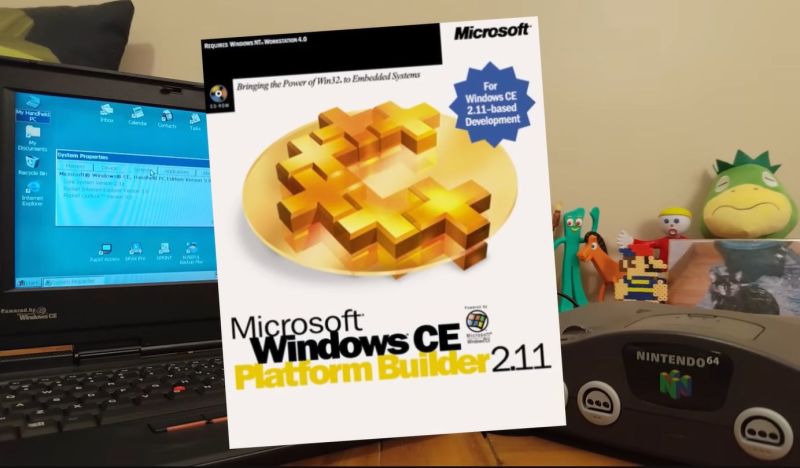
Although Windows CE doesn’t use the NT kernel, it’s similarly designed to run on a wide variety of system architectures. Since the Nintendo 64 uses a MIPS CPU it should basically just run either kernel. You might assume that the N64’s rather limited specs are a bit of a problem, but fortunately Windows CE is designed to run on a digital potato, and requires only a MB of RAM. Since that just so happens to be what the N64 has under the hood, [Throaty Mumbo] was optimistic about getting Windows CE running on the 1990s game console.
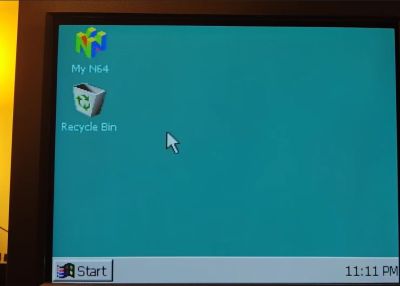
The idea for this project came when [Throaty] was tinkering with an IBM Workpad Z50 laptop that uses almost the same CPU as the N64 and also runs Windows CE. Although said laptop is probably a lot more practical of a platform to run Windows on, this didn’t mean that it wouldn’t be a fun challenge.
Since CE was intended to be customized by companies for their own embedded hardware this means that you can use an official SDK, such as Microsoft Windows CE 2.11 Platform Builder. Making Windows CE 2.11 run on an N64 thus involves creating a board-specific configuration and compile that against said SDK.
If you want to give it a shot yourself, the entire project is available on GitHub which is where you find most of the technical details as well. When using a flash cart such as the EverDrive, you can also put applications on the SD card and run them from within the Windows GUI. You’ll still be limited by the N64 hardware, but otherwise the experience is very smooth as the video below demonstrates.












Just fair warning – this video is one of the most frustrating videos I’ve ever watched and isn’t very technical.
I don’t know whether it was an act but yeah.
Cool project though.
At least is not boring. At least for me.
Very true!
I never recognize his YT channel name before clicking play, but I recognize the guy’s voice and “huh?! What?!” immediately. It’s an extremely annoying shtick that pretty much ruins the whole video. If the project is at least interesting on the surface, I have to just mute it and follow along/power through.
While I do think the project itself is cool, he’s not really doing anything other than being hands for an LLM and reading the output to us and injecting “huh?! what?!” to every line.
I was wondering how much work did the author and how much did the LLM do. And I’m also wondering if the fact that LLM did all the work wouldn’t be even more impressive ;-)
Interesting! That screen resolution is very low, though.
Didn’t certain N64 games support about 640×480 pixels (480i) via Expansion Pak?
Anyway, that 320×200 pixel -ish desktop resolution brings back memories of Windows 3.0 MME.
It had an experimental MCGA driver that did 320×200 pixels @256c and used pixel-art for Windows 3.x GUI.
Understandably, it never caught on and wasn’t included in Windows 3.1 anymore.
First 64bit version of windows? Before xp?
The N64’s NEC VR4300 CPU was binary compatible with the previous 32-bit MIPS II instruction set, and even had a “32-bit mode” that would lock out its 64 bit extensions completely. I don’t know if CE used this, but either way it was fundamentally a 32-bit OS & Kernel that happened to run on some 64-bit capable processors.
Here one should mention that the Sega Dreamcast was compatible with Windows CE and able to boot the OS from the GD-ROM disc, together with loading the game.
If I remember correctly, my Dreamcast even had a windows ce sticker on it. I think it was just the underlying OS. It let devs use DirectX.
I work with weather and river stage monitoring sites. They’re all run by a Sutron Xlite 9210 with Windows CE. The XLite UI looks like it was written in VB and can be a bit slow compared to modern applications, but if you need to run a sensor on 12v in austere conditions its a solid platform.
Granted we’re pushing data out over a VHF network and the average transmission is less than 50 bytes so it’s not like we’re doing bulk helium cryptocurrency mining.
Seeing it on a N64 makes me wonder just how weird a platform Win CE can be pushed onto. Can we run Doom on Windows CE on a N64 though?
Sutron manual: https://beta-software.otthydromet.com/wp-content/uploads/2022/05/9210B-User-Manual-2.pdf
I’m not sure the N64 CPU will handle Doom on CE gracefully but in theory it should work. Doom works on CE. Without an expension pack you’ll have to do with about 3MB ram and that’s not a lot for Doom.
This seems like a waste of time with the advent of the dreamcast
Well I’M saving up my allowance for a Sony PlayStation 2.
Technically, there was an even earlier console that ran MS Windows, the Tandy VIS.
It was 80286 based, had 512 KB of RAM, a CD-ROM drive, a built-in modem and ran a copy of Modular Windows.
It was the very first embedded version of MS Windows, probably.
https://en.wikipedia.org/wiki/Tandy_Video_Information_System#Modular_Windows
Obnoxious YouTuber uses LLM and makes a clickbait video.
I’m so glad HaD wasted my time by writing a feature on it…