
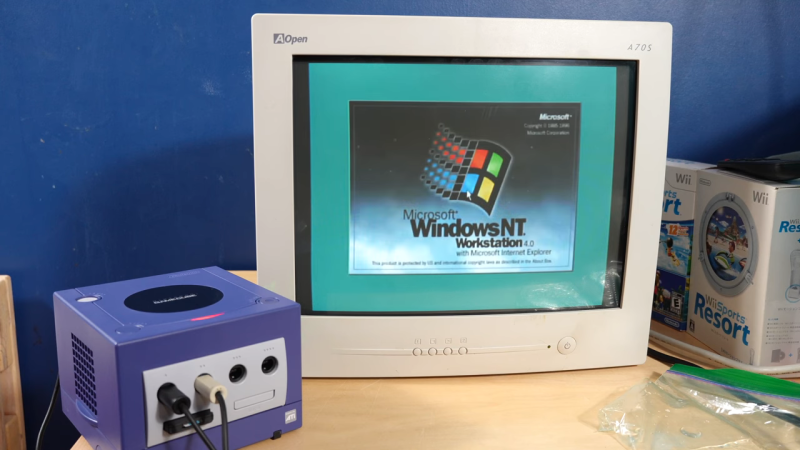
The Nintendo GameCube is known for playing the best version of Smash Bros. and its vaguely rectangular aesthetic. It’s not particularly known for running a workstation OS from the mid-1990s. However, with a little work, your diminutive purple console could also boot up Windows NT if you really wanted it to.
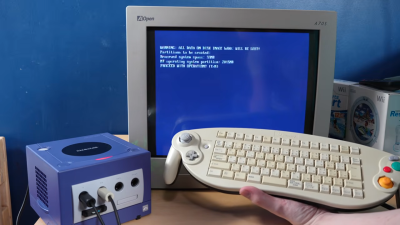
If you’re interested in seeing what this looks like, there’s a great video from [Jiga Tech] on YouTube that outlines the install process. Just note that the GameCube never really came with a proper keyboard. If you want textual input, you’ll have to fuss with a range of controller-entry methods, or get one of the rare GameCube controllers that had an entire keyboard in the middle. We’re not even kidding, they did exist.
If you’re still obsessed with this generation of consoles, consider trying to order pizza from your Sega Dreamcast. Video after the break.












Retroactively catching up with Dreamcast which had “Compatible with Microsoft Windows CE” embossed on the front of the console itself.
In turn, the Tandy VIS ran a custom Windows 3.1 and predated the Dreamcast. :)
It was never meant to work or be useful in any way. The whole “console-computer” thing was done only for tax reasons in countries which imposed lower taxes on computers compared to game consoles. Same deal with PS2 Linux and others.
The topic is quite interesting, IMHO!
Interestingly, China had built home computers based on Famicom/NES technology.
That was quite an conveniant solution, apparently.
Game consoles were not so socially well accepted,
so instead kids got educational computers they could use to play Famicom games on, too.
And secondly, it made use of the existing high production run of Famiclone chips (Dendy and co were made in China).
There even were keyboard-based Famiclones with 3,5″ floppy drives, mouse, a GUI and an DOS-style operating system (see Subor, Batong products etc).
Something similar existed with Sega MD/Genesis clones, too, but to a lesser extent.
my atari 400 and later 800 and 800xl and my frriends colico adam were not all that bad not comadoe 64 level of comupyer but not bad.
PS2 Linux was an actual official Sony product, it wasn’t a homebrew or customized community build
https://en.wikipedia.org/wiki/Linux_for_PlayStation_2
Port AmigaOS 3 .1 to it. Source of that is available. https://github.com/Arquivotheca/amiga-os-src
Looks like it has lots of 68k assembly code, so porting would not be a simple task.
The Power Macs solved this by having an 68EC040 emulator in boot ROM.
https://apple.fandom.com/wiki/Mac_68k_emulator
Oops. Yep. My bad. AmigaOS 3.1 was meant for 68k-only.
AmigaOS 4 is PowerPC-native. But it needs a hefty 128MB minimum and 256MB recommended. So that’s out of the question, as the GC has only 24MB memory. Its CPU is fast enough, though. So if it were somehow possible to increase the memory, and then also write graphics drivers for the Flipper chip, it would be possible to do.
Now all I have to do is see if my GameCube still works.
so is x86??? means u can run anything on it
Hi, not quite, it’s not x86. But RISC editions of Windows NT 4 have built-in an 80486 CPU emulator for MS-DOS and Win16 applications (Win 3.x).
Those will run unmodified on any RISC edition.
Win32 applications written for i386 won’t run, unless there’s an emulator installed.
For Alpha, it’s FX!32. For PPC it’s Motorola SoftWindows 32 for PowerPC.
Native Win32 applications written for the RISC processors do run without that, of course.