
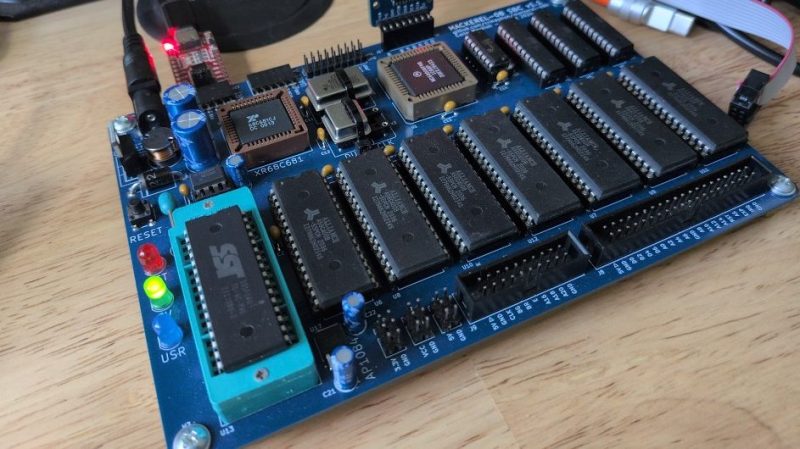
Linux developers have been trimming the fluff in recent years, removing support for older processors that hardly anyone uses with a modern kernel anymore. With that said, it’s possible to run the latest kernel on some truly old metal. As a case in point, [Colin Maykish] just got it going on a Motorola 68008!
The rig in question is a Mackerel-68k—a homebrew single-board computer built around Motorola’s famous 68000 CPU line. This version in particular is running a 68008 rated at 8 MHz, though it’s overclocked to 14 MHz for a little more pep, and has just 3.5 MB of RAM. Despite these limitations, the board can run the mainline v7.1-rc6 kernel, booting into userspace and providing a very minimalistic BusyBox shell. Booting is slow, and doing much more than that is impossible without running out of RAM, but it’s an impressive feat nonetheless. [Colin] has also had the 68010 and 68030 chips running the kernel, too.
We’ve previously discussed efforts to bring Linux into the future while leaving old chips behind. Video after the break.












Doesn’t the linux kernel require some sort of memory management?
No, uclinux got upstreamed a bunch of years ago
I was pretty sure noMMU support got ripped out a couple years ago for being a hassle to maintain.
Looking at the post, this isn’t a vanilla linux kernel. It’s an amalgamation of the abandoned 2016-era uclinux code with a more recent 7.1 kernel.
thanks. that’s a great example of how we have more choices than ever, even when ‘official’ support is dropped
Linux currently still has NOMMU support:
https://cateee.net/lkddb/web-lkddb/NOMMU.html
The author created a new git history from scratch instead of starting on top of a full kernel history, but I checked locally and their
v7.1 baselinematches exactly thev7.1tag.So the following diff is the actual diff.
https://github.com/crmaykish/mackerel-linux/compare/main…mackerel
permalink to current commits https://github.com/crmaykish/mackerel-linux/compare/4c51788d5ddcc62151f8b31845c40bb524f174e4…ea156cb89afe170acc4b60ffeb07ea197377f766
μClinux, which was called “you-see-Linux”, which maybe should be a giveaway that it isn’t underneath. But I remember when development was on Palm III in the 90s, and it was really stretching definitions to refer to it as “linux”. I guess the idea is that memory management is done in software rather than hardware.
Looking at wikipedia article, it lists Linux kernel releases for 2.0, 2.4 and 2.6, but that was back in 2016, about 17-8 years into development, and after 2.6 kernel already reached EOL. It reminds me of the situation with Apple MkLinux, which didn’t have a linux kernel but a microkernel(hence the name) It had all the GNU tools, but at a time when GNU fans were insisting on calling the OSes GNU-Linux, Apple was offending both groups. :)
When I was porting Unix™ to 68000 boards in the early 80s, our base product had a “whopping” 1MByte of ram. It would boot a kernel and load a shell. Anything more started it swapping. The second generation prototype used some of the first 4Mbit DRAM chips when they became available.
just 3.5 MB of RAM
And the original Mac, with its 68000, had just 128 kilobytes.
Admittedly not any sort of unix tho’, and that 128k sorely tested most real users. The Fat Mac (512 kB) released a few months later was more more capable, but even more horrifically expensive.
The standard RAM expansion was poor for its time, I think.
For comparison, the Atari Mega ST 2 and ST 4 released in ’87 had 2 and 4 MB of RAM, respectively.
The expandable SE/30 was the first serious Mac model here, I think.
It could take desperately needed upgrades without the hacking required for early models.
Apple’s A/UX needed 2 MB of RAM at very minimum in late 80s.
For an Unix system, that’s very modest. Though in reality, 4 MB or more was probably reasonable. OS/2 1.1 on PC needed 3-4 MB , too.
Source: https://archiveos.org/aux/
To be fair, the Mac Plus addressed the ram issue in ’86, accepting up to 4 MB (IIRC), for those who could afford it.
Yeah, 4 MB was usable for *nix. I first installed Slackware on a ‘386 with 4 MB in ’93. We ran two simultaneous users, one running X locally and one on a serial terminal in a different room, running through SLIP on a 14.4 kbps modem to the outside world. We thought it was pretty cool at the time, being able to both use the line at the same time (hey, cash-poor and easy to impress at the time). Even cooler was being able to mount NFS disks across the continent (which you can’t do now).
I forgot to mention, the standard RAM expansion for an EMS memory board in the late 80s was 512 KB.. 2MB.
And many applications supporting EMS weren’t shy to fill up those 2 MB.
Having 4 MB wasn’t overkill if Windows 2.x software (WinWord, Excel, ZSoft Paintbrush etc), AutoSketch 3 or DTP software was involved.
But of course, home users and professionals have different needs here.
Without user-generated data and without an multi-tasking environment, RAM consumption is lower.
… and the monolithic tord called systemd is more than making up for it.