
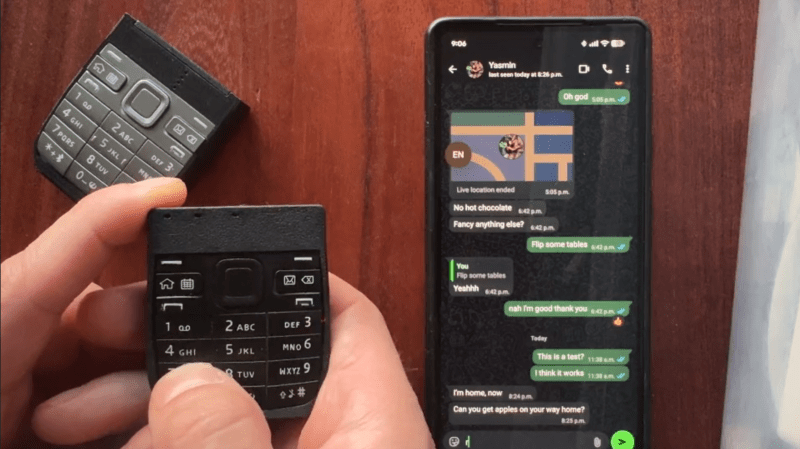
These days, most of us are fortunate enough to use smartphones with decent touchscreen keyboard capabilities. However, once upon a time, if you wanted to type something on a phone, you had to tap it out on the number keys instead. [Jarrett] is bringing that back with a custom T9 keyboard for modern phones.
The build is designed around the keypad of the Nokia E52, a Symbian smartphone released in 2009—two years after Apple changed the game with the first iPhone. The phone keypad itself is laid over a custom PCB with Alps SKRK tactile switches corresponding to each individual key. Each is wired with a diode and the switches are scanned as a row/column array as is typical for keyboards. Reading the matrix is an ESP32-C6 microcontroller, which counts the keypresses and spits out the right letters over its Bluetooth connection to an attached smartphone or other device. Power is via a small lithium-ion battery, looked after by a TP4200 charger chip.
Overall, the keyboard works as you’d expect, allowing T9-style input to any compatible device that works with Bluetooth keyboards. [Jarrett] does have one regret, with the 0.98 N actuation force switches used leaving he keypad feeling a little mushy. The firmer 1.57 N switches were suspected to give a more satisfying response under thumb, which was a nice upgrade in the second revision build.
We’ve seen other builds in this vein before, too, albeit with bigger keys. If you’re coming up with your own esoteric input methods, don’t hesitate to notify the tipsline.











Nice build, but this isn’t really T9. T9 was the predictive text input software making use of the phone keypad. I was hoping to see that being implemented too, but I wouldn’t know how without building some custom text input software on android.
Yep, the demo video shows it’s not T9 since hehas to press keys multiple times to get to the right letter. iPhone (and i believe Android too) have T9 built in, just use the numeric keypad when dialing someone and use the T9 method to start selecting a contact by name. So 7,3,8,3 for Pete.
I really miss T9. I used to be ridiculously fast with it. Shame that physical buttons are vanishing on new tech, getting good with finger muscle memory is good for your fine dexterity.
Why does “The future” have to be so damn smooth and seamless? It’s like they don’t want us to feel anything anymore!
This be like x10 mini on a tactile keypad
The source article states that T9 wasn’t implemented and acknowledges that it is only multi-tap.
“… That would have enabled a proper T9 keyboard style, instead of just ABC. T9 requires a dictionary of the language in use …”
https://en.wikipedia.org/wiki/Multi-tap
Why? I know the standard reply is ” because I can” but this seems a bit extreme. Almost like replicating a wax tablet and stylus with a computer tablet. Oh, wait…
Fortunate? I wish phones with a physical keyboard were still a thing.
Amen brother!!!
The SonyEricsson Xperia X1 came to mind with the slide-out keyboard. Apart from the stupid, braindead Windows OS (many times it would ring, but the phone app didn’t want to foreground, so you could not answer the call), I loved the thing…
My Pixel 4a has similar functionality. When a call pops up, if I click the answer button (the green one), it hangs up the call. Even 2 android major revisions later, it’s just as reliable as ever. At least I find comfort in the fact that I’m as good as any google phone engineer. :p
If you want a good algorithm for real T9 style typing I recommend https://github.com/neutralinsomniac/t9 – I translated it to javascript easily (I think it’s less than 500 lines) and it works well for me, especially once I made a custom dictionary from my own chat logs.
I just woke up from a coma thank you for this product.
It’s so many years later, and I’ve never found a better phone entry device than the keypad on my smt5600 and the T9 on the windows mobile OS it ran. I could type on that phone without looking at the screen, and never miss a key, and the T9 “just worked” to a ridiculous degree.
Now we have touchscreens and swype and autocorrect and predictive text and somehow I’m having to retype and manually pick entries or fix misspellings from mistyping SO much more. I used to be able to type on that thing while walking and watching where I was going, while doing court runs. Now? Haha no way. I used to laugh at people who said they’d gotten a BlackBerry because it was so easy to type on, when I could type multiple times faster because of how ridiculously good that T9 was. sigh. Maybe I need to try a chording keyboard again.
Still found it slower than a straight “press a letter/number/etc”.
Is it just me or has whatever default spell checker android has running these days grown a little um useless? I could have sworn that all you had to do was have the damn word wound a little bit like what you were after and a suggestion would be made. Now I type “newturd” and it suggest that I just go ahead and leave it as is or type “new turd”. I am discussing the surgical removal of the dogs nuts not fresh feecees (see there is another word it can’t decipher anymore so let’s go with “recent door doo”) ugh… Like I said is it just me? because I thought i always spell nueturd as newturd
(I tried to spell it right that time and still no suggestion not even when clicking on it afterward) Shit like that makes me smile before spell checking/correcting it.
i remember t9 wasn’t fun like that but it did get you the correcting spelling for an unknown word fairly quickly by a quick backspace and letter change. If you were lucky the wrong letter and the right one were the same number so it didn’t matter I cant spell for shit.
If I break out the laptop today and f7 comes up with nothing for my favorite misspellings I’m going to cry. I can’t stand these damn squiggaly red lines they mean I’m not done yet! I suppose there is a way to fix but I’m set in my weighs!
U mean auto text
does the trackpad work? will this available to buy?
This is a genuinely useful idea for people who are constantly on their feet and need to unobtrusively type onto, say, a shared whiteboard. Teachers would love this. Well. I’m a teacher and I’d love this. Cruising around my classroom and being able to one handed type stuff into the screen. Right now, the solutions to do that are so bad that I find myself either chained to my desk, or walking around with a keyboard or mouse. Both awful options.
Half the students would think its magic. Put on one of those trackballs that HTC phones and Blackberry’s used to have and you have an incredbile portable keyboard and mouse.
So cool.