
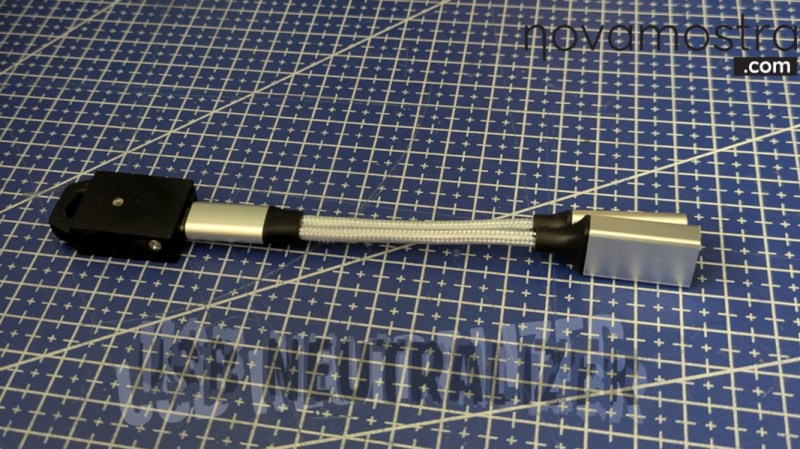
For how useful USB thumb drives are for quickly toting around and copying files from one computer to another, they can be a bit of a security headache. Programs can be loaded on them with all kinds of malware; they can be obscured in some ways that are difficult to detect, and they can be set up to execute certain programs when they’re plugged in. The general wisdom is to simply avoid untrusted USB devices completely, but that sort of abstinence-only policy rarely works in the real world. If, for some reason, an untrusted USB device absolutely needs to be used, many of these security issues can be mitigated with this tool.
Built by [Novamostra], the device is simple on the surface: it’s a Raspberry Pi Pico mated to a 2-in-1 USB splitter cable. But with the USB Neutralizer software they have written loaded onto the Pico, it automatically destroys the ability of any connected USB thumb drive to load files. The program works by deleting the first and last 34 Logical Block Addressing (LBA) sectors on the drive immediately when it’s plugged in, without doing anything else. This effectively corrupts the drive bad enough to prevent malicious software in the partitions from doing anything, allowing the user to (relatively) safely put the USB drive into their computer and format it for re-use. The code for this tool is also open-source and reviewable on the project’s GitHub page.
Of course, this isn’t a perfect security solution for all USB attacks. It doesn’t erase or replace the firmware on the drive itself, and although firmware-level attacks are rare they’re not out of the question for all users, all the time. It also won’t prevent a malicious physical attack like this high-voltage one, and it may also not stop hidden or obscured partitions or devices programmed for storage and some other nefarious purpose simultaneously, like a USB HID. But still, this solves a great many of the problems associated with getting new drives from semi-untrustworthy sources, like retailers or friends whose computer skills we don’t fully trust.












It seems like the only attack it actually stops is (coincidentally?) an attack that’s irrelevant except to Windows users? No matter what information is on the ‘disk’, i don’t expect my linux machine to start executing from any device plugged into it… But they are certainly vulnerable to voltage spikes and nefarious HID devices.
This sort of attack vector reminds me how much of practical technology use is effectively stochastic. If i had a positive reason to mistrust a USB device, i would just throw it in the trash. But if for some reason i had a different goal, i would just use a burner laptop (possibly even disconnect its wifi). I have 2 or 3 laptops that could serve this role, and the odds of killing both of them with hostile USB devices is so low, i wouldn’t hesitate to risk them this way. But for the regular run-of-the-mill USB device of unknown prevenance (i.e., federated online marketplace), risking it on my daily driver laptop is a no-brainer. The worst experience i’ve had so far is a scanner that becomes unreliable on battery power (I guess its light-bar causes the USB to drop below 5V).
Ideally, i would be a little more precious with my main PC because that would be a little harder to recover if i killed it…but mostly it gets spared this sort of risk simply because it’s not physically at-hand when i’m doing something foolish.
But fundamentally i’m vulnerable to, say, a piece of cheap technology that functions as a trojan horse and only misbehaves when i’m not looking. What are the odds i’ll meet something like that in my lifespan? What are the odds i’ve already met something like that and not regretted it? Fundamentally it’s just like HDD failure…an unlikely event that i can partially mitigate with backups that allow me to recover more easily, rather than true prevention that makes failure impossible.
Many Linux desktops these days are set up to automount devices (even if autorun is not a thing), and I wouldn’t bet against there being some exciting exploitable bugs that can occur just by mounting a specially crafted filesystem image. It’s possible, though less likely, that there could be bugs that can be triggered just by reading a partition table or looking for lvm/md metadata automatically or whatever else might happen without human intervention.
Exploitable bugs in filesystems ABSOLUTELY exist. You 100% have them in the kernel you’re running right now.
There’s a continual stream of bugs that get found and fixed, but filesystems have both an absurdly large attack surface with complicated datastructures that are hard to verify, and performance is important. So it’s more a game of whack-a-mole where they only fix ones that show up.
If you want to even begin to approach something more secure in this area, you have to start looking at FUSE to run your filesystem drive in a sandbox in userspace. Ideally your entire USB stack too.
I’ve once managed to corrupt a fs table badly enough to crash udisks2 on plugging it in.
I’d suggest the odds are approaching 1 on the going forward stuff even if you don’t expect to live that much longer. As the microprocessor needed to misbehave intentionally and still do the users expected job well enough too used to be comparatively expensive and physically larger and meaningfully more power hungry compared to the just does the job chip. Now they are quite likely the same darn price and maybe even entirely the same silicon just with different software. And the laser to remark the different chip as something that would be expected has become so cheap I’m thinking of trying to find space to add one to my tool pile too!
Which is worrying in itself, and gets worse now data mining personal details etc has become hugely more profitable or at least easier to get money out of – the incentive to be dodgy goes up and the cost of blanket attacks flooding the market with seemingly normal devices approaches nill… A problem we are all fairly likely to encounter soon I suspect, if we haven’t already – the problem is noticing it happened, and then knowing what to blame. As it would be rather easy to blame the social media platform, email provider, bank, government etc from not having your data secured, or your “AI agent” breaking the supposed rules etc etc.
hahah chip re-marker would make a great hackaday write up
Rather than a full featured laptop, I’d consider using the cheapest SBC I had available (Raspberry flavored or not) that runs some basic Linux in offline air-gapped mode.
Automount or not, attach it and dig around in the logs and devs-folders to see what it might be up to.
Worst-case (e.g. a HV-usbkiller device), all you’ve lost is the cheap-ish SBC. And if there’s reason to suspect such a thing, maybe it could be bench-tested by feeding it only +5V and Gnd in a lab test setup first, checking that it doesn’t go all Tazer-mode on you
i have a raspi that cost me $75 and a laptop i bought used for $75. the raspi, i use it every day to play mp3s. it’s got a stupid little relay board to multiplex the livingroom speakers. and the laptop is sitting in a pile of 3 other similar laptops that also all work, unused for 18+ months.
between the two, i’d rather roast the spare parts laptop :)
oh plus, a couple of the laptops still have an isolated power supply
First gen RPi zero (non-w) was $10 at the time and still finds very little use. That would make a good USB drive checker. Full OS support, cheaper than a bag of dirt, and if you lose it, you probably wouldn’t bother to replace it. Just upgrade to something better.
Idea #1: Use the status LED to indicate the presence of “surprising USB descriptors”.
If what should be a USB drive comes up with a keyboard / mouse descriptor, say, that’s a big red flag. It would be nice if a big red light came on.
Those kinds of devices do exist; what I don’t know is if they have ways to conceal their nature, such as only re-enumerating with the extra descriptors after they’ve been plugged in for a while…(I know you could code that behavior in circuitpython and it feels reasonably obvious)
idea #2: is there any merit in creating some kind of proxy device to make a fake “safer filesystem”? For instance, it could present a GPT that shows no bootable partitions, and on the fly change every “foo.exe” to “foo_exe.bin” in FAT directory listings.
Given the horrendously deleterious effect that it has on any USB drive plugged into it, is there any chance that the firmware could be retooled to operate as – effectively – a hardware write-blocker?
I’ve lost count of the number of devices that’ve been irreparably damaged by plugging them into a SATA/IDE/CF/whatever USB device that’s then plugged into a Windows machine. Make no mistake, there’s a very good chance that Windows will overwrite the first 512-ish bytes of your media before it even asks you what to do with it.
Look no further than the Philips B.O. “Videosynthesizer” prototype for what would eventually become the CD-i. I told the owner over and over again to not plug it into a Windows machine. It ended up falling on the shoulders of CD-i Fan, a super-knowledgable person regarding OS-9/68k, to manually rebuild those first 512 bytes, as apparently they contain some critical data regarding the operating system.
I understand that this hack is something of a gag, but from a broader perspective, please don’t think that just because you aren’t using this device that your data is safe.
So a read only usb drive, which would defeat this tool entirely, offering a false sense of security.
If you get the USB flash controller’s tools, you can format flash drives so that it has a virtual CD drive that can’t be overwritten without using the manifacturer’s tools again.
I’m with the others on this one. Even on Windows, I don’t believe files are arbitrarily executed on insertion of a drive (at least since Windows realized that was incredibly exploitable in the XP days).
I think the much greater concern are devices that have microprocessors that allow them to either suddenly act as a HID (or other device) when not being watched or one that could maybe scan and maliciously alter files (like swapping an trusted exe out) to find its way in.
So what would be more useful would be a relay device that can strip the ability of a device to act as something other than mass storage which I believe is currently the most exploited path.
The other vulnerability that I mentioned would require some known good memory to check against making it much harder to block.
You can always be sure that Microslop doesn’t learn from past mistakes.
Most of the random USB drives of unknown origin I receive, I actually receive for the Data on them. It makes zero sense to arbitrarily delete them.
To block possible Hardware based attacks, I plug them on a cheap hub. wlWhen it breaks something it was cheap. As for accessing data with malware, I use an old and empty laptop. If there is data of value I copy it to a known good drive and only connect that drive to my actual system and still run a virus check.
If you receive random USB sticks in the post, you can not just delete them.
This does nothing to stop USB worms.
Why not remap the drive to look like the binary contents of another file? An image of a disk image for forensics.
Deleting arbitrary data doesn’t make it otherwise safe, unless you can actually delete everything and validate it was actually deleted.
Hackers do not use Windows.
Real coders use copy con foo.exe
I have somewhere in my parts box a board small enough to fit inside a thumb drive casing with an Atmega microcontroller on it and a USB connector on one end. It looks like an Arduino Leonardo/Pro Micro when you plug it in but that can easily be changed. That thing could conceivably be used to do all kinds of mischief on a PC’s USB system: enumerating as a fake USB HID is probably only the beginning. Enough that a USB firewall might be worth considering.
I would just use an old junk PC that boots Linux from a DVD. If auto mount is disabled, nothing should be able to run. With no writable media or network connection, the malware couldn’t do much if it somehow managed to run.
First you need electrical separation so you wont get hurt by -200V. Second, you need a swith to tell your reader what type of device you plugged in, and restrict the actions it can perform based on that (ie: if you select that it’s a memory stick, the device will vlock any HID commands/communications attempts). Next comes the file contents scan.