
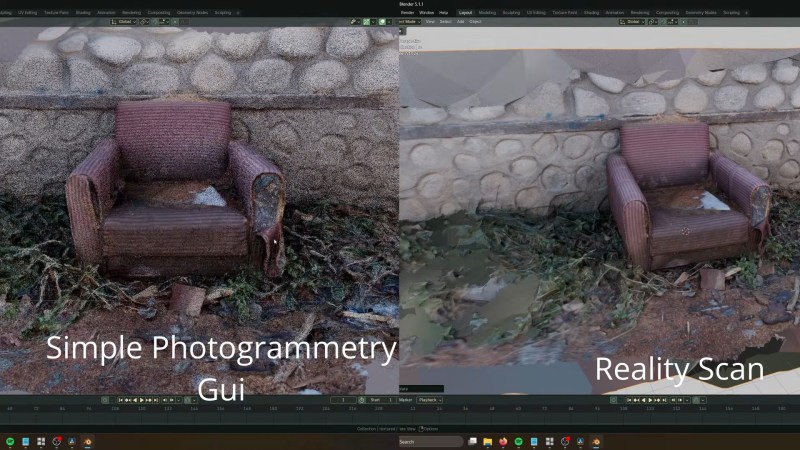
One of the fun aspects of open source software is that you can often find so many libraries and tools that implement the functionality you need, but ease of use for e.g. artists is often not a priority. This is where [Edin Spiegel] ‘s annoyances with photogrammetry tools led him down to the path of creating the Simple Photogrammetry GUI project, which is basically what it says on the tin.
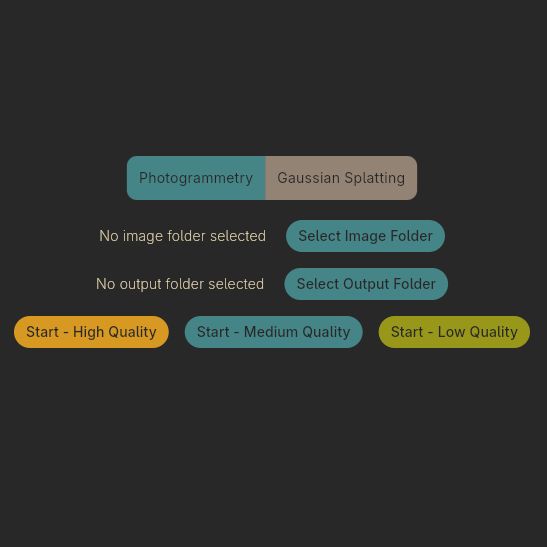 In an associated video its development and use is demonstrated, combining tools like Colmap, OpenMVS, mvs-texturing, pymeshlab, brush and PoissonRecon to implement both photogrammetry and gaussian splatting to turn those photos into a not too shabby mesh along with realistic textures.
The GUI uses the Flutter GUI kit, so Linux support is still somewhat sketchy, but should work in this new release of this GUI wrapper. The author is asking for people to test this GUI and report any issues found so that they can be addressed.
From a quick glance at the project and the comments to the video it seems quite useful for anyone who wants to get started quickly with photogrammetry. One niggle is perhaps that it relies on processing using CUDA, with a much slower fallback to CPU processing if you do not happen to have an Nvidia-blessed GPU installed. Of course this is one of those universal issues in a world where theoretically everyone should be using OpenCL already.
In addition to the build instructions you can also download an AppImage for Linux and compiled binaries for Windows to theoretically get started as fast as your internet connection allows. Interestingly, the AppImage is well over a GB in size, whereas the Windows ZIP file is just 207 MB for the v1.1.5 release, so take that into account.












Based on the intro pics, I am not sold on the output quality: stone wall looks like Legos and vegetation has severe artifacts and appears unnatural. But, I can understand why a open-source beginning that even is limited is a great start.
He mentions in the video that particular example was processed at only medium quality, so that’s not the limit of what the tools are capable of. At any rate, all the various tools which make the output are not what’s being shown here, rather the wrapper combining them all into a single workflow.
It uses the same libraries as a lot of the other suites. I’ve messed with this stuff quite a bit professionally; it is extremely dependent on input quality. And variable twiddling. It is possible that the variables still need to be properly twiddled.
So… WebODM?
I know I could google it but HAD comments always dial it right in for me and keep the rabbit holes at a distance. Could someone explain what exactly this is for? I just see chair one angle chair and chair different angle with some blurs. Is it to remove the blurs??? Was it because they wanted more crap on the ground?
It’s to create a 3D model from multiple photos from different angles.
The left image looks like a point cloud, the right is the “solid” model seen from an angle.
Kind of making up for the cost of real equipment that does 3D Point clouds.
The left image is done using this tool, the right image is done using a paid service called RealityCloud. So this is just showing the side-by-side comparison of this FOSS option compared to a paid service.
Would this stack of tools be applicable for photographing an object to create STL files?