
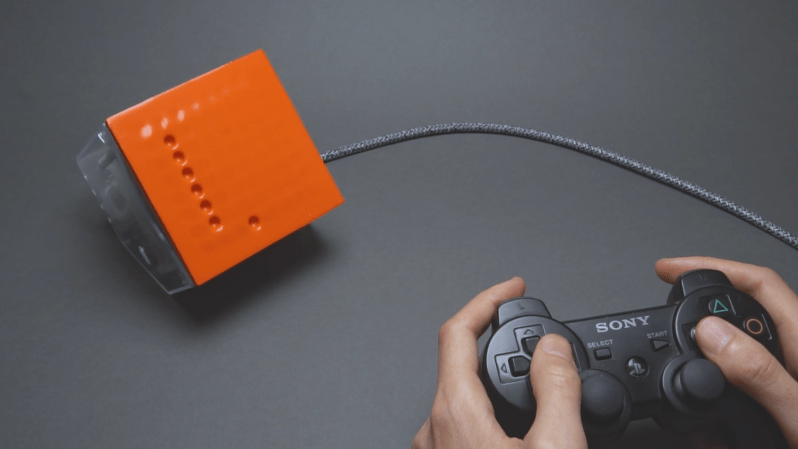
[soiboi soft]’s vacuum-driven dot matrix display is part suction gripper, part touchscreen, and altogether impressive. Its display capabilities are entirely shadow-based, with each pixel being made of a cavity behind a flexible silicone sheet; when the display’s microfluidic logic circuitry activates a pixel, a vacuum pump pulls the sheet inwards, creating a visible hollow.
As in previous iterations, the display’s control circuitry is built around a pneumatic “transistor”, which allows an air channel to be opened or closed by applying vacuum to a control channel. As a first test, [soiboi soft] built a 16-pixel dot matrix display. Eight control channels – four row and four column channels – are multiplexed to individually control each pixel. The transistors act like one-way valves, so the pixels hold their state, even when pressed in by hand; simply add some circuitry to read a pixel’s state, and it would be a fully-functioning touchscreen. The supporting pneumatics also got an upgrade; the solenoid valves now cleanly mount to the back of the board, and the vacuum pump connects via a Luer lock adapter.
The 3D printing used to make certain parts and silicone molds caused issues when scaling up to a 64-pixel display, however. The parts were warping, destroying the seal necessary to keep pixels “on”. To straighten them out, [soiboi soft] pressed the printed part against a flat glass build plate in a vacuum bag and annealed it at 60 Celsius for several hours. This worked quite well, particularly when slightly raised rings were printed around the area to be sealed. Once all these bugs were worked out, the display was clear and decently responsive. [soiboi soft] was able to display letters, numerals, and animations, and even able to play Pong and Snake. It won’t be setting any refresh rate records, but it was nevertheless fully usable.
For another approach to playing Snake with microfluidics, check out this project. If printing molds and casting silicone seems too fiddly, there are always other ways to make microfluidic circuits.











Could it be used for brail? Can the bumps point out ward? I don’t know very much about brail but if you had a little square pressed against your body some where you could have ai translation for foreign language going on as some one speaks. I’m saying this because translation coming through an earbud gets a little overwhelming to me and looking at a screen is not very practical also.
I’m thinking of a belt some one made that would give haptic feedback of which way north was. After a while it was said that when you took off the belt most people had a new found sense of direction. feeling the belt in there mind pointing north. Maybee it could help you pick up a new language faster. If you of course learn the brail first.
Then you could say “when that person speaks, you can feel what they are saying”
Braille uses much smaller dots (around 0.5 – 1.0 mm). Also, you need a sharper shape than a – basically – half baloon.
I don’t know if I quite understand what you’re saying, if you can read small letters why can’t you read larger letters?
Because is depends on the size of your finger for example?
Ones finger is only so big. In theory it would be possible but far slower (and I assume more error-prone).
There are more practical means of making a braille display for now.
fascinating project!
Doom theme starts playing in the background.
Next step: diy and minimize the valves.
And maybe panel modules, you can just stick together?
With a transistor and a memory cell he should build more logic and a shift register. It should be possible to clock the rows (one hot) and save on solenoids. It is one row active at a time only anyway.
Certainly, higher pixel is next and could be achieved without doubling the solenoids again.
Would be cool to run Conway’s game if life on it with the controller moving a window around a larger simulation than is visible on the display itself