
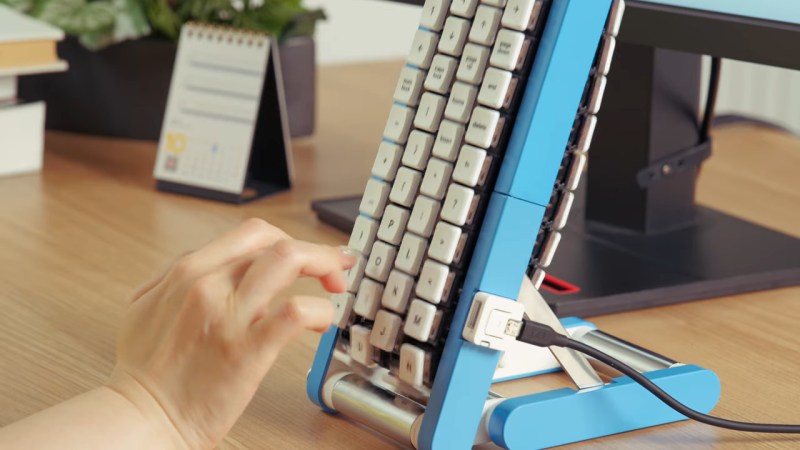
It must be April in October again, because Google Japan has a new, hilariously impractical reimagining of the keyboard: a conveyor belt. This time it’s on GitHub with firmware, STLs, and a full build guide if you, too, want to wait a full cycle to get the ‘backspace’ key whenever you make a typo, or to write such fun words as “ooid” or “princesship”.
You can watch it in action in the video embedded below, but just the photo probably gives you the idea: the four staggered rows of keys are each 3D-printed chains holding mechanical key switches, driven from a motor in the base. Each row also has a flexible PCB to keep everything wired together, though it’s unclear how those electrical impulses from the key presses get off the conveyor belt and into your computer. That part of the build guide is “TBD” and the source code doesn’t appear to be complete.
Those details may be forthcoming, or it might never be revealed because this is obviously a joke, but now that they’ve gone to the effort of providing STLs, we’re now invested in figuring out how to actually make it work. A BLE-equipped microcontroller in each belt? RFID tags on each key, with readers in the base? SMD LEDs on the flex PCB that flash out the ASCII code of each pressed key as they whiz past a sensor? In theory, any of those should work, but which should we use? You decide!
We like Google Japan and their weird keyboards, and we have to say that compared to the hat from a few years ago, this one is almost practical, though the rotary-phone one wins on style points. In some ways, it occurs to us that this is the exact inverse of the chain printers of yesteryear.
Thanks to [CityZen] for the tip! If October for you is more “spooky” than “silly”, we still want to know about it. Or if you build any of the Gboards. Either way, let us know on the tips line what you’re up to.











My poor mini-fig got caught in it and now falls endlessly….and Ted Levine still mocks my secretary who lost her press-on nail in it… MANGLER style.
Next up…Tetris/type and minefield-craft…when you want to take all day making a grocery list.
Do I have to wait for the turn signal to go green before I >>>>
augh##&$
It looks like they used low profile switches on a flex PCB
Daft as it seems on the surface I could see that concept actually having some real legs with a little more refinement to make it a real HID device. You have your QWERTY (etc) for typing Latin alphabet languages, flip to the runes to type directly in your old norse/fictional dwarfish, a numberpad for your spreadsheet etc, or your gaming layout(s) of choice.
Being able to change not just the legends on the keys but the key placement to suit your needs could be really quite functional and fun.
I’ll post my variant, so others can take inspiration or make it real.
As AI knows everything, all you need is a single key. The AI knows what you wanted to type and types if for you one character at the time. This way you’ll also always be able to say that you typed the generated message yourself, which is not completely untrue. But not very useful.
Is this where investors’ money go?
I think Google has been solidly revenue-positive for a while now; possibly excluding some of the ‘AI’-driven compute buildout craze, so probably not in any meaningful quantity.
Probably also worth considering how much money is actually moving. This sort of thing definitely isn’t free; but it’s not exactly giant money compared to some branded-company-hoodies or mandatory-employee-bonding-fun-time exercises that companies do all the time; and they get this little “look at google, how whimsical” story rather than yet another “oh, yeah, the creepy adsense guys who are working at chipping away the relative openness that was the main upside of their runner-up mobile OS…” day in the PR mines.
Unless you are hewing pretty hard in the direction of ‘work means 100% nothing but do job description; receive paycheck, all other considerations heretical’, or your employees are a lot cheaper than Japanese engineers are likely to be, this is just not a terribly expensive office frivolity project; and probably one that the staff enjoy more than trust fall based corporate team building or similar gimmicks.
Considering the free advertisements that Google is getting by making these silly videos, It is probably worth it.
Investors from 1998? I think they’re retired by now. They better be if they got in on that ground floor
They should have used the money to dig up your backyard specifically and put in a datacenter.
Anyone know what the lifespan of a flex PCB under such conditions would likely be? I don’t see any sharp creases being flexed repeatedly, so probably not ‘dead within hours at most’; but it looks less gentle than the treatment you see in things like flatbed scanners where they tend to give it about as much room as possible to bend gently.
If perhaps I am being unduly jumpy; but if I were looking at a serious implementation I’d be curious about going hall effect: with a gray code printed on the back the system could track the position of the belt quite closely and that would allow you to keep the keys and belt 100% mechanical and the electronics 100% static, with the readout of a given hall effect sensor being interpreted as a different keycode based on the belt position at the time.
Flex PCB can be pretty darned durable as long as the bend radius never gets too sharp, so I’d think this concept as is would work well enough, looks like there is a fair bit of mechanical support from the plastic belt and enough freedom to flex smoothly around a decent radius. Though without really hands on you may be correct, so perhaps slightly larger roller radius and even a s shape to the flex PCB for better stretch capacity just to be safer.
I like your Hall effect static electronics suggestion though – have an array of them under the front plane of the conveyor belt and you could with relatively few sensors detect many buttons, even buttons placed outside of the regular grid for custom layouts that suit the needs of the moment better (somewhat computationally expensive compared to a switch to triagulate which position of magnets moved however).
Though I think I’d raise you to a touch sensitive plate with more selectively positioned hall effect underneath it – a multitouch capable surface should be able to handle the regular keypresses, deal with any bizarre key layout you wanted, and your mechanical switch will jab its contact pad down only after the haptic feedback break point for a nice typing experience – still pretty standard mechanically at least switch its just offloaded the electronics. Then the selectively placed hall effect across that surface can be used as analogue keys that are depth/velocity sensitive for those layouts it might matter.
I suspect that you are on to something with capacitive.
Vastly more computationally expensive vs. any sort of ‘normal’ switch matrix; but the area you would need to cover is, conveniently, just about the size of a smallish tablet, so you can be pretty sure that a selection of vendors are spitting out highly capable capacitive sensors of the size you need for a pittance. Given how often LCDs are bonded to capacitive sensors for better image quality you could probably even get a screen to use for fancy backlighting of the keycaps for close to free.
Honestly, I would not bother with the ‘belt’ arrangement; but I could see the utility for basic ‘custom function keypad’ setups of having keys with a little capacitive nub and a suction cup or sticker film to hold them to the screen in order to turn your basic disposably cheap tablet into a custom-layout/re-customize on the fly key input device. Just a super basic program that thinks it is registering finger touches; but with the mechanical keys and capacitive nub to give proper keyfeel.
I was also wondering about how to practically implement this keyboard. I also thought that you’d want no electronics on the moving belt. My first idea was some kind of optical interrupter setup where each key press would interrupt a number of longitudinal beams. However, you’d need about 5 beams per column, and they’d have to stay well aligned with the moving keys. Another idea was for each key press to push out some kind of bar code or QR-like code that could be sensed by a camera looking down from the top inside the conveyor.
Those thoughts aside, the other questions that come to mind about this keyboard is how would you implement shift keys? Seems like using a push-on/push-off scheme would really slow down your typing. Of course, having to wait for the next key to come around would also really slow you down if you need to hit the same key repeatedly. Probably too many questions asked!
Tough sell in Greenville, Mississippi.
If you come from a culture with literally thousands of characters, like Japanese Kanji, I can see how you might think of a scrollable keyboard. And I can see how you might try it out first with western characters so you can plug it into a readily-available computer to actually use it and assess the feasibility and durability.
Thousands of characters, but composed from much fewer sets of strokes, so it’s more like comparing western words to kanji instead of letters to kanji. I think. I still struggle to see a pragmatic use for this, but I think it’s a project about whimsy rather than pragmatism anyway.
Your “words” analogy is definitely somewhat apt, although there are many more words made of multiple kanji than there are compound words in English. Modern Japanese input methods using an ordinary keyboard, touchscreen, or hell, even a classic numeric cell phone keypad are indeed very much superior, though they tend to be based on phonetics rather than strokes.
Japan has a “traditional” keyboard layout which uses the Japanese phonetic alphabet directly, but it’s also fairly common these days to type phonetically using the standard QWERTY layout. Either way, your device is constantly doing a dictionary lookup to suggest the proper kanji / word that matches your phonetic typing.
To look at it another way, Japanese devices started using predictive text and autocomplete way (decades) before it was a thing anywhere in the Western world.
From what I understand, modern Chinese text input is very similar, using QWERTY and pinyin for phonetic input and then selecting the correct word if there are multiple options.
Now, a typewriter version of this might have been compelling, had someone come up with a way to make it work.
Early Japanese and Chinese typewriters were fascinating, somewhat more like automated typesetting machines with a giant grid of keys to select individual kanji. Kanji were organized based on strokes and by sub-characters (many Kanji have a primary sub-unit called a “radical” which is one way they’re organized in a dictionary).
No wonder Japan is the world leader in kinky toys 😉
As daft as it seems on the surface. If you could control each column individually, you could make some form of predictive text keyboard that guesses which letter you need next and shifts it into position for you.