A photo of the thrust meter from the Apollo lunar module

Apollo Lunar Module Thrust Meter Lives Again

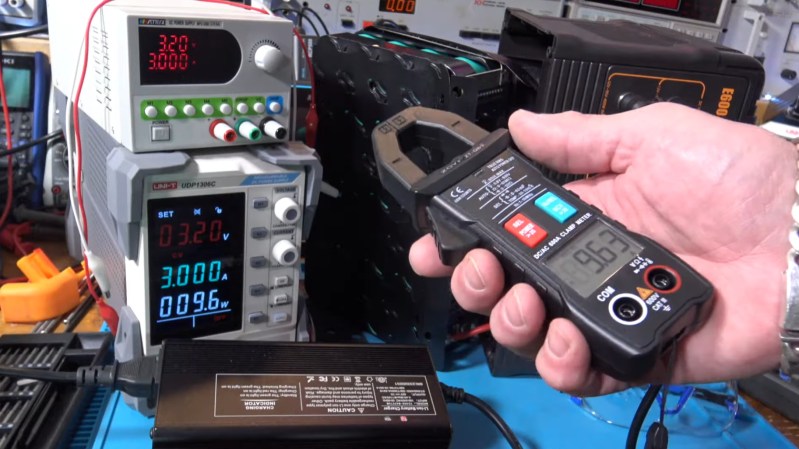
[Mike Stewart] powers up a thrust meter from an Apollo lunar module. This bit of kit passed inspection on September 25, 1969. Fortunately [Mike] was able to dig up some old documentation which included the pin numbers. Score! It’s fun to see the various revisions this humble meter went through. Some of the latest revisions are there to address an issue where there was no indication upon failure, so they wired in a relay which could flip a lamp indicator if the device lost power.

This particular examination of this lunar thrust module is a good example of how a system’s complexity can quickly get out of hand. Rather than one pin there are two pins to indicate auto or manual thrust, each working with different voltage levels; the manual thrust is as given but the auto thrust is only the part of the thrust that gets added to a baseline thrust, so they need to be handled differently, requiring extra logic and wiring for biasing the thrust meter when appropriate. The video goes into further detail. Toward the end of the video [Mike] shows us what the meter’s backlights look like when powered.

If you’re interested in Apollo mission technology be sure to check out Don Eyles Walks Us Through The Lunar Module Source Code.

Continue reading “Apollo Lunar Module Thrust Meter Lives Again”

Scientific staff members working on the computing machine Setun

The Setun Was A Ternary Computer From The USSR In 1958

[Codeolences] tells us about the FORBIDDEN Soviet Computer That Defied Binary Logic. The Setun, the world’s first ternary computer, was developed at Moscow State University in 1958. Its troubled and short-lived history is covered in the video. The machine itself uses “trits” (ternary digits) instead of “bits” (binary digits).

When your digits have three discrete values there are a multiplicity of ways of assigning meaning to each state, and the Setun uses a system known as balanced ternary where each digit can be either -1, 0, or 1 and otherwise uses a place-value system in the normal way.

An interesting factoid that comes up in the video is that base-3 (also known as radix-3) is the maximally efficient way to represent numbers because three is the closest integer to the natural growth constant, the base of the natural logarithm, e, which is approximately 2.718 ≈ 3.

If you’re interested to know more about ternary computing check out There Are 10 Kinds Of Computers In The World and Building The First Ternary Microprocessor.

Continue reading “The Setun Was A Ternary Computer From The USSR In 1958”

Interconnected circuits for controlling the clock

Tick, Tock, Train Station Clock

We’ve seen a few H-bridge circuits around these parts before, and here’s another application. This time we have an Old Train Station Clock which has been refurbished after being picked up for cheap at the flea market. These are big analog clocks which used to be common at railway stations around the world.

This build uses an ESP32 C3-mini microcontroller (PDF) in combination with an A4988 Microstepping Motor Driver (PDF). The logic is handled with MicroPython code. The A4988 provides two H-bridge circuits, one for each of two stepper motors, only one of which is used in this build.

The controller for this clock needs to send an alternating positive then negative DC pulse every minute to register that a minute has passed so the clock can update its hour hand and minute hand as appropriate. The ESP32 and the A4988 H-bridge cooperate to make that happen. The wifi on the ESP32 C3-mini is put to good use by facilitating the fetching of the current time from the internet. On an hourly basis the clock gets the current time with a HTTP call to a time server API, for whatever is suitable for your time zone.

Thanks to [PiotrTopa] for writing in to let us know about his project. If you’re interested in learning more about H-bridge applications be sure to check out Introduction To The H-bridge Motor Controller and A H-Bridge Motor Controller Tutorial Makes It Simple To Understand.

Schematic for the TULIP4041

TULIP: The Ultimate Intelligent Peripheral For The HP-41 Handheld Calculator

[Andrew Menadue] wrote in to let us know about the TULIP-DevBoard and TULIP-Module being developed on GitHub.

TULIP is short for “The Ultimate Intelligent Peripheral” and it’s an everything expansion board for the HP-41 line of handheld calculators sold by HP from 1979 to 1990. These particular calculators support Reverse Polish notation which seems to be one of those things, like the Dvorak keyboard, where once you get used to it you can never go back.

Continue reading “TULIP: The Ultimate Intelligent Peripheral For The HP-41 Handheld Calculator”

A photo of the circuit on a breadboard

Retro Semiconductors: The Silicon Controlled Rectifier

Over on YouTube [Lockdown Electronics] reviews an old bit of kit known as the Silicon Controlled Rectifier (SCR). Invented in the 1950s the SCR is a type of thyristor and they were popular back in the 1970s. They are often replaced these days by the TRIAC and the MOSFET but you might still find some old schematics that call for them and you can still buy them.

The SCR is a three terminal electronic switch which latches on. You apply a signal at the gate which allows the other two pins, the anode and cathode, to conduct; and they continue to do so until power is removed. The silicon inside the device is comprised of three semiconductor junctions, as: PNPN. The P on the left is the anode, the N on the right is the cathode, and the P in the right middle is the gate.

Continue reading “Retro Semiconductors: The Silicon Controlled Rectifier”

A photo of the SigCoreUC

SigCore UC: An Open-Source Universal I/O Controller For The Raspberry Pi

Recently, [Edward Schmitz] wrote in to let us know about his Hackaday.io project: SigCore UC: An Open-Source Universal I/O Controller With Relays, Analog I/O, and Modbus for the Raspberry Pi.

In the video embedded below, [Edward] runs us through some of the features which he explains are a complete industrial control and data collection system. Features include Ethernet, WiFi, and Modbus TCP connectivity, regulated 5 V bus, eight relays, eight digital inputs, four analog inputs, and four analog outputs. All packaged in rugged housing and ready for installation/deployment.

[Edward] says he wanted something which went beyond development boards and expansion modules that provided a complete and ready-to-deploy solution. If you’re interested in the hardware, firmware, or software, everything is available on the project’s GitHub page. Beyond the Hackaday.io article, the GitHub repo, the YouTube explainer video, there is even an entire website devoted to the project: sigcoreuc.com. Our hats off to [Edward], he really put a lot of polish on this project.

If you’re interested in using the Raspberry Pi for input/output you might also like to read about Raspberry Pi Pico Makes For Expeditious Input Device and Smart Power Strip Revived With Raspberry Pi.

Continue reading “SigCore UC: An Open-Source Universal I/O Controller For The Raspberry Pi”

2WD robot

Two-Wheeled Arduino Robot Project For Beginners

Here’s a fun build from [RootSaid] that is suitable for people just getting started with microcontrollers and robotics — an Arduino-controlled two-wheeled robot.

The video assumes you already have one of the common robotics kits that includes the chassis, wheels, and motors, something like this. You’ll also need a microcontroller (in this case, an Arduino Nano), a L293D motor driver IC, a 9 V battery, and some jumper wires.

The video goes into detail about how the two wheels connected to one motor each can move the robot in various directions: forward, backward, left, and right. The motors can be made to spin either forward or backward, depending on the polarity of the power supply, using an H-bridge circuit.

The L293D motor driver IC powers and controls the motors connected to the wheels. The L293D takes its commands from the Arduino. The rest of the video is spent going over the software for controlling the wheels.

When you’re ready to go to the next level, you might enjoy this robot dog.

Continue reading “Two-Wheeled Arduino Robot Project For Beginners”