Laser Cutting Orreries

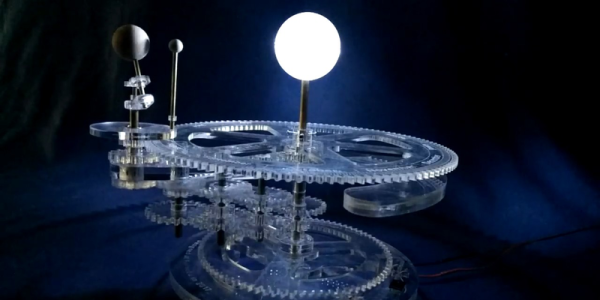
An orrery is a clockwork model of the solar system, demonstrating the machinations of the planets traveling around the sun in a sublime pattern of epicycles. A tellurion is a subset of the orrery, showing the rotation of the Earth around the sun, and the orbit of the moon around the Earth. [HuidongT] created his own tellurion out of laser-cut parts and just a few bits of copper tubes and bearings.

This project was originally inspired by the holzmechanik, a tellurion constructed from plywood gears and brass tube. [HuidongT] saw a few shortcomings in this project: the Earth didn’t spin and the moon didn’t orbit with its natural five-degree inclination. [Huidong]’s tellurion would have these features and include an illuminated sun, demonstrate the change of the seasons, and show lunar and solar eclipses.

While there was a bit of math involved in figuring out the gearing, it’s not much: the Earth would go around the sun every 365.25 days, the moon would go around the Earth every 27.32 days, and there is a difference between sidereal and solar time. A quick script made quick work of the math, and anyone can easily find tools to create gears given a diameter and the number of teeth.

The fabrication of this tellurion was made with acrylic on a laser cutter with a handful of 3D printed parts. The electronics are simple enough — just a motor and a few LEDs, and the completed project works well enough. You can check out a video of the tellurium below.
Continue reading “Laser Cutting Orreries”

Friday Hack Chat: BadgeLife

For the last few years at DEF CON, we’ve seen the emergence of an entire community of badge creators. These aren’t official badges — good news, since the official DEF CON badge will probably be an unpuzzling piece of laser cut acrylic this year. Lucky for us this is the biggest year yet for independent electronic badges. This is BadgeLife, the fine art of designing and building hundreds of badges for eager conference goers.

This Friday, we’ll be hosting a Hack Chat with a few of the folks tapped into BadgeLife. [Whitney Merrill], lawyer, hacker, and overseer of the Crypto & Privacy village will be joining us talking about this year’s badge, the puzzle she designed, and what BadgeLife really means. Also joining us will be [Karl Koscher], research scientist and co-organizer of the Crypto and Privacy village.

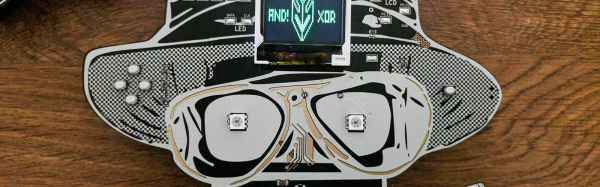
Also on deck will be the creators of this year’s Bender Badge. Last year, AND!XOR created one of the most popular electronic conference badges in recent memory. This year, the Bender Badge is getting an upgrade with Blast Processing, a quart of tequila, and two dozen amyls.

We’re proud to note that Hackaday.io has become an unofficial repository for all the best badges from the BadgeLife community. The Hunter S. Rodriguez badge is on there, as is the Ides of DEF CON. As the creator of the most innovative and desirable badge this year, I will also be attending this Hack Chat discussing the trials and tribulations of developing and shipping hardware on a very condensed schedule.

While the focus of this BadgeLife Hack Chat is developing electronic conference badges for DEF CON, it could have easily been called ‘Electronic Design’. There’s a massive amount of work that goes into each of these badges from design to production, and all of it is highly relevant to any hardware developer.

Here’s How To Take Part:

join-hack-chatOur Hack Chats are live community events on the Hackaday.io Hack Chat group messaging. This Hack Chat will take place at noon Pacific time on Friday, July 14th. Confused about where and when ‘noon’ is? Here’s a time and date converter!

Log into Hackaday.io, visit that page, and look for the ‘Join this Project’ Button. Once you’re part of the project, the button will change to ‘Team Messaging’, which takes you directly to the Hack Chat.

You don’t have to wait until Friday; join whenever you want and you can see what the community is talking about.

DEF CON BadgeLife: Blinky Bling

This is the biggest year yet for unofficial electronic conference badges. We’re calling it the year of Badgelife, and for the next few weeks, we’re going to be taking a look at the unofficial conference badges being deployed at this year’s DEF CON.

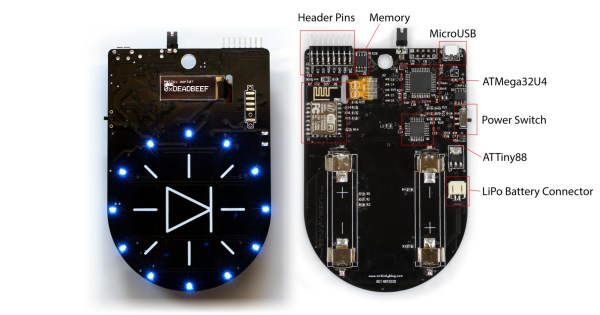
[Mr Blinky Bling] a.k.a. [Benn Hibben] has created his own badge for this year’s con. On board is a bunch of LEDs, WiFi, and capacitive buttons. It’s a WiFi badge for all your AP scanning and deauth needs. The electronics for this badge are a bit more complicated than simply throwing an ESP8266 on a board and calling the design done. The capacitive touch functionality is being handled by an ATTiny88, the OLED display is handled by an ATMega32U4, wireless functions are done with an ESP8266, and there are a few bits and bobs for a LiPo battery.

This WiFi Badge is the focus of an astonishingly successful Kickstarter (ending in just a few hours), and [Mr Blinky Badge] already has enough backers to move 200 badges. This is really a spectacular amount of work; it’s one thing to build a single prototype for an electronic conference badge, but it’s another matter entirely to put a badge into production, source all the parts, handle the assembly, and finally ship all these badges to Kickstarter backers and conference attendees.

If the challenge of building and deploying hundreds of electronic conference badges sounds like fun, you’re in luck. This Friday, we’ll be hosting a Hack Chat with some of the creators of this year’s unofficial DEF CON badge creators. There’s a lot you can learn from these folks, and a lot of very cool badges that will make an appearance at this year’s Def Con.

Hackaday Links: July 9, 2017

Doom is now running on the ESP32. This is some work from [Sprite_tm], and the last we heard about Doom on the ESP32 is that there was a silicon bug or something. Now we’re knee deep in the dead on a tiny WiFi and Bluetooth-enabled microcontroller.

Loading animations have a long and storied history. What originally began as an hourglass quickly turned into a hand counting to five and progress bars. There were clocks, the Great Beach Ball of Death, and now loading animations are everywhere. However, the loading animation has still not been perfected — until now, that is. This is a fidget spinner loading animation. It’s beautiful.

Just a quick reminder that a Minecraft scholarship exists. Yeah, I know what you’re thinking, but there is a scholarship from the Klingon Language Institute for studying any language, and last year’s winner built a redstone computer from scratch,

[8bit generation] recently released a documentary, about the rise of Atari. Easy to Learn, Hard to Master is about the rise of Atari under [Nolan Bushnell]. Now [8bit generation] is working on a new documentary: Firing Steve Jobs. The [Steve Jobs] story is fascinating, and no matter what you think of him, he probably knew what he was doing.

Want to build and sell some hardware? Over on Tindie, we’re taking a look at some of the most successful designers of custom crafted hardware. This time it’s [Albertas Mickėnas] of Catnip Electronics who has sold five thousand soil moisture sensors.

You can just go out and buy a CNC machine, but that doesn’t quite underscore the difficulty in getting a CNC machine running. Our ‘ol pal [Jeremy] recently picked up a Romaxx CNC machine and put together a video of its commissioning. There’s a lot of work here, from building a shelf/stand for a rather beefy machine to cutting into the bed for t-tracks, and figuring out how dust collection is going to happen.

Before there was KiCad and Eagle and a ton of web-based PCB design tools, there was Autotrax. Want to know what PCB design and GUIs look like in DOS? I did a walkthrough for designing a small PCB in the DOS version of Autotrax late last year. There are thousands of designs locked up in discontinued EDA suites, and [Erich] has a way to revive them. He’s developed an Autotrax/Easytrax layout import/export plugin for pcb-nd. Now legacy Protel designs can be imported into software released in this century. This is really cool, and you can check out some screenshots here.

PCB Art Becomes Lapel Pins

We’re now living in the golden age of PCB art. Over the last year or so, the community has learned to manipulate silk screen, copper, and solder mask layers into amazing pieces of craftsmanship. These boards are putting the ‘A’ in STEAM, and now we have fiberglass replacements for enamel lapel pins.

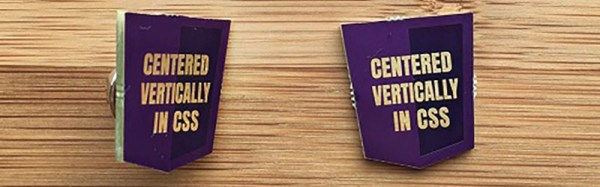
[jglim] didn’t have much experience with fabric, but a PCB lapel pin was something that seemed like it should work. There are really only three parts to a lapel pin — the small ornamental pin itself, a solderable spike somehow attached to the pin (usually by soldering), and a clasp that holds the pin steadfastly to a lapel. The spike and clasp assembly were easily sourced on AliExpress, with one hundred clasps available for seven dollerydoos.  Attaching the spike to the PCB was as simple as adding a circular copper pad on the obverse side, applying some solder, and the liberal application of toaster ovens.

The design of the pin was based on the HTML5 logo, with the actual art done in Photoshop using a palette picked from OSHPark’s preview colors. The four colors used in this design are bare copper, a light purple for mask over copper, a darker purple for mask without copper, and a pale yellow for exposed FR4. This design was imported into KiCad with the Bitmap2Component tool.

The assembly of these lapel pins went very easily, and the finished product looks great. There’s a lot you can do with the standard OSHPark color stackup like making money of me, and this is a great example of exactly how much you can do with PCB art.

DEF CON Badgelife: The Puffy That Runs Linux

DEF CON is canceled again this year, and this time that statement is at least partially true. There will be no special official badges this year. There is no challenge or mystery embedded in the official DC badge. This is the year that unofficial badges from villages and random attendees finally supersedes the official offering. This is badgelife, and for the next few weeks, we’re going to be taking a look at some of the unofficial badges of DEF CON.

The idea for [dorkengine]’s Puffy badge began last year with the so-called Bender badges from AND!XOR.  Chalk this up to a story that ends with, ‘but you had to have been there’, but the Bender badges were wildly popular, sold like hotcakes, and were an astonishing success of independent badge craft at DC. [dorkengine] decided to get in on the action and build his own badge for DC 25.

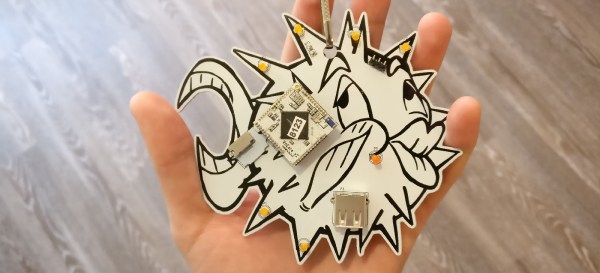
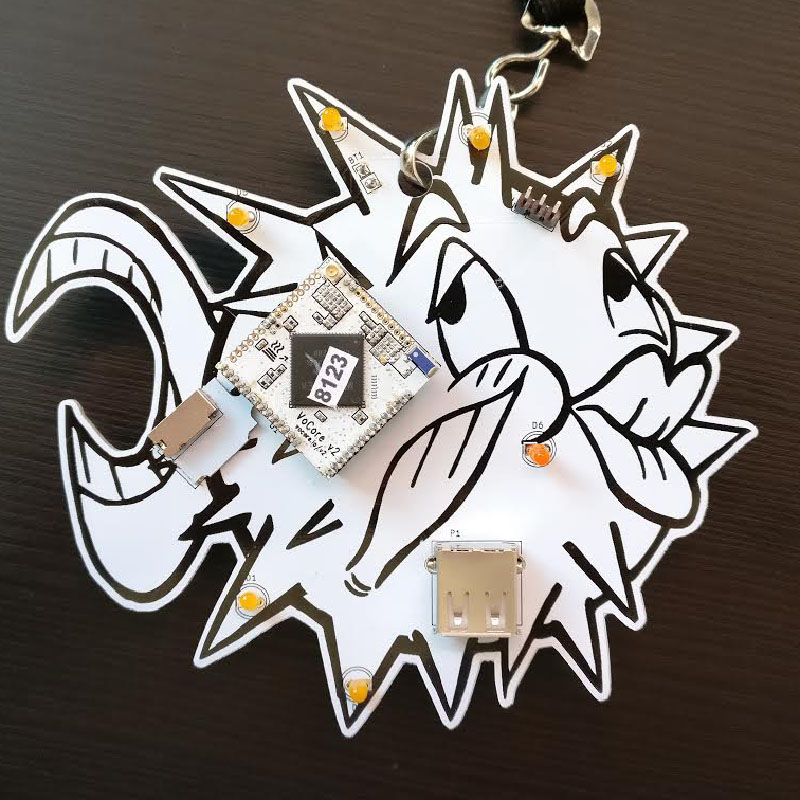
The design of the Puffy badges is based on a highly stylized rendering of the OpenBSD logo and mascot. Why a pufferfish with Kardashian lips? [dorkengine] has a bunch of boxes in a closet running OpenBSD, and that’s a good enough reason for us.

An electronic badge must do something, and the feature list [dorkengine] came up with included some sort of wireless connectivity, hackability, a serial console, blinkenlights, and some sort of *nix-ish OS. OpenBSD didn’t make the cut, but [dorkengine] eventually stumbled upon the VoCore2, a tiny System on Module that runs Linux, has WiFi and a few GPIOs, and is barely an inch on a side.

After getting a good deal on a large order of VoCores, [dorkengine] started on the PCB. The circuit was simple enough with just a VoCore attached to a USB port, power adapter, and a few LEDs. The Puffy rendering translated beautifully into soldermask and silkscreen, and after a prototype from ITEAD Studio, [dorkengine] had 40 PCBs that worked perfectly.

So, what is [dorkengine] going to do with a box full of Puffy badges? He’ll be selling them for $40 around the con. That’s surprisingly inexpensive for a large PCB soldered to a $17 SoC. If you want to get your grubby mitts on one, you could email him or ping him on Twitter. Of course, if you want to make your own, [dorkengine] has the KiCad files and software available, but at this point, you’re looking at a very fast turnaround for a board house.

Blinking A Light With Ping

The Flashing Light Prize is on right now, and that means all our favorite geeks and YouTubers are aspiring to what could be done with a 555. The rules are simple: turn a light bulb on and off somehow. [Sprite_tm] is answering the call, and he’s blinking lightbulbs at the speed of light.

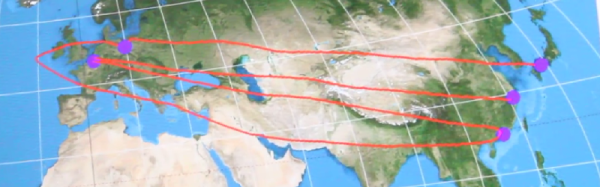
[Sprite]’s method of blinking a light is simple: Use an ESP32 development board to turn on a relay. At the same time, send a packet out to the Internet and through four servers spread across the globe. When the packet goes through servers in Shanghai, the Netherlands, to Hong Kong, to Germany, and finally Japan — and back again — the light bulb turns off. It’s a physical demonstration of the speed of light and the quality of undersea optical fibers.

This route is quite long, and a reasonable estimate for the one-way, great circle path from Shanghai to the Netherlands to Hong Kong to Berlin and finally to somewhere near Osaka is about 36,000 km. A round trip for this light bulb packet is 72,000 km, or about 0.2 light-seconds. There are delays, of course, from fiber and cables not going directly over the Himalayas, delays in routers, and the difference between the speed of light in a vacuum and the speed of light in glass fiber. Still, light is quick, and the light blinks at about 1Hz.

You can check out [Sprite]’s entry video for the Flashing Light Prize below.

Continue reading “Blinking A Light With Ping”