Hackaday Prize Entry: A 3D Printed Prosthetic Foot

For the last few years of the Hackaday Prize, there have been more than a few prosthetic devices presented. Almost without exception, the target for these projects are prosthetic hands. That’s a laudable goal, but mechanically, at least, feet are much more interesting. A human foot must sustain more than the weight of the human it’s attached to, and when it comes to making this out of plastic and metal, that means some crazy mechanics.

This Hackaday Prize entry is a complete reversal of all the prosthetic limbs we’ve seen before. It’s a prosthetic foot, and in the tradition of easily made and easily modified prosthetic arms, this prosthetic foot is mostly 3D printed.

A foot will take a lot more abuse and weight than a hand, and because of this 3D printing all the parts might not seem like the best idea. Exotic filaments exist, though, and the team behind this project does have access to a few pieces of test equipment in a materials engineering lab. With the right geometry, everything seems to support the load required.

There are some relatively new twists to this 3D printed prosthetic foot, including electronic control, a micro-hydraulic power plant, and sensors to measure and adjust the user’s gait. It’s all very cool, and deserves a lot more engineering than even the most complicated 3D printed prosthetic hand.

Hackaday Prize Entry: FLipMouse

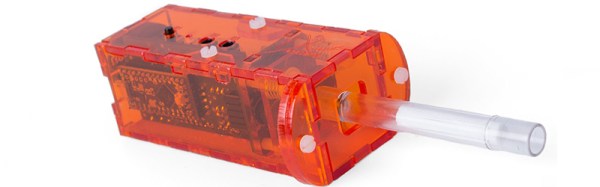
The theme of the last Hackaday Prize challenge was Assistive Technologies, and with this comes technical solutions for people with severe motor restriction. One of the best we’ve seen is a device designed to use a sip and puff interface and buttons to control a cursor through USB. The almost too clever name for a device meant to be used via fingers or lips is the FLipMouse, and right now it’s in the running for the finals in the Hackaday Prize.

The FLipMouse isn’t so much a mouse as it is a very long and very sensitive joystick. The main method of interaction is a long, hollow tube wrapped with force sensors. These force sensors, like those seen in the Nintendo Power Glove or this other Hackaday Prize entry, turn the tube into an exceptionally sensitive joystick, meant to be gripped by the user’s lips. This tube is hollow, too, so a sip-and-puff interface is used to register right and left clicks. Of course, there are a few external buttons that may be remapped to anything.

How useful is it? This mouth-based mouse seems to be exceptionally capable. In the video below, [Harry Hötzinger] plays a synthesizer live on stage using a step sequencer and a mouse-controlled synth interface. It’s all highly optimized for the specific piece of music, but it is an incredible display of what you can do with a laser cutter and a Digikey BOM.

Continue reading “Hackaday Prize Entry: FLipMouse”

Hackaday Prize Entry: A Cheap, Portable Incubator

Millions of premature babies are born every year, and more than a few of these births occur hours away from any hospital with a NICU. [Manoj]’s entry for the Hackaday Prize is a simple, but very useful primitive incubator. Is it as good as the incubators you would find in a world-class hospital? No, but that’s not the point. This is an incubator for the rest of the world, where neonatal care is lacking.

You’re not going to get mechanical respiration or even oxygen into a device that is meant for the most far-flung areas on the planet, so this incubator focuses almost solely on monitoring. Packed inside a premie-sized sleeping bag is enough electronics to measure heart rate, blood oxygen, temperature and respiration. Also, there are a few resistive fabric elements to turn electricity into warmth.

Of course, anything you would find in any hospital or clinic would greatly outclass what this project has to offer. That’s really not the point, though; this incubator is cheap, can be deployed anywhere, and provides enough information to hopefully keep a preterm child alive. That’s good enough for us, and makes for a great entry into the Hackaday Prize.

Hackaday Prize Entry: An Open Bluetooth Switch Interface

The theme of the last Hackaday Prize challenge was Assistive Technologies, and there is perhaps no assistive technology as desperately needed as a device to help people who can’t use common input devices. Using a keyboard, mouse, or touchscreen can be hard, but this Hackaday Prize project turns all these problems into a simple Bluetooth-enabled switch.

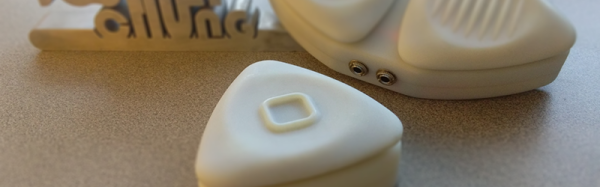
The BOSI – the Bluetooth Open Source Switch Interface – is, at its heart, just a big Bluetooth button inside a 3D-printed enclosure designed in Solidworks. These enclosures house a button connected to an Adafruit Bluefruit EZ-Key. Add a battery and a charging circuit, and you have a button that can be pressed by anyone, that connects to any device, and can do anything.

The real trick to a system like this is the software stack, and for this, BOSI can be used with iOS and OS X using the Switch Control interface. Android works, too, and the entire device is exceptionally usable for anyone that can’t use a normal input device. A great entry for the Hackaday Prize.

NextThingCo Introduces C.H.I.P. Pro, GR8 System On Module

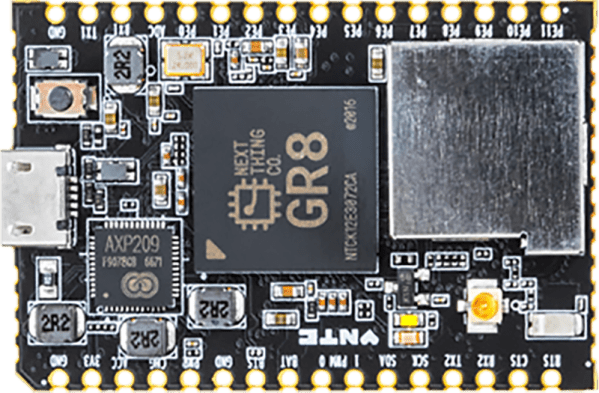
NextThingCo, makers of the very popular C.H.I.P. single board Linux computer, have released the latest iteration of their hardware. It’s the C.H.I.P. Pro, an SBC designed to be the embedded brains of your next great project, product, or Internet of Things thing.

The C.H.I.P. Pro features an Allwinner R8 ARMv7 Cortex-A8 running at 1 GHz, a MALI-400 GPU, and either 256 MB or 512 MB of NAND Flash. The Pro also features 802.11 b/g/n WiFi, Bluetooth 4.2, and is fully certified by the FCC. This board will be available in December at supposedly any quantity for $16.

The design of the C.H.I.P. Pro is a mix between a module designed to be installed in a product and a single board computer designed for a breadboard. It features castellated edges like hundreds of other modules, but the design means that assembly won’t be as simple as throwing down some paste and reflowing everything. The C.H.I.P. Pro features parts on two sides, making reflow questionable and either 0.1″ headers or a cutout on a PCB necessary. As a single board computer, this thing is small, powerful, and a worthy competitor to the Raspberry Pi Zero. A C.H.I.P. Pro development kit, consisting of two C.H.I.P. Pro units, a ‘debug’ board, and headers for breadboarding, is available for $49, with an estimated ship date in December.

A $16 Linux module with WiFi, Bluetooth, and no NDA is neat, but perhaps a more interesting announcement is that NextThingCo will also be selling the module that powers the C.H.I.P. Pro.

The GR8 module includes an Allwinner R8 ARMv7 Cortex-A8 running at 1 GHz, a MALI-400 GPU, and 256 MB of DDR3 SDRAM. Peripherals include TWI, two UARTS, SPI (SD cards support is hacked onto this), two PWM outputs, a single 6-bit ADC, I2S audio, S/PDIF, one USB 2.0 Host and one USB 2.0 OTG, and a parallel camera interface. This isn’t really a chip meant for video out, but it does support TV out and a parallel LCD interface. A limited datasheet for the GR8 is available on the NextThingCo GitHub.

Putting an entire Linux system on a single BGA module must draw comparisons to the recent release of the Octavo Systems OSD355X family, best known to the Hackaday audiences as the Beaglebone on a chip. Mechanically, the Octavo chip will be a bit easier to solder. Even though it has almost twice as many balls as the GR8, 400 on the Octavo and 252 on the GR8, the Octavo has a much wider pitch between the balls, making escape routing much easier.

Comparing peripherals between the OSD355X and GR8, it’s a bit of a wash, with the OSD coming out slightly ahead with Ethernet, more RAM and fancy TI PRUs. Concerning pricing, the GR8 wins hands down at $6 per chip in any quantity. That’s significantly less than the OSD355X.

The original C.H.I.P. has been exceptionally well received by the community NextThingCo is marketing to, despite the community’s distaste for Allwinner CPUs, cringeworthy PR, and questions concerning the true price of the C.H.I.P.. The C.H.I.P. Pro will surely see more than a few uses, but the GR8 is the real story here. A jellybean part that contains an entire Linux system has been the fevered dream of a madman for years now. The GR8 makes putting the power of open software into any project much easier, and we can’t wait to see the applications it allows.


Creating A PCB In Everything: Friends Don’t Let Friends Use Fritzing

This week, we’re continuing our Creating A PCB In Everything series, where we go through the steps to create a simple, barebones PCB in different EDA suites. We’re done with Eagle, and now it’s time to move onto Fritzing.

fritzing-logoFritzing came out of the Interaction Design Lab at the University of Applied Sciences of Potsdam in 2007 as a project initiated by Professor Reto Wettach, André Knörig and Zach Eveland. It is frequently compared to Processing, Wiring, or Arduino in that it provides an easy way for artists, creatives, or ‘makers’ to dip their toes into the waters of PCB design.



I feel it is necessary to contextualize Fritzing in the space of ‘maker movement’, DIY electronics, and the last decade of Hackaday. Simply by virtue of being an editor for Hackaday, I have seen thousands of homebrew PCBs, and tens of thousands of amateur and hobbyist electronics projects. Despite what the Fritzing’s Wikipedia talk page claims, Fritzing is an important piece of software. The story of the ‘maker movement’ – however ill-defined that phrase is – cannot be told without mentioning Fritzing. It was the inspiration for CircuitLab, and the Fritzing influence can easily be seen in Autodesk’s 123D Circuits.

Just because a piece of software is important doesn’t mean it’s good. I am, perhaps, the world’s leading expert at assessing poorly designed and just plain shitty PCBs. You may scoff at this, but think about it: simply due to my vocation, I look at a lot of PCBs made by amateurs. EE professors, TAs, or Chris Gammell might beat me on volume, but they’re only looking at boards made by students using one tool. I see amateur boards built in every tool, and without exception, the worst are always designed in Fritzing. It should be unacceptable that I can even tell they’re designed in Fritzing.

Fritzing has its place, and that place is building graphical representations for breadboard circuits. Fritzing has no other equal in this respect, and for this purpose, it’s an excellent tool. You can also make a PCB in Fritzing, and here things aren’t as great. I want to do Fritzing for this Creating A PCB In Everything series only to demonstrate how bad PCB design can be.

For the next few thousand words, I am going to combine a tutorial for Fritzing with a review of Fritzing. Fritzing is an important piece of software, if only for being a great way to create graphics of breadboard circuits. As a PCB design tool, it’s lacking; creating parts from scratch is far too hard, and there’s no way to get around the grid snap tool. No one should ever be forced to create a PCB in Fritzing, but it does have its own very limited place.

Continue reading “Creating A PCB In Everything: Friends Don’t Let Friends Use Fritzing”

Hackaday Prize Entry: Augmented Reality Historical Reenactments

Go to a pier, boardwalk, the tip of Manhattan, or a battlefield, and you’ll see beautifully crafted coin operated binoculars. Drop a coin in, and you’ll see the Statue of Liberty, a container ship rolling coal, or a beautiful pasture that was once the site of terrific horrors. For just a quarter, these binoculars allow you to take in the sights, but simply by virtue of the location of where these machines are placed, you’re standing in the midsts of history. There’s so much more there. If only there was a way to experience that.

This is why [Ben Sax] is building the Perceptoscope. It’s a pair of augmented reality binoculars. Drop in a quarter, and you’ll be able to view the entirety of history for an area. Drop this in Battery Park, and you’ll be able to see the growth of Manhattan from New Amsterdam to the present day. Drop this in Gettysburg, and you’ll see a tiny town surrounded by farms become a horrorscape and turn back into a tiny town surrounded by a National Park.

This is a long term project, with any installations hopefully lasting for decades. That means these Perceptoscopes need to be tough, both in hardware and software. For the software, [Ben] is using WebVR, virtual reality rendering inside a browser. This means the electronics can just be a tablet that can be swapped in and out.

The hardware, though, isn’t as simple. This is going to be a device running in the rain, snow, and freezing weather for decades. Everything must be overbuilt, and already [Ben] has spent far too much time working on the bearing blocks.

Although this is an entry for The Hackaday Prize, it was ‘pulled out’, so to speak, to be a part of the Supplyframe DesignLab inaugural class. The DesignLab is a shop filled with the best tools you can imagine, and exists for only one goal: we’re getting the best designers in there to build cool stuff. The Perceptoscope has been the subject of a few videos coming out of the DesignLab, you can check those out below.

Continue reading “Hackaday Prize Entry: Augmented Reality Historical Reenactments”