This Week In Security: Linux WiFi, Fortinet, Text4Shell, And Predictable GUIDs

Up first this week is a quintet of vulnerabilities in the Linux kernel’s wireless code. It started with [Soenke Huster] from TU Darmstadt, who found a buffer overwrite in mac80211 code. The private disclosure to SUSE kernel engineers led to a security once-over of this wireless framework in the kernel, and some other nasty bugs were found. A couple result in Denial-of-Service (DOS), but CVE-2022-41674, CVE-2022-42719, and CVE-2022-42720 are Remote Code Execution vulnerabilities. The unfortunate bit is that these vulnerabilities are triggered on processing beacon frames — the wireless packets that announce the presence of a wireless network. A machine doesn’t have to be connected or trying to connect to a network, but simply scanning for networks can lead to compromise.

The flaws were announced on the 13th, and were officially fixed in the mainline kernel on the 15th. Many distros shipped updates on the 14th, so the turnaround was quite quick on this one. The flaws were all memory-management problems, which has prompted a few calls for the newly-merged Rust framework to get some real-world use sooner rather than later.

Fortinet

Much of Fortinet’s lineup, most notable their Fortigate firewalls, has a pre-auth authentication bypass on the administrative HTTP/S interface. Or plainly, if you can get to the login page, you can break in without a password. That’s bad, but at this point, you *really* shouldn’t have any administrative interfaces world-accessible on any hardware. Updated firmware is available.

More than just a couple days have passed, so we have some idea of the root problem and how it was fixed. It’s a simple one — the Forwarded HTTP headers on an incoming request are unintentionally trusted. So just send a request with Forwarded:for and Forwarded:by set to 127.0.0.1, and it falls through into code logic intended for internal API calls. Add a trusted SSH key, and pop, you’re in. Whoops. Continue reading “This Week In Security: Linux WiFi, Fortinet, Text4Shell, And Predictable GUIDs”

This Week In Security: Npm Timing Leak, Siemens Universal Key, And PHP In PNG

First up is some clever wizardry from the [Aqua Nautilus] research team, who discovered a timing attack that leaks information about private npm packages. The setup is this, npm hosts both public and private node.js packages. The public ones are available to everyone, but the private packages are “scoped”, meaning they live within a private namespace, “@owner/packagename” and are inaccessible to the general public. Trying to access the package results in an HTTP 404 error — the same error as trying to pull a package that doesn’t exist.


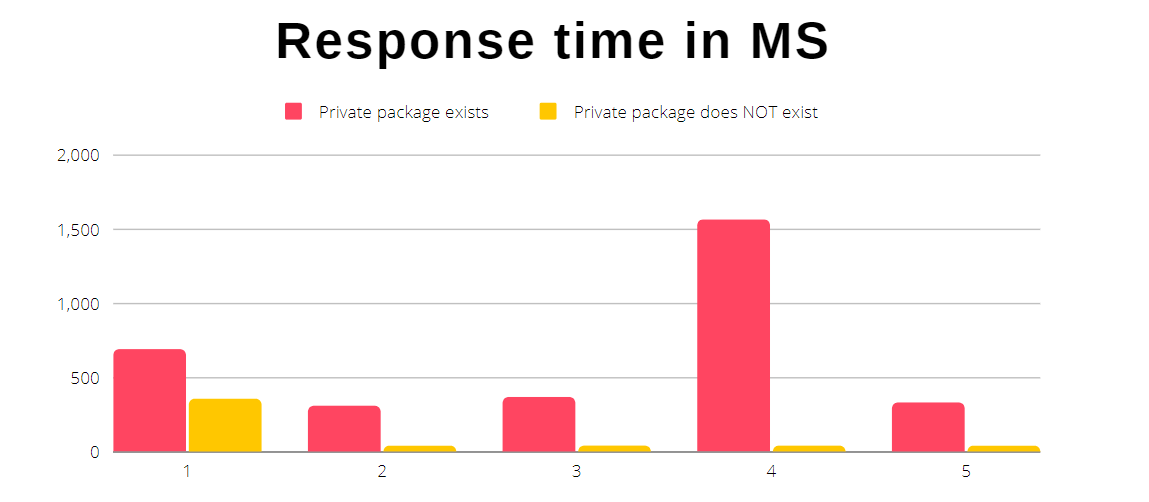
The clever bit is to keep trying, and really pay attention to the responses. Use npm’s API to request info on your target package, five times in a row. If the package name isn’t in use, all five requests will take the expected amount of time. That request lands at the service’s backend, a lookup is performed, and you get the response. On the flipside if your target package does exist, but is privately scoped, the first request returns with the expected delay, and the other four requests return immediately. It appears that npm has front-end that can cache a 404 response for a private package. That response time discrepancy means you can map out the private package names used by a given organization in their private scope.

Now this is all very interesting, but it turns into a plausible attack when combined with typosquatting and dependency confusion issues. Those attacks are two approaches to the same goal, get a node.js deployment to run a malicious package instead of the legitimate one the developer intended. One depends on typos, but dependency confusion just relies on a developer not explicitly defining the scope of a package.

Continue reading “This Week In Security: Npm Timing Leak, Siemens Universal Key, And PHP In PNG”

This Week In Security: PHP Attack Defused, Scoreboard Manipulation, And Tillitis

If you use PHP, you likely use the Composer tool for managing dependencies, at least indirectly. And the good folks at SonarSource found a nasty, potential supply chain attack in this tool, when used in the Packagist repository. The problem is the support for arbitrary README filenames. When a package update shows up on Packagist, that service uses a Version Control Service (VCS) like Git or Mercurial to pull the specified readme location. That pull operation is subject to argument injection. Name your branch --help, and Git will happily run the help argument instead of doing the pull intended. In the case of Git commands, our intrepid researchers were unable to weaponize the issue to achieve code execution.

Composer also supports projects that use Mercurial as their VCS, and Mercurial has a --config option that has… interesting potential. It allows redefining a Mecurial command as a script snippet. So a project just has to contain a malicious payload.sh, and the readme set to --config=alias.cat=!hg cat -r : payload.sh|sh;,txt. For those keeping track at home, the vulnerability is that this cursed string of ugly is accepted by Composer as a valid filename. This uses the --config trick to redefine cat as a bit of script that executes the payload. It ends in .txt because that is a requirement of Composer.

So let’s talk about what this little hack could have been used for, or maybe still used for on an unpatched, private install of Packagist. This is an unattended attack that jumps straight to remote script execution — on an official package repository. If discovered and used for evil, this would have been a massive supply chain attack against PHP deployments. Instead, thanks to SonarSource, it was discovered and disclosed privately back in April. The official Packagist repo at packagist.org was fixed the day after disclosure, and a CVE and updated packages went out six days later. Great work all around.
Continue reading “This Week In Security: PHP Attack Defused, Scoreboard Manipulation, And Tillitis”

2022 Cyberdeck Contest: The Oscilloscope Deck

When [Jak_o_Shadows] Siglent Oscilloscope died, he didn’t just mourn the loss, he saw an opportunity. See, he had a Raspberry Pi 400 already set aside for a cyberdeck build, and he just scored a novel case. Most of the insides of the old scope came out, but the screen and control knobs live on in the new build. An HDMI-to-LVDS adapter brought the screen back to life, and the control knobs are a work-in-progress. Added to the case are some fun goodies, like a LimeSDR, connected to the old scope inputs. A PL2303 is wired to the serial port, making that functional, too. It’s a very nice touch that the build retains the original scope’s functions this way.

There’s plenty of 3d-printed goodness, like some internal brackets to hold things in place. The real star of the show is a 3d-printed hinge, holding the scope and Pi 400 together and making the whole package portable. There’s a neat tip, too, in that the Pi 400 has a huge integrated heat sync under the keyboard. It’s just a sheet of metal, so you can drill and tap it as mounting points. Cool!

This is a nifty build, and certainly a worthy deck for jacking-in to whatever you’re working on. And re-purposing an oscilloscope is a nice aesthetic. If [Jak_o_Shadows] can just get the front array of buttons and knobs working with his STM32, this will be a killer deck, the envy of console cowboys everywhere.

Microsoft Wants You (To Help With Assistive Tech)

In college I had an exceptional piano teacher that was entirely blind. One day he noticed I had brought in my new-ish laptop, and his unexpected request — “can I look at your laptop?” — temporarily flabbergasted me. Naturally there wasn’t much he could do with it, so he gave it a once over with his fingers to understand the keyboard layout, and that was that. I still think about this experience from time to time, and the most obvious lesson is that my paradigm for using a computer didn’t map well to his abilities and disability.

The folks at Microsoft are thinking about this problem, too, and they’re doing a lot of work to make technology work for more users, like the excellent Xbox Adaptive Controller pictured above. Now, if you have some experience helping folks overcome the challenges of disability, or have a killer idea for an assistive technology solution, Microsoft is looking for projects to fund. Did you rig up a Raspberry Pi and webcam to automatically read text aloud? Maybe you pulled that old Kinect out, and are working on sign-language reader using 3D data points.

Make a pitch of your project or solid idea by the November 4th deadline, and just maybe you can get some help to make it a reality. Just make sure you come back and tell us about it! After all, some of the coolest hacks we’ve ever covered have been adaptive tech projects.

Thanks to [MauroPichiliani] for sending in this tip.

This Week In Security: Exchange 0-day, Doppelgangers, And Python Gets Bit In The TAR

According to researchers at GTSC, there’s an unpatched 0-day being used in-the-wild to exploit fully patched Microsoft Exchange servers. When they found one compromised server, they made the report to Microsoft through ZDI, but upon finding multiple Exchange servers compromised, they’re sounding the alarm for everyone. It looks like it’s an attack similar to ProxyShell, in that it uses the auto-discover endpoint as a starting point. They suspect it’s a Chinese group that’s using the exploit, based on some of the indicators found in the webshell that gets installed.

There is a temporary mitigation, adding a URL-based request block on the string .*autodiscover\.json.*\@.*Powershell.. The exact details are available in the post. If you’re running Exchange with IIS, this should probably get added to your system right now. Next, use either the automated tool, or run the PowerShell one-liner to detect compromise: Get-ChildItem -Recurse -Path -Filter "*.log" | Select-String -Pattern 'powershell.*autodiscover\.json.*\@.*200. This one has the potential to be another really nasty problem, and may be wormable. As of the time of writing, this is an outstanding, unpatched problem in Microsoft Exchange. Come back and finish the rest of this article after you’ve safed up your systems.

Continue reading “This Week In Security: Exchange 0-day, Doppelgangers, And Python Gets Bit In The TAR”

The 1337 PNG Hashquine

A hashquine is a fun way to show off your crypto-tricks — It’s a file that contains its own hash. In some file types it’s trivial, you just pick the hash to hit, and then put random data in a comment or other invisible field till you get a collision. A Python script that prints its own hash would be easy. But not every file type is so easy. Take PNG for instance. these files are split into chunks of data, and each chunk is both CRC-32 and adler32 checksummed. Make one change, and everything changes, in three places at once. Good luck finding that collision. So how exactly did [David Buchanan] generate that beautiful PNG, which does in fact md5sum to the value in the image? Very cleverly.

md5sum hashquine.pngThankfully [David] shared some of his tricks, and they’re pretty neat. The technique he details is a meet-in-the-middle hack, where 36 pairs of MD5 collision blocks are found, with the understanding that these 36 blocks will get added to the file. For each block, either A or B of the pair will get plugged in at that location, and the md5sum won’t change. It’s a total of 2^36 possible combinations of these blocks, which is more computation than was practical for this particular hack. The solution is to pre-compute the results of every possible combination of the first 18 blocks, and store the results in a lookup table. The second half of the collisions are run backwards from a target CRC value, and the result checked against the lookup table. Find a hit, and you just found a series of blocks that matches both your target md5sum and CRC32 results.

Thanks to [Julian] for the tip! And as he described it, this hack is one that gets more impressive the more you think about it. Enjoy!