Aluminum Business Cards Make Viable PCB Stencils

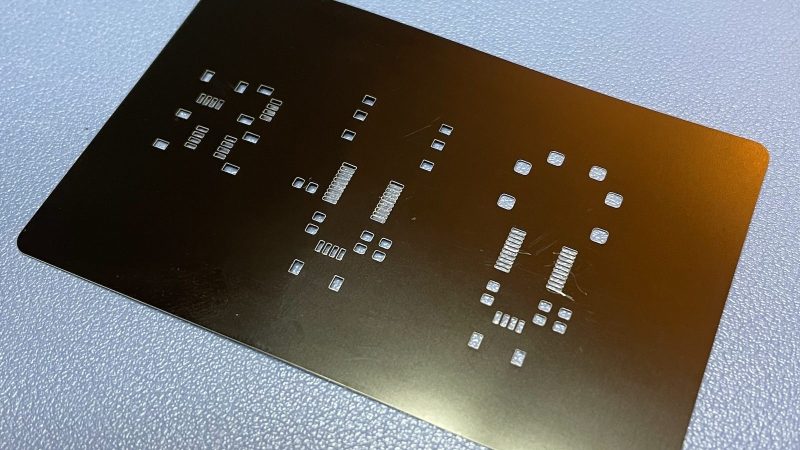
[Mikey Sklar] had a problem—namely, running low on the brass material typically used for making PCB stencils. Thankfully, a replacement material was not hard to find. It turns out you can use aluminum business card blanks to make viable PCB stencils.

Why business card blanks? They’re cheap, for a start—maybe 15 cents each in quantity. They’re also the right thickness, at just 0.8 mm 0.18 mm, and they’re flat, unlike rolled materials that can tend to flip up when you’re trying to spread paste. They’re only good for small PCBs, of course, but for many applications, they’ll do just fine.

To cut these, you’ll probably want a laser cutter. [Mikey] was duly equipped in that regard already, which helped. Using a 20 watt fiber laser at a power of 80%, he was able to get nice accurate cuts for the stencils. Thanks to the small size of the PCBs in question, the stencils for three PCBs could be crammed on to a single card.

If you’re not happy with your existing PCB stencil material, you might like to try these aluminium blanks on for size. We’ve covered other stenciling topics before, too.

Continue reading “Aluminum Business Cards Make Viable PCB Stencils”
“Glasses” That Transcribe Text To Audio

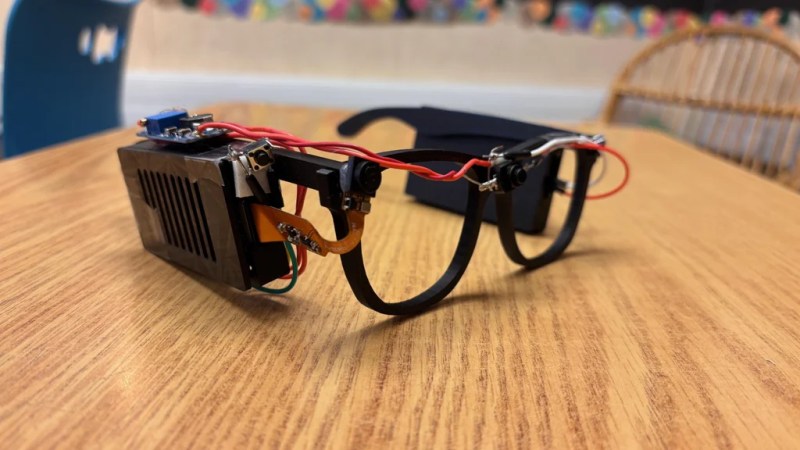
Glasses for the blind might sound like an odd idea, given the traditional purpose of glasses and the issue of vision impairment. However, eighth-grade student [Akhil Nagori] built these glasses with an alternate purpose in mind. They’re not really for seeing. Instead, they’re outfitted with hardware to capture text and read it aloud.

Yes, we’re talking about real-time text-to-audio transcription, built into a head-worn format. The hardware is pretty straightforward: a Raspberry Pi Zero 2W runs off a battery and is outfitted with the usual first-party camera. The camera is mounted on a set of eyeglass frames so that it points at whatever the wearer might be “looking” at. At the push of a button, the camera captures an image, and then passes it to an API which does the optical character recognition. The text can then be passed to a speech synthesizer so it can be read aloud to the wearer.

It’s funny to think about how advanced this project really is. Jump back to the dawn of the microcomputer era, and such a device would have been a total flight of fancy—something a researcher might make a PhD and career out of. Indeed, OCR and speech synthesis alone were challenge enough. Today, you can stand on the shoulders of giants and include such mighty capability in a homebrewed device that cost less than $50 to assemble. It’s a neat project, too, and one that we’re sure taught [Akhil] many valuable skills along the way.

Continue reading ““Glasses” That Transcribe Text To Audio”

Speeding Up Your Projects With Direct Memory Access

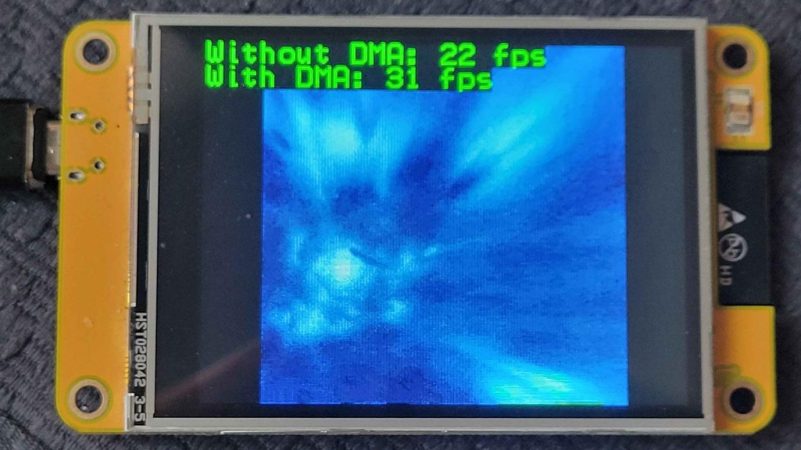
Here’s the thing about coding. When you’re working on embedded projects, it’s quite easy to run into hardware limitations, and quite suddenly, too. You find yourself desperately trying to find a way to speed things up, only… there are no clock cycles to spare. It’s at this point that you might reach for the magic of direct memory access (DMA). [Larry] is here to advocate for its use.

DMA isn’t just for the embedded world; it was once a big deal on computers, too. It’s just rarer these days due to security concerns and all that. Whichever platform you’re on, though, it’s a valuable tool to have in your arsenal. As [Larry] explains, DMA is a great way to move data from memory location to memory location, or from memory to peripherals and back, without involving the CPU. Basically, a special subsystem handles trucking data from A to B while the CPU gets on with whatever other calculations it had to do. It’s often a little more complicated in practice, but that’s what [Larry] takes pleasure in explaining.

Indeed, back before I was a Hackaday writer, I was no stranger to DMA techniques myself—and I got my project published here! I put it to good use in speeding up an LCD library for the Arduino Due. It was the perfect application for DMA—my main code could handle updating the graphics buffer as needed, while the DMA subsystem handled trucking the buffer out to the LCD quicksmart.

If you’re struggling with updating a screen or LED strings, or you need to do something fancy with sound, DMA might just be the ticket. Meanwhile, if you’ve got your own speedy DMA tricks up your sleeve, don’t hesitate to let us know!

A Foot Pedal To Supplement Your Keyboard

It’s 2025, and you’re still probably pressing modifier keys on your keyboard like a… regular person. But it doesn’t have to be this way! You could use foot pedals instead, as [Jan Herman] demonstrates.

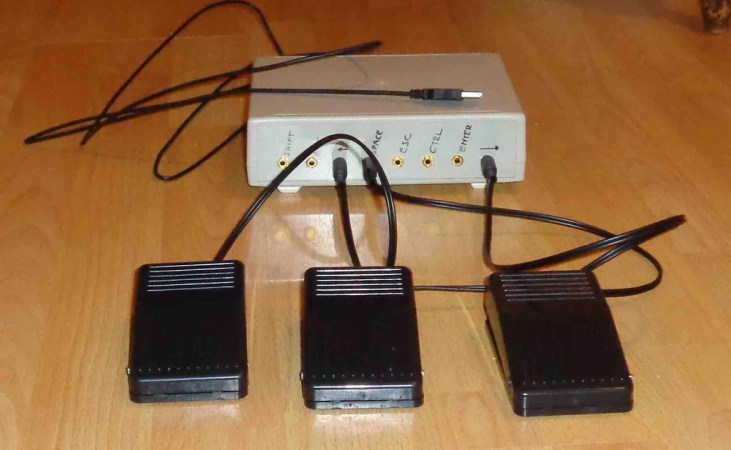
Now, if you’re a diehard embedded engineer, you might be contemplating your favorite USB HID interface chip and how best to whip up a custom PCB for the job. But it doesn’t have to be that complicated! Instead, [Jan] goes for an old school hack—he simply ripped the guts out of an cheap USB keyboard. From there, he wired up a few of the matrix pads to 3.5 mm jack connectors, and put the whole lot in a little metal project box. Then, he hooked up a few foot pedal switches with 3.5 mm plugs to complete the project.

[Jan] has it set up so he can plug foot pedals in to whichever keys he needs at a given moment. For example, he can plug a foot pedal in to act as SPACE, ESC, CTRL, ENTER, SHIFT, ALT, or left or right arrow. It’s a neat way to make the project quickly reconfigurable for different productivity tasks. Plus, you can see what each pedal does at a glance, just based on how it’s plugged in.

It’s not an advanced hack, but it’s a satisfying one. We’ve seen some other great builds in this space before, too. If you’re cooking up your own keyboard productivity hacks, don’t hesitate to let us know!

Simulating Embedded Development To Reduce Iteration Time

There’s something that kills coding speed—iteration time. If you can smash a function key and run your code, then watch it break, tweak, and smash it again—you’re working fast. But if you have to first compile your code, then plug your hardware in, burn it to the board, and so on… you’re wasting a lot of time. It’s that problem that inspired [Larry] to create an embedded system simulator to speed development time for simple projects.

The simulator is intended for emulating Arduino builds on iPhone and Mac hardware. For example, [Larry] shows off a demo on an old iPhone, which is simulating an ESP32 playing a GIF on a small LCD display. The build isn’t intended for timing-delicate stuff, nor anything involving advanced low-level peripherals or sleep routines and the like. For that, you’re better off with real hardware. But if you’re working on something like a user interface for a small embedded display, or just making minor tweaks to some code… you can understand why the the simulator might be a much faster way to work.

For now, [Larry] has kept the project closed source, as he’s found that it wouldn’t reasonably be possible for him to customize it for everyone’s unique hardware and use cases. Still, it’s a great example of how creating your own tools can ease your life as a developer. We’ve seen [Larry]’s great work around here before, like this speedy JPEG decoder library.
Continue reading “Simulating Embedded Development To Reduce Iteration Time”

DIY Your Own Red Light Therapy Gear

There are all kinds of expensive beauty treatments on the market — various creams, zappy lasers, and fine mists of heavily-refined chemicals. For [Ruth Amos], a $78,000 LED bed had caught her eye, and she wondered if she could recreate the same functionality on the cheap.

The concept behind [Ruth]’s build is simple enough. Rather than buy a crazy-expensive off-the-shelf beauty product, she decided to just buy equivalent functional components: a bunch of cheap red LEDs. Then, all she had to do was build these into a facemask and loungewear set to get the same supposed skin improving benefits at much lower cost.

[Ruth] started her build with a welding mask, inside which she fitted red LED strips of the correct wavelength for beneficial skin effects. She then did the same with an over-sized tracksuit, lacing it with an array of LED strips to cover as much of the body as possible. While it’s unlikely she was able to achieve the same sort of total body coverage as a full-body red light bed, nor was it particularly comfortable—her design cost a lot less—on the order of $100 or so.

Of course, you might question the light therapy itself. We’re not qualified to say whether or not red LEDs will give you better skin, but it’s not the first time we’ve seen a DIY attempt at light therapy. Continue reading “DIY Your Own Red Light Therapy Gear”

Simple Robot Assembled From E-Waste Actually Looks Pretty Cool

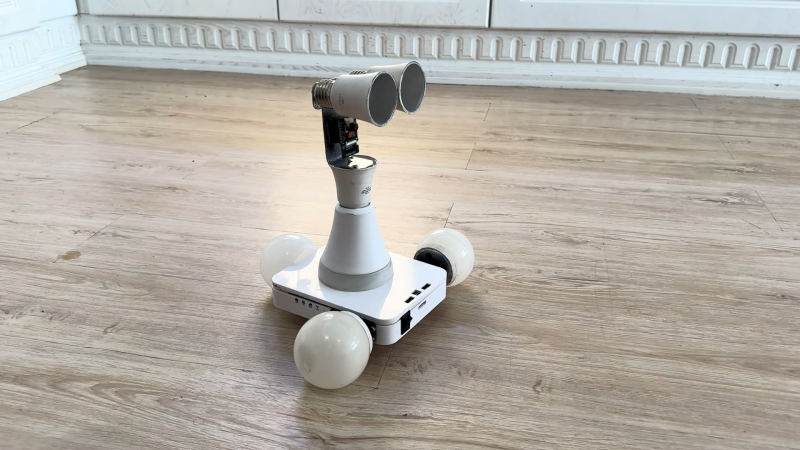
If you’re designing a robot for a specific purpose, you’re probably ordering fresh parts and going with a clean sheet design. If you’re just building for fun though, you can just go with whatever parts you have on hand. That’s how [Sorush Moradisani] approached building Esghati—a “robot made from garbage.”

Remote viewing made easy.

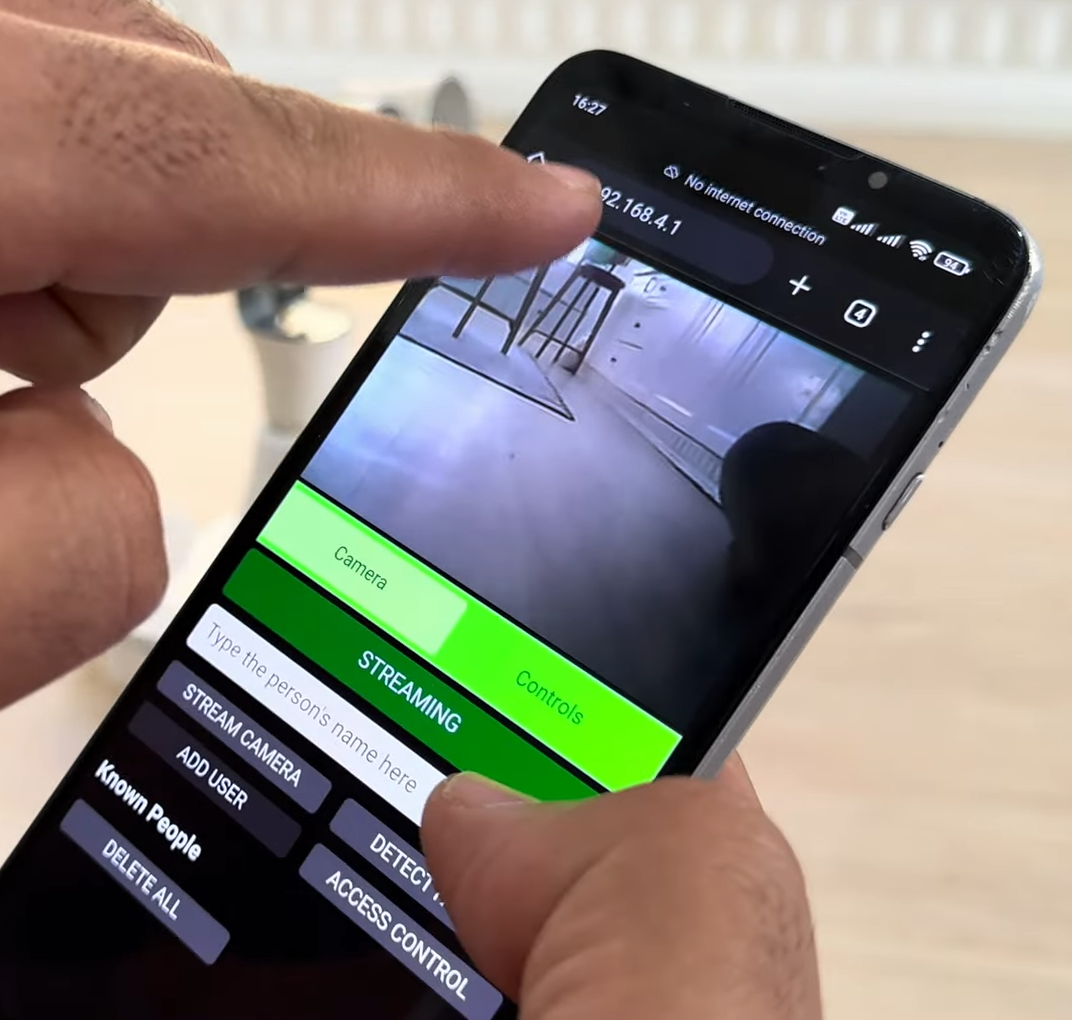
The body of the robot is an old Wi-Fi router that was stripped clean, with the antenna left on for a classic “robot” look. The wheels are made out of old diffusers cut off of LED lamps. Two servos are used to drive the wheels independently, allowing the robot to be steered in a rudimentary tank-style fashion. Power is courtesy of a pair of 18650 lithium-ion cells. The brains of the robot is an ESP32-CAM—a microcontroller board which includes a built-in camera. Thanks to its onboard Wi-Fi, it’s able to host its own website that allows control of the robot and transmits back pictures from the camera. The ESP32 cam itself is mounted on the “head” on the robot for a good field of view. Meanwhile, it communicates with a separate Arduino Nano which is charged with generating pulses to run the drive servos. Code is on Github for the curious.

It’s not a complicated robot by any means—it’s pretty much just something you can drive around and look through the camera, at this stage. Still, it’s got plenty of onboard processing power and you could do a lot more with it. Plus, the wireless control opens up a lot of options. With that said, you’d probably get sick of the LED bulb wheels in short order—they offer precious little grip on just about any surface. Really, though, it just goes to show you how a bit of junk e-waste can make a cute robot—it almost has Wall-E vibes. Video after the break.

Continue reading “Simple Robot Assembled From E-Waste Actually Looks Pretty Cool”