Get Thee To Git

While version control used to be reserved for big corporate projects, it is very mainstream these days. You can attribute much of that to Git, the software that has nearly displaced other version control. Git works well, it is versatile, and it scales well. It is easy to use as an individual developer or as part of a worldwide team. But Git is also one of those things that people don’t always study, they just sort of “pick it up” as they go. That motivated [Glasskube] to create “The Guide to Git I Never Had.”

If you are ready to click away because you are not a software person, hang on. Git is actually useful for many different kinds of data, and there are a number of hardware projects that use Git in some form. That’s especially true if the project has some code associated with it, but there are projects that consist of PCBs, reverse engineering documentation, or schematics.

Continue reading “Get Thee To Git”

Hackaday Podcast Episode 287: Raspberry Pi Woes, Blacker Than Black, And Printing With Klipper

Elliot Williams is back from vacation, and he and Al Williams got together to talk about the best Hackaday posts from the last week. Of course, the Raspberry Pi RP2350 problem generated a bit of discussion.

On a lighter note, they saw laser lawn care, rooting WiFi devices, and some very black material made from wood. Need more current-sinking capability from a 555? They talked about that, too, along with a keyboard you use with your feet.

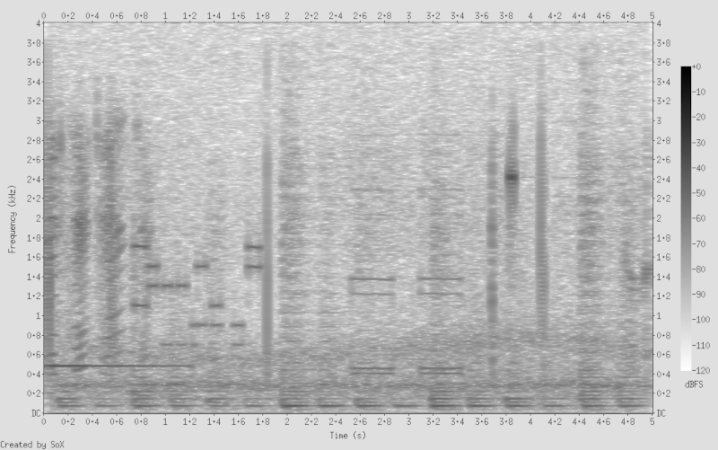
The guys had a lot to say about Klipper, why you might want to move your 3D printer to it, and the FCC’s stance on ham radio antennas in restricted neighborhoods. Oh, and don’t forget to play “What’s that Sound?”

DRM? Who’s got time for that? Download our legally unencumbered MP3.

Continue reading “Hackaday Podcast Episode 287: Raspberry Pi Woes, Blacker Than Black, And Printing With Klipper”

How Sony Mastered The Transistor

When you think of Sony, you probably think of a technology company that’s been around forever. However, as [Asianometry] points out, it really formed in the tough years after World War II. The two people behind the company’s formation were an interesting pair. One of them was a visionary engineer and one was a consummate businessman.

While it is hard to imagine today, securing a license to produce transistors was difficult in the early days. What’s worse is, even with the license, it was not feasible to use the crude devices in a radio.

Continue reading “How Sony Mastered The Transistor”

Humble 555 Gets A Boost For ESR Meter

[Peter Demchenko] wanted to use a low power TS555 in an ESR meter design. The problem is, he needed to handle significant current sink requirements for cases where the capacitor under test had a low ESR. The TS555 wasn’t up to the task.

However, [Peter] made an interesting observation. the output pin of the device can sink or source current. However, the discharge pin is exactly the same output but can only sink current.

But what if you tied them together? Using some equalizing resistors, that’s exactly what he did, and this roughly doubles the rated current sink capability. According to [Peter], you do make the circuit more sensitive to power supply variations, but that could be an acceptable trade, depending on your application.

Continue reading “Humble 555 Gets A Boost For ESR Meter”

Art of 3D printer in the middle of printing a Hackaday Jolly Wrencher logo

3D Printering: Switch And Klip(per)

Last time I tried to convince you that, if you haven’t already, you should try running your 3D printer with Klipper. There are several ways to actually make it work.

The first thing you need is something to run the Klipper host. Most people use a Raspberry Pi and if you already have one that runs OctoPrint, for example, you might well use it. Just tuck your SD card away in case you give up and install a fresh Linux system on a new card.

The Creality Sonic Pad has issues, but it does work.

However, a Pi isn’t your only option. You should be able to make it work on nearly anything that runs Linux. We’ve even seen it running on Windows under WSL. If you have an old laptop that can run Linux, that would work, too. We’ve even heard it works on a Chromebook.

The other option is to get a “pad.” Several vendors make touchscreens with some Linux single-board computer bundled together with Klipper preinstalled. For example, there is the Creality Sonic Pad, along with similar devices from other 3D printing companies.

If you decide to go that route, you might want to make sure it is easy to install your own software easily. Some pads, like the Creality unit, are notorious for having so much customization that they don’t lend themselves to upgrades unless they come from the manufacturer. In some cases, you can wipe out the stock firmware and install a normal operating system, but at that point, you could probably just buy a Pi and a touchscreen, right?

Continue reading “3D Printering: Switch And Klip(per)”

College Gives You Practical Electronics

While classroom learning isn’t for everyone, one awesome benefit of the Internet is that you have a variety of college classes available to you, even if they aren’t for credit. You can virtually audit classes from institutions around the world on just about any topic you can think of. Of course, the topic we think of is practical electronics and that happens to be the title of a class from [Dr. Bill Newhall] of the University of Colorado. You can watch the first part in the video below. So far, there are two lectures available but more are coming as the class is ongoing right now.

[Dr. Newhall] is one of us. He’s a ham radio operator and a pilot, as well as an electrical engineer. This class is aimed at others who need to understand electronics in another context. It reminded us of the genesis of one of our favorite books — also from a professor — The Art of Electronics.

The course material promises to cover topics ranging from solar and battery power sources, power conversions, IoT and RF communications, sensors, and DC motor control. Of course, there will also be sections on microcontrollers and associated hardware.

Just like a real class, the first lecture has a lot of housekeeping information, but you might want to skim it anyway. But if you want to get to the electronics, the second video won’t disappoint. While it covers a lot of ground that is probably familiar to most Hackaday readers, it is a good review and there’s more coming in the future lectures.

With all the resources online, you can easily hack your own degree plan together. Having access to instructors like [Dr. Newhall] is exactly the point we were making about how the Internet allows you to leverage the best educational opportunities no matter where you are.

Continue reading “College Gives You Practical Electronics”

Art of 3D printer in the middle of printing a Hackaday Jolly Wrencher logo

3D Printering: Klipper, The Free 3D Printer Upgrade

I have several 3D printers, and I’ve always been satisfied with using either Repetier or Marlin on all of them. There are a few other firmware versions that could run on my hardware, but those two have been all I’ve needed. Sure, it was painful for a while having to juggle features to fit the firmware image onto the smaller microcontroller boards. Now that Marlin supports big 32-bit boards however, that hasn’t been a problem. But recently, I’ve been on a program to switch everything to Klipper.

In this post, I’ll tell you why I did it and give you some data about why you might consider it, too.

The Landscape

Marlin is written in C and burned into a 3D printer’s flash memory. It does a lot. It receives G-code commands, interprets them, and translates them to meaningful actions on the hardware. Modern versions handle automatic transformations to account for lumpy beds, input shaping to reduce shaking, and linear advance to produce better prints.

It might seem simple to control a 3D printer, but there are lots of little details to take into account. For example, if you are moving the head between two XY coordinates and you expect a certain flow rate, then you have to figure out how fast to turn the steppers to get the right amount of plastic out over that time. You also may have to retract before you start a move, make sure temperatures are stable, and transform the actual coordinates based on bed leveling data. There’s a lot going on.

Klipper does the exact same job, but it does it differently. On the 3D printer board is a tiny piece of software that does very little. It’s a bit like a device driver for the printer. All by itself, it does nothing. But it can handle very basic commands that describe how to move the machine.

All the rest of the processing you expect to happen now runs on some Linux computer. That is very often a Raspberry Pi, but it could be a spare laptop, your desktop computer, or anything that will run a reasonable Linux install. Several vendors even sell single-board computers with touchscreens made specifically for running this part of Klipper.

However, even though a screen is nice, you don’t really need it. I’ll talk about that more later.

Continue reading “3D Printering: Klipper, The Free 3D Printer Upgrade”