Using Spy-Bi-Wire With The MSP430 Launchpad

[Suraj] has been working with some larger MSP430 chips with won’t fit on the Launchpad board. But that’s okay because he built a shield and wrote a guide about using the Spy-Bi-Wire protocol for programming the chips.

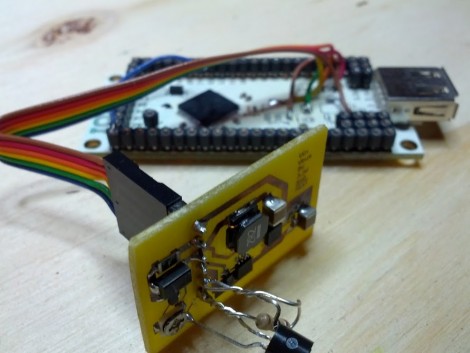
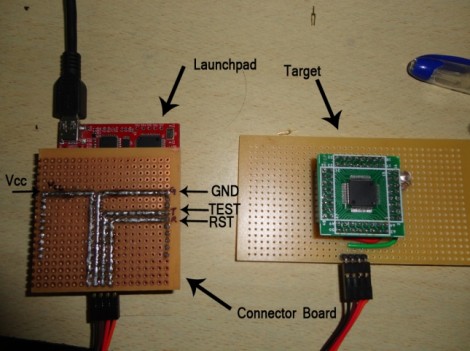
SBW is a four-wire interface. In the past we’ve used all of the board’s programming connections for in circuit programming, but the chips that support SBW only need a connection to the SBW and TEST pins (of course the other two connections are for voltage and ground). This shield brings the four pins together into one male pin header. In the image above [Suraj] is using the technique to program an MSP430F4152. His guide is Windows-based, but looking back, [Sprite_TM] shows how to use SBW when debugging in Eclipse.
Failed Kayaking Data Logger Is Something We Want To See Succeed

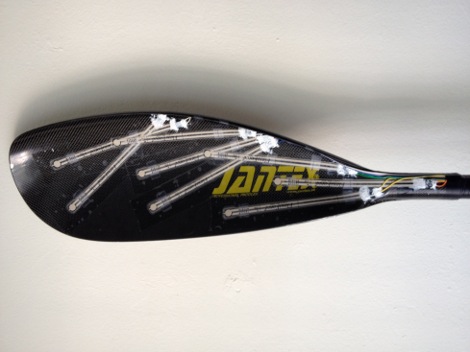
How can your love of hobby electronics and your participation in the Canadian National Kayaking Team be combined? Why not use your technical know-how to provide a performance edge? [Geoff Clarke] decided to rig up a paddle for data capture to see if they could learn anything.

Here you can see that a series of flex sensors were applied to one of the business ends of the paddle. These are connected to a microcontroller which is constantly monitoring them and dumping the data onto an SD card. The design will provide about nine minutes of data before the storage is used up. That sounds like a number that might need improving. We could see this being useful to log a series of practice runs on the same course, but with different athletes. By graphing and comparing the data, you should be able to make observations about how the paddle is being held and when force is applied that could help the rest of the team improve.

But we’re way ahead of ourselves. The rig was given a premature test-run and the flex sensors were destroyed by the salt water. We wish this had worked out and hope that [Geoff] will give it another try after rethinking the water proofing.

Physical Email Box — Mail Flag And All

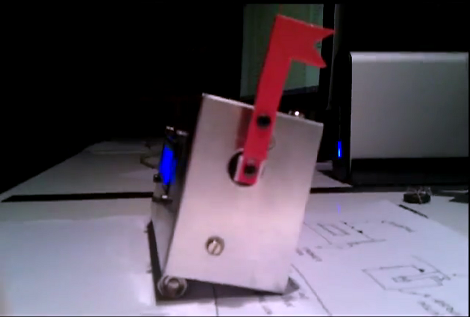
We gave you a side view because we really like the red new-mail flag. Sure it works the opposite of how USPS boxes do (where the flag tells the letter carrier there is outgoing mail to be picked up) but it’s still a fun touch. What you can’t see here is that this physical email box has a character LCD screen to read your messages and a set of buttons on the top to send back replies.

[Eraclitux’s] project puts an Arduino, LCD, a few buttons, and a servo motor inside of a metal project box. It connects to his computer and takes commands over the USB cable. The Python script is where most of the magic happens. This is a good reference project if you’re interested in using POP and SMTP packages to interface your Python scripts with an email server. You’re pretty limited on responses, with preprogrammed messages to reply “Yes”, “No”, or “Read”. But it’s journey that matters, not the destination.

Continue reading “Physical Email Box — Mail Flag And All” →

New IOIO In The Works

There’s a new version of the IOIO on the way and we think you’re going to like the goals this redesign aims to achieve. If you’re not familiar, the IOIO is an Android accessory board. It connects to the phone via USB and is aimed at making it easier to build your own hardware peripherals for the handhelds. Just look around here for a while and you’ll find a bunch of projects that are built around this board (for instance: adding MIDI control to your phone).

With [Ytai’s] announcement that the second generation IOIO is in the works he touches on price and functionality improvements. Certainly the $50 cost of the original board is pretty low, but if you’re just planning on hacking for giggles it’s a roadblock. Although no number has been quoted, the plan is to make the new rendition more affordable. As for functionality, the next generation will be a USB On-the-Go device. This means it can be a master when connected to the phone, or a slave when plugged into a computer. There are also a smattering of electrical design improvements.

WebKit On Chumby Lets Developers Avoid Flash

[Huan Truong] was looking for an Internet interface for one of his projects. In this case it’s a temperature logger, but it could be just about anything. He decided to give the Chumby a try, but was turned off by its use of Flash as the app framework. He decided to open up more options by running WebKit via his custom Chumby’s firmware.

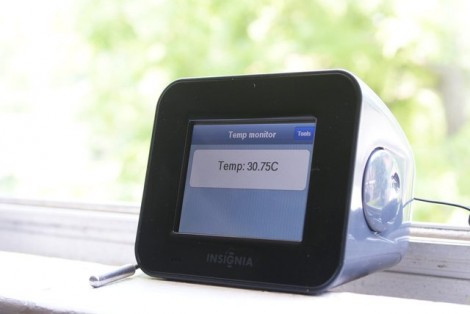
In the video after the break he shows the boot sequence and demonstrates his first app. The device runs through a screen calibration as it powers on. When the app comes up it looks and responds much more like an Android or iPhone app than the Chumby interfaces we’re accustomed to. This technique gives you pretty wide range of app development languages. That’s because all the Chumby really cares about is the index.cgi file that serves as the interface. Development and debugging can be done on a desktop (not that it couldn’t before but Flash development under Linux was always a pain).

It looks like this idea isn’t new, but we don’t recall seeing any other projects that used WebKit as an alternative Chumby interface.

Continue reading “WebKit On Chumby Lets Developers Avoid Flash” →

Hackerspace Introduction: Makers Local 256 In Huntsville Alabama

When I announced I would be traveling through Alabama and Georgia this summer, [Tim] from Makers Local 256 emailed me pretty quickly and asked if I’d like to swing by for a visit. Since I was planning to take my kids to the space center in Huntsville anyway, I thought it would be a perfect opportunity to tour another hackerspace.

Continue reading “Hackerspace Introduction: Makers Local 256 In Huntsville Alabama” →

Making An Audio Spectrum Analyzer With A Microcontroller

While [Vinod] says he’s not an expert in this sort of thing, we really like his audio spectrum analyzer build from a simple microcontroller and LCD display.

It is a well-studied fact that every audio waveform – a recording of your voice, for instance – is just the sum of many, many sine waves. These sine waves can be plucked out using Fourier analysis, using a Discrete Fourier transform. This is the principle that spectrum analyzers operate under; [Vinod] wrote a bit of code using DFT to take apart audio captured from a microphone and output their frequency on an LCD display.

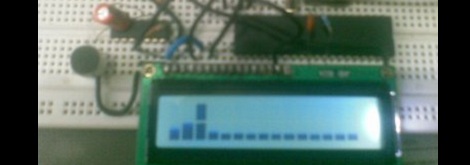
To output the spectrum on his LCD, [Vinod] stacked horizontal bars up into 8 custom characters in his display. Like [Vinod]’s previous audio on an ATMega32 experiment, an LM324 amplifier is connected to the ATMega through an analog pin. [Vinod] has a very clever build on his hands with his spectrum analyzer, and a great answer to the perennial ‘how do I build a guitar tuner’ questions we’re constantly asked.

After the break, you can see [Vinod]’s spectrum analyzer in action. Be forewarned; you may want to turn down the volume.

Continue reading “Making An Audio Spectrum Analyzer With A Microcontroller” →