Breaking Disk Encryption With RAM Dumps


If you haven’t gotten a chance yet, do watch the video of this attack. It’s does a good job explaining the problem. Full drive encryption stores the key in RAM while the computer is powered on. The RAM’s stored data doesn’t immediately disappear when powered off, but fades over time. To recover the keys, they powered off the computer and booted from a USB disk that created an image of the RAM. You can read more about the attack here.

How can you reduce this threat? You can turn off USB booting and then put a password on the BIOS to prevent the specific activity shown in the video. Also, you can encrypt your rarely used data in a folder on the disk. They could still decrypt the disk, but they won’t get everything. I don’t think this problem will truly be fixed unless there is a fundamental change in hardware design to erase the RAM and even then it would probably only help computers that are powered off, not suspended.

The potential for this attack has always been talked about and I’m glad to see someone pull it off. I’m hoping to see future research into dumping RAM data using a USB/ExpressCard with DMA access.

Tin Hat Bonus: Jetlag Got Me.

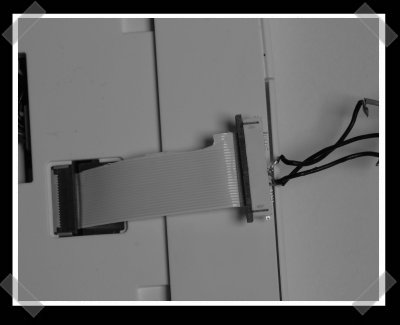
Update: Sorry guys. I hadn’t seen it before, but apparently this dell keylogger junk is a rather delicious hoax. To keep from confusing the RSS readers, I’m leaving a post stub up. If I wasn’t travel-beaten I would have paid attention to the fact that the supposed keylogger wasn’t on a flexible flat cable. I pulled the image since it was originally stolen.

It’s probably totally BS, but supposedly this guy found what seems to be a keylogger inside his new dell 600m laptop. He submitted a FOIA request to the DHS, only to have his request denied. It’s a bit tin-hat, but the idea that a three letter agency might be adding extra hardware to your laptop is very disturbing indeed. I guess it’s time to start auditing any new hardware purchased for bonus parts. [via]

Console On The Kindle (and More)


[Dev] sent in an interesting blog series on hacking Amazon’s kindle. [Igor] has documented getting a console, the bootloader and more. Even if you don’t have a Kindle to hack on, it’s a good overview of hacking similar devices. He used a cell phone cable to build his interface, but I suggest getting familiar with the MAX232 family of semiconductors for cheap rs-232 to ttl converters.

I’m Still Out Of Town Extra


I received some good stuff via the tips line while I’ve been making an extra stop after Shmoocon. I spent the day helping my less project endowed family run some new wiring (and made some awesome sparks in the process.)

[Damian] sent in his customized version of the classic Atari 2600 adventure game.
[iraqiGeek] sent in his efforts to use the six-axis controller. He used lib-usb and PPJoy to create his own app.

[HP Friedrichs] sent in this interesting post on building military style power supplies. Good stuff if you’re into building your own gear and like interesting chassis designs.

[John] sent in his version of the new KITT’s light bar. (You know you watched it.)

Got something good to share? Use the tips line.

Do Math To Turn Off Your Alarm Clock


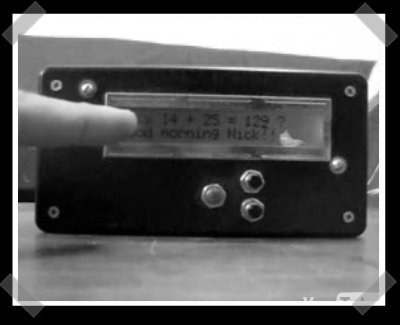
[nickjohnson] sent in what might just be the most incredibly evil alarm clock ever. It’s a fairly simple pic project with a PIC, LCD and input buttons. When the alarm goes off, you have to solve math problems before it will shut off. If you answer correctly, you make it stop. In my case, I’d probably add a mute button that can be held down while you do the math. Source, schematics and pcb layout are provided.

The 2008 Shmooball Gun


I caught up with [Larry] from pauldotcom.com and got a quick walk-through of his Shmooball gun. After several less successful attempts, this one worked pretty damn well and featured a distinctive sound that caused a notable glimmer of fear in the eyes of the speakers. *cough*[renderman]*cough*. Read on for the secrets of the Shmooball gun.

Continue reading “The 2008 Shmooball Gun” →

ShmooCon 2008: Hard Drive Highlights


Today wrapped up with a talk on recovering data from solid state hard drives by [Scott Moulton]. The talk focused on the differences in data storage between SSD and platter technology. I did come away with a few interesting bits of knowledge. In an effort to extend device life, flash based drives store changed data to a new location, leaving the old data intact until a garbage removal subroutine gets around to clearing it out. Probably the best way to recover data from them will be altering or replacing the controller chip so you can access old data.

Yesterday I caught an interesting talk on recovering passwords from drive images by [David Smith]. He found that he could take a system image, strip out all the strings that were stored by various programs and use them to build a dictionary of possible passwords. By limiting string lengths and matching for known password policies, he was able to further filter his dictionary for likely passwords.