Laser Cutting Technique Makes Plywood Bendable

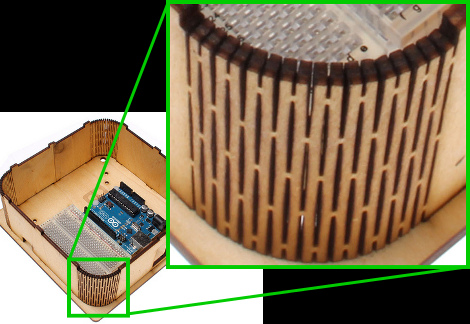
Here’s a laser cutting technique that makes thin plywood bendable. By cutting away elongated diamond shapes from the material, a lattice of strips connected minimally by alternating tabs is left over. The wood is then bendable, and it must be somewhat durable since the idea came from a product that uses the technique as a hinged notebook enclosure.

We don’t have much interest in it as an often used pivot point as surely it must be a problem with long-term use. But we love the look of it as a rounded corner on an enclosure like the Arduino project box seen above. The side walls are one continuous piece, with identical top and bottom sections which receive the alignment tabs. The whole thing is held together with just four bolt/washer/nut combinations.

But if you don’t have access to a laser cutter, we guess you’ll have to stick to altering pre-made enclosures for now.

Milling Interlocking Wooden Rings

[Johan von Konow] wanted to make something special as a wedding gift to his wife. He decided a pair of interlocking miniature rings would be the perfect keepsake. He started his search for a way to mill the wooden rings from a solid piece of wood, and documented his journey for our enjoyment.

This project poses an interesting challenge. Most CNC mills offer three axes of freedom, but he only had a 2D mill meant for routing PCBs. This means the cuts can only be made from the top down at one depth. In order to fabricate the rings he needed to cut from more than one side. With more study, [Johan] discovered that it would be necessary to cut the wood stock from eight different angles before the rings would be complete.

The solution to the problem was to first mill a jig to hold the wood stock. It has positions to hold the stock at each different angle. The final step before starting the cut was to mill the stock itself to perfectly fit his custom jig. We think it turned out great, thanks in part to hand filing, sanding, and polishing to smooth the marks left from milling.

OpenPnP Working To Create An Affordable And Completely Open Pick And Place Machine

open-pick-and-place

If you happen to do a lot of SMD work, a pick and place machine is an incredible time saver. The problem is that most automated pick and place solutions are well outside of the “small outfit” price range, let alone the budget of a hobbyist.

We have seen some great DIY pick and place implementations around here, though most are lacking professional features or the sort of documentation that would make it easy for others to replicate. The OpenPnP project is looking change things, with a completely open source hardware and software solution with a price target of under $1,000.

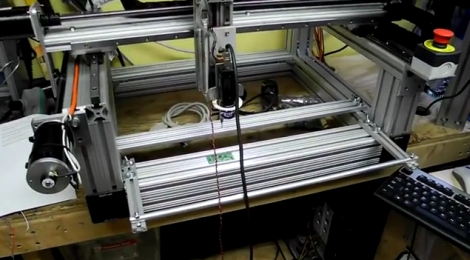
Things are already well under way, with plenty of details available in the project’s wiki. According to the development page, a prototype should go into construction in the near future, and development of the pick and place’s control software is coming along nicely.

While things are looking great for the OpenPnP project, they can always use some help to keep things moving. Be sure to check out the project page if you are interested in lending a hand.

To see some of the progress being made, stick around to see a short demo video of the control software and camera in action.

[via Make]

Continue reading “OpenPnP Working To Create An Affordable And Completely Open Pick And Place Machine”

Extreme Finger Painting With A Router

Most of the time, CNC machines are used for very precise and exacting. There is another way that allows for a more “hands on” approach to routers and mills that allows for a lot more creativity and freedom. The touchCNC these guys whipped up allows anyone to finger paint with a friggin router.

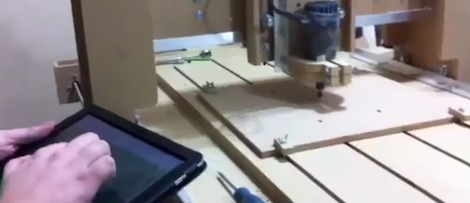
From the forum post the guys sent in, they wrote a simple Android app for a tablet that allows for router control via a touch interface. There are three parts to the software. An Android app sends finger positions to a java server running on the CNC computer. This server dumps gcode into a text file. A vbscript inside the router software keeps reading from the specified file. With all this, finger movements are translated directly into machine movements.

The controls are fairly simple, like a real-life representation of Microsoft Paint. Of course there’s a ‘tap GOTO’ command that moves the router to a specified position. The router bit is lowered onto the work piece with a ‘long tap’ and stays lowered until the finger is released.

You can check out the code for touchCNC, but the guys are working on a few additional features like converting the tablets gyro output to gcode. Until then, enjoy the videos the guys posted after the break.

Continue reading “Extreme Finger Painting With A Router”

MAME Cabinet 3D Modeled And CNC Milled

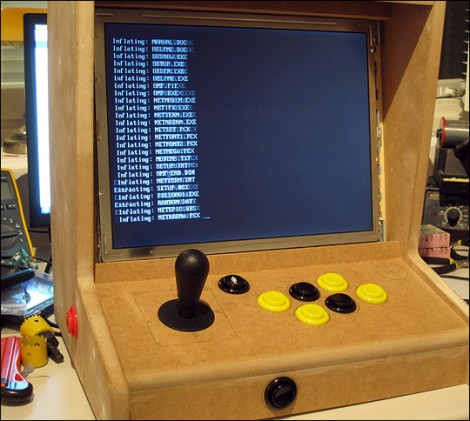
[Entropia] is just putting the final touches on his bar-top MAME cabinet (translated). The project started out as a 3D model to get the case dimensions just right. An old laptop is being, so the enclosure was designed to fit the bare LCD assembly and hide the rest of the computer. [Entropia] had access to a CNC mill through an education program and used it to cut most of the parts for the case out of MDF.

From there the build proceeds as normal. Mounting holes for the controls were cut with a drill and hole saws. We think it’s a bit easier to lay this design out once you have the control panel itself milled, rather than try to get it right in the 3D model. The image above is part way through the build. Since it was taken the case has been painted and a sound system was added but it looks like it’s still waiting for a bezel over the LCD and a marquee for the masthead.

You can see a demo of the game selection UI after the break.

Continue reading “MAME Cabinet 3D Modeled And CNC Milled”

The Cheapest And Easiest 3D Printer We’ve Seen So Far

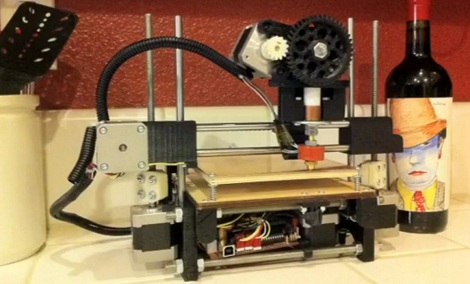
3D printers are awesome, but boy are they frustrating. If you’ve built a RepRap Mendel, Prusa or Huxely, you know there’s nothing quite like trying to get a washer off of a threaded rod without disassembling the entire machine. This frustration in part sourcing, assembling and correctly aligning a printer is where printers like the Makerbot find their niche. There’s a new printer on the block that promises a 45 minute assembly time and less than 2 hours from starting the build to first print. It will do all this for under $500, electronics and motors included.

From the Flickr photoset, we can see that the Printrbot has 2 motors for the z-axis, uses sanguinololu electronics, and uses a derivative of Wade’s extruder – all proven design choices. Unlike the RepRaps, most of the frame is actually printed, and not built out of threaded rods. This drastically reduces the assembly and calibration time.

The inventor of the Printrbot, [Brook Drumm], has a Kickstarter up where he’s selling complete kits (electronics, motors and vitamins) for $499. This beats the very inexpensive SUMPOD in affordability. We haven’t been able to find the 3D design files for the Printrbot (although you can buy these printed parts for $75), and there’s no word on the build volume of the stock printer. That being said, the printrbot does have pretty good resolution. Check out the video of a Printrbot in action after the break.

Continue reading “The Cheapest And Easiest 3D Printer We’ve Seen So Far”

Polar Pen Plotter Draws Huge Images Very Slowly

[Euphy] just posted an Instructable of his Polargraph drawing machine that’s able to draw huge images slower than molasses in November. The plotter only uses two stepper motors to control the position of the pen and can be made nearly entirely from salvaged parts – [Euphy] built his for just about £150.

The Polargraph uses two stepper motor on the top corners of a large, flat surface. A weighted pen carriage is attached to both motors with beaded cord that’s often seen in window blinds. By controlling the distance from the carriage to each motor, the position of the pen can be precisely controlled. It’s not a very fast way of drawing an image (check out the real-time video), but it sure is interesting to watch.

There have been a few other rope-and-chain plotters, like Der Kritzler and Hektor. [Euphy]’s work is the is one of the best documented builds we’ve seen, and he’s also put up the code and a website.

We really could have used [Euphy]’s plotter when we wanted to draw some whiteboard art. While we’re out dumpster diving for some small stepper motors, check out the time-lapse video of the Polargraph after the break.

Continue reading “Polar Pen Plotter Draws Huge Images Very Slowly”