Real Life Subtitle Glasses

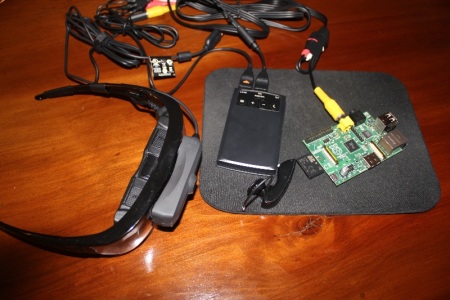
[Will Powell] sent in his real-time subtitle glasses project. Inspired by the ever cool Google Project Glass, he decided he would experiment with his own version.

He used two Raspberry Pi’s running Debian squeeze, vuzix glasses, microphones, a tv, ipad, and iphone as the hardware components. The flow of data is kind of strange in this project. The audio first gets picked up by a bluetooth microphone and streamed through a smart device to a server on the network. Once it’s on the server it gets parsed through Microsoft’s translation API. After that the translated message is sent back to a Raspberry Pi where it’s displayed as subtitles on the glasses.

Of course this is far from a universal translation device as seen in Star Trek. The person being translated has to talk clearly into a microphone, and there is a huge layer of complexity. Though, as far as tech demos go it is pretty cool and you can see him playing a game of chess using the system after the break.

Continue reading “Real Life Subtitle Glasses”

copper-islands

Cutting Islands Into Copper-clad PCBs With A Drill

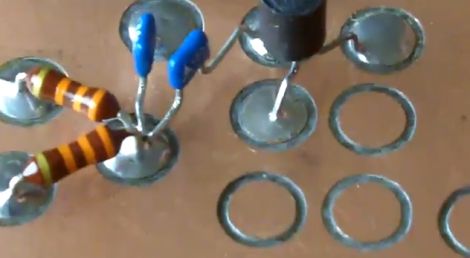
If you’re looking to build some small radio circuits, or if you are simply seeking a new look for your PCBs, you might want to check out what YouTube user [AndyDaviesByTheSea] has been working on lately. He has been building RF circuits as of late and was searching for a better way to create islands or “lands” on copper-clad PCBs.

He says that these sorts of islands are traditionally cut into the PCB with a scalpel or file – hardly an efficient process. [Andy] did a little experimenting and found a great way to quickly and precisely cut lands with a drill. Borrowing a bit of metal from an old VHS tape, he crafted a circular land cutter with a metal file. When mounted as a drill bit, his cutter produces clean, shallow cuts which create perfect lands on which to solder his components.

The only drawback to this method is that [Andy] found his bits were being dulled by the fiberglass boards pretty quickly. His solution was to carefully grind a broken heavy duty drill bit to do the task, which he says works even better than his original cutter.

Hackaday RBC Team Finished!

Our Project: “Minotaur’s Revenge”

We built two giant marble mazes. The maze itself is all mechanical, with a 2 person team controlling x and y axis. The fun happens though when you hit buttons to activate magnets and traps on the other team’s table.

Check out the Live Stream. Nothing is happening at the moment, but a couple of dedicated Hackaday fans are checking out an empty couch. We have a very strange readership.

[sonofabit] recorded the last 8 hours of the build at 1fps and made a time lapse video. It’s an hour long, and we thank [sonofabit]’s CPU for all its hard work. You can also check out the video after the break.

Continue reading “Hackaday RBC Team Finished!”

Reclaiming The Numpad For Laptop Users Everywhere

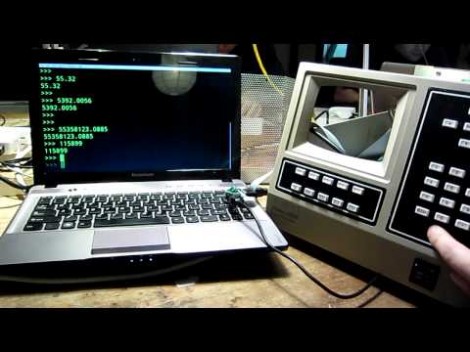
We have to agree with NYCResistor, the exclusion of numeric pads from laptops is a real loss for productivity. Ever try to working with a huge spreadsheet ledger without a 10-key? Sure, there are usually function key alternatives hiding somewhere on those reduced keyboards. But that’s hardly the same thing. We think it’s time to take back the numpad. This project shows you how easy it is by using some old time lab equipment to replace the missing keys.

They’re using a Teensy microcontroller board to translate the key matrix into USB inputs. Most of the work is already done for you because of the USB HID Keyboard library available for the development board. Scanning your own key matrix, or decoding the buttons from some rad hardware like this Walters 600E is up to you. A demo of the rig in action can be found after the jump.

Is there anyone else who wishes the 10-key had an ‘X’ on it for coding hex values? Perhaps that will be a future project for us.

Continue reading “Reclaiming The Numpad For Laptop Users Everywhere”

Static Testing Hybrid Rockets For A Flight To Space

A team of rocketry enthusiasts at Boston University have been working on a small hybrid rocket motor that serves as a test bed for a larger, yet-to-be-designed power plant that will hopefully launch a rocket into space.

The static tests of the BURT Mk. II began last April with a series of tests using HTPB solid fuel and Nitrous Oxide as the oxidizer. The team had a series of failures – mostly due to the JB Weld seal on the igniter leads blowing out – but managed a 10 second burn on April 21st.

For later tests, a vector drive system built by a complimentary Boston University engineering group was used to control the direction of the thrust up to 12 degrees away from the axis of the engine. That’s an impressive bit of kit, especially considering the exhaust from the rocket reaches over 5000 degrees Fahrenheit.

Even though it’s summer now and the Boston University team is on a much deserved break, we can’t wait to see what the BURT team comes up with next year. Hopefully we’ll see a flight test that reaches the team’s goal of the Karman line.

Continue reading “Static Testing Hybrid Rockets For A Flight To Space”

Firing Rocket Engines In The Wrong Direction — This Is Only A Test

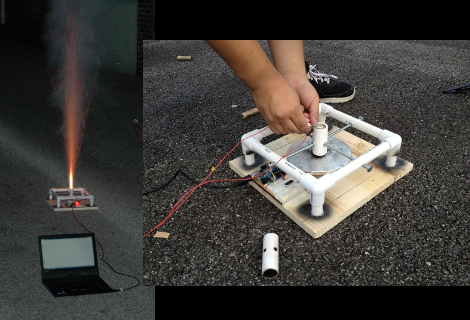
LVL1 has a new rocketeering group. This rocket engine testing platform is the first project to come out of the fledgling club. The purpose of the tool is to gather empirical data from model rocket engines. Having reliable numbers on thrust over time will allow the team to get their designs right before the physical build even starts.

The rig uses a pine base, with a PVC frame, threaded bolts, and a PVC cuff for mounting the engine in place. It is set to fire up in the air, directing the thrust down onto a scale. The flex sensor in the scale is monitored by an Arduino, and should be able to hold up to the 5000 pounds grams of thrust max which this type of engines can put out. The data is pushed via USB to a laptop computer where it is stored in a spreadsheet.

Calibration would be an issue here. But as long as they’re always using the same strain sensor the numbers will be accurate enough relative to each other.

Teaching A Computer To Learn

[Łukasz Kaiser] programmed a computer to play Tic-tac-toe. That doesn’t sound very remarkable until you realize he never told his computer the rules of Tic-tac-toe. The computer learned the rules by itself after watching a video of two people playing the game (link to actual paper – PDF warning).

[Łukasz] wrote a small program in C++ to recognize the placement of objects on a Tic-tac-toe, Connect 4, and Breakthough board. This program sifts through winning and losing games along with illegal moves to generate a Lambda calculus-like rule set for the relevant game. Even though [Łukasz] has only programmed a computer to learn simple games such as Tic-tac-toe, Connect 4, and Breakthrough, he plans to move up to more complex games such as Chess.

The fact that [Łukasz] programmed a computer to actually learn the rules of a game gives us pause; in one of the fabulous lectures [Richard Feynman] gave to freshman physics students in 1964, the subject of Chess came up. [Feynman] drew parallels between learning Chess and performing research. Every move is hypothesis testing, and when a very strange move occurs – castling, en passant, and the promotion of a pawn, for instance – the theory of the rules of the game must be reworked. Likewise, when extremely strange stuff happens in physics – particle/wave duality, and the existence of black holes – scientific theory is advanced.

Yes, teaching a computer to learn the rules of Tic-tac-toe may seem irrelevant, but given the same learning process can be applied to other fields such as medicine, economics, and just about every science, it’s not hard to see how cool [Łukasz]’ work is.

via extremetech