Precision Frequency Measurement Library For 8-bit Microcontrollers

[Paul] has been working on porting over Arduino libraries for use with the Teensy microcontroller platform. This tends to be pretty simple since they both use the same Atmel chip architecture. But once in a while he finds the Arduino libraries are not what they’re cracked up to be. When looking to port over a frequency measurement library he ended up writing his own that works better and is much more portable.

He had two big beefs with the Arduino Frequency Counter Library. The first is that it required the compensation factor the be calibrated using an accurate frequency counter. That’s a chick-and-egg problem since many people who build a frequency counter with an Arduino are doing so because they don’t already have a standalone tool. The second problem is that the Arduino library was hardcoded for ATmega168 or ATmega328 chips.

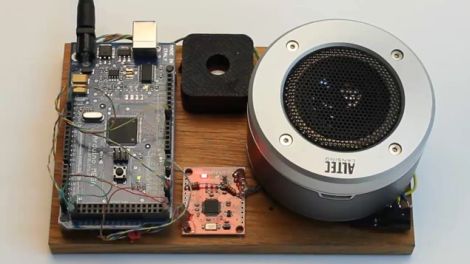
This new library fixes both issues with just one trade-off. Your hardware setup must be using a crystal oscillator. You can see above in the image above that the frequency measurement is quite accurate with this method. The package also uses a thin abstraction layer which will make it easy to port to any 8-bit microcontroller which is programmed in C.

Fan Throttling For PS3 Temperature Control

This setup will let you monitor Play Station 3 temperatures and throttle the cooling fan accordingly. [Killerbug666] based the project around an Arduino board, and the majority of the details about his setup are shared as comments in the sketch that he embedded in his post. He installed four thermistors in his PS3 on the CPU heatsink, the GPU heatsink, the Northbridge or Emotion Engine, and one in front of the air intake grate to measure ambient room temperature.

Above you can see the setup he used to display temperatures for each sensor on a set of 7-segment displays. The project also includes the ability to push this data over a serial connection for use with a computer or a standalone system.

The project is still in a prototyping stage. It works, but he likens the fan throttling to the sound of a car engine constantly revving. Future plans include smoothing out the fan speed corrections and scaling down the size of the hardware used in the system. We’d suggest doing away with three of the displays and adding a button that lets you select which set of sensor data you’d like to display.

[Thanks User]

Cheap And Cheerful Arduino Breadboard Basics

For those less experienced folks looking to move their Arduino projects to more permanent installations, this is just for you! [Martyn] Posted a three part series, VeroBoardUino, over at his blog about moving your Arduino project to a soldered breadboard.

Part one kicks off with the appropriate breadboard requirements, modifications, and a simple 7805 power supply. In the guide [Martyn]  is using strip board, so copper connections will have to be broken using a drill or just by scraping with a hobby knife. Strip board also saves a bit of wire routing in the end. Part two handles the reset button, serial connection and chip socket  (Part 2.5 has also been added to include schematics of the breadboard). Finally, part three installs the crystal and connects your Atmega chip to power and ground.

Next post he will be covering more on the software end of things, burning the bootloader and uploading programs to your new board so stay tuned for updates!

Prototyping The New Office Clock

[Damage] was tapped to build a new clock to hang on the wall at the office. He got a hold of some 6.5 inch seven segment displays for the hours and minutes, as well as some 4.5 inch modules for the date and month. Rather than jump right in with the large hardware (especially because he’s waiting for the PCB order to arrive)  he built this prototype with more commonly sized displays.

His build is Arduino powered. In the video after the break he mentions the temperature compensated crystal oscillator that keeps the time. We’d wager that’s the DS3234 based RTC module that Sparkfun sells. This is the same chip family as the Chronodot and it was our choice for the Ping Pong Clock.

The finished clock will hang high on wall, out of reach when you need to set the time. This shouldn’t need to be done much – if ever – since that RTC includes a backup battery. But [Damage] took the time to develop a remote programming device anyway. Using another Arduino, an LCD display, and an Xbee pair he whipped up a remote that can be used to navigate and change the main unit’s settings.

Continue reading “Prototyping The New Office Clock”

easytransfer_serial_arduino_communications_library

Library Makes Arduino To Arduino Serial Communications Dead Simple

When [Bill Porter] works on a project, he says that he typically writes his own NMEA standard communications protocols to fit the job at hand. While it makes things easy to troubleshoot, he admits that his custom protocols are wasteful of both processor time and bandwidth. Binary communications on the other hand are more efficient, but a bit trickier to manage.

To make things easy for the common user, he wrote a library called EasyTransfer which abstracts packetized serial communications between two Arduino boards. The process is pretty simple – all one has to do is define a data structure on both Arduino boards so that they know what sort of data is coming over the wire, and EasyTransfer handles the rest. This allows users to worry less about communications protocols or transmission errors, and focus on their projects instead.

If you’re working on a project and searching for an easy way to get a pair of Arduinos talking, swing by his site and grab the library. It doesn’t get much easier.

Solar-powered Bird House Tweets Using B-Squares

This bird house will tweet to let you know when the occupants pass through the door… err… hole. It uses solar panels to keep a battery topped off, and an Arduino along with an optical sensor which monitors the doorway to pass along an alert via an XBee module.

Admittedly, the video after the break is a bit tongue-in-cheek and doesn’t safeguard against the elements, or even against bird poop. AND it’s basically an advertisement for B-Squares. But we still like it.

These squares use magnetic corners to connect the solar squares together, as well as the squares that house the Arduino and the battery. These magnetic corners also act as the power and ground rails. Two nails have been pounded through the roof of the bird house, acting as a surface to magnetically attach the solar panels to, as well as a conductor to pass the power rails through the wood. It’s no wonder that B-Squares are closing in on  raising five-times their Kickstarter goal.

Continue reading “Solar-powered Bird House Tweets Using B-Squares”

Programming An ATtiny Using An Arduino

attiny

[Scott] is a big fan of the Arduino platform, and he’s not afraid to admit it. It does all the things he needs, but now and again he would like to use something a bit smaller, without all the bells and whistles the Arduino has to offer. He contemplated using an ATtiny for smaller projects, but after looking into what he would need to program the chip under Linux, he could never find the motivation to give it a go.

That all changed when he discovered the Arduino-Tiny project, which aims to bring a limited Arduino IDE to the ATtiny line of microcontrollers. He found the project to be quite useful, so he put together a brief tutorial that walks through everything you need to get started.

The tutorial is fairly straightforward, and even demonstrates how the Arduino can be used as an ISP for the ATtiny, removing the need to purchase a standalone programmer. Be sure to check it out if you are searching for an easy way to get started with ATtiny chips under Linux.