
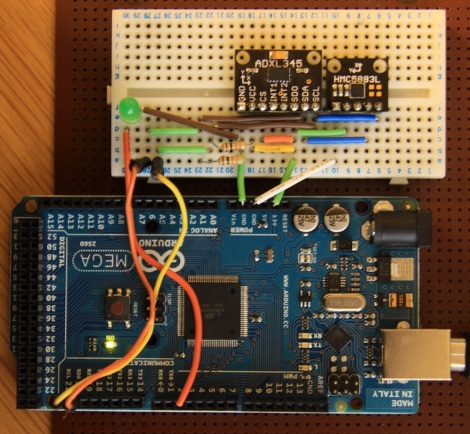
Tilt Compensation When Reading A Digital Compass

If you’re familiar with using a compass (the tool that points to magnetic north, not the one that makes circles) the concept of holding the device level makes sense. It must be level for the needle to balance and rotate freely. You just use your eyes to make sure you’re holding the thing right. Now think of a digital compass. They work by measuring the pull of a magnetic field, and have no visual method of showing whether they’re level or not. To ensure accurate readings you might use an accelerometer to compensate for a tilted magnetometer.

The process involves taking measurements from both an accelerometer and a magnetometer, then performing calculations with that data to get a true reading. Luckily the equations have been figured out for us and we don’t need to get too deep into trigonometry. You will, however, need to use sine, cosine, and arctangent in your calculations. These should be available in your programming language of choice. Arduino (used here) makes use of the avr-libc math library to perform the calculations.


Snow Leopard Ditches Real Math For Fake

snow_leopard_fake_math

We’ve always felt that hard drive manufacturers were dirty crooks because of their use of fake math to make drives sound bigger than they actually are. Here’s a quick refresher for those who need it: Because digital information consists of 1’s and 0’s (two possible settings), digital architecture revolves around powers of 2. Long ago, when nomenclature was setup for measuring data the term kilobyte was adopted to represent 2 to the 10th power bytes (base 2, aka real math). The problem here is that 2^10= 1024 and when laymen hear the root “kilo” they think 1000 which is 24 byes less (base 10, aka fake math). So, if you have a 500,000,000 byte drive, base 10 math would call that a 500GB drive, but base 2 math would call that 476.8GB.

We understand why hard drive manufacturers use the base 10 system; larger sounding drives sell better. Now we find out that OSX 10.6 Snow Leopard is using base 10 math to calculate storage space. While base 2 math is the standard storage measurement for operating systems it may at first be difficult to understand why Apple would change to a base 10 system. But think about it once more, doesn’t Apple have a lot to gain if all the storage-containing-hardware they sell sounds bigger than it actually is?

[via Gizmodo]

Update: Force Snow Leopard to calculate storage in base 2 [via Gizmodo]







