
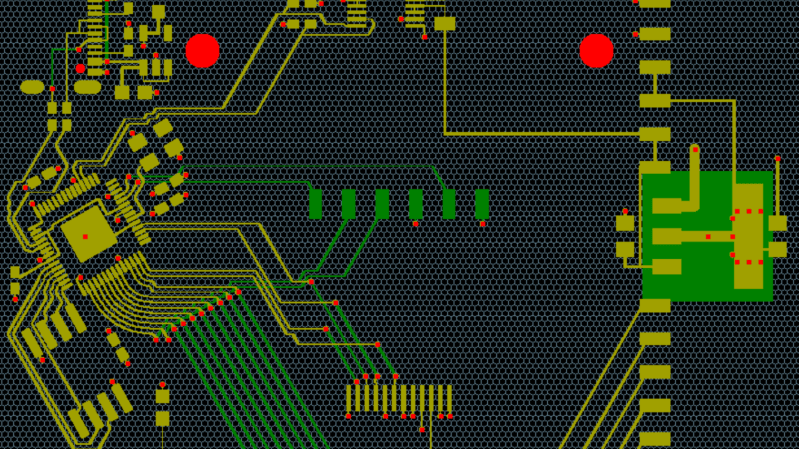
A PCB layout is superimposed on a grey grid of hexagonal cells. The PCB traces mostly bend at 120-degree angles, and an integrated circuit's footprint is tilted at an angle matching the grid.

Improving An Autorouter With A Hexagonal Grid

Despite the recent leaps forward in other forms of computer-driven design, the reliability of PCB autorouters remains questionable; on the positive side, though, the lack of massive training data makes them plausible for a determined programmer to implement. For anyone contemplating this undertaking, [James Bowman] recommends a slightly unusual choice: use a hexagonal layout grid.

[James] built his own autorouter in his CuFlow PCB layout program. It takes a fairly straightforward approach: it represents the board as a grid of cells, and uses Lee’s algorithm to find the shortest routes between connected cells. The program initially used a square grid, but a hexagonal grid had a few advantages: in particular, each cell has six equidistant neighbors, rather than four (or eight, if you accept diagonal neighbors at a different distance), which allows denser routing. Because a hexagon more closely approximates a circle than a square, the same minimum-distance rules allow smaller cells, allowing the autorouter to pack more traces into the same space.

While we have previously seen a self-built autorouter, it’s much more common to interface with an external tool. If you start to get into high-speed PCB routing, though, building an autorouter becomes much harder.


The PCB Router You Wish You Had Made

The advent of cheap and accessible one-off PCB production has been one of the pivotal moments for electronic experimenters during the last couple of decades. Perhaps a few still etch their own boards, but many hobbiest were happy to put away their ferric chloride. There’s another way to make PCBs, though, which is to mill them. [Tom Nixon] has made a small CNC mill for that purpose, and it’s rather beautiful.

In operation it’s a conventional XYZ mechanism, with a belt drive for the X and Y and a lead screw for the Z axis. The frame is made from aluminium extrusion, and the incidental parts such as the belt tensioners are 3D printed. The write-up is very comprehensive, and takes the reader through all the stages of construction. The brains of the outfit is a Creality 3D printer controller, but he acknowledges that it’s not the best for the job.

It’s certainly not the first PCB router we’ve seen, but it may be one of the nicer ones. If you make a PCB this way, you might like to give it professional-looking solder mask with a laser.








