Getting PCIe Working On The New Pi 5

After the Pi 4 released, a discovery was quickly made that the internals of the popular single-board computer use PCIe to communicate with each other. This wasn’t an accessible PCIe bus normally available in things like desktop computers for expansion cards, though; this seemed to be done entirely internally. But a few attempts were made to break out the PCIe capabilities and connect peripherals to it anyway, with varying levels of success. The new Pi 5 seems to have taken that idea to its logical conclusion and included a PCIe connector, and [George] is showing us a way to interface with this bus.

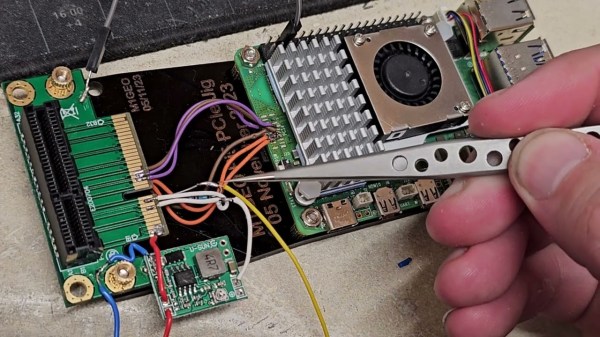
The bus requires the port to be enabled, but once that’s done it’s ready to be used. First, though, some support circuitry needs to be worked out which is why [George] is reverse engineering the system to see what’s going on under the hood. There are a few handshakes that happen before it will work with any peripherals, but with that out of the way a PCIe card can be connected. [George] removed the connector to solder wires to the board directly in order to connect a proper PCIe port allowing a variety of cards to be connected, in this case a wireless networking card and an old Firewire card. This specific build only allows Gen 1 speeds, but the bus itself supports faster connections in theory with better wiring and support circuitry.

While it might not be the prettiest solution, as [George] admits, it does a great job of showing the inner workings of this communication protocol and its use in the new, more powerful Raspberry Pi 5. This makes a lot of things more accessible, such as high-speed PCIe HATs allowing for a wide range of expansion for these popular single-board computers, which wouldn’t have been possible before. If you’re still stuck with a Pi 4, though, don’t despair. You can still access the PCIe bus on these older models but it’ll take a little bit more work.

Thanks to [CJay] for the tip!
Continue reading “Getting PCIe Working On The New Pi 5”

Reduce The Pi 5’s Power Consumption At A Stroke

The Raspberry Pi 5 is the new wunderkind single-board computer on the block, so new in fact that users are still finding out its quirks. One of those quirks is a surprisingly high power consumption when powered down, despite halting the SoC, it leaves the power on and consumes over a watt even in standby. [Jeff Geerling] has a solution, and it’s a simple config change.

It’s useful to know how to fix this, and we’re indebted to him for finding it, but it’s hardly the most complex of hacks. Where the interest lies is in why the board leaves the lights turned on when nobody’s at home in the first place. It seems that some HATs have an issue when the 3V3 rail shuts down, but the 5V rail doesn’t. The Raspberry Pi foundation took the most compatible route and kept the rails on all the time. Perhaps future OS releases will come up with something more elegant, but at least there *is* a fix.

If you’re new to the Pi 5, you can take a look at our review of a preview model, and see why it’s the closest yet to a usable everyday PC that they’ve produced.

Raspberry Pi Reveals A Little About Their RP1 Peripheral

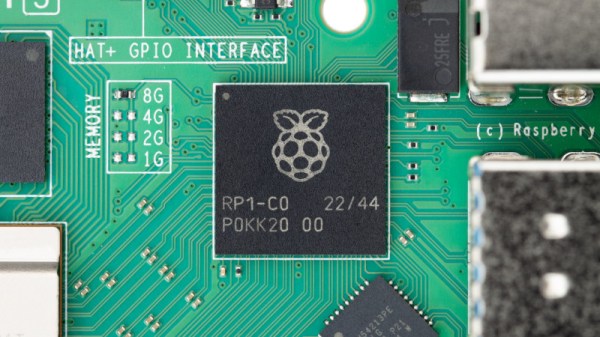
The Raspberry Pi 5 is the new hotness from the Cambridge-based single board computer vendor, thanks in part to its new wonder-chip peripheral that speeds up much of its interfacing with the world. The RP1 hangs of the CPU’s PCIe bus and takes on many functions previously in the SoC, and those curious about it now have a little bit of information. Eben Upton has posted an article about the chip, and there’s a partial datasheet and a video in which the engineers talk about the chip as well.

The datasheet is intended to help anyone wishing to write a hardware driver for a Pi 5, and they admit that it doesn’t reveal everything on the silicon. We don’t expect them to put this chip up for sale on its own because doing so would enable their competitors to produce something much closer to a Pi 5 clone. It does reveal a few nuggets, though; there are a couple of Cortex M3 cores for housekeeping, and alongside all the interfaces we know from earlier boards it has, perhaps most interestingly for Hackaday readers, a 12-bit analogue-to-digital converter. This has always been on our Pi wishlist and is a welcome addition.

So, if you read the datasheet and watch the video below, you’ll learn a lot about the interfaces and how to talk to them, but not quite so much about the full workings of the chip itself. They hint that there’s more to be released, but since the Pi people have a history of not letting go of the family silver, we won’t expect the keys to the kingdom.

Have a read of our Pi 5 launch coverage.

Continue reading “Raspberry Pi Reveals A Little About Their RP1 Peripheral”