Programming The XMEGA With An ISP

Atmel’s XMEGA series of microcontrollers are neat little pieces of hardware; with a very fast clock, a ton of IO, USB, and up to 8 UART ports, these neat little chips serve as a nice bridge between AVRs and PICs and the very powerful ARM chips coming out on the market. Unfortunately, the XMEGAs don’t use the extremely common ISP programming header found on just about every AVR dev board making them a bear to program. [Szu] over in Poland came up with a very easy way to program these chips, all while using the programming hardware you already have on hand.

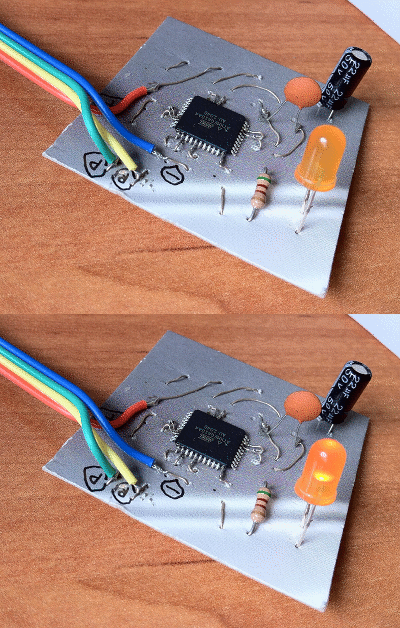
[Szu]’s build uses a few resistors and diodes to break out a USBASP connection to the XMEGA’s PDI interface. On the software side of things, [Szu] wrote an update to the USBASP firmware to allow it to program PDI devices, and also has a patch for AVRdude to allow uploading firmware from the command line.

A very cool build, and one that allows for very, very powerful devices that build on the AVR code you’ve already written.

Very Inexpensive RF Module Tutorial

Let’s say you need a way to make a project wireless, but don’t have the scratch for a ZigBee or its ilk. You could use IR, but that has a limited range and can only work within a line of sight of the receiver. [Camilo] sent in a project (Spanish, translation) to connect two devices via a wireless serial connection. As a small bonus, his wireless setup is cheap enough to create a wireless network of dozens of sensors.

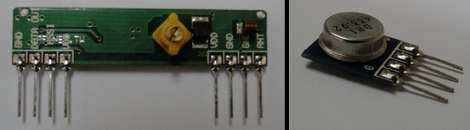
[Camilo] used the TLP434A transmitter/receiver combination to get his wireless project off the ground. These small devices only cost about $5, but being so inexpensive means the hardware designer needs to whip up their own communications protocol.

For a microcontroller, [Camilo] chose a Freescale MC9S08QC, a pleasant refrain from the AVR or PIC we normally see. After making a small board for his transmitter, [Camilo] had a very small remote control, able to send button presses or other data to a remote receiver.

After the break, you can see a short demo video [Camilo] posted of his wireless transmitter turning on an LED attached to his receiver. Unfortunately, this video was filmed with a potato, but all the schematics and code is on his web site for your perusal.

Continue reading “Very Inexpensive RF Module Tutorial”

Real Time GPS Decoding With Software Defined Radio

In case the Realtek RTL2832u-based USB TV tuner dongle isn’t useful enough, the folks behind a project to get a software defined GPS receiver off the ground successfully plotted GPS data in real-time with this very inexpensive radio.

Previously, we’ve seen these dongles grab data from GPS satellites – useful if you’re building a GPS-based clock – but this build required hours of data collection to plot your location on a map.

The folks working on the GNSS-SDR project used an RTL2832 USB TV tuner and a Garmin active GPS antenna to track up to four GPS satellites in real-time and plot a location accurate to about 200 meters.

The Google Earth plot for this post shows the data collected by the GNSS-SDR team; the antenna was fixed at the red arrow for the entirety of the test, and the  yellow lines represent a change in the calculated location every 10 seconds. Amazing work, and only goes to show what this remarkable piece of hardware is capable of.

Toorcamp: Kelp Horns

[Ari] and Jake from Noisebridge were out on the beach at Toorcamp when they saw some giant kelp and had an idea. Using a pocketknife, [Ari] cut a mouthpiece into the stem and cut the bulb in half. After some practice, they figured out how to play the kelp horn. [Jimmie], shown here, was able to get a pretty good range of notes out of it by playing it like a bugle. [Neil] tried to cut holes into the stem to play it like a flute.

The horns were fairly loud, so they attracted a few people who wanted to make their own. Once the group had six or seven horns playing various tones, they headed to the camp to show off their new instruments. They weren’t quite in tune, and didn’t taste very good, but they did make a variety of odd sounding tones. Leave it to a camp of hackers to make musical instruments of whatever they find washed up on shore.

[Photo maltman23]

An Adafruit Raspberry Pi Extravaganza

The folks at Adafruit are busy as a bee working on bringing some of their really cool boards to the Raspberry Pi platform. Here’s a few that came in over the last few days:

16 servos is almost too many

Servos require a PWM output but the Raspi only has hardware support for PWM on a single GPIO pin; certainly not enough to build a gigantic, city-leveling robot. [Kevin] over at Adafruit put together a tutorial for using this 16 channel servo driver with the Raspi.

12 bit DAC

With only one PWM pin and no analog out, it was only a matter of time before someone hooked up the Adafruit 12 bit DAC to the Raspberry Pi.

16×2 LCD displays

Both the servo and DAC builds use the Adafruit I2C library and a bit of Python. Of course it’s possible to treat the GPIO pins on the Raspberry Pi as digital outs, just as [Mikey] did with his Raspi LCD display tutorial.

So, what distro are you using?

Of course all these builds use Adafruit’s Occidentalis distro, a maker-friendly Linux distro we’ve posted about before. It’s too useful to languish as a single Hackaday post, so here it is again.

Expand Your Pi With A Gertboard

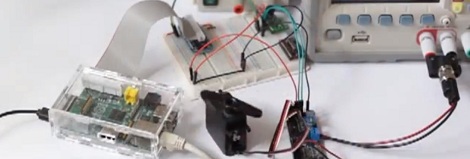
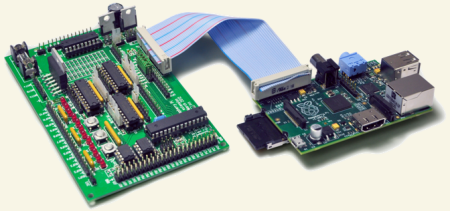
[Gert van Loo], the person who designed the alpha hardware for the Raspberry pi model B, has put out an expansion board for the Raspberry pi that we think many of you might be interested in seeing. Dubbed the Gertboard, this expands the Raspi  with some GPIO goodness.

We have seen TONS of tutorials for the Raspberry pi, and a few projects as well. We’re hoping that we’ll start seeing more projects where the Raspberry pi is the brain, but only part of the project, start becoming more frequent. The board is pretty cool, now lets see what you guys can build with all that power!

[thanks Zimm3rmann]

Making The Arduino Sleep The Long Sleep

Earlier this week, I showed you [Naim Busek’s] kickstarter for his turn signal helmet. In that article I explained that, while the helmet is a neat idea, I was really interested in what [Naim] had told me about his power consumption.  To put it the shortest way, he has made his arduino sleep so efficiently, it can be waiting for input longer than the battery’s optimum shelf life.

After that article, [Naim] wrote in to give me the details on what he did to achieve such an efficient system. You can read his entire explanation, un altered here.

Continue reading “Making The Arduino Sleep The Long Sleep”