
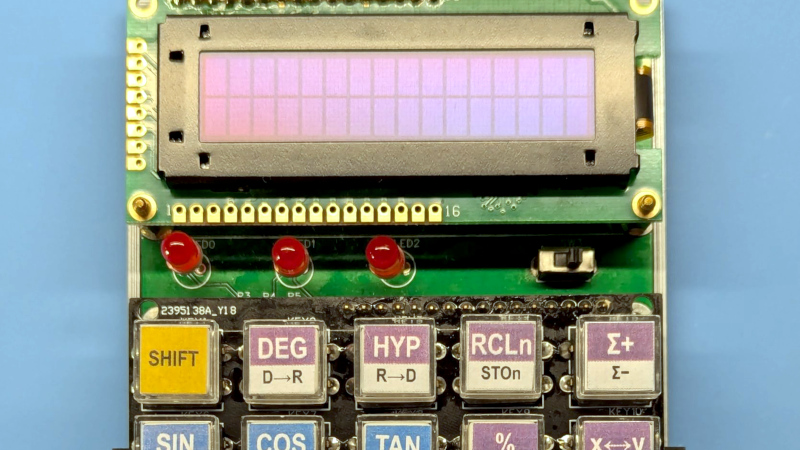
It’s possible that among Hackaday readers are the largest community of people who have designed their own CPU in the world. We have featured many here, but it’s possible that not so many of them have gone on to power an everyday project. Step forward [Baltazar Studios] then, with a scientific calculator sporting a self-designed CPU on an FPGA.
The calculator itself is nice enough, with a smart 3D printed case, an OLED display which almost evokes a VFD, and very well made buttons. But it’s the CPU which is of most interest, because while it follows a conventional Harvard architecture with a 12-bit instruction set, it works with 4-bit nibbles. This choice follows one used by HP in their calculator designs, seemingly because it can be optimised for the binary coded decimal which the calculator uses.
With calculators being yet another app on our spartphones or comnputers, there seems to be less use of calculators outside of education in 2026. But if you are a calculator user there’s nothing like a calculator you made yourself, and with a CPU of your own design it has few equals. We like this project almost as much as we like the Flapulator!












“spartphones or comnputers”
Prof reading?
Honestly I kimda appreciate the typos, it’s a (very shaky and easy to spoof) proof of humanity, since slopgens rarely make those types of mistakes.
Dont gve them any ideas.
Every time I find a typo, I immediately start searching for my 5th grade teacher!! “Proof read” was her response!!
I’ll gladly exchange my so-called “smartphone” (it really isn’t, it has to be told what to do) with the spartphone, which I speculate is short for “spartan phone”, which is what I really need, simple phone with minimum features that Just Works When It Has To Work. Oh, and I’ll exchange the exorbitant price for the spartan one, too, while at it. Down to $50 per, because that’s all I am willing to spend on one.
Seriously, the amount of tweaking my cell phone had to go through to become stable enough to be usable counters entire point of having the equivalent of Cray computer in my pocket. It is so dumb, it doesn’t know how to turn what I don’t need (for example, the incessant location triangulation – I do NOT need it, unless I am using Maps, and I do NOT want it outside of one particular use).
How are they supposed to track and log your every movement if they don’t have location running all the time?
If/when they are tracking me the KGB-style, they can always hack the cell towers’ signal.
Obviously, my cell phone is not always in my pocket, but that’s their personal problems.
BTW, disabling location extended the charge nearly two-fold. Regularly I charge the phone once week, sometimes (when traveling) once every three days. With no location enabled it goes to nearly two weeks on one charge. Because I don’t have things I don’t need (internet connection, etc) on when not in use. I turn it on, use it, turn it off. That’s why I call cell phone dumb – it doesn’t compute this simple routine it HAS to do ALL the times, EVERY time. I had to enable The Developer Mode to truly track which app keeps starting itself all the time, so I know the KGB Agents’ by their names :- ]
Translation – I am not exactly against my information being milked for profit – I am against have zero share in the profits thus made. Even measly $1 a month shared with me would change my mind, but that never happened, so sc***w them back.
Those are the same buttons I got from a diy solder-your-own-calculator kit
I had a kit of that kind too… it was very disappointing, perhaps that disappointment was inspiration for [Baltazar Studios].
Were the buttons disappointing or the kit? I love the buttons, any idea what they are?
A search with the magic words “pushbutton cap transparent” on Ali gives a bunch of results. I think the buttons are “B3F” and the caps are “A14”, but there are other models too.
Thank you! It’s so hard to look for things when you don’t know the name, and boy is the name inconsistent, sometimes it’s “pushbutton”, sometimes “tactile switch”. Sometimes the switches are labelled B3f, sometimes the caps …
If size is not a problem there are also Cherry MX keycaps in that style, very handy. Combined with the hardest clicky keyboard keys they make a wonderful interface.
I also bought that kit (with PMMA casing) and I quite liked it.
What I liked:
* The simple but yet usable PMMA housing. (It is a bit finicky though, It’s not ideal).
* The PCB with the ATMEGA328. (reprogrammable).
* The low cost of the kit.
* The buttons with the paper inlays.
* The buttons can be bought separately, and in bulk (cheap).
* Built in HD44780.
What I don’t like about that kit is the firmware. it’s very buggy, and it can’t even compute properly.
I bought it out of curiosity of the buttons, and the reprogrammable atmega and display. For me it’s more a basis for a development kit with keyboard and display. The calculator is just a little extra.
You are not alone and glad you said something. I was thinking to myself where had I seen these before…
Geez, that’s impressive on so many parts. Inspirational, even.
The link to the actual writeup is there on github, gives a whole lot more info: https://baltazarstudios.com/calculator-introduction/
4 bit “Nybbles?”
Half of an 8 bit Byte, of course…
csw
my comnputer has billions of them!
OLED display? I don’t think so – looks like a bog-standard HD44780-based white-on-blue 16×2 LCD.
When ‘off’ it sure does look a lot like those standard LCDs, doesn’t it?
But the blog says “The OLED is a Newhaven NHD-0216AW” and its datasheet says that “AW’ suffix means “Character OLED Module”
And when lit it’s certainly not the familiar white-on-blue LCD.