
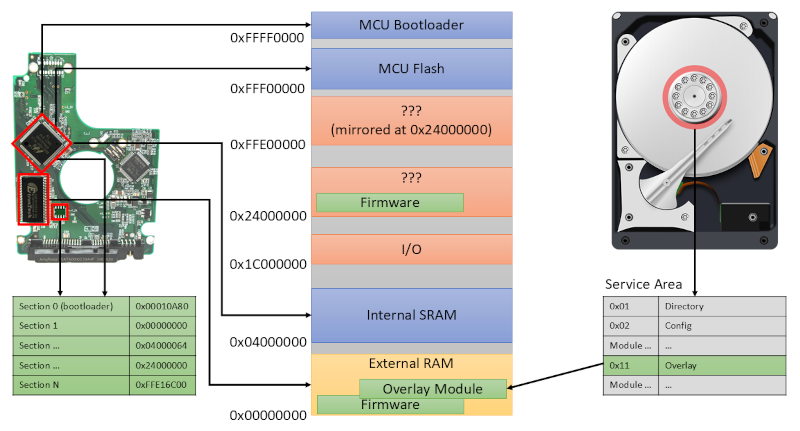
You probably flash new firmware on a variety of devices regularly, even though that’s rare for non-technical types. But what about your hard drive firmware? Most of us don’t want to touch our operating drives, so unless you are dealing with surplus drives or have a special project in mind, you may not think much about the firmware running your spinning rust storage. [I Code 4 Coffee] uses hard drives in an unusual way to exploit Xbox 360s, and wound up reverse engineering some drive firmware with an eye to making changes.
The analysis started with three hard drives and an SSD. Looking for people who’ve done similar work wasn’t as productive as you might think. There isn’t much call for modifying hard drive firmware, and what data there is can be outdated.
One thing that was available was firmware dumps taken with a PC-3000 data recovery tool. What follows is a deep dive down the hard drive rabbit hole. There are backdoor vendor commands and connections to the diagnostic RS-232 port on some drives. You can find the technical artifacts on GitHub.
We learned a few things, and we bet you will too. Another way to get into the hard drive’s firmware is via JTAG.












“There isn’t much call for modifying hard drive firmware, and what data there is can be outdated.”
Ask the NSA.
So, can we use this to enable any interesting enterprise features that have been softlocked out of the consumer drives? Stuff like SR-IOV, or NVME namespaces?
The soft lock is pretty easy to get around. Generally on a hotplug interface, just remove and reinsert on a booted system and unlock through a Linux cli, youll need the qr code on the label. I just did 50 on hgst and western digital.
i’ve been burned too many times flashing an “upgrade” firmware onto a device only to find the options i depend on have been removed. the only time i ever install new firmware at this point is to install something open source such as openwrt or rockbox. still working on a Nest thermostat i got for a dollar at the Tibetan Center thrift store west of Kingston, NY (shout out, yo yo)
Check out P&T Surplus also in Kingston
Same here…got bitten once too often. I stopped doing any firmware updates after the last firmware update to my alarm system ethernet module, removed local access, to force you into the cloud. The complete alarm system is now in the trash.
My firmware updates are now very selective or open source, and it has to fix a problem I experience, or it doesn’t happen. The new feature honeytrap usually comes with feature removal attached at no extra charge.
I had an iPad2 ask permission to upgrade. It was old at the time, but I was using it to read ebooks. And it bricked the device.
… but will it run DOOM?
Put a bunch of LEDs on a platter and let it spin: there’s your screen! Then load a DOOM firmware to show something on that screen. Add some kind of controller. And you’re done!
:)
I was more thinking about serving bitmaps on the harddrive, but I like your train of thought better!
IDK, but maybe there are FPGA hackers who would like a library of hard drive firmware, something to make transition with vintage hardware seamless. Although the cheap solution is Compact Flash Card or SD Memory Card adapter on a 3.5″ 40Pin IDE Adapter, etc.: these won’t last too much further into the future than the hard disk drives did, probably a lot less. So “virtualizing/emulating(if you want to get picky about the terminology),” solves this for using SDD and other storage technologies in the future. We’ve seen a generation of persnickety 16-bit home computers and consoles that need such specific hardware emulated exactly right (the 8-bit ones, too, but so little was standardized then, and few need different hard drive configurations specifically.) Now even those hard drives for 32-bit and 64-bit consoles like the Xbox 360 are failing, they came after PC clones’ commodified hard drives. Not to mention it’s important as just preservation of history; because all of the original drives are going to fail eventually, and not all the paperwork or schematics was digitized. And more time travelers like John Titor might come back for timeline-saving vintage parts!
I am thinking that the term “commoditized” would be more appropriate to use than the word “commodified” in this instance. Nevertheless, I found your comments interesting and relevant !
You might want to look into “PicoGUS”/”PicoMEM”, “PicoIDE”, “ZuluIDE”, “BlueSCSI” … I think there are a few more. Different ones for many consoles also. Most use SD cards, so its basically a solved problem luckily.
Back around 1990 buddy and I figured out how to send random commands to an MFM controller of an XT. Few opcodes were obvious from the int 13 BIOS but some of the other ones made lots of strange sounds, kind of like the drive having a seizure. Probably came up on factory calibration commands but had no clue what they were. IDE interface cleaned up and moved all that detail into the drive firmware so there has to be plenty of Easter eggs
It would be awesome if somebody would crack the vendor-locked limited part of the firmwares.
I have drives which refuse to be reformatted to 512 bytes – all they support is 520/528 byte sectors. These are SAS. Then there is also a micron drive, which is SATA internally behind a SAS bridge. But the SATA part is already in 520B mode and this is quite hard to work with – can bypass the bridge chip, but the drive is still unusable.
There’s an old writeup from 2013 from someone who did just this, and ended up getting the uclinux kernel running on the harddrive controller. https://spritesmods.com/?art=hddhack&page=1
“from someone”? You must be new around here :)
It was featured on had too: https://hackaday.com/2013/08/02/sprite_tm-ohm2013-talk-hacking-hard-drive-controller-chips/