
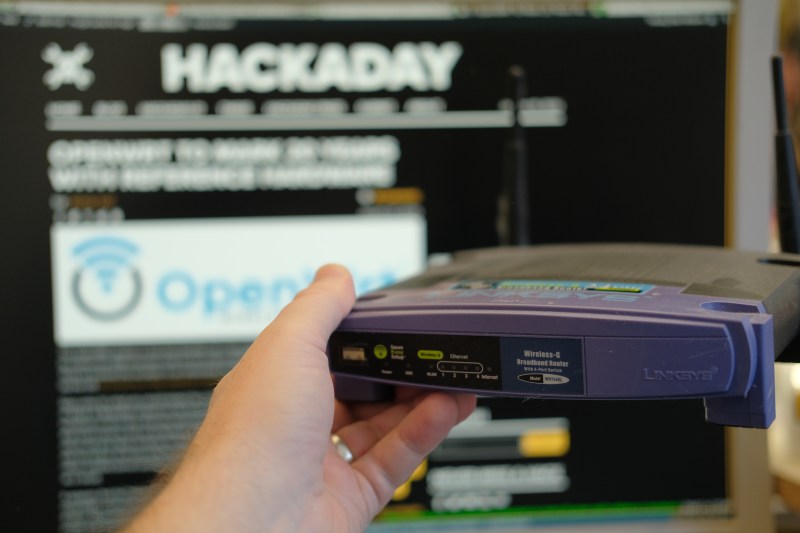
How long have we been hacking routers? To some of you who’ve been in the Hackaday audience for a while, the answer is “nearly forever”. In the early 2000s, they were one of the few consumer gadgets that had the trifecta of hackability: WiFi and networking built in, a user-friendly Linux operating system, and a few spare GPIOs that could control from the OS. Back when the Linksys WRT54GL was the king of the hill, we saw some pretty absurd hacks.
Take this example robot from October 2008. Link-rot hasn’t been kind to the original project, but from what we can tell, it used the GPIOs to drive servo motors hacked for continuous rotation, and features the equally anachronistic CD-ROM wheels. Where would you even get those today?
But the OS that this 18-year-old hack uses is still around: OpenWRT Linux. Although it still takes its name from the lovable purple router of old, it hasn’t supported that particular model in over a decade because of growing memory requirements. But it’s still the go-to distro for any modern router hacks, and it provides a lot more general-purpose Linux than you might expect on otherwise constrained platforms. As Tom pointed out in the podcast, if you see a used router for cheap, see if it’s supported by OpenWRT, and if it is, buy it.
While the project that got us thinking about routers again, Al’s recent networking hack, basically uses the router as a souped-up router, that’s by no means a given. OpenWRT is a real Linux OS, and can make use of most peripherals that your router find has available. Networking? Of course. USB? No problem. If you find a serial port and some GPIOs, you’re most of the way to a Linux SBC, although very likely a headless one.
There are a lot of hacks we see go in and out of style, and we see software projects come and go. But here we tip our hat to the router hacks, and to the plucky Linux OS that’s been ported to them all. Long may it keep old devices out of the landfill!
Featured image: My old baby, about a year or so before something in the radio modem finally gave up the ghost.











It looks like that CD rom wheeled robot is using a serial port on the router to communicate with an arduino, which is driving the wheels. And the whole thing is being driven by a 12V battery, probably nickel-metal hydride or cadmium given the time.
That’s a classic. Still have it around here somewhere.
Keep in mind the router’s gut can be totally different, but the model number will be the same. Not all BEFSR41 have the same circuits.
I remember going in and buying a stack of the WRT54G-TM (T mobile hotspot branded version, slightly more flash IIRC) when they were on clearance.
The guy didn’t want to sell them to me…thought I was scamming. Ended up with around 10 of them and flashed them with DD-WRT…sold a few on ebay…kept the rest.
I still have a couple around. Only one “died” on me even after over 10 years of use. It lost the ability to transmit but it still boots and receives packets.
My 54G is still doing reliable duty as a low speed wifi extender. Over 10 years on ddwrt and it’s bomb proof
I got three WRT54G-TM units for $19 each when TMobile closed them out 2009 ish. One is still being used as an access point for household IOT. Just fast enough to stream 4K video, though took my kid overnight to download a large Switch 2 game. Running Fresh Tomato which still maintained; really ought to donate to them. FYI the TM version has twice the ram and flash of the siblings.
Why are you streaming videos and downloading games on your IoT network?
Hacking routers since 2006 here. Who remembers the “FON.com” debacle? They were giving away free (crippled and locked-down) routers -and yet they were still a scam! Lying about their adoption stats, fake “hotspot map” showing live spots that we knew had long been offline, scorning their fan base’s concerns (technically experienced and adept people on the whole), giving away their user’s bandwidth to every major corporation they could “partner” with, and purging their forum of anyone who caught on to their bs. There were dozens of “renegade” online forums run by the people Fon had driven off. elfonblog.fondoo.net is still on Archive.org
Funny thing is, I picked up a Linksys WRT1900AC at a thrift store a couple of weeks ago for just $5.00! It’s the one Encystco released back in 2014 with the old “WRT54x” vibe, though it’s not stackable with the original models. Once I slapped DD-WRT on it, it turns out to still be a very powerful and useful router.
Yeah, FON was an interesting (anti-)social experiment. It was ahead of its time, but apart from digging their own grave, the hype happened around a time where governments and ISPs increasingly started to poke into what people are doing online, so the idea of having strangers piggypack on your ADSL wasn’t particularly inviting to many.
Concerning the spirtual successor of the old WRTs: I have this exact WRT1900AC model as my daily driver running vanilla OpenWRT and it is rock solid. Every once in a while I think of replacing it, but this thing has uptime in the years not weeks and never crashes or looses signal; I only reboot for sysupgrades. The one thing that would make me retire it is a single device with 6GHz WiFi and dual 10G SFP+ modules running vanilla OpenWRT which is sadly non-existent as a COTS device yet.
” and features the equally anachronistic CD-ROM wheels. Where would you even get those today?”
The same place you get the routers — at Goodwill or ARC thrift stores.
I’ve always wanted to know if normal consumer ‘routers’ (you know, router+switch+WiFi AP+gateway+DHCP server+firewall ‘device’ that you buy on amazon for 50$) have hardware processing paths for packet switching that the high end routers use?
I’ve heard that the serious routers have special blocks in sillicon which handle normal routing tasks at the sillicon level and don’t bother the CPU at all. That’s why we’re able to get crazy good speeds when routing locally. I’ve also heard hardware routing acceleration only works if the options field in TCP packets is not used, otherwise the CPU is called to handle them. For this reason a good way to bring down the speed of routing is to make junk packets with option field bits set to whatever. This is just hearsay though.
Does anyone know about this? Networking isn’t too niche of a topic but somehow no one has any idea about what goes into actual networking sillicon, at least among the people I ask irl.
At least in Qualcomm terms, you just described IPA (Internet Packet Accelerator), meaning there’s a path inside the SoC that “learns” from the Linux firewall and routing paths what must do and bypasses them in order to accelerate networking processing without any IRQ or polling onto the CPU.
And yes, the TCP options field thingy you mentioned is a problem, indeed.
Even cheap consumer models typically come with hardware-implemented switching between the LAN ports and (sometimes) WiFi. Those chips are an inexpensive commodity and they take a lot of the CPU-intensive workload off the embedded CPU. The CPU often couldn’t handle switching at line speeds, but it can easily do routing at the speeds that consumers expect when talking to their ISP. These switching solutions can either be on a separate chip or part of the SOC
It depend. I use a ubiquiti edge max. It’ll do gigabit routing fine until you turn on any kind of smarts of packet inspection.
The Soc had hardware acceleration, but as soon as you turn on any kind option the hardware doesn’t support, it’s drops to a few hundred megabits
“Al’s recent networking hack”
Can we get that guy to change his name or hackaday to change its font? ;-)
For a second there, I wondered who was turning artificial intelligence loose on their router firmware.
Some years ago, every time I went to the Tibetan Center thrift store on Route 28 west of Kingston, NY, I always checked to see if the routers for sale there would run OpenWRT. If they did, I bought them. Sometimes I would go on to install USB ports via some hack (usually the USB version was limited to 1.1). But at some point I realized that a $2 ESP8266 was far more useful (what with all the GPIO and I2C) and I stopped buying routers.
Ðon’t forget arednmesh.org for really fun hackability that proves extended usefulness!
There was a period between 2007 to 2012 where I bought quite a few routers that were listed as supported by OpenWRT/DD-WRT.
I used quite a few of them, and one as my main home router for a few years.
Some of the routers I bought turned out to be the wrong HW revision, but still take space in my HW cabinet. It is probably time to throw those away, they are not of any use to anyone.
I use bought new Gli.net GL-MT300N-V2 mango routers for homeassistant controlled audio streaming devices. I reflash their factory supplied version of openwrt with a clean version of openwrt from github because I trust nobody really, strip back the stuff the build doesn’t really need & install mpd and some audio libs on them which just fit in the filesystem space leaving some space for persistant log files for mpd, and add tiny c-media usb sound cards to them & use them and a amplifier & speakers as poe powered remote audio satelites. Music assistant supports them really nicely too.
Ive been doing this for some years now, only recently has the esp32 etc seemed to be capable of performing the same, and if HA is down, I can use malp on a android phone or gmpc etc to play to them anyway.