
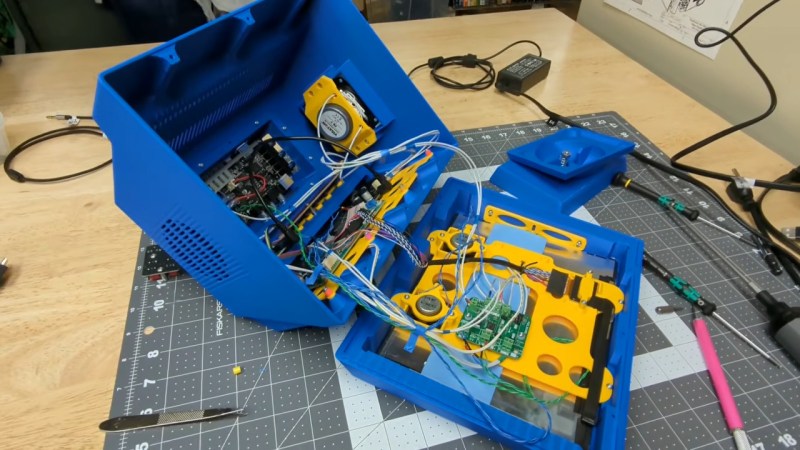
Perfection is an inherently subjective measure, in that one must choose the criteria against which to measure. A perfect circle is an absolutely rubbish octagon, for example. So when you see that [RetroBuiltGames] declares that he has built “the perfect multi-input display for retro gaming and vintage computing” — dubbed the “PixelVision AV1000 MKII”— keep in mind that he means the perfect display for his use case. That’s who he’s building it for, after all! The degree to which you find his product perfect is going to depend by-and-large how similar his use case is to yours. In that sense detailed explanations in the design/build video embedded below may be more valuable than the STEP files and PCBs in the GitHub link above– that way if your use case isn’t identical, you can perhaps learn something on the journey to build your own perfect monitor.
For [RetroBuiltGames] the aesthetic was obviously a big part of it– he’s inspired by the Amiga 1000’s monitor, and a tiny tilting Sony CRT TV. He was obviously looking for many inputs, as given by the title, and he has an unusually high interest in pixel density for a retro enthusiast. Hence a 9.7″ 2K iPad display forms the basis of the project. The multi-input aspect is provided by a retrotink clone whose PCB lives in a bulge on the back of the unit that could easily house an SBC if you wanted an all-in-one emulation station– it already has a couple of decent speakers mounted in the sides.
Another big piece of the puzzle we don’t see enough of in such projects is Design For Manufacturing– the manufacturing method of choice being FDM 3D printing. The whole assembly was designed in chunks that can be easily printed with the most visible surface flat on the bed – and if assembly proved difficult, than the parts were redesigned. His explanations aren’t a full DFM course by any means, but it’s good to see these things considered. If you need more detail on that front, we’ve featured plenty of such guides before.
We’re particularly taken by the conceit of creating his own packaging for the unit, and going to the effort of filming an unboxing video for a product he made himself. It’s just a bit of silly fun. We’ve seen boxes before, but generally speaking that sort of thing is saved for when a project becomes a product.












I get it. Perfection is in the eye of the beholder, but for a gaming monitor, it’s rather small.
It’s actually better for retroplaying. At least that’s what she said.
As kids we used our TVs for playing actually. They weren’t small.
Speak for yourself, rich kid! We had a 16(ish) inch TV for most of my early life. We didn’t get anything bigger until I I was 22, when I gave my parents my old 22 incher after I left the army.
I’ve had an old beige Commodore AV monitor for playing on my Nintendo.
A friend of mine had a similar sized color TV in his bed room.
And some other friend and his sister had an 19″ SCART TV in bed room or something.
In living room two of my friends played SNES/MD on huge monster CRT TVs.
Must been 28″ to 32″ or something. The parents had control over console/TV most of time.
True. I believe the standard at the time was a 13-15″ crt. This one is 9.7″.
Hi! TTL monochrome monitors (MDA, Hercules) and some mono VGA monitors (cashier monitors) were in 9″ to 12″ range, I believe.
The IBM 5151 MDA monitor was 12″, for example, I think.
The small size is probably the result of the limits of the 3D printer
or because a small screen gives the illusion of a higher image fidelity at a low screen resolution.
But yes, 13-15″ was common.
The earliest VGA/MCGA color monitors were in that range, too.
For example, the ’87 IBM PS/2 monitor 8512 had an 14″ diagonal size, 0.41mm dot pitch and a shadow mask.
The blurry image was intentional to make MCGA in 320×200 pels at 256c look good,
but still allow productivity software at 640×480 / 720×400 pels to be usable.
Info:
https://ps-2.kev009.com/pcpartnerinfo/ctstips/ee1a.htm
Sample video:
https://www.youtube.com/watch?v=kcBd_ZUuNAQ
Hi again! I forgot the 15 KHz video monitors, sorry about that!
Commodore 1084 specs: 14″ screen (13″ vis), 0.42 mm dot pitch, slot mask
Commodore 1701/1702 specs: 14″ screen (13″ vis), 0.64 mm dot pitch, slot mask
The 170x was also used as a cheap studio monitor.
The blurry CRT made composite video look nice, I think. ;)
(It also had Chroma/Luma ports, which were S-Video predecessors. Useful for 80char mode of C128.)
I vaguely remember that the 1701 had a transformer PSU, while 1702 had a switching PSU.
The latter also had better radiation specs.
https://crtdatabase.com/crts/commodore/commodore-1084
https://crtdatabase.com/crts/commodore/commodore-1702a
All inputs?
Where’s the light pen?
I think the “Checkmate Retro Monitor” is pretty darn good, has everything a retro-gamer needs.
https://www.checkmate1500plus.com/
Um, does it have a CRT simulator built-in? A real one, I mean.
Not just scan lines and some bilinear filtering.
Something like the GLSL shaders found in DOSBox-X (say CRT-pi) or the conventional filters found in SNES9x or Kega Fusion (Blargg NTSC).
Or that pretty PAL emulation in VICE 64..
https://thingsiplay.game.blog/2022/03/08/crt-shader-showcase-for-retroarch/
https://emulation.fandom.com/wiki/NTSC_Filters
Personally, when I play MCGA games in DOSBox, a CRT emulation makes everything feel more organic.
Amiga games are about same thing, basically.
A Commodore 1084 or an IBM 8512 have similar CRT fidelity.
Some picture comparison between LCD/TFT can bee seen here: https://tinyurl.com/496e9ns3
VGA games (mode 12h) and SVGA games in 800×600 feel more authentic, too, if there’s a fine CRT mask visible.
Experience is similar to playing on an 15″ SVGA monitor of mid-90s (0.21 to 0.26 mm dot pitch).
It’s not about thick black scan lines, but the fine details and how pixels blend into each others a bit, I think.
Duck Hunt, anyone?
Oh wait, it’s not a CRT. Well it was good while it lasted.
It’s indeed a popular NES title. I never understood the hype about that game.
The idea of shoting/klling animals or people virtually using a gun didn’t appeal to me.
That beind said, I used to play Rad Racer via red/blue glasses on a PAL NES (via 50 Hz CRT).
The Japanese version, Highway Star, used real 3D glasses.
Both required a traditional 50 or 60 Hz CRT (modern 100 or 120 Hz models likely didn’t work).
https://en.wikipedia.org/wiki/Rad_Racer
Those 2 opening sentences. Wow.
Light pen or riot ;)
“We’re particularly taken by the conceit of creating his own packaging for the unit,..”
I hope you meant “concept”.
For this kind of thing I have a now-old “everything” TV from the early 2000s that will accept every usual output (Composite, RGB, HDMI etc.) (no light pen) – it gets used more than even I thought it would as I go through old video etc.