Floreo: E-textililes And Moving Clothing

pedul [Alica] and [Jerika] are seniors in the Digital Culture program at Arizona State University and for their capstone, the wanted to take something that is traditionally male dominated and make it more female friendly. They chose e-textiles, which are most commonly extremely avant garde and nearly unapproachable with a lot of LEDs and zany mechanisms. Their initial designs reflected this, with multiple LED strips and huge shoulder pads. Then they discovered Flexinol shape memory actuator wire, and found this could be a much ‘softer’ integration of technology with haute couture.

[Jerika] and [Alica] chose to create an electronic flower, able to bloom with the help of a shape memory alloy. When a current is applied to the Flexinol wire, it contracts. Sewing these wires into laser cut fabric petals, the girls created a fabric flower that booms with the help of an LiliPad Arduino.

While they weren’t able to complete their dress due to electronic weirdness and burning out the wire too soon, they did succeed in creating a flower pin that demonstrated the intended effect.

Videos below.
Continue reading “Floreo: E-textililes And Moving Clothing”

GPIB To USB, With A Python API

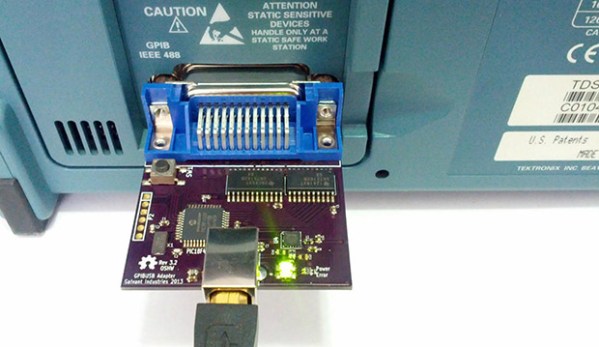
If you’re not so daft as to think Arduino-based oscilloscopes and multimeters are actually useful for all but the simplest tests and measurements, you just might have some big iron sitting around your workbench from the likes of HP, or Tektronix. You might have noticed a strange port on the back of these machines, labeled GPIB or IEEE-488. This is the standard interface for these devices, and if you’ve ever priced out a USB to IEEE-488 converter, you can see why [Steven] thought it would be cheaper to build his own.

This build is an update to an earlier version we saw a few years ago. Since then, [Steven] has taken some advice from the community and replaced a bunch of resistors with proper GPIB line driver ICs, and generally cleaned up the firmware.

Because a USB to GPIB adapter is only one small part of the tools necessary to connect these old measurement devices to a modern computer, [Steven] has also been working on InstrumentKit. It’s a Python library that takes all the standardized instrument commands and wraps them up in an easy to use API. You can check out the docs for InstrumentKit here, or just look through the board files and firmware on the Github

Testing The Efficiency Of PCB Etchants

etchIn the interest of the scientific method [Feynmaniac] (great name, btw) over on Instructables has posted a little experiment on something we all, no doubt, care about: putting PCB traces in copper clad boards with the most common etchants out there.
The experiment used the ‘ol standard, ferric chloride, and the safe, inexpensive newcomer, vinegar, hydrogen peroxide, and table salt. Finding the most efficient mixture of ferric chloride is easy: just use what’s in the bottle. The vinegar and H2O2 requires some stoichiometry, though, and [Feynmaniac] calculated that with an 8% acetic acid solution and the most commonly available 3% peroxide solution, a 2:3 ratio of peroxide to vinegar is the best. Salt to taste, or until everything turns green.

Four copper clad boards were used for the test, masked off in a ‘barcode’ pattern. Two methods of applying the etchant were used: either rubbing the etchant on with a sponge, or immersing the boards in a bath of the etchant being tested.

In terms of speed, ferric chloride was by far the fastest, with 3 minutes until the board was etched using the rubbing method, or 10 minutes when simply immersed. Vinegar/peroxide took longer with 11 minutes rubbed, and 20 minutes immersed. No differences in the quality of the etch were noticed.

While ferric chloride was by far the fastest etchant, it does have the downside of being environmentally unfriendly and fairly expensive. The vinegar and peroxide etchant is safe, cheap, and can be found in any grocery store on the planet.

This experiment didn’t test other common etchants like HCl and H202, or cupric chloride (which is is the byproduct of HCl and H202). Still, it’s a good confirmation that the vinegar and peroxide method actually works, in case you were wondering.

The P.u.l.s.e Parking Light

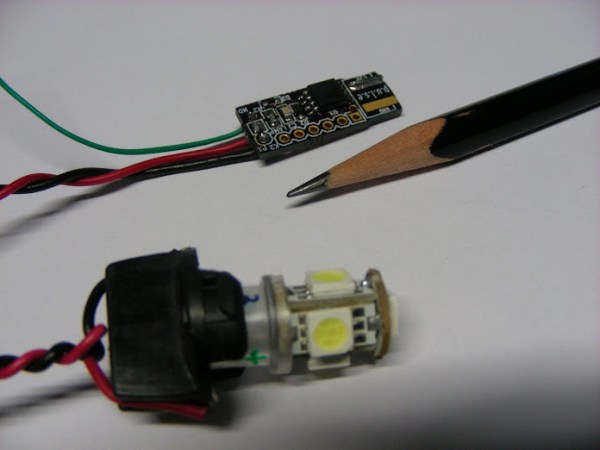
[Anool]’s brother loves his motorcycle, and when he came across a ‘breathing LED’ mod for the brake light, he had to have one. Being tasked with the creation of a pretty cool mod, [Anool] came up with p.u.l.s.e., an extremely small LED controller and a slight tip ‘o the hat to Pink Floyd and the second or third greatest CD packagings.

The circuit is a slightly Apple-inspired mod for the  parking light that keeps the lamp fully lit when the Neutral Detect line on the bike is high, and slowly pulses the LED in a ‘breathing’ pattern when the Neutral Detect line is low. Not a lot of logic is needed for something this simple, so [Anool] turned to the ATtiny45 and the Arduino IDE to accomplish his goal.

[Anool] created a circuit in KiCAD that would plug in to the lamp socket of his brother’s bike. A cluster of LEDs replace the T10 lamp inside the parking light, and a small amount of code takes care of the logic and breathing effect. It’s a great mod, and the astonishingly small size of the board puts him in the running for the smallest Arduino we’ve ever seen.

Videos of the light in action below.

Continue reading “The P.u.l.s.e Parking Light”

MiniBloq IDE, Graphical Programming For Robots Of All Sizes

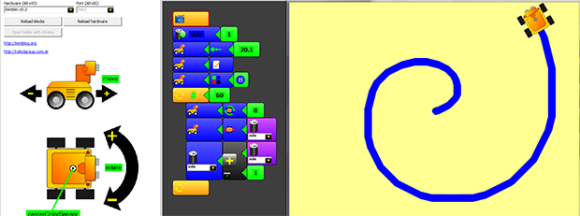
MiniBloq

The Arduino IDE only brings the ire of actual EEs and People Who Know Better™, but if you’re teaching robotics and programming to kids, you really don’t want something as simple as a text editor with a ‘compile’ button. For that educational feat, a graphical system would be much better suited. [Julián] has been working for months to build such a tool, and now miniBloq, the graphical programming tool for just about every dev board out there, has a new release.

The idea of a graphical programming language for robotics has been done before, most memorably with the Lego Mindstorms programming interface. That was closed source, of course, and only worked with the magical Lego brick that allowed you to attach motors and sensors to a child’s creation. miniBloq takes the same idea and allows the same programming environment to work with dozens of dev boards for robots of every shape and size. Already, the Pi-Bot, SparkFun RedBot, Maple, Multiplo DuinoBot, and anything based on an Arduino Leonardo works with miniBloq, as will any future dev boards that understand C/C++, Python, or JavaScript. It’s not just for powering motors, either: there’s a few Python and OpenCV tutorials that demonstrate how a robot can track a colored object with a camera.

The current version of miniBloq can be downloaded from the gits, with versions available for Windows and *nix. The IDE is written with wxWidgets, so this could also be easily ported to OS X.

Coloring 3D Prints With Sharpies

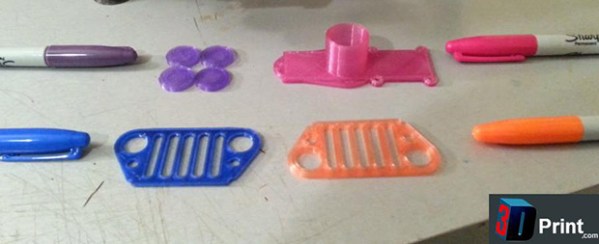
Printing objects in full color easily is one of the paramount goals of the ‘squirting plastic’ 3D printer scene, and so far all experiments have relied on multiple colors of filament, and sometimes multiple extruders. This, of course, requires a stock of different colored filaments, but [Mathew Beebe] has a different idea: why not dye a natural colored filament just before it’s fed into a printer? Following his intuition, [Mathew] is doing some experiments with the common Sharpie marker, and the resulting prints look much better than you would expect.

The basic procedure or this technique is to drill a hole in the butt end of the Sharpie, pull out the felt in the tip, and feed a length of filament through the marker before it goes into the extruder. The filament is dyed with the Sharpie ink, and the resulting print retains the color of the marker.

Despite the simplicity of the technique, the results are astonishing. An off-white ‘natural’ filament is easily transformed into any one of the colors found in Sharpies.

Besides the common Sharpie, there’s a slightly more interesting application  of this technique of coloring 3D printer filament; as anyone who has ever been in a dorm room with a blacklight knows, you can use the dye inside a common highlighter to make some wicked cool UV-sensitive liquor bottles. Whether the ‘Sharpie technique’ works with highlighters or other markers is as yet unknown, but it does deserve at least a little experimentation.

Video below.

Continue reading “Coloring 3D Prints With Sharpies”

Input And Output On A Single Pin

IO

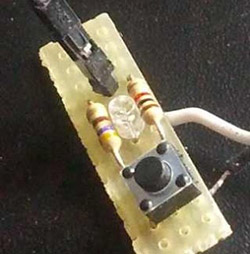
[Emilio] has a Raspberry Pi with a few sensors running totally headless. It’s a great way to gather data and post it on the Internet, but for the rare occasions when the Pi needs to be turned off for maintenance, [Emilio] needs to connect a monitor, a keyboard, and a mouse. Not a perfect solution when a simple pushbutton and indicator LED would suffice. There’s one problem with adding a simple button and LED combo: there’s only one GPIO pin available in the setup. That’s nothing a few resistors won’t fix.

After wiring up a very simple circuit on a piece of perfboard, [Emilio] met his design goal of being able to tell if the Pi was running and giving it a software reset button using only a single GPIO pin. The circuit requires only two resistors, and the software to make everything run – a simple Python script – toggles the pin between input and output, checking if the button is held down for five seconds. If it is, the Raspi powers off for [Emilio]’s routine maintenance.