Finally, A Firewall For All The Porn On The Internet

porn

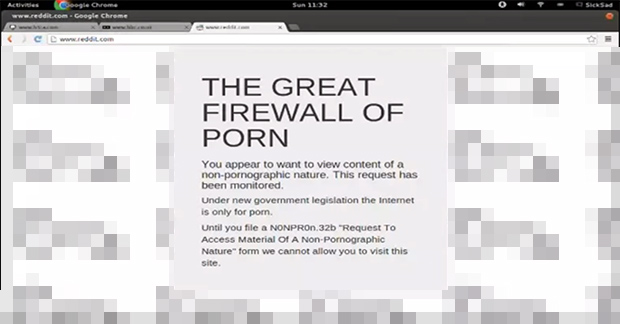
The current UK government is proposing an Internet porn firewall. Unlike other countries with Internet firewalls, such as North Korea, China, Iran, Saudi Arabia, and Syria, the citizens of the UK are so especially helpful some of them decided to help code the new porn filter. The idea behind the Great Firewall of Porn is simple: if a user wants to visit a NSFW website, let them. If, the user wants to visit the other 19% of the Internet, block it, and forward them to a page with hand drawn cockswains a baubles as the background.

The way the firewall works is actually pretty clever – it checks each request against the OpenDNS FamilyShield filter. If the request is denied, load the page, and if the OpenDNS request is allowed, block the page.

The genius behind this filter, [sicksad], provided all the tools required to get your own porn filter up and running over on his git. There’s also a great setup tutorial video available below, with a little social commentary thrown in for free.

Continue reading “Finally, A Firewall For All The Porn On The Internet”

Rekindling Forth With A Propeller Jupiter Ace

Jupiter

The Jupiter Ace was a small membrane keyboard, cassette tape drive computer akin to the ZX Spectrum released in 1982. Priced at £90, it was a little more expensive than its home computer contemporaries, but had a very interesting feature: instead of BASIC, the Ace ran Forth. This interpreted stack-based language is far more capable than the BASIC variants found on home computers of the day, but unfortunately the Ace failed simply because Forth was so foreign to most consumers.

Not wanting to let a good idea die, [prof_braino] is bringing Forth back into the modern age. He’s using a Parallax Propeller to emulate a simple home computer running Forth. Instead of a book-sized computer, the new Propeller version runs on a single chip, with 8 CPU cores running 24 times faster than the original, with 32 times more RAM and an SD card for basically unlimited storage.

Turning Kerbal Space Program Into A Proper Space Simulator

Kerbal

Kerbal Space Program – the game of freakin’ space Lego and incompetent little green men – has seen a lot of popularity since it was on the Steam Summer sale. Now, in a bid to out do the flight sim aficionados who build 737 cockpits in their garage, a few enterprising Kerbalnauts are building custom controllers for this wonderful introduction to [Tsiolkovsky], [Goddard], and [Evel Kinevel].

[vladoportos] thought KSP could use custom gaming controllers to provide switches for staging, attitude hold, and reaction control system commands. In the game, these are toggled by keyboard input, but this unfortunately destroys the immersion of being a rocket-powered angel of death for your Kerbal volunteers. He rigged up an Arduino Leonardo to send USB HID commands to his computer whenever he pressed one of the buttons connected to his breadboard controller. It’s a work in progress, but [vladoportos] has some big plans that include a physical nav ball to show his ship’s orientation in space.

USB input is one thing, but that’s only half the problem. If you want to build a real Kerbal ship simulator, you’ll need to get data out of the game, and into your glass or analog displays. [voneiden] over on the KSP subreddit has the solution for you. He’s been working on a ‘mission control’ app that runs in Python, connects to a Kerbal Space Program plugin over TCP, and displays flight information such as speed, altitude, longitude, latitude, apoapsis, and periapsis.  The code is up on his git, ready for some individual to bring this over to a Raspi and a character LCD display.

Heart-shaped Heart Simulator

Heart

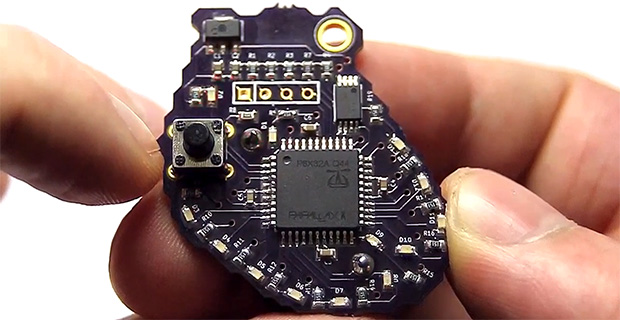
A few years ago, [Addie] over at Tymkrs put together a spooky little Halloween project: a small Propeller board that emulates the electrical signals in a heart. As a cardiac nurse, she thought her project could use a little improvement, and after two years she’s finally done. It’s a heart-shaped board that simulates electrical signals moving through the heart.

There are several key areas that conduct electrical signals through the heart – the sinoatrial node, atrioventricular node, and bundle branches all work like players in an orchestra to keep a heart beating like it should. If something goes wrong with one of these, the heart goes into tachycardia or fibrillation – not good, by any measure. [Addie]’s board simulates all the different ways a heart can go wrong with LEDs standing in for the electrical signals in a real heart. The name of the game here is to look at the LEDs and tell what state the heart is in.

The PCB heart is just one part of [Addie]’s heart simulator. The simulated heart can also plug into a neat little heart-shaped project box wired up with a solenoid, LCD display, headphone jack, and other electronics to turn this electronic heart into a complete study tool for heart rhythms. The nurses in [Addie]’s unit love the thing, and it looks like [Addie] might have a real cardiac training tool on here hands here.

Continue reading “Heart-shaped Heart Simulator”

Geometry Class Just Got Augmented

ruler

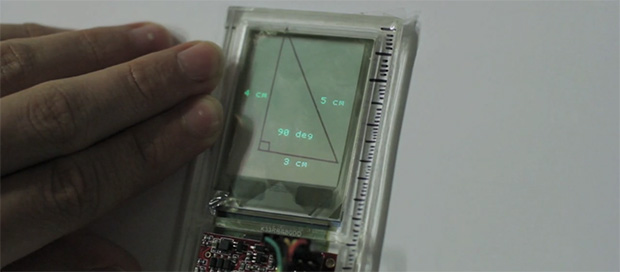
Just about every engineer needs to take a drawing class, but until now we surprisingly haven’t seen electronics thrown into rulers, t-squares, and lead holders. [Anirudh] decided to change that with Glassified. It’s a transparent display embedded in a ruler that is able to capture hand drawn lines. These physical lines can be interacted with or measured, turning a ruler into a bridge between a paper drawing and a digital environment.

For the display, [Anirudh] mounted a transparent TOLED display with a digitizer input into a ruler. The digitizer captures the pen strokes underneath the ruler, and is able to interact with the physical lines, either to calculate the length and angle of lines, or just to bounce a digital ball inside a hand-drawn polygon.

There’s no word on how this display is being driven, or what kind of code is running on it. [Anirudh] said he will have some schematics and code available up on his website soon (it’s a 404 right now).

This Bear Can Pass A Turing Test

bear

Some thought the first artificial intelligence would come about as an accident, others as a war machine that decides the only way to protect humans is to kill them all. It turns out both these ideas were wrong. The first AI is apparently a teddy bear, available on Kickstarter for $60.

The Supertoy Kickstarter is selling a mechatronic teddy bear with motors, speakers, and enough electronics to connect to a cell phone. After plugging your cell phone and stuffing it in Teddy’s thorax, the bear comes alive with an intelligence all his own and a voice seemingly lifted from [Peter Griffin].

Needless to say, we’re just a bit skeptical that Teddy here can perform as demonstrated in the Kickstarter video. While the team behind Teddy has developed a successful talking chatbot before, the video makes this tech seem too good. Even the voice sounds like a real person with a microphone, and not like a clunky GPS personality.

Feel free to speculate in the comments on how good this tech can possibly be.

Making A Dropbox With A Chumby And Bittorrent

chumby

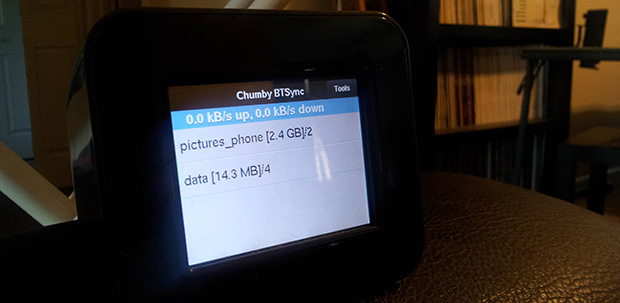
Since the Chumby servers went offline earlier this year, [Huan] found himself with a few of these tiny, extremely hackable internet devices lying around. He’s also getting tired of his NAS and wanted a way to sync folders between all his computers. Combine the two desires, and you can make a personal cloud with a Chumby, thanks to some help from the people at BitTorrent Labs.

[Huan] is using BitTorrent Sync for his Dropbox-like server. After creating a webkit interface for BitTorrent Sync, [Huan] loaded up his Chumby with new firmware, set up a few folders to be synced, and let the Chumby do all the work.

It’s not exactly fast, given the Chumby’s wireless connection and USB 1.1 for an external disk drive, but it’s more than enough to keep your personal project folders synced across multiple computers. As a bonus, it’s also very, very secure, getting around most of the security problems cloud solutions entail.