The Internet Of Christmas Tree Watering

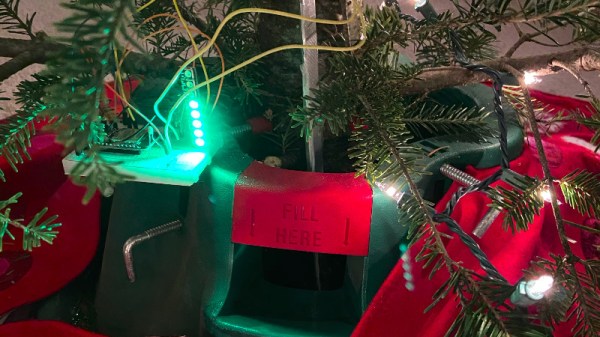
There’s nothing quite like a real Christmas tree, but as anyone who’s had one will know there’s also nothing like the quantity of needles that a real tree can shed when it runs short of water. It’s a problem [RK] has tackled, with a Christmas tree water level monitor that has integration with Adafruit’s cloud service to give a handy phone notification when more watering is required.

The real interest in this project lies in the sensor development path. There are multiple ways of water level sensing from floats and switches through resistive and light scattering techniques, but he’s taken the brave step of using a capacitive approach. Water can be used as a dielectric between two parallel metal plates, and the level of the water varies the capacitance. Sadly the water from your tap is also a pretty good conductor, so the first attempt at a capacitive sensor was not effective. This was remedied with a polythene “sock” for each electrode constructed with the help of a heat sealer. The measurement circuit was simply a capacitive divider fed with a square wave, from which an Adafruit Huzzah board could easily derive an amplitude reading that was proportional to the water level. The board then sends its readings to Adafruit.io, from which a message can be sent to a Slack channel with the notification enabled. All in all a very handy solution.

Plant care is a long-running theme in Hackaday projects, but not all of them need a microcontroller.
A Novel Micro Desktop Display For Your Raspberry Pi

Since its debut back in 2012 there have been a variety of inventive displays used with the Raspberry Pi. Perhaps you remember the repurposed Motorola phone docks, or you have one of those little displays that plugs into the expansion port. Inevitably the smaller options become disappointing as desktop displays, because while the advert triumphantly shows them sporting a Raspberry Pi OS desktop the reality is almost unusable. Until now.

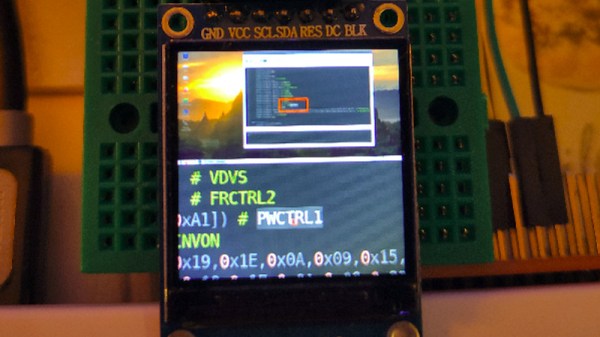
Along comes [igbit] with a solution in the form of a little SPI display with a different approach to displaying a desktop. Instead of displaying a matchbox-sized desktop over the whole screen it divides into two halves. At the top is a representation of the desktop, while below it is a close-up on the area around the mouse pointer.

Unexpectedly its mode of operation is very accessible to the non-Linux guru, because it works through a Python script that takes screenshots of both areas and passes them as a composite to the display. An area the size of the magnified window is drawn around the mouse pointer, allowing it to be easily located on the tiny desktop. It relies on the main display being pushed to the HDMI output, so if the Pi is otherwise headless then its configuration has to be such that it forces HDMI use. The result isn’t something that would help you with the more demanding desktop tasks, but it provides a neat solution to being able to use a Pi desktop on a tiny screen.

Of course, in a pinch you can always use your mobile phone.

LEDs-On-Chips Will Give Us Lower Cost Optoelectronics

The LED is one of those fundamental building block components in electronics, something that’s been in the parts bin for decades. But while a simple LED costs pennies, that WS2812 or other fancy device is a bit expensive because internally it’s a hybrid of a silicon controller chip and several LEDs made from other semiconductor elements. Incorporating an LED on the same chip as its controller has remained something of a Holy Grail, and now an MIT team appear to have cracked it by demonstrating a CMOS device that integrates a practical silicon LED. It may not yet be ready for market but it already displays some interesting properties such as a very fast switching speed. Perhaps more importantly, further integration of what have traditionally been discrete components would have a huge impact on reducing manufacturing costs.

Anyone who has read up on the early history of LEDs will know that the path from the early-20th-century discoveries of semiconductor luminescence through the early commercial devices of the 1960s and up to the bright multi-hued devices of today has been a long one with many stages of the technology reaching the market. Thus these early experimental silicon LEDs produce light in the infrared spectrum often useful in producing sensors. Whether we’ll see an all-silicon Neopixel any time soon remains to be seen, but we can imagine that some sensors using LEDs could be incorporated on the same die as a microcontroller. It seems there’s plenty of potential for this invention.

This research was presented earlier this month at the IEDM Conference in a talk entitled Low Voltage, High Brightness CMOS LEDs. We were not able to find a published paper, we’d love read deeper so let us know in the comments below if you have info on when this will become available. In the meantime, anyone with any interest in LED technology should read about Oleg Losev, the inventor of the first practical LEDs.

Improve ATtiny Timing Accuracy With This Clock Calibrator

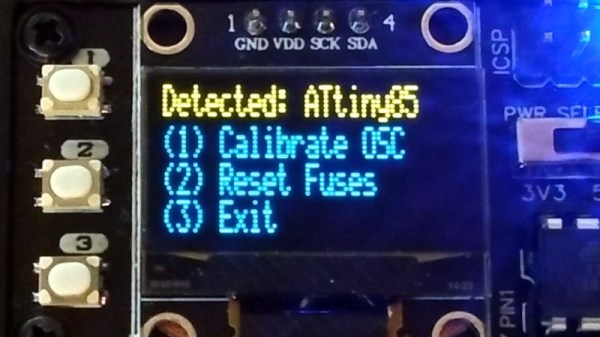
The smaller ATtiny microcontrollers have a limited number of pins, and therefore rely on an internal 9.6 MHz oscillator rather than an external crystal. This oscillator lacks the accuracy of a crystal so individual chips can vary over a significant tolerance from the nominal figure. Happily the resulting timing inaccuracies can be mitigated through a calibration process, and [Stefan Wagner] has incorporated this into his Tiny Calibrator. In addition, it also has the required charge pump circuitry to reset the internal fuses to rescue “bricked” ATtinys, thus allowing those little mistakes to be salvaged.

The board has its own larger ATtiny with a crystal oscillator and an OLED screen, allowing it to measure that of the test ATtiny and generate a correction factor which it applies to the chip. This process is repeated until there is the smallest possible difference from the standard. You can find the files for the hardware on EasyEDA, and the software in a GitHub repository.

It’s important to state that the result will never be as stable as a crystal so you’d be well advised not to put too much trust in those timers, but at least they won’t be as far off the mark as when shipped. All in all this is a handy board to have at hand should you be developing for the smaller ATtiny chips.

Be careful when chasing clock accuracy — it can lead you down a rabbit hole.

Amiga Now Includes HDMI By Way Of A Raspberry Pi Daughterboard

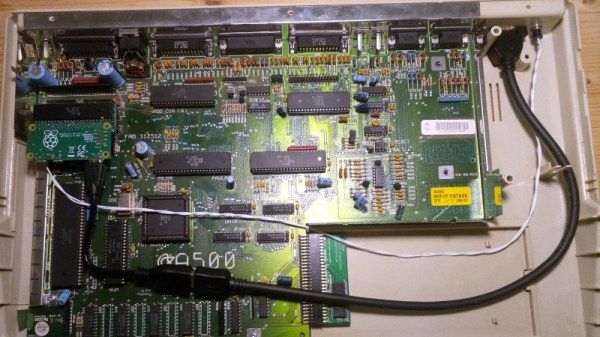
If you had an Amiga during the 16-bit home computer era it’s possible that alongside the games and a bit of audio sampling you had selected it because of its impressive video capabilities. In its heyday the Amiga produced broadcast-quality graphics that could even be seen on more than a few TV shows from the late 1980s and early 1990s. It’s fair to say though that the world of TV has moved on since the era of Guru Meditation, and an SD video signal just won’t cut it anymore. With HDMI as today’s connectivity standard, [c0pperdragon] is here to help by way of a handy HDMI upgrade that taps into the digital signals direct from the Amiga’s Denise chip.

At first thought one might imagine that an FPGA would be involved, however instead the signals are brought out via a daughterboard to the expansion header of a Raspberry Pi Zero. Just remove the DENISE display encoder chip and pop in the board with uses a long-pinned machined DIP socket to make the connections. The Pi runs software from the RGBtoHDMI project originally created with the BBC Micro in mind, to render pixel-perfect representations of the Amiga graphics on the Pi’s HDMI output. The caveat is that it runs on the original chipset Amigas and only some models with the enhanced chipset, so it seems Amiga 600 owners are left in the cold. A very low latency is claimed, which should compare favourably with some other solutions to the same problem.

This isn’t the first time we’ve seen an HDMI Amiga conversion, but it’s one that’s usable on more than simply the big-box machines.

Continue reading “Amiga Now Includes HDMI By Way Of A Raspberry Pi Daughterboard”

Reverse Engineering Silicon From The First Pocket Calculator

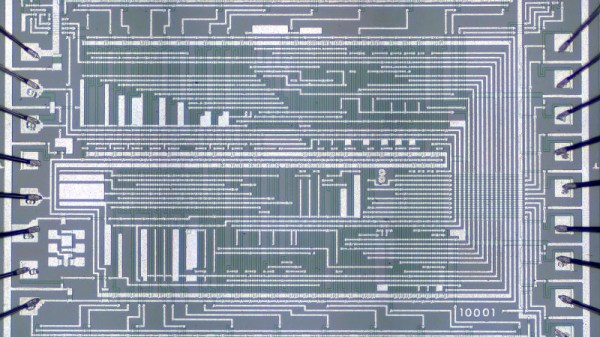
We’ve seen so many explorations of older semiconductors at the hands of [Ken Shirriff], that we know enough to expect a good read when he releases a new one. His latest doesn’t disappoint, as he delves into the workings of one of the first hand-held electronic calculators. The Sharp EL-8 from 1969 had five MOS ICs at its heart, and among them the NRD2256 keyboard/display chip is getting the [Shirriff] treatment with a decapping and thorough reverse engineering.

The basic functions of the chip are explained more easily than might be expected since this is a relatively simple device by later standards. The fascinating part of the dissection comes in the explanation of the technology, first in introducing the reader to PMOS FETs which required a relatively high negative voltage to operate, and then in explaining its use of four-phase logic. We’re used to static logic that holds a state depending upon its inputs, but the technologies of the day all called for an output transistor that would pull unacceptable current for a calculator. Four phase logic solved this by creating dynamic gates using a four-phase clock signal, relying on the an output capacitor in the gate to hold the value. It’s a technology that lose out in the 1970s as later TTL and CMOS variants arrived that did not have the output current drain. Fascinating stuff!

[Ken] gave a talk at the Hackaday Superconference a couple of years ago, if you’ve not seen it then it’s worth a watch.

Netscape Communicator And SHA-1 Written Into Brexit Agreement

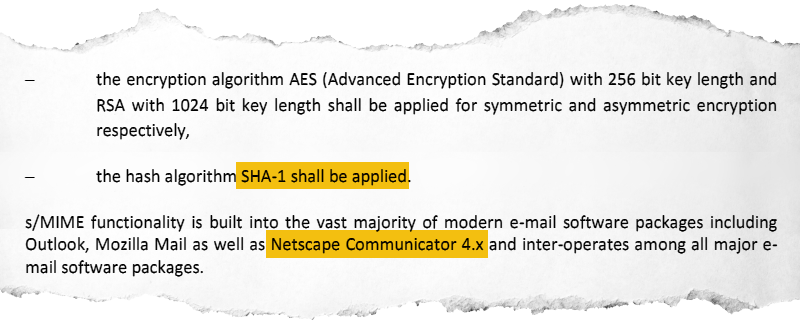
We pity the civil servants involved in the negotiations between the European Union and the United Kingdom, because after tense meetings until almost the Eleventh Hour, they’ve had to cobble together the text of a post-Brexit trade agreement in next-to-no time. In the usual manner of such international agreements both sides are claiming some kind of victory over fish, but the really interesting parts of the document lie in the small print. In particular it was left to eagle-eyed security researchers to spot that Netscape Communicator 4, SHA-1, and RSA encryption with a 1024-bit key length are recommended to secure the transfer of DNA data between states. The paragraphs in question can be found on page 932 of the 1256-page agreement.

It’s likely that some readers under 30 years old will never have used a Netscape product even though they will be familiar with Firefox, the descendant Mozilla software. Netscape were a pioneer of early web browsers, and  Communicator 4 was the company’s all-in-one browser and email offering from the late 1990s. It and its successors steadily lost ground against Microsoft’s Internet Explorer, and ultimately faded away along with the company under AOL ownership in the late 2000s. Meanwhile the SHA-1 hashing algorithm has been demonstrated to be vulnerable to collision attacks, and computing power has advanced such that 1024-bit RSA encryption can be broken in a sensible time frame by anyone with sufficient GPU power to give it a try. It’s clear that something is amiss in the drafting of this treaty, and we’d go so far as to venture the opinion that a tired civil servant simply cut-and-pasted from a late-1990s security document.

So will the lawmakers of Europe now have to dig for ancient software as mandated by treaty? We hope not, as from our reading they are given as examples rather than as directives. We worry however that their agencies might turn out to be as clueless on digital security as evidently the civil servants are, so maybe Verizon Communications, current owners of the Netscape brand, could be in for a few support calls.