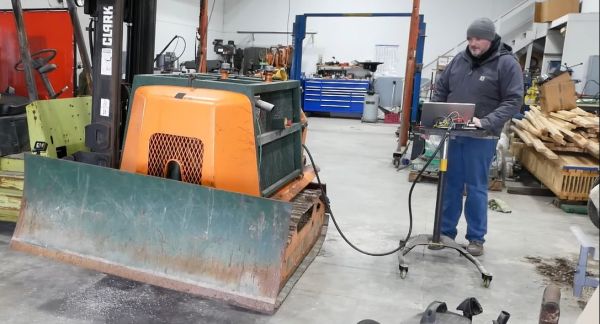
Sketchy Logg Dogg Logging Robot Remote Control Hacking

When we last left [Wes] amidst the torn-open guts of his Logg Dogg logging robot, he had managed to revitalize the engine and dug into the hydraulics, but one big obstacle remained: the lack of the remote control unit. In today’s installment of the Logg Dogg series, [Wes] summarizes weeks of agony over creating a custom circuit based around a microcontroller, a joystick and a lot of relays and other bits and pieces to drive the solenoids inside the logging machine that control the hydraulics.
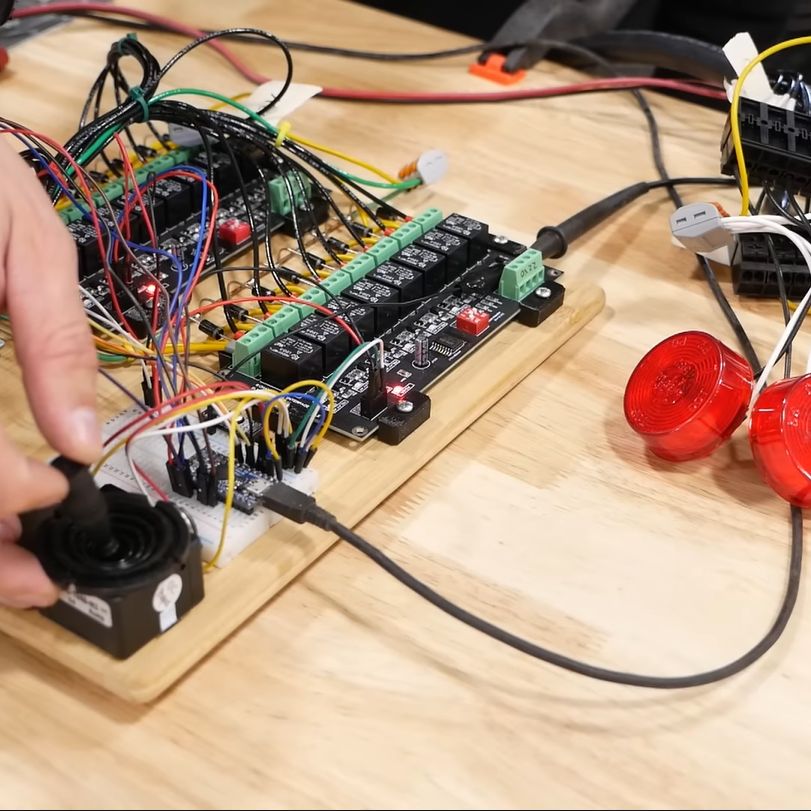
Giving the remote controller a bench test before connecting to the logging robot (Credit: Watch Wes Work)

Most of the struggle was actually with the firmware, as it had to not only control the usual on/off solenoids, but also a number of proportional solenoid valves which control things like the track speed by varying the hydraulic flow to the final drives.

This requires a PWM signal, which [Wes] generated using two MOSFETs in a closed-feedback system, probably because open loop controls with multi-ton hydraulic machinery are not the kind of excitement most people look forward to.

Ultimately he did get it sorted, and was able to take the Logg Dogg for its first walk since being rescued from a barn, which both parties seemed to rather enjoy. The background details of this machine and the project can be found in our first coverage.

We’re looking anxiously forward to the next episode, where the controller goes wireless and the sketchiness gets dialed down some more.

Continue reading “Sketchy Logg Dogg Logging Robot Remote Control Hacking”
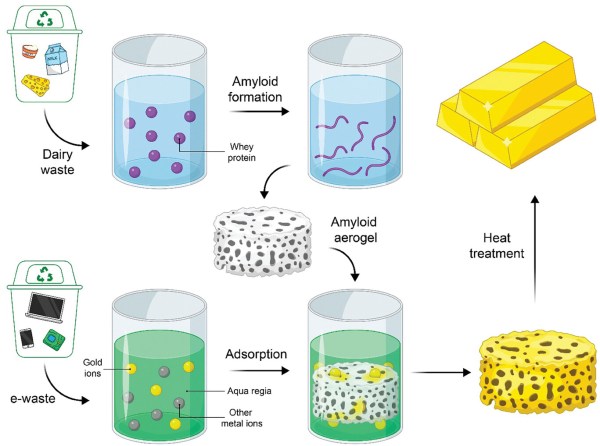
Gold Recovery From E-Waste With Food-Waste Amyloid Aerogels

A big part of the recycling of electronic equipment is the recovery of metals such as gold. Usually the printed circuit boards and other components are shredded, sorted, and then separated. But efficiently filtering out specific metals remains tricky and adds to the cost of recycling. A possible way to optimize the recovery of precious metals like gold could be through the use of aerogels composed out of protein amyloids to which one type of metal would preferentially adsorb. According to a recent research article in Advanced Materials by [Mohammad Peydayesh] and colleagues, such aerogels could be created from protein waste from the food industry.

The adsorption mechanism of the protein amyloids is a feature of these proteins which form chelants, which are structures that can effectively bond to metal ions. These are usually organic compounds, and are used in certain medical treatments where heavy metal poisoning is involved (chelation therapy). By having these protein amyloids in an aerogel structure, the surface area for adsorption is maximized, which in the research article is said to have an efficiency of 93.3% for gold recovery, while leaving the other metals in the aqua regia solution (nitric and hydrochloric acid) mostly untouched.

Of note here is that although the food waste protein angle is taken, the experiment used whey protein. This is also one of the most popular food supplements in the world, to the point that microbial production of whey is a thing now. Although this doesn’t invalidate the aerogel chelation approach to e-waste recycling, it’s a curious omission in the article that does not appear to be addressed.

ForceGen: Using A Diffusion Model To Help Design Novel Proteins

Although proteins are composed out of only a small number of distinct amino acids, this deceptive simplicity quickly vanishes when considering the many possible sequences across a protein, not to mention the many ways in which a single 1D protein sequence can fold into a 3D protein shape with a specific functionality. Although natural evolution has done much of the legwork here already, figuring out new sequences and their functionality is a daunting task where increasingly deep learning algorithms are being applied. As [Bo Ni] and colleagues report in a research article in Science Advances, the hardest challenge is designing a protein sequence based on the desired functionality. They then demonstrate a way to use a generative model to speed up this process.

They set out to design proteins with specific mechanical properties, for which they used the known unfolding characteristics of various protein sequences to train a diffusion model. This approach is thus more akin to the technology behind image generation algorithms like DALL-E than LLMs. Using the trained diffusion model it was then possible to generate likely sequences of which the properties could then be simulated, with favorable results.

As a large data set aid, such a diffusion model could conceivably be very useful in fields even beyond protein synthesis, automating tedious tasks and conceivably speeding up discoveries.

Installing SteamOS And Windows On A Google Meet Video Conference Computer

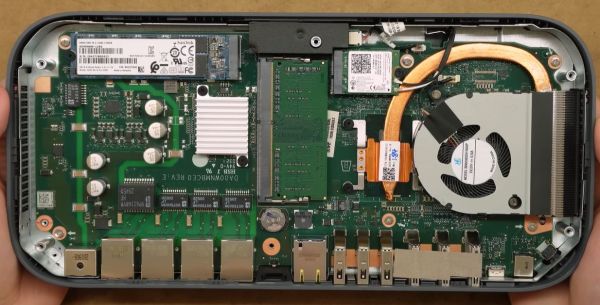
The Lenovo Meet is a collaboration with Google to bring Google Meet to customers in a ready to install kit for conference rooms and similar. Also called the Google Meet Series One, it features a number of cameras, speakers, display and more, along with the base unit. It is this base unit that [Bringus Studios] on YouTube tried to install a different OS capable of running Steam games on in a recent video. Along the way many things were learned about this device, which is – unsurprisingly – just another ChromeOS box.

After removing the rubber bottom (which should have been softened with a hot air gun to prevent damage), the case can be opened with some gentle prying to reveal the laptop-like innards. Inside are an 8th gen Intel CPU (i7-8550U @ 1.8 GHz), a 128 GB SATA M.2, 2 GB DDR4 RAM, along with 2 more GB of DDR4 a MicroSD slot and a Google Coral DA1 TPU on the bottom of the mainboard. It should be easy to install Linux, Windows, etc. on this other than for the ChromeOS part, which locks down the non-UEFI BIOS firmware.

Continue reading “Installing SteamOS And Windows On A Google Meet Video Conference Computer”

Low-Cost Saliva-based Biosensor For Cancer Detection

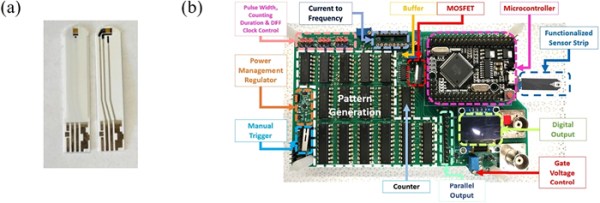
More and more biomarkers that can help in the early diagnosis of diseases like cancer are being discovered every year, but often the effective application relies on having diagnostic methods that are both affordable and as least invasive as possible. This is definitely true in the case of breast cancers, where the standard diagnostic method after seeing something ‘odd’ on a scan is to perform a biopsy so that a tissue sample can be tested in a laboratory. What [Hsiao-Hsuan Wan] and colleagues demonstrate in a recently published research article in the Journal of Vacuum Science & Technology B is a way to use saliva on disposable test strips to detect the presence of cancer-related biomarkers. Best of all, the system could be very affordable.

The two biomarkers tested in this experiment are HER2 (in 10 – 30% of breast cancer cases) and CA 15-3, both of which are indicative of a variety of cancers, including breast cancers. According to the researchers, the levels of these biomarkers in saliva can be correlated to those in blood serum. Where other biosensors may include the read-out circuitry – making those disposable and expensive – here the disposable part is the test strips which are plated with electrodes.

Continue reading “Low-Cost Saliva-based Biosensor For Cancer Detection”

Doubling The CPU Speed Of The TRS-80 Model 100 With A Mod Board

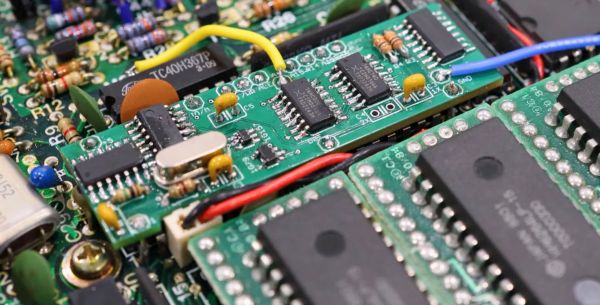
The TRS-80 Model 100 was released in 1983, featuring an 80C85 CPU that can run at 5 MHz, but only runs at a hair under 2.5 MHz, due to 1:2 divider on the input clock. Why cut the speed in half? It has a lot to do with the focus of the M100 on being a portable device with low power usage. Since the CPU can run at 5 MHz and modding these old systems is a thing, we got a ready-made solution for the TRS-80 M100, as demonstrated by [Ken] in a recent video using one of his ‘daily driver’ M100s.

This uses the board design from the [Bitchin100] website, along with the M100 ROM image, as one does not simply increase the CPU clock on these old CPUs. The issue is namely that along with the CPU clock, connected components on the CPU bus now have to also run at those speeds, and deal with much faster access speed requirements. This is why beyond the mod board that piggybacks on top of the MPU package, it’s also necessary to replace the system ROM chip (600 ns) with a much faster one, like the Atmel AT27C256R (45 ns), which of course requires another carrier board to deal with incompatible pinouts.

Continue reading “Doubling The CPU Speed Of The TRS-80 Model 100 With A Mod Board”

WoWMIPS: A MIPS Emulator For Windows Applications

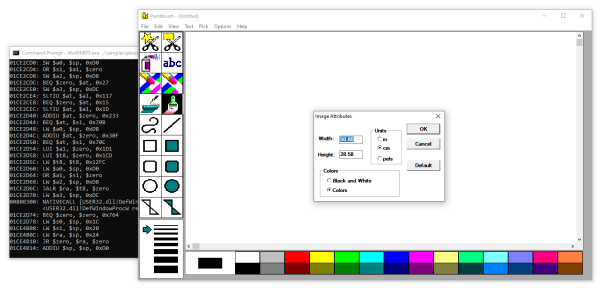
When Windows NT originally launched it had ports to a wide variety of platforms, ranging from Intel’s x86 and i860 to DEC’s Alpha as well as the MIPS architecture. Running Windows applications written for many of these platforms is a bit tricky these days, which [x86matthew] saw as a good reason to write a MIPS emulator. This isn’t just any old emulator, though. It maps 32-bit Windows applications targeted at the MIPS R4000 CPU to an x86 CPU instead. Since both platforms run in a little-endian, 32-bit mode, this theoretically should be a walk in the park.

The use of the Windows PE executable format is also the same, so the first task was to figure out how to load the MIPS PE binary in a way that made sense for an x86 platform. This involved some reverse-engineering of the MIPS ntdll.dll file to figure out how relocations on that platform were handled. Following this, the mapping of the instructions of the R4000 CPU to the (CISC) x86 ISA was pretty easy. Only Floating Point Unit (FPU) support was left as a future challenge. Memory access was left as direct access, meaning no sandboxing or isolation, for simplicity’s sake.

The final task was mapping the native API calls, which call almost directly into the underlying host Windows OS’s API, with a bit of glue logic. With all of this done, Windows NT applications originally written for 1990s MIPS ran just fine on a modern-day x86_64 PC running Windows — as long as you don’t need an FPU (for now).