Mega Tree Game Display

images-mediaFiles-holiday-MegaTreeGame-IMG_4914-640x480

Christmas may be over, but the holiday hacks keep rolling in, like this awesome interactive Mega Tree Game Display!

[Lior] loves setting up light shows every year (just check out last year’s awesome White Christmas display with music!), but taking them down just… well… sucks! So this year he decided to make a fully controllable non-holiday specific light display that he can reuse it all year long.

It features 12 x 5 meter long waterproof RGB LED strips secured firmly to the front of his house, making a trapezoidal 12 x 150 pixel display. It was originally controlled with an Arduino but he found the USB connection was far too slow for the high frame rates he was aiming for — so he’s using a combination of a Raspberry Pi and a Teensy 2.0 instead.

Now, just making a programmable light show suitable for all holidays is pretty cool we must admit, but as [Lior] puts it, a plain light show is “so last decade”. So he’s gone and made the whole thing smartphone interactive. Yep, you can actually log in with your phone and play a silly game that involves dropping gifts on houses and snowmen. He’s also got a pretty cool Hanukkah display that features a spinning dreidel! Check out the full demonstration video after the break.
Continue reading “Mega Tree Game Display”

Jello Shot Printer

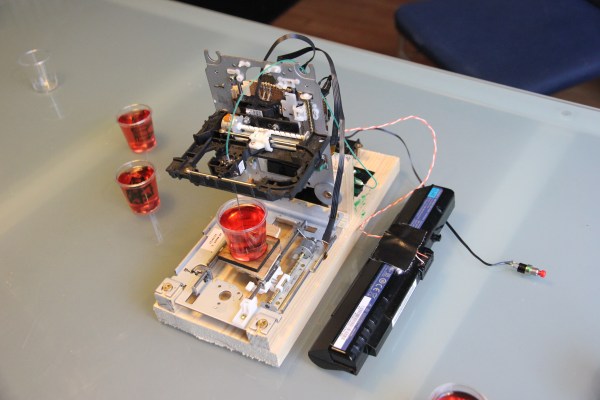
While inspecting some jello shots for a friend’s upcoming 25th birthday, [Sprite_tm] had an epiphany. What if you could print designs inside the jello shots? He quickly grabbed a syringe and proceeded to inject food dye into one of the jello shots — it worked. Unfortunately, his friend pointed out that it would take far too long to do each jello shot by hand, to which [Sprite] responded:

Never mind that, I’ll just whip up  a 3D printer that can make nice figures in the jelly for you.

Classic. The great thing about the hacker-mindset is that you never say no when confronted with a problem!

To achieve this printer, [Sprite_tm] has taken a handful of old CD-ROM drives to create a three axis moving platform. He’s using a forth drive’s ejector assembly to depress a syringe which pushes a concoction of banana liquor, green food colouring and cornstarch through medical tubing to the ink-head. To control it, he’s just using an ATTiny2313 with a mere 2K of memory. It took a bit of fiddling with to find the right flow, but works surprisingly well. Stick around after the break to see its printing capabilities.

Continue reading “Jello Shot Printer”

NeverWet On Electronics?

adafruit-neverwet-04

Does NeverWet work on electronics? The team over at Adafruit just had to find out — and to an extent, it does work!

But wait, what’s NeverWet? It’s Rust-Oleum’s miracle water-repelling coating which is super hydrophobic. It actually works, and we’re kind of surprised we haven’t seen it used in a hack yet! Anyway, let’s start this hack with a quick disclaimer. NeverWet is not designed for waterproofing electronics.

But when has that ever stopped the pursuit of science!?

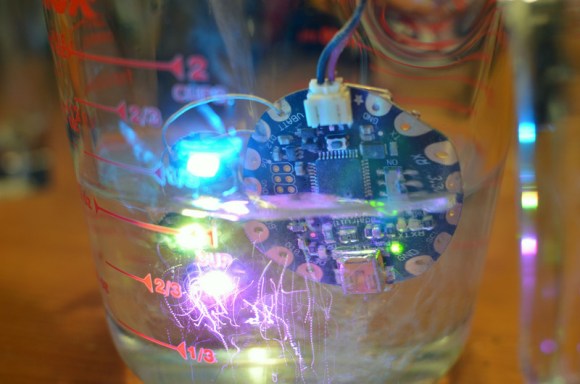
The experimenters chose a few electronic guinea pigs to test out NeverWet’s capabilities. An Arduino Micro, a FLORA LED broach, and a Raspberry Pi. Using the proper application method they coated the unlucky electronics with a few generous layers of the product. Using plain NYC tap water they tested each component. The FLORA LED broach (shown above) lasted underwater for about 4 hours before it died. The Arduino Micro fared similar, however the Wet Raspberry only booted once before losing connection to the SD card.

For full details check out the full experiment or stick around after the break to see a video of the tests.

Continue reading “NeverWet On Electronics?”

Christmas Tree Analyzes Your Tweets

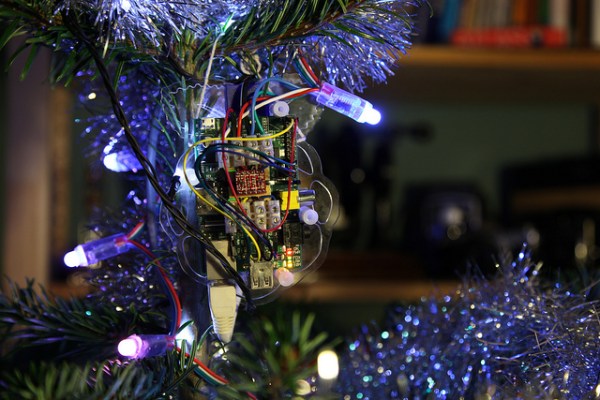
It’s Christmas time. You have a string of 50 individually addressable RGB LEDs, what would you do? Well, [Barney] decided to try something different. He’s made a Christmas tree that reflects Twitter’s current sentiments about the holiday.

Wait, what? We admit, it’s a kind of weird concept, but the software behind it is pretty cool. As it turns out Stanford University’s Natural Language Processing Group released the source code for their sentiment analyzer. Unlike a normal sentiment analyzer which assigns points to positive words and negative points for negative words, this one actually uses a deep learning model which builds up a representation of entire sentences based on their structure — only problem? It was designed and trained to analyze movie reviews, not Christmas tweets.

Regardless, it still does the trick (kind of), but, it’s pretty slow. [Barney] has his fastest computer running four instances of the analyzer, which pulls Christmas tweets that have been sorted by the Twitter API — it then analyzes them, assigns the sentiment, and places them in a second queue. He’s using beanstalkd for the queuing and a Raspberry Pi to control the lights. The result is a pretty light display whose colors represent the sentiments of incoming tweets — it’s hard to say if it’s actually successful in reflecting the opinion of the tweets, but it’s a pretty cool concept.

Stick around after the break to see the Christmas Tweet Analyzing Tree in action — say that 5 times fast!

Continue reading “Christmas Tree Analyzes Your Tweets”

Spherebot: Decorating Xmas Baubles

spherebot_1-446x500

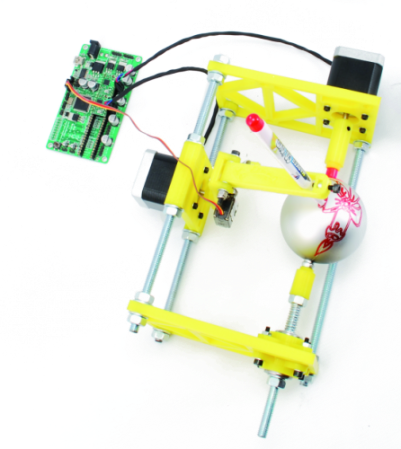
The Spherebot is an open source machine capable of printing designs onto spherical objects, such as Xmas baubles!

The design is based on the ever-popular Egg-Bot, which we have seen derived into many other useful printers such as the Mug Plotter, and the Ping Pong Printer.

The Spherebot features two stepper motors, one servo motor for marker actuation, some cheap mounting hardware, and a whole bunch of 3D printed parts—all of which are available on Thingiverse. In this design they used a 3D printer controller board called the 3Drag by Open-Electronics, which is based on the ATmega2560 (the same microcontroller as the Arduino MEGA). The Spherebot doesn’t require all three axes or an extruder, so they only installed 2 out of the 4 stepper drivers on the board to save cost.

Once you have it all built, it’s a simple matter of uploading your design into the free Spherebot-Host-GUI provided on GitHub. Stick around after the break to see just what it is capable of!

Continue reading “Spherebot: Decorating Xmas Baubles”

Trainable Robotic Arm

customer_projects_arm-learning

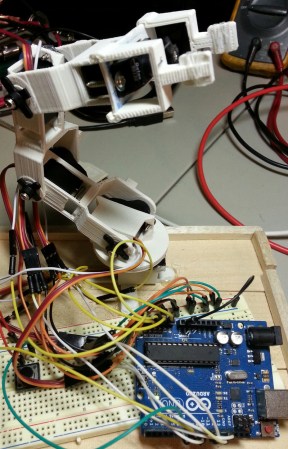
When [Robert] realized Adafruit is now selling analog feedback servos, he decided he just had to make a programmable robot arm that could be trained like the commercially available Baxter robot.

The neat thing with the analog feedback servos is it takes all the complexity out of training a robot. All you have to do is put the robot in teach mode, physically move the robot’s joints to the positions you want, and save your program! Depending on your application, it certainly beats trying to work out the fun kinematics equations…

Anyway, the full guide available on Adrafuit’s learning system provides instructions on how to build your own arm from scratch (well, with a 3D printer) or how to replace the servos in a pre-made toy robotic arm you might already have sitting around. It’s very thorough and includes all the code you need for your Arduino too.

Stick around after the break to see how the robot works!

Continue reading “Trainable Robotic Arm”

A Clock Built From Scraps

IMG_0409

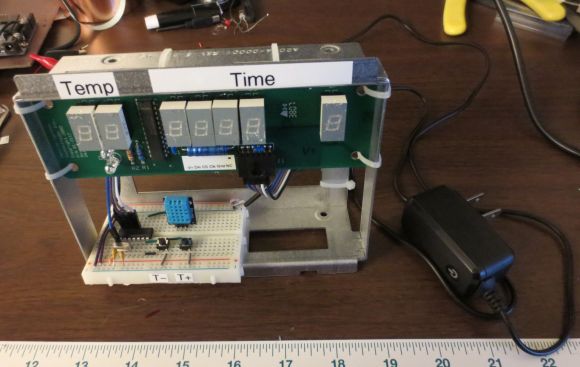
Who doesn’t love a good surplus store? [Tyler Bletsch] just finished up this awesome clock hack by re-purposing a scrapped medical circuit board.

Ax-Man Surplus in Minneapolis has all kinds of goodies and it’s been around a long time (here’s a hack from the ’90s that source from the store). One day while digging through their inventory, [Tyler] found a bunch of scrap circuit boards with 7-segment displays. At $2 a pop, he decided to risk it to tinker with.

He quickly identified the main chip on the board to be a common LED driver (MAX7221) and began reverse engineering the board by tracing the circuit. He actually has a brilliant guide on his website about how to make circuit tracing way easier. From there it was just a matter of loading a MAX7221 library onto a ATtiny44, adding a 16MHz crystal, and since there’s an extra 2 digits available on the display… a temperature sensor too!

It’s a great little hack, and as it turned out, there wasn’t anything wrong with the boards, except for a minor typo in the company’s name. Hooray for reusing scrapped parts!