80-PIC32 Cluster Does Fractals

One way to get around limitations in computing resources is to throw more computers at the problem. That’s why even cheap consumer-grade computers and phones have multiple cores in them. In supercomputing, it is common to have lots of processors with sophisticated sharing mechanisms.

[Henk Verbeek] decided to take 80 inexpensive PIC32 chips and build his own cluster programmed in — of all things — BASIC. The devices talk to each other via I2C. His example application plots fractals on another PIC32-based computer that has a VGA output. You can see a video of the device in action, below.
Continue reading “80-PIC32 Cluster Does Fractals”

3D Printed Circuit Boards… Sort Of

Comedian Demetri Martin does a bit about the phrase “sort of”. He says:

“Sort of’ is such a harmless thing to say… sort of. It’s just a filler. Sort of… it doesn’t really mean anything. But after certain things, sort of means everything. Like… after “I love you”… or “You’re going to live.”

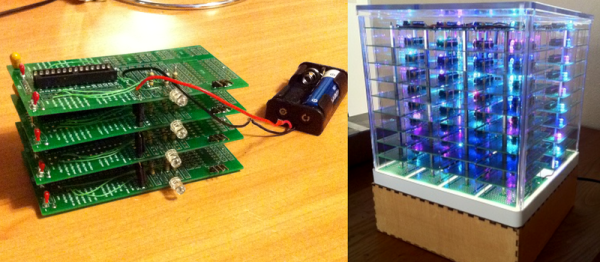
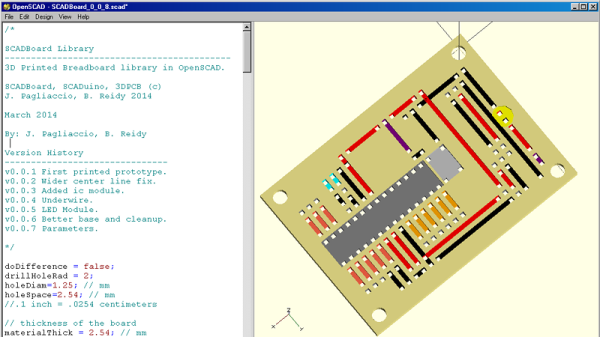
SCADboard is an OpenSCAD library that lets you create 3D printable circuit boards…sort of. The library lays out like a breadboard with two bus bars on each side and a grid of rows and columns. OpenSCAD modules provide a way to create a board, ICs, LEDs, wires and other fundamental components. You set a few initial variables (like the board thickness) then your code looks like this:

 wire(1,bln,1,e, neg); // Neg left trace to LED
 led(1,e+1, 1,e+2, yellowled); // LED
 wire(1,f, 1,i, pos); // LED Pos
 wire(1,j, 1,brp, resistor); // Resistor
 
 wire(3,c,3,h, pos); // Cap Pos
 wire(4,c,4,h, neg); // LED Resistor

Continue reading “3D Printed Circuit Boards… Sort Of”

Detecting Water With And Without Headaches

In Texas — at least around Houston — we don’t have basements. We do, however, have bilges. Both of these are subject to taking on water when no one is paying attention. A friend of mine asked me what I thought of an Instructable that showed how to make a water sensor using a few discrete components. The circuit would probably work — it relied on the conductivity of most water to supply enough current to a bipolar transistor’s base to turn it on.

It is easy to overthink something like this, so I told my friend he should go with something a little more old-fashioned. I don’t know the origin of it, but it is older than I am. You can make a perfectly good water detector with things you probably already have around the house. My point isn’t that you should (or shouldn’t) construct a homemade water sensor. My point is that you don’t always need to go to the high-tech solution.

Continue reading “Detecting Water With And Without Headaches”

Extech Power Supply: If It Ain’t Broke, Fix It Anyway

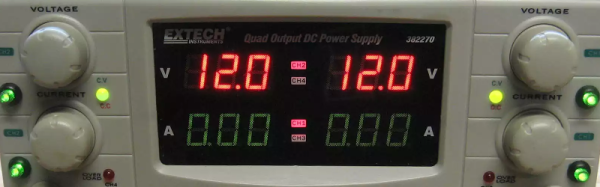
[Wolf] came into possession of an Extech power supply that wasn’t quite in working order. It has been used in battery manufacturing and was fairly corroded. He was able to fix it but found there was an issue with the power supply that wasn’t a defect. By design when you turn off the outputs, the voltmeters read zero. That means you can’t adjust the voltage to a known value without turning on the outputs. Sure, you ought to disconnect things before you adjust, but you can only hope you’ll remember.

At first, he tried to use the existing output control switch, but that really cut power. Instead, he turned to a small microcontroller board usually used for servo control. He added a few nice looking pushbuttons to the front panel. There was plenty of room in the enclosure to mount the controller board and four relays. You can see the final result in the video below.

Continue reading “Extech Power Supply: If It Ain’t Broke, Fix It Anyway”

Make Your Own Arduino Header Pins

There are two kinds of people in the world (and, no, this isn’t a binary joke). People who love the Arduino, and people who hate it. If you’ve ever tried to use a standard prototype board to mount on an Arduino, you’ll know what kind of person you are. When you notice the pins aren’t on 0.1 inch centers, you might think, “What the heck were those idiots thinking!” Or, you might say, “How clever! This way the connectors are keyed to prevent mistakes.” From your choice of statement, we can deduce your feelings on the subject.

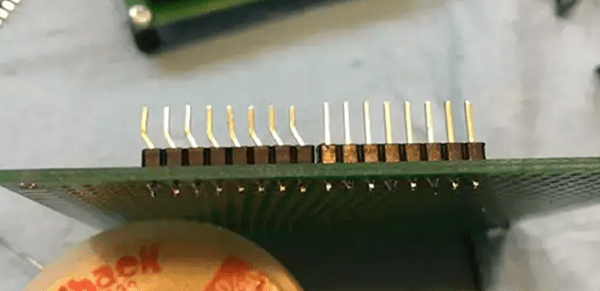
[Rssalnero] clearly said something different. We weren’t there, but we suspect it was: “Gee. I should 3D print a jig to bend headers to fit.” Actually, he apparently tried to do it by hand (we’ve tried it, too). The results are not usually very good.

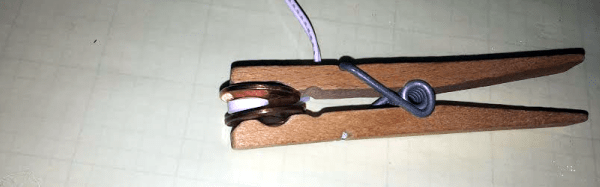
He created two simple 3D printed jigs that let you bend an 8-pin header. The first jig bends the correct offset and the second helps you straighten out the ends again. You can see the result in the picture above.

Continue reading “Make Your Own Arduino Header Pins”

Be Your Own Google Mapper

Google Maps is one of the modern wonders of the world. It is hard to remember how expensive it used to be to get high-quality aerial  images. Of course, you don’t get to pick when they fly over a particular piece of the planet. If you are like [Dennis Baldwin] that’s not good enough. He’s been using his drone to document the construction of a high school stadium.

[Dennis] uses the open-source GDAL tools to create Google Map tiles from drone imagery. Even better, he’s documented the process in the video you can find below. Once you can make your own map tiles, you can control when you take the images — important if you are documenting construction like [Dennis] did.

Continue reading “Be Your Own Google Mapper”

Make Use Of Your Drone Video With WebODM

If you ever watch the original Star Trek, Captain Kirk and crew spend a lot of time mapping new parts of the galaxy. In fact, at least one episode centered on them taking images of some new part of space. It might not be new, but if you have a drone, you probably have accumulated a lot of frames of aerial imagery from around your house (or wherever you fly).

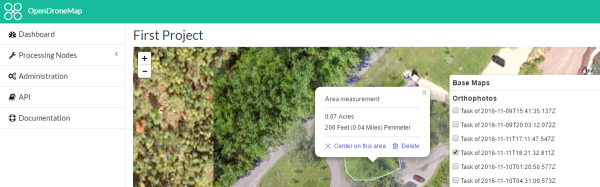
WebODM allows you to create georeferenced maps, point clouds and textured 3D models from your drone footage. The software is really an integration and workflow manager for Open Drone Map, which does most of the heavy lifting.

Continue reading “Make Use Of Your Drone Video With WebODM”