
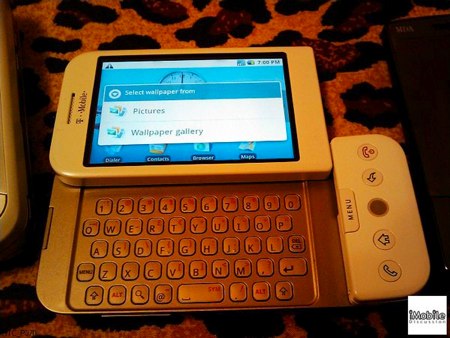
Engadget has a full gallery of the new HTC Dream, the first production phone running Android. It will be available on T-Mobile some time this Fall (missing features notwithstanding).
Cellphone Hacks541 Articles
Macro Photography With An IPhone
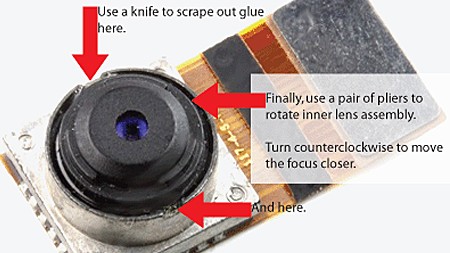
The camera lens on the iPhone is much like any other cameraphone lens in the fact that the lens has a fixed minimum and maximum focus length. If you want to get a little closer to your subject, you just might want to give [eastrain’s] macro camera mod a try.
According to [eastrain] both first and second generation iPhone cameras have a screw type focus ring that has been glued to infinity from the factory. This was probably set so that 99% of your photos were roughly in focus.
Gaining access to the camera lens requires the disassembly of your phone and will undoubtedly void any type of warranty you may have had. Once the lens is in view you will need to break the 2 glue points that hold the lens at its current position.
Using needle nose pliers you can then rotate the lens counter clockwise to increase the zoom or clockwise to decrease it. Enabling the built in camera app allows you to see in real time your changes. When you’re satisfied, just put everything back together. Of course the next step should be an externally mounted ring to allow manual zooming on the fly.
Security Flaw Allows Full Access To Locked IPhones
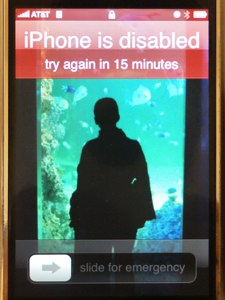
[greenmymac] on the MacRumors forums recently exposed a security flaw that allows anyone full access to a locked iPhone running firmware version 2.0.2. The flaw works by entering the emergency call menu of a locked iPhone, and double tapping the home button. This opens the iPhone’s Favorites menu, allowing anyone in your Favorites to be called. From here, an attacker has access to your SMS messages and potentially your email or Safari browser. While we are sure that Apple has a patch for this flaw on the way in the next firmware update, there is a temporary way to secure your locked iPhone. Simply enter the Settings menu on your iPhone and enter General > Home Button and select “Home” or “iPod”. Now when you double tap your home button, it will navigate to either your home screen or the iPod screen. While this fix might be annoying for some, as of right now it seems like the only way to secure your locked iPhone.
[photo: Refracted Moments™]
[via Gizmodo]
IPhone SSH Client Roundup
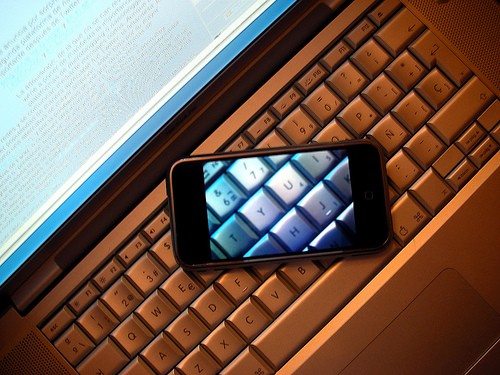
Considering an iPhone but not sure if you can live without SSH in your pocket? Have no fear! Hot off the press is this review of four SSH clients for the iPhone: iSSH, pTerm, TouchTerm, and SSH. All four clients have their strengths and weaknesses, and iSSH seems to be the best option so far. Although each of these is an early release, and therefore has its own idiosyncrasies, they’ve got improved features being planned for the next major release. Furthermore, they’re surprisingly inexpensive (none of them are more than five dollars), and so you should give them a shot if you see the need to SSH without being bound to your terminal.
iSSH is the best of the reviewed clients, giving you a good balance of usability and features. It has is share of problems, though, primarily related to the way it handles scrolling, pTerm comes in second, and is almost perfect. Its two rather glaring weaknesses are a too-large font that requires plenty of scrolling, and a lack of Ctrl, ESC, and Tab keys. TouchTerm, which comes in third, is the most configurable of the reviewed SSH clients,but is otherwise irrationally quirky. SSH is even quirkier than TouchTerm, and is a waste of your time and money.
Between the idiosyncrasies of iSSH, pTerm, and TouchTerm, you’re bound to find one that you like. Furthermore, these are initial releases; all three have exciting features on the roadmap (like implementing the ESC key) which should improve their usability.
Should you give one of them a try? For five bucks, it wouldn’t hurt.
[photo: edans]
[via Waxy]
IPhone With A Light-up Apple Logo
[youtube=http://www.youtube.com/watch?v=VgfyUsjwGwM&hl=en&fs=1&rel=0&color1=0x3a3a3a&color2=0x999999]
If you feel that your iPhone alone no longer carries the cachet it once did, what with the price dropping and all, this may be just the modification that you need to stand out among the crowd. iPhones.ru has a teaser glimpse of an iPhone hack that causes the Apple logo on the back of the device to light up when the screen is turned on. Details are sketchy, but it appears that the hack involves replacing the metal insert on the back of the phone with an LED-equipped plastic one; custom software allows the user to select the brightness of the glowing effect independently of screen brightness… or maybe they’re just using the backlight.
USB Wall Charger
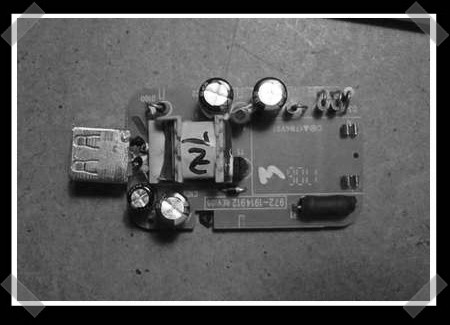
[rbhays] did this sweet little hack back in 2006. He took a Motorola cellphone wall charger and modified it into a USB wall charger. He needed to charge his iPod, but misplaced the original charger. A replacement would have cost him $30. So he did what any respectable hacker would do, he cut up something else to make it work for him.
He had one sitting around that was equipped with a mini USB end. He checked it out and it was the perfect voltage. Some commenters below the project noted that their motorola charger had a higher voltage rating than his. Those would still work, but would require some extra steps to bring the voltage down.
After some careful soldering, and a bit of super glue, he’s left with a perfectly good wall charger. He can charge most things that only use the juice from the wall. Some things refuse to charge though, such as Zunes. There was another project by [Cvesey] that claims to charge Zunes as well. While wall chargers may be available fairly cheaply now, many of us have some of these cellphone chargers just sitting around. Now we have a use for them.
Iphone-dev Team Progress Update

The iphone-dev team hasn’t been resting on their laurels since releasing the iPhone Pwnage Tool 2.0 nearly two weeks ago and decided to update everyone on their progress. Despite the iPhone 2.0 jailbreak, there still isn’t a way to unlock a 3G phone. They’ve managed to do other things like downgrade a 3G to an older baseband firmware, which demonstrates their ability to bypass security checks and run unsigned code on the baseband. A nice side effect of all the downgrade work is that they’ve perfected the percautions they take to prevent bricking. The team has been following threads about using SIM proxy devices for unlocks as well, but concluded that the devices are a kludge at best and reliability can vary wildly depending on the phone’s location. They also pointed out the fine work that RiP Dev has been doing on Installer 4 which will help you install software that isn’t from the AppStore.









